WiFi Security Recommendations
From Ralph:
Charles
Thank you, Charles, for the straightforward recommendations, which
suits the common Jane & Joe WiFi users quite well.
But let me point out two things I think you should slightly put in
focus, so that people really get the needed security in place:
- Do no longer recommend WEP to anyone. WEP is considered a "no
encryption" at place and a defunct technology. Even a blank minded user
can breach it in mere seconds when he runs simple software to do so.
It's time to upgrade to WPA - well, WPA2 to be exact. Any WiFi router
available in the last three years are able to support it, as add-on
WiFi PCI/PCMCIA/CardBus cards are. You get them cheap - and used ones
are a bargain. Machines running older AirPort hardware can upgrade this
(via classic OS 9 AirPort Software 2.0.4 security patch) to
128-bit support, which then gives them WPA encryption - but only if
they do use OS X 10.3 the least. This leads to a definite
decision: Don't use System 9 to do WiFi that involves your personal
data; use at least OS X 10.3.
- The hiding of SSID is a no go, too. Anyone will find the SSID of an
active router within seconds without special software. It gives you a
false sense of security, similar to WEP - which is always to be
avoided, when you deal with protection. It technically is of no use,
but makes WiFi management to the router more complicated and may slows
down your network speed.
This essential triple will make you safe and is all you need in
place:
- Choose WPA, better WPA2
- Create a looooooooong random letter mix password (12 to 15 the
least, best is the maximum 63).
- Select MAC access restriction
Best wishes,
Ralph
Hi Ralph,
Thanks for the info and warnings.
Actually it was Dan who added the bits on WEP and SSID
in an editor's note, so he may want to comment further when this
crosses his desk.
Charles
Ralph and Charles,
I am a firm believer that some security is better than
none, and for those who only have 802.11b hardware, WEP is the only
option. Hiding SSID and using WEP is vastly superior to broadcasting
SSID and having no security. It's far from perfect, but it's better
than a wide open connection anyone can discover and use.
I would love to see 802.11b phased out, but until
someone comes up with an 802.11g or 802.11n card that can plug-and-play
replace the original AirPort Card, there aren't any simple, elegant
solutions except for CardBus cards in PowerBooks. Make it work with
Apple's drivers, and you can eliminate the need to use 802.11b, which
only supports WEP, on old, AirPort-equipped Macs.
Dan
Unibody MacBook or White One?
From Laurie:
Hi Charles,
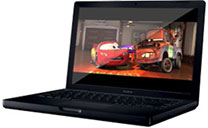 I just read your article about your
new 13" aluminum
MacBook and was wondering how it's working out for you. My lovely
"BlackBook" (which I bought when my Pismo died) has had problems
with overheating, sound, and unrecognized battery issues from the
beginning, and Apple has finally said they will most likely replace
it.
I just read your article about your
new 13" aluminum
MacBook and was wondering how it's working out for you. My lovely
"BlackBook" (which I bought when my Pismo died) has had problems
with overheating, sound, and unrecognized battery issues from the
beginning, and Apple has finally said they will most likely replace
it.
The issue for me is that the black MacBook is no longer being
manufactured and is not available as a replacement (they won't replace
with refurbished computers). Apple has tentatively offered me either a
new MacBook White or a new aluminum 2.0 GHz (not 2.4) MacBook. The new
aluminum sounds like a good machine, but I am not crazy about the
aesthetics or the lack of FireWire, and I was wondering if you are
liking yours or if you have any cautionary advice you might offer me
before I send back my imperfect but loved Black MacBook in order to
receive the new and unknown Aluminum MacBook.
Thank you.
~ Laurie
Hi Laurie,
Sorry to hear about the troubles with your black
MacBook. At least Apple is willing to replace it.
I've had my aluminum MacBook for
around two months now, and so far I have nothing but good to report
other than the well-known lack of FireWire - and being stuck on a
dial-up connection I would prefer to have an internal modem, but that
hasn't been an option since the Intel changeover.
Living without FireWire is about as annoying as I
expected it to be, which is to say that it's a pain sometimes, but not
a deal-breaker. My biggest complaint is that USB 2.0 is much slower
than FireWire for large data transfers.
Aesthetics are, of course, a subjective matter. I am
quite smitten with the looks of the Unibody MacBook, and find that it
grows on you. The build quality is superb and a pleasure in its own
right.
My MacBook runs very cool, and so far the fan has
never come on even when doing fairly heavy-duty multitasking such as a
Time Machine back up running in the background while I'm dialed up to
the Internet and doing some other sort of work in the foreground.
Temperature
Monitor tells me that it runs roughly 5Á hotter than my
17" G4 PowerBook
does, but for some reason the case gets barely warm to the touch on the
palm rests.
The hard drive is almost dead silent, and so far I'm
getting along just fine with the standard 2 GB of RAM, even when
running
MacSpeech Dictate, which I'm incidentally using to compose this
reply.
I had wavered between buying this machine (an Apple
Certified Refurbished unit that appears indistinguishable from new) or
one of the new 2.0 GHz white MacBooks with 2 GB of RAM and Nvidia
9400M graphics, but any equivocation about that has been erased now
that I have the Unibody in hand. This is simply a beautiful machine and
made like a fine watch. It's early days yet, but so far I have had zero
problems or reliability issues. It's stable as a rock, and even with a
bunch of applications running I can go much longer than I could with
the 17" PowerBook before a restart is necessary to free up memory.
I hope this helps.
Charles
Hello Charles,
Thank you so much for taking the time to get back to me and yes,
your opinions, experience, and thoughts, as always, are very helpful. I
do not know anyone who has the new MacBook, so your comments about it
are illuminating.
How are you liking MacSpeech Dictate? I was just reading about it
when I received your response to my email. I'm a writer who types
rather slowly and I am dealing with carpal tunnel issues, so MacSpeech
Dictate is definitely intriguing.
Thanks again,
~ Laurie
Hi Laurie,
For the long answer on how I'm liking Dictate on the
MacBook, you can see
my recent review on Applelinks.
Short answer: I love it. Dictation has always been a
useful and helpful tool for those of us with physical disabilities, but
the combination of Core 2 Duo power and MacSpeech Dictate makes it
effortless, enjoyable, and even fun - worth considering even if you can
type for hours without a twinge of pain. If you do have typing pain
issues, Dictate is a revelation and a delight.
Charles
How to Delete Apps
From Frank:
As a fellow Low End Mac user, I hate to ask this question, but how
do you correctly uninstall an application? The reason is that I
recently had problems with VisualHub and I heard from someone that
trashing it get rid of it. Is this true? It's driving me crazy. Thank
you.
Frank
Hi Frank,
There is no "one-size-fits-all" answer. A few OS X
applications come with uninstallers. Most don't and can be disposed of
by dragging to the Trash and flushing, except that most leave a
preference file in the Preferences Folder, and there my be other
residues scattered about in the Documents Folder, the Application
Support Folder, or even the Library Folder, and so forth.
There are AppZapper ($12.95 trialware), AppTrap (donationware),
and AppDelete ($5
trialware).
You can find more info on this topic in How to
"Uninstall" Programs in Mac OS X and Uninstalling
Applications in Mac OS X.
Charles
Thanx for responding back. I enjoy your website, and it's helped me
a lot, as I feel like I live on Mars, as I'm one of a few Native
Americans who use a Mac on the Navajo reservation, or even have a
computer. But I recently got into Macs in the last 2 years. Before that
I was Windows user. I love old Macs the most, especially the G3s,
someday I would like to get a G4 or G5. I don't know about the Intels,
but I almost bought one last year. But I went with a HP laptop, so I
could learn Vista and that's been an okay experience. Thank you
again.
Frank
Bought two of these Macs through your website.
Hi Frank,
Glad I could help.
I also live off the beaten track in an area where
there are very few Mac users. Indeed, I can only think of two others
that I know of within a 25 mile radius, although a university about 50
miles from here has switched to Macs, so that may spill over a bit.
I liked my G3s as well, although our G3 iBook
recently expired, and both of the family Pismos have been upgraded
to G4. My daughter "borrowed" the old WallStreet PowerBook, so
come to think of it, we no longer have any working G3s in the
house.
I'm liking my first Intel Mac, a Unibody MacBook, a
lot so far.
Charles
Hack for Use of External Western Digital
Drives
From Lee:
Hi Charles,
When you're up to your backside in alligators...
My original problem was that
Western Digital Home version external hard drives quad interface, none
of the features work.
I still do not understand why one needs to use software to control a
hard drive.
I have a couple of different small capacity externals. Most don't
even have power buttons. They eject fine and don't seem to get
corrupted - some large desktop style drives, and some PowerBook size
drives. I think only one had a new drive in it when purchased.
This one would not work with my Lombard until I got an external
power supply, which should have been sent with original order. I told
them about my concern that the Lombard's USB port might not have enough
juice to drive it. Yes, I still use a Lombard on occasion. I have
medical records on Winchester disks; Lombard has SCSI
I have lived by the principle of "Use it up, Wear it Out. Make it
Do, or Do Without" pretty much all my life.
Now it seems, and I don't blame young people, if it's not the
newest, with all the bells and whistles, fastest, wireless, somehow
your image or some other inconsequential crap will be damaged. I don't
believe in microwaving my brain with cell phones, and I have a small
Sony radio. It has AM and FM, and if I don't like what's on I can
change the station. I don't have to use my Mac to get music in or out
of it. I don't have to worry if what's coming out of it is legal, so an
MP3 is not high on my list of must-haves either. I do have a wireless
keyboard and mouse, because I can't sit up for any length of time. If I
radiate my nads, so what, I'm not interested in extending my poor gene
pool.
If people would have lived within their means, the global economy
would not be in the shape it's in.
Sorry this seems to have turned into a rant. I'm a Luddite and proud
of it.
These WD drives, I'm told, have a light behind the power on/off
switch. Can't prove it by me. They won't eject. Not by dragging the
Icon to the Trash, not by using the Put Away command, or any of the
other redundant means.
Will the XPostFacto hack help the "features" work on these
drives?
Sorry for delay. Been ill. 89 emails to sort through.
If a 1.42 GB eMac
becomes affordable, I might be tempted. Or 800 - 900 MHz iBook.
Otherwise I'll wait till G5s get close to their expiry date.
Thanks
TTFN
Lee
Hi Lee,
"Use it up, Wear it Out. Make it Do, or Do Without" -
a philosophy which, as you say, might have saved us from the economic
meltdown, but on the other hand, there would have been a much smaller
economy to melt down from. ;-)
Actually, it's a philosophy I practice in my own like
to a considerable degree. Temperamentally, I don't embrace change
gladly. I'm not a total Luddite (I'm composing this reply on a
2-month-old MacBook - OTOH, it's my first Intel Mac), but I'm inclined
to hang back and observe how the dust settles and/or until I perceive
compelling reason to make or adopt changes. I also tend to like things,
be they computers, cars, tools, or clothing that I use, work with, and
wear more the longer they're in service.
I don't have the answer to your WD external drive
dilemma. May be something unique to that product. I'm not optimistic
that XPostFacto would help. I find that some machines have enough juice
at the port to bus power one of my USB drives (iBook and Pismo) and
others don't (G4 PowerBook), making an external power supply
necessary.
Hope you're feeling better.
Charles
PowerBook Duo Prototype?
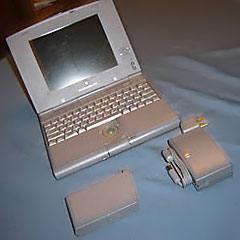 From Evan,
Might wanna check this out. I found
an eBay auction for what the seller claims is a PowerBook Duo
Prototype on eBay, and after reading your LEM article on the duo and
DuoDock, I thought I should email this to you. Is this genuine?
-PTL (sure, I'm a PC user but I like Macs and PCs equally.)
Hi Evan,
Hard to say for sure that it's the real McCoy without
seeing documentation or at least more info. It looks like it might be
from the photo, but...?
Charles
Go to Charles Moore's Mailbag index.



