I love Nuance's
Dragon Dictate speech recognition software, which I find an
indispensable typing stress reducer and efficiency enhancer. As a user
of Mac OS dictation software since the mid-1990s - initially as a
workaround to help minimize typing's aggravating chronic nerve pain
symptoms in my arms and hands - I can affirm that Dragon Dictate
represents a new high water mark in Mac speech recognition
excellence.
Back in the
'90s, dictation software was so clumsy, slow, and error-prone that I
couldn't imagine anyone using it unless obliged to for health reasons.
However, the technology has advanced exponentially. Dragon Dictate is
based on former MacSpeech software developer Dictate application
(MacSpeech was acquired by Nuance just about a year ago), but improves
on the accuracy and performance of already impressive MacSpeech Dictate
1.5 - thanks to the new Dragon 11 speech engine that also powers
recently announced Dragon NaturallySpeaking 11 for the PC.
Dragon Dictate is so slick and accurate, even with a minimum of
voice training, that I don't doubt Nuance's claim that it can speed up
typing performance by up to three times the rate even skilled typists
can achieve with a keyboard, thus presenting an attractive alternative
to manual typing even for users who have no issues with repetitive
stress or typing pain.
Unfortunately, the one significant bug I encountered in the early
builds of Dragon Dictate 2.x had an unhappy and frustrating propensity
to transpose the last two letters of some words in transcribing spoken
dictation to digital text. This was most evident when dictating into
third-party applications - and mostly absent when using Dictate's own
Notepad application. But since one of Dictate's marquee features is its
ability to enter dictated text virtually anywhere, it amounted to a
serious and aggravating flaw.
Happily to report, that bug has now been eliminated with the release
of the Dragon Dictate 2.0.2 update. I've been dictating this article
into my favorite text editor, Tex-Edit
Plus, and the transcription bug is evidently completely squashed.
Bravo! Dictate is now an unalloyed pleasure and joy to use.
Incidentally, in addition to allowing you to use your spoken
voice instead of a keyboard to produce text, you can also control your
Mac by voice with Dictate. Instead of using your keyboard and mouse,
just speak commands into the microphone to launch and control
applications, move the cursor, or click anywhere on screen by
voice.
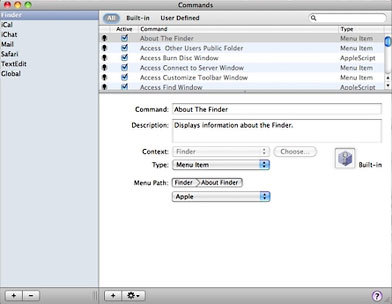 Dictate has four modes: Dictation Mode, Command Mode, Spelling
Mode, and Sleep Mode. Dictation Mode is self-explanatory, but while
you're in it you can also issue commands, while when in Command Mode
the program recognizes and executes only commands and can be considered
"Command Only" Mode.
Dictate has four modes: Dictation Mode, Command Mode, Spelling
Mode, and Sleep Mode. Dictation Mode is self-explanatory, but while
you're in it you can also issue commands, while when in Command Mode
the program recognizes and executes only commands and can be considered
"Command Only" Mode.
A completely new Spelling Mode made its debut with MacSpeech Dictate
1.2, allowing users to spell words, names, or acronyms by using either
natural language or the International Radio Alphabet (Alpha, Bravo,
Charlie, Delta, Echo, etc.). Sleep Mode simply lets you toggle the
microphone and application on and off.
Another Dragon Dictate feature is Phrase Training, which helps
you increase accuracy by letting you train your voice profile as you
proceed. While most of the speech recognition industry refers to this
feature as "correction", which is accurate in the sense that it can
indeed be used to correct text in your documents, this descriptor in
some respects misses the point, because ongoing training also helps
refine Dictate's ability to recognize what you intended to say.
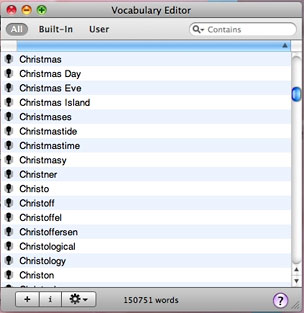 With Phrase Training you're not stuck with the level of
accuracy arrived at with your initial voice training until you take the
time to read more training stories, and you don't have to specifically
train the recognition engine from a document or selection. Instead, you
can train a phrase immediately when you see it was misrecognized. Then
the next time you dictate that phrase or word in the phrase, Dragon
Dictate is more likely to recognize it accurately.
With Phrase Training you're not stuck with the level of
accuracy arrived at with your initial voice training until you take the
time to read more training stories, and you don't have to specifically
train the recognition engine from a document or selection. Instead, you
can train a phrase immediately when you see it was misrecognized. Then
the next time you dictate that phrase or word in the phrase, Dragon
Dictate is more likely to recognize it accurately.
Rating Dragon Dictate presents a bit of a conundrum. On the one
hand, it's the closest to perfection in Mac dictation software anyone
has yet achieved. On the other hand, there is still plenty of room for
improvement, especially in making getting up to speed on its more
advanced features more intuitive and user-friendly. There are also a
few functional niggles that could stand some work. I wish there was a
way to hide the floater control palette (even though it's a lot
prettier than the old one in MacSpeech's former PowerPC dictation
product iListen)
when it's not in use other than closing the program. Working on a 13.3"
MacBook screen, one cherishes every square millimeter of desktop real
estate.
The program still takes a long time to start up, which I guess
is somewhat inevitable when it has to load a voice profile and
dictionaries before you can get underway, a process limited by
processor and hard drive speed. A 7200 RPM hard drive or SSD would
probably speed things up noticeably. However, once it's running, even
on my 2.0 GHz Core 2 Duo
MacBook with 4 GB of RAM, a relatively modest spec power-wise
these days, Dictate is satisfyingly responsive.
The Plantronics microphone headset that comes bundled with Dictate
has proved excellent, equal to or better than any mics I ever used with
MacSpeech iListen. It's light, adjustable, attractive-looking, and has
a conveniently long cord. The mic does require a USB dongle, which uses
up a precious USB port, but I prefer the precision responsiveness of a
hard-wired mic to the lesser accuracy I've experienced dictating with
Bluetooth wireless microphones.
For now, I'm giving Dragon Dictate 2.0.2 a three out of four rating,
but with a bullet. At this stage of the game it's your best (actually
only) Mac OS dictation solution and a tool well worth having in your
software suite.
Dragon Dictate requires an Intel-based Mac, Mac OS X 10.6 Snow
Leopard or greater, 3 GB of available hard drive space, 2 GB
of RAM recommended, and an Internet connection for product
registration. The software comes complete with a bundled,
Nuance-approved Plantronics USB microphone headset that's lightweight
and comfortable to wear for long sessions.
System Requirements:
- Intel-based Mac
- Mac OS X 10.6 or later.
- Internet connection required for product registration.
- MacSpeech-certified USB microphone (included with new
purchase).
Dragon Dictate for Mac 2.0 sells for $199.99 through
Nuance's Website and third-party resellers and includes a
high-quality USB microphone with new purchases. A Bluetooth microphone
option is available. Existing MacSpeech Dictate customers and Dragon
NaturallySpeaking customers can upgrade to Dragon Dictate for Mac
starting at $49.99 and $99.99 respectively for a limited time.
The version 2.0.2 update is free for registered version 2.0 users.




