The Review Vault
InvisibleShield Great Protection for iPods, Notebooks, Cell Phones, PDAs, and More
- 2009.04.15
Rating: 
Popularity: ![]()
![]()
![]()
![]()
May the InvisibleShield be with you....
When you buy an iPod or some other gadget, you immediately think to yourself, "It seems to me that I need to get something to protect it. But what shall I choose?"
There are plenty of cases out there, but some are too bulky. You think, "Wouldn't it be cool if there were an invisible case that doesn't even look like a case?" Look no further than InvisibleShield from Zagg.
I have an iPod classic and an AlphaSmart Neo. I found that Zagg has InvisibleShield's for both. Is it a good investment? Will it protect your gear?
I had a chance to try them out, and those are some of the questions we'll answer in this review.
The first thing you'll notice is the minimal packaging. It's like a tri-fold brochure. Inside you'll find three things: a squeegee, ShieldSpray, and the InvisibleShield itself.
What is the InvisibleShield? It's a thin, transparent film that protects the casing of your device of choice.
Installation
First, I made sure my hands were clean to keep from getting fingerprints on the adhesive side of the InvisibleShield. Before I started, per the instructions, I sprayed my fingers with the ShieldSpray. Next was choosing which side of the device to start with. If you're applying this to the iPod classic, like I did, I recommend starting with the front, then the scroll wheel, then the select button, then the back, and finally the corners of the iPod.
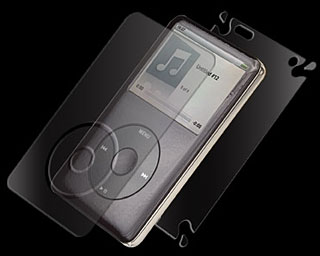
Let me say this first of all: This is a very meticulous
process. One slip, and it'll be out of alignment quickly. You need to
be calm and especially be sure to exercise patience. It took me a few
times before I got it right.
The next thing I did once I peeled off the front part of the InvisibleShield was to, again per the instructions, spray both sides lightly with the ShieldSpray. Then came applying it. You have to exercise extreme caution and have steady hands to get it applied properly. Once I had it applied on the front, I used the squeegee to smooth out the bubbles, as per the instructions. You'll still find a few small bubbles, but overall, it worked like a charm. Then I peeled off the other parts and applied them the same way.
I also applied the InvisibleShield to the screen on my AlphaSmart Neo, as they have one which is made especially for the Neo.
Great Protection
I'm pleased to say the InvisibleShield does in fact offer great protection for both devices. It's very durable material that will no doubt hold up to many bumps and drops. Zagg even touts it as Military Grade. I have no doubt it is. The InvisibleShield comes with a Lifetime Replacement Warranty, which I doubt will ever have to be used, but it's nice to know it's available if needed.
I rate it 4 out of 4.
The cost for this protection? For full body coverage of the iPod classic, $24.95. If you want just screen coverage, $14.95. If you have a AlphaSmart Neo, you can only get screen coverage for it, and like the iPod classic screen protection, it's $14.95.
Zagg makes InvisibleShield for a host of other items as well - the iPhone, iPod touch, MacBooks, Palms, and much more.
Check out the entire line of InvisibleShield products from Zagg by
going to InvisibleShield.com.
Recent articles in The Review Vault
- Penguin Hats Bring Joy to All, 2012.01.04. It's not Mac-related or even Linux-related, but people can't help but smile when they see you wear a penguin hat.
- Crosley CR245: Two Ways to Digitize Your Vinyl, 2010.04.27. The Crosley 'Director' has a belt-drive turntable and can record directly to CD - or to your Mac, using the appropriate cable.
- Lenovo S10-2 Is a Great $300 Netbook, 2010.03.02. If you're looking for a small, inexpensive, usable netbook, Lenovo's S10-2 may very well satisfy you.
- More in the Review Vault index.
Links for the Day
- Mac of the Day: Macintosh 512K 'Fat Mac', introduced 1984.09.10. The first Mac with enough memory for serious work.
- May 23 in LEM history: 00: A computer I understood - 01: Mac: A dream fulfilled - 02: PowerKey - 03: 12" PowerBook better than 15" TiBook - 05: The First Macs - 06: What's in your workspace? - Picking the right laptop - Sun has set on the G4 - 06: Running your notebook using flash memory - 08: MacBook holds its own against Dell and HP
- Support Low End Mac
Recent Content on Low End Mac
- Mac Pro on the Way Out or Changing with the Times?, Dan Bashur, Apple, Tech, and Gaming, 2012.05.22. No other desktop Mac offers a wide range of expansion options, but is that enough reason for Apple to keep the behemoth powerhouse Mac Pro around?
- iPhone 3D: Stereo Photography and 3D Movies for the Rest of Us, Anne Onymus, The Rumor Mill, 2012.05.22. Until now, stereo photography and 3D movies required expensive dedicated equipment. With the iPhone 3D, Apple will make it available to the masses.
- iPad 2 'Feels Like an Upgrade' from New iPad, Samsung Tops Apple in Smartphone Market, and More, iOS News Review, 2012.05.21. Also Apple to maintain tablet dominance, working in portrait mode, Wozniak would like to see end of walled garden, and more.
- MacBook Airs Top Ultrabooks, Boost MacBook Performance, MacBook Pro Update in June?, and More, The 'Book Review, 2012.05.21. Also Retina displays available now but costly, USB 3 expected in next MacBook rev, hybrid drives an affordable alternative to SSDs, and more.
- Flashback Removal Update for OS X 10.5 Leopard, Dropbox Pick of the Cloud Litter, and More, Mac News Review, 2012.05.18. Also Kodak Hero supports wireless printing from anywhere, WinOnX lets you run Windows apps on Macs, and free Mac Malware Remover.
- More links in our archive.
Recent Deals
- Best iPod classic Deals
- Best Mac OS X 10.6, iLife, and iWork Deals
- Best iPad Deals
- Best 15" MacBook Pro Deals
- Best iBook G4 Deals
- Best Classic Mac OS Deals
- Best Mac Pro Deals
- Best 15" PowerBook G4 Deals
- Best 17" PowerBook G4 Deals
- More deals in our archive.
About LEM Support Usage Privacy Contact
Follow
Low End Mac on Twitter
Join Low End Mac
on Facebook
Low End Mac Reader Specials
Macsales.com for the Right Mac Memory. Most Popular: 16GB from $128; 8GB from $50. MacBook Pro & Mac mini Kits up to 16GB. iMac up to 32GB & Mac Pro now up to 128GB. - Macsales.com
Don't install Parallels to play poker online! Macpokeronline.com will show you how to download and play Poker on a Mac natively on your Mac in just minutes.
Favorite Sites
MacSurfer
Cult of Mac
Shrine of Apple
MacInTouch
MyAppleMenu
InfoMac
The Mac Observer
Accelerate Your Mac
RetroMacCast
PB Central
MacWindows
The Vintage Mac Museum
Deal Brothers
DealMac
Mac2Sell
Mac Driver Museum
JAG's House
System 6 Heaven
System 7 Today
the pickle's Low-End Mac FAQ
Affiliates
Amazon.com
The iTunes Store
PC Connection Express
Parallels Desktop for Mac
eBay




