I recently had a bit of a quandary - I wanted to send an MP3 player
to a music-deprived friend. I wanted it to work with both Windows and
Macs. And I wanted it to cost under $100.
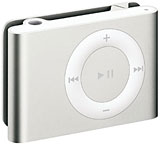 The iPod shuffle
(C$55-$75) wasn't going to do the trick; shuffle mode is a fun
way to randomly bring up tunes, like a radio station that only programs
songs that you like. But I wanted my friend to have the option of
shuffle mode when he wanted it - and of being able to play specific
albums, artists, or songs when he wanted that too. And I wanted him to
be able to tell what song was playing. You can't do that on an iPod
shuffle either.
The iPod shuffle
(C$55-$75) wasn't going to do the trick; shuffle mode is a fun
way to randomly bring up tunes, like a radio station that only programs
songs that you like. But I wanted my friend to have the option of
shuffle mode when he wanted it - and of being able to play specific
albums, artists, or songs when he wanted that too. And I wanted him to
be able to tell what song was playing. You can't do that on an iPod
shuffle either.
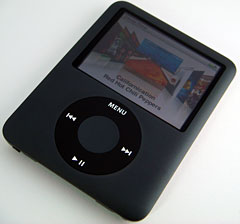
The iPod nano (C$159-209) would do everything I wanted except fit in
my budget. In fact, unless I was prepared to buy a secondhand iPod,
none of Apple's models would fit my needs.
MP3 Players for Macs
Other MP3 player manufacturers don't exactly spend a lot of time
marketing their products to Mac owners - they've pretty much concluded
that if you own a Mac and are shopping for a music player, you're
probably going to buy an iPod. And if you plug many of these models
into your Mac - like Microsoft's Zune or any of Creative's many models
- nothing pops up on your desktop; there's no indication that you've
got anything attached.
These models use a connection standard called MTP; they require
additional software installed to allow them to be recognized on Windows
systems. I'm not aware of manufacturers of MTP players who include
Mac-able software. The open source XNJB can be used, however,
to allow many (but not all) of these music players to work, at least to
some degree, with Macs.
Some other models, however, use a connection standard known
varyingly as UMS or MSC; these models, when connected, appear to be an
external USB drive - on Windows, Linux, and Mac systems. As a result,
they can be used without requiring any additional software or drivers
on any of those systems - just drag music files to the Music folder,
and you're in business.
(While many - though not all - iPods can be set to appear as
external drives, Apple has hidden the Music and other media folders,
making it more difficult, though not impossible, to work with them in
this straightforward manner).
SanDisk Sansa Clip
As a result, at least some models of MP3 players from companies
including SanDisk, Archos, and even Sony, can be used with non-Windows
computers. I went shopping for a SanDisk Sansa
Clip, and found a 4 GB model for about C$80 - a bit more than half
the price of a comparably-sized iPod nano. (There are also 1 GB
and 2 GB Clip models available). Apparently, as a memory manufacturer,
SanDisk is able produce flash memory music players and other flash RAM
devices cheaply. SanDisk holds the #2 spot in MP3 players, though its
market share is far below Apple's.
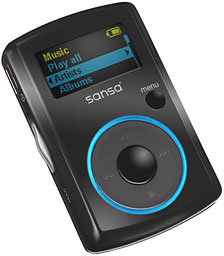 The Clip
is a small (2.2" by 1.4" by 0.5") device with a 1" square colour
display and a round 4-position control pad with a select button in the
centre. As well, there's a Home button, a volume switch on the side,
and USB and headphone jacks. A removable belt-clip is also included.
The interface lets you find tunes by album or artist as well as by song
name.
The Clip
is a small (2.2" by 1.4" by 0.5") device with a 1" square colour
display and a round 4-position control pad with a select button in the
centre. As well, there's a Home button, a volume switch on the side,
and USB and headphone jacks. A removable belt-clip is also included.
The interface lets you find tunes by album or artist as well as by song
name.
Although I had seen a review of the Clip noting that it could
connect to Macs, there was no indication on the packaging that it was
Mac-compatible; the box listed system requirements as Windows XP2 and
Windows Media Player 10. Luckily, I could have brought it back for a
refund if it hadn't worked for me.
The Clip comes with a short USB cable; when it was connected to my
Mac, it promptly appeared as an external drive - the Clip's 1" screen
showed that it was connected and charging. Double-clicking the drive
icon on my Mac showed folders labeled Music and Audible (for Audible
book recordings). It was no sweat to copy album folders from my Mac
into the Music folder.
The real test, of course, is whether the music works. The Clip's
packaging promises support for MP3 and both protected and unprotected
Windows Media music files, along with Audible book files. There's no
support for Apple's AAC file format, used by default when you rip CDs
to iTunes or download copy-protected music from the
iTunes Store.
Because I routinely set iTunes to rip CDs to MP3, the music files
that I copied over to the Clip played without problem, showing artist
and album information on its small screen.
Unlike the pricier iPod nano, there's no support for photos or video
files - though you could use the Clip as an external drive to transport
these or other data files. But there are several features that you
don't get on any iPod model, at least not without buying third-party
add-ons. The Clip has a built-in FM radio tuner with support for up to
40 preset stations. There's a built-in mike and voice recorder. There's
even an adjustable five-band equalizer.
Sound quality is pretty good, especially for such an inexpensive
device. As with Apple's iPods, you may want to ditch the included
earbuds for something better - I use
Creative's Zen Aurvana in-ear earphones.
It's not going to replace my iPod touch, but it's nice to know that
however much Mac owners may like Apple's iPod models, there are other
Mac-usable MP3 players available.
I just wish SanDisk would mention this on their product packaging!

- Sansa
Clip 1 GB, currently $34.51 from Amazon.com
- Sansa
Clip 2 GB, black, currently $47.98 from Amazon.com
- Sansa
Clip 2 GB, red, currently $42.82 from Amazon.com
- Sansa
Clip 2 GB, blue, currently $48.45 from Amazon.com
- Sansa
Clip 2 GB, pink, currently $48.45 from Amazon.com
- Sansa
Clip 4 GB, silver, currently $71.18 from Amazon.com
- Zen
Aurvana in-ear earphones, currently $76.13 from Amazon.com



