Compiled by Charles Moore
and edited by
Dan Knight
- 2004.01.23
Except as noted, prices are in US dollars, bold links are to
outside sites, and regular links lead to 'Book profiles on Low End
Mac.
SideTrack Enhanced Trackpad Driver
SideTrack
is a replacement driver for the trackpad (touchpad) found on Apple
PowerBooks and iBooks. It brings many of the advanced trackpad
features found on Windows laptops to Mac OS X.
SideTrack supports these features:
- Vertical scrolling at left or right edge of pad.
- Horizontal scrolling at top or bottom edge of pad.
- Map hardware button to left or right click.
- Map trackpad taps to no action, left click, left click drag
(with or without drag lock), or right click.
- Compatible with uControl, including uControl's scroll
emulation.
SideTrack is fully multiuser aware, different users on the same
PowerBook can have different settings depending on their needs.
SideTrack is simply another driver for the trackpad. It uses the
standard kernel interface for mouse drivers. This is exactly the
same interface used by all third party mice. SideTrack does use the
trackpad in a different mode than the standard Apple driver, but
this mode is fully supported by the hardware.
SideTrack works by emulating a scroll wheel mouse. It sends
scroll wheel events to the operating system, and the OS routes
those events to applications. Unfortunately, not all applications
respond to scroll events properly. Most Mac OS X applications
understand vertical scroll wheel events. Generally in order for
vertical scrolling to work the mouse pointer must be within the
scrollable area of the window you wish to scroll (not inside the
scrollbar, just anywhere within the scrollable section of the
window). Some applications (notably Apple's Safari browser) take
this a step further and will scroll the frontmost window no matter
where the mouse pointer is located. Support for horizontal scroll
events is somewhat rarer. Most Apple applications support
horizontal scroll events, but support for horizontal scroll in
third party applications is less common. Ultimately it is up to the
application author to provide support for scroll events, SideTrack
can do nothing about the limitations of these applications.
SideTrack is presently a public beta. As a beta release
SideTrack may contain bugs and could potentially cause a kernel
panic. Users are advised to exercise appropriate caution when
testing SideTrack and be sure to read the FAQ for information on
how to disable SideTrack if it causes problems.
SideTrack can be temporarily disabled on your machine by holding
down the Shift key after rebooting. Hold the key down from the
initial gray screen till the login window appears. This is a "Safe
Boot" and will prevent all third-party drivers from loading. In
"Safe Boot" your PowerBook trackpad will revert to Apple's default
driver. "Safe Boot" only works when you do not have an Open
Firmware password set on your PowerBook. Open Firmware passwords
are set using Apple's Open Firmware Password Utility. You may wish
to consider turning off the Open Firmware password on your machine
when first installing SideTrack. Once you are sure SideTrack
operates properly on your machine you can then re-enable the
password.
For full installation instructions see the "SideTrack Read
Me.rtf" file included in the download.
This public beta version (0.7.6) of SideTrack will expire on
April 30, 2004.
iBook vs. PowerBook? New vs. Used? Opinions
Solicited
MyMac's John Nemerovski has
posted:
Please use "Article discussion" section at bottom of my entry to
present your opinion on the following questions. Thanks!
- On a limited budget, should a person needing a portable G4 Mac
buy a 12" iBook or 12" PowerBook? What are the major dis/advantages
of either one versus the other? Presume identical RAM and the
purchase of AppleCare.
- If a used G4 15" PowerBook costs roughly the same as one or the
other 12" new iBook/PowerBook, but the 15" used model is out of
warranty, should buying used be considered an alternative, given
the probability of an expensive potential repair?
I wrote a The Road Warrior column last year,
The 12in iBook and 12in PowerBook - Brothers Under the Skin, on
the relative merits of the 12" G4 PowerBook vs. the 12" G3 iBook.
With the G4 iBook, the distinctions have narrowed even more.
Willow Courtenay 12" PowerBook Slipcase
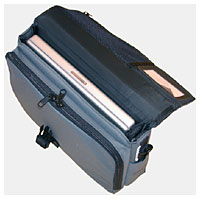 The Courtenay 12" PowerBook
slipcase offers a lightweight, compact, yet flexible solution
for carrying your notebook, power supply and cord, and some
accessories. The stylish design offers excellent protection for
your PowerBook in a very compact and expandable sleeve style
case.
The Courtenay 12" PowerBook
slipcase offers a lightweight, compact, yet flexible solution
for carrying your notebook, power supply and cord, and some
accessories. The stylish design offers excellent protection for
your PowerBook in a very compact and expandable sleeve style
case.
Features:
- a clean, very lightweight and very compact size.
- excellent protection for your PowerBook afforded by 1.2 cm
(0.5") soft "gushy" foam reinforced by corrugated plastic on the
top and sides.
- exterior 600 denier polyester and interior 200 denier nylon
both of which are urethane coated for waterproofedness. The fabrics
give an excellent balance between superb protection and durability
and light weight.
- great carrying comfort foam wrapped, polyethylene cored padded
handle designed with the seam at the top for maximum comfort.
- contoured, padded shoulder strap with a special sticky bottom
to keep it on your shoulder.
- nylon web handle, quadruple reinforced with rivets, to insure
the safety of your notebook.
- convenient rubber luggage feet riveted through a high density
polyethylene bottom piece to keep the slipcase off the ground if
you're leaning it against your leg or chair in the office or on
your commute.
- outer front organizer panel with pockets for business cards,
pens, calculator plus extra space at the bottom for the Apple power
supply, power cord and a separate mouse.
- rear flat pocket which can expand to 2.8 inches deep when
needed.
- convenient under lid pocket which can be flipped up to access
change, tickets or other smaller items.
- very handy, covered outer key chain clip to allow home or
office keys to be immediately accessed on the daily commute.
- stylish and protective reflective strips on slipcase front and
sides for superior nighttime visibility.
- lifetime guarantee against defects in materials or
craftsmanship.
Available colors: black, charcoal, navy, taupe, burgundy
Pricing: $119 Cdn./$89 U.S.
Willow Stikine 12" iBook Slipcase
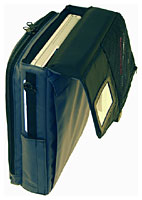 The Stikine 12" iBook
slipcase offers a lightweight, compact yet flexible solution
for carrying your iBook, power supply and cord and, when you need
it, a pile of accessories. The stylish design offers excellent
protection for your iBook in a compact and expandable case.
The Stikine 12" iBook
slipcase offers a lightweight, compact yet flexible solution
for carrying your iBook, power supply and cord and, when you need
it, a pile of accessories. The stylish design offers excellent
protection for your iBook in a compact and expandable case.
Features:
- excellent protection for your iBook afforded by 1.2 cm (0.5")
soft "gushy" foam reinforced by corrugated plastic on the top and
sides.
- exterior 600 denier polyester and interior 200 denier nylon
both of which are urethane coated for waterproofedness. The fabrics
give an excellent balance between superb protection and durability
and light weight.
- great carrying comfort assured by a foam wrapped, polyethylene
cored, padded handle designed with the seam at the top so it
doesn't dig into your hand.
- contoured, thickly padded shoulder strap with a special sticky
bottom to keep it on your shoulder.
- nylon web handle, quadruple reinforced with rivets, to insure
the safety of your notebook.
- convenient rubber luggage feet riveted through a high density
polyethylene bottom piece to keep the slipcase off the ground if
you're leaning it against your chair or desk.
- vertical configuration allows power adapter to be plugged into
iBook while store in the slipcase.
- outer front organizer panel with pockets for business cards,
pens, calculator plus extra space at the bottom for the Apple power
supply, power cord and a separate mouse.
- rear flat pocket which can bellow out to 2.8 inches deep when
needed.
- convenient under lid pocket which can be flipped up easily with
the slipcase on the shoulder to access change, tickets or other
smaller items.
- business card holder under the lid for identification plus
storage of extra business cards in addition to the front organizer
pocket slot.
- very handy, covered outer key chain clip to allow home or
office keys to be immediately accessed on the daily commute.
- stylish and protective reflective strips on slipcase front and
sides for superior night time visibility.
- lifetime guarantee against defects in materials or
craftsmanship.
Pricing: $119 Cdn./$86 U.S.
Available colors: black, charcoal, navy, taupe, burgundy
iSkin, iBook/PowerBook G4 Keyboard Protector,
on Sale
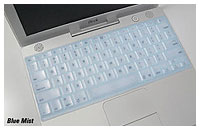 If you love your iBook or PowerBook G4,
you will want to protect it against everyday hazards caused by
spills, dirt, crumbs, and other unwanted elements that may get in
between the keys.
If you love your iBook or PowerBook G4,
you will want to protect it against everyday hazards caused by
spills, dirt, crumbs, and other unwanted elements that may get in
between the keys.
iSkin
is precisely molded to protect your iBook/PowerBook G4 (Titanium
667 MHz+) keyboard by creating a molded silicone layer above your
keyboard keys. The iSkin keyboard protector also helps protect your
iBook or PowerBook's screen by reducing the occurrence of screen
staining caused by finger oils and dirt particles.
The iSkin iBook/PowerBook keyboard protector can be cleaned by
either wiping with a damp cloth or by washing in a mild soap
solution. Washing will remove any oils and build up that may occur
over time. Washing does not affect the durability or protective
qualities of the iSkin protector.
The iSkin iBook/PowerBook Keyboard Protector is available in six
colors known as Skin Tones. Skin Tones add a tint of color to iBook
keyboards and are available in a variety of colors including Blue
Mist (light blue), Bubble Gum (light pink), Creamsicle (light
orange), Lemonade (light Yellow), LimeLight (light green), or
without color as White Frost (frosted clear).
Note: This item does not work with any of the current PowerBooks
or iBooks. Available only for iBook (White) and PowerBook G4
Titanium (667 MHz+). US keyboard layout only.
Regular Price: $24.95. Sale Price: $20.95
TiBook Tote and Tilt on Sale at ThinkDifferent
Store
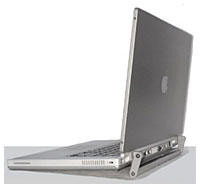 TiBook Tote and Tilt features:
- Tote your PowerBook by a handle.
- Tilt to allow for air circulation under your PowerBook, helps
to increase battery life and performance
- Easy access to rear data ports.
- Installs in five minutes.
- Does not void warranty.
- 100% handmade in the USA.
- All aluminum construction for lightness & sturdiness.
- Color powder coated to complement the PowerBook.
Regular Price: $44.95. Sale Price: $39.
Linux on Mac: A POWER Programmer's Primer
Even though most Linux users have treated Linux as an operating
system for their x86 white boxes, Linux runs equally well on
PowerPC machines. In Linux
on Mac: A POWER Programmer's Primer, Gnosis Software, Inc.
developer David Mertz looks at Linux on the PowerPC and the
appealing range of PPC machines produced by Apple, where the option
of using Linux is of great value to many users.
"For many Linux users, the best reason to buy a PowerPC machine
will be, quite simply, the range of well engineered and reasonably
priced machines available from Apple. Admittedly, the G4 lines -
bottom line - do not quite keep up with comparably priced x86
machines in CPU power. The G4s do not lag that far behind, but they
do a little. However, Apple makes some of the best laptops
available from an ergonomic, aesthetic, battery-life, and weight
perspective. All of those features are far more important to me,
for a laptop, than raw number-crunching."
Quanta Computer Aims to Supply 30% of Notebooks
Worldwide in 2004
DigiTimes.com's
David Tzeng and Steve Shen report:
"Quanta Computer, the world's largest notebook maker, will aim
to supply 30% of notebooks worldwide in 2004 and more than 40% in
2005, company sources said.
"Quanta shipped 9.3 million notebooks in 2003, or about 24% of
estimated global sales of 39 million units."
Quanta has manufactured PowerBooks for Apple since the G3 Series PDQ in 1998.
Escape from PC Laptop Hard-drive Hell
AnchorDesk Executive Editor
David Coursey writes about his travails replacing the hard
drive in his PC laptop. A Toshiba drive wouldn't work, and the
Compaq Armada is currently running a 3 GB drive salvaged from
a Mac.
Coursey also notes:
"The other machine I'll be using - my all-around favorite laptop
right now - is the new 15-inch G4
PowerBook. This is one of the sweetest computers I've used in a
long time; now that I finally have Entourage (the Mac Office
Outlook replacement) connecting to my Exchange Server, I'll
probably be using it more.
"This great computer will probably spoil me. The biggest problem
I'm facing is retrieving it from the family member who's been using
it."
Bargain 'Books
There are two different versions of WallStreet running at 233
MHz, the cacheless MainStreet
version and the later Series II
with a level 2 cache. It's not always possible to determine from
the vendor's listing which is being offered, so we've included
links within this paragraph to the two models. The same goes for
the PowerBook G4/667 (Gigabit
Ethernet/2001) and G4/667
(DVI).
- new 12" iBook 800,
128/30/CD-ROM, AirPort, $749
- new 12" iBook 800,
640/30/CD-ROM, AirPort, $799
- refurb 14" iBook 900,
256/40/Combo, Macally iceCAD USB Mini Writing Tablet, $1,035
- new 12" PowerBook G4/867,
256/40/SuperDrive, Kensington Astro Pack Gray, Kensington Kevlar
MicroSaver Security cable, $1,449
- refurb 15" PowerBook G4/1 GHz,
256/60/Combo, $1,799
For more deals on current or recently discontinued models, see
our Best PowerBook G4 Deals
and Best iBook Deals.



