New iBook Value, Radeon 9550 Core Image Support, iCooked Overclocks iBook G3, 120 GB Upgrade Service, and More
Low End Mac Reader Specials
Memory To Go Special: New 2008 iMac 2GB $42 / iMac Intel Core2 DUO & MacBook Pro 2GB $36 - 1GB $20. MacPro 8 Core Memory 4GB kit $154 / 2GB kit $94 -- Free shipping available.
Download Typestyler, still the Ultimate Styling Tool for Internet, Print and Video
Graphics. Works great in Classic with a Native OS X Version on the way. Free
Tryout: www.typestyler.com
LA Computer Company: Specials on AppleCare, iMac's, Apple Batteries and Apple A/C Adapters. Also Great prices on Used Apple Computers. Call 1-800-941-7654 Click Here.
OWC: Juice up your iPod w/NewerTech High Capacity Battery from $19.99 Free Installation Videos for most models. Pro Installation Service w/FedEx Shipping From $57.95 (Battery Included). - www.MacSales.com
Mac users can finally play Party Poker for Mac. Not only that, they can also learn how to play PokerStars for Mac.
Laptop Hardware Provided by TechRestore - Overnight Mac & iPod Repairs.
Compare products like desktop computers, laptops, and LCD TVs side by side! All the information and reviews to make the best purchasing decision for a new cell phone GPS products or MP3 players. The Ciao network makes searching products easy for you.
New iMac 800Mhz Memory 4GB $90, 2GB $45 - Click to Maximize your Macs...
Charles Moore
- 2005.07.29
This Week's PowerBook, iBook, and Notebook News
General Apple and Mac desktop news is covered in The Mac News Review. iPod news is covered
in iPod News Review. News about
Apple's transition to Intel CPUs and other Intel developments is
covered in The Macintel Report.
All prices are in US dollars unless otherwise noted.
News & Opinion
- Apple Throws in the Kitchen Sink with New
iBook
- Radeon 9550 Has Tiger Core Image Support
- What Is ATI's Radeon 9550?
- iBooks Enhance Learning in Broward County
Schools
Advice
Products and Services
- iCooked Simple iBook G3 Overclock
Software
- PowerBookResQ 120 GB Hard Drive Upgrade
Service
- myBattery Battery Information Software
- Portable Travel Router Shares Broadband Internet
Wirelessly
- SideTrack Advanced Trackpad Driver
- Free Focused Scroll Advanced Trackpad
Driver
- CPU Director Changes Cache & CPU Clock Speed
on PowerLogix Upgrades
- 7dbi Wireless Antennas for 15" and 17" Aluminum
PowerBooks
Tech Trends
Bargain 'Books
News & Opinion
Apple Throws in the Kitchen Sink with New
iBook
Bill Palmer says:
"Let's see what we're getting here with the new [iBook] model
that we wouldn't have gotten if we'd bought, say, yesterday:
marginally faster processor, twice as much RAM, 33 percent larger
hard drive, better video card, built-in Bluetooth, sudden motion
sensor, and trackpad scrolling. I think there also might be a
kitchen sink in there somewhere. Good thing I waited, eh? I mean,
that's an awful lot to throw in for the same $999 price tag. And
the deal gets even sweeter for those folks looking for a 14 inch
iBook, as (if I'm not mistaken) they now get a SuperDrive standard
on top of all the other goodies.
"And in terms of Macintosh history, we just might now be
entering the Era of the Kitchen Sink."
Radeon 9550 Has Tiger Core Image Support
Accelerate Your Mac reports:
"Earlier today I mentioned the new iBook line is using the
Radeon 9550 graphics chip and guessed it had Tiger Core Image/Video
support (since the desktop 9550 is based on the R3xx/9600 series)
but wrote a contact at ATI who verified it does."
What Is ATI's Radeon 9550?
Xbitlabs' Anton Shilov reported last year:
"ATI's Radeon 9550 is down-clocked Radeon 9600 featuring 128 MB
of DDR SDRAM memory with 128-bit bus.... Graphics cards based on
the Radeon 9550 will work at 250 MHz/400 MHz speeds for
chip/memory, 75 MHz below core clock-speed provided by the Radeon
9600.
"All graphics cards based on the Radeon 9550 and Radeon
9600-series VPUs are based on processors code-named RV350 and
RV360. From architectural stand-point these two chips are same and
feature 4 pixel and 2 vertex pipelines, but the RV360 is made using
more advanced 0.13 micron low-k fabrication technology."
iBooks Enhance Learning in Broward County
Schools
PR: 30,000 new iBook G4s
Apple today announced that it will supply 30,000 new iBook G4s
to Broward County Public Schools for use by all of its students in
kindergarten through twelfth grade. The iBooks will greatly
increase students' access to the latest technology for learning,
authoring and communication.
"We're excited to work with Broward County to provide students
with the best learning tools available," said Tim Cook, Apple's
executive vice president of Worldwide Sales and Operations.
"Thousands of schools across the country have improved academic
achievement with the help of Apple's education solutions, and the
addition of 30,000 iBooks will do much to help provide students
with necessary 21st century skills."
"As one of the nation's leading school districts, Broward County
Public Schools has long used technology to enhance teaching and
learning," said Dr. Frank Till, superintendent of Broward County
Public Schools. "The new iBooks are ideally suited to meet the
needs of our students, and demonstrate Apple's commitment to
education."
Designed with education in mind, the new iBook is encased in a
sleek, durable polycarbonate plastic enclosure and offers improved
performance with either a 1.33 GHz or 1.42 GHz PowerPC G4
processor. Providing up to six hours of battery life for all-day
use in the classroom, iBook features AirPort® Extreme 54 Mbps
802.11g wireless networking. Every iBook also comes preloaded with
Mac OS® X and iLife® '05, allowing students and teachers to
make the most of digital movies, photos and music in school
projects and presentations. The lightweight iBook fits easily in a
backpack and its slot-load optical drive has no protruding trays or
doors that can break. The new iBook also includes a scrolling
TrackPad to easily scroll through long web pages or pan across
large photographs and Apple's Sudden Motion Sensor technology to
help protect a spinning hard drive if the notebook is accidentally
dropped.
Advice
Powerbook Dissection Fixes Display Problem
Blogger Anthony Peña says:
"I work in an Orthopaedic surgery research laboratory and we
have a lot of Macs. We have three MDD Powermacs, one B&W 350
MHz Powermac, a Wallstreet PB, a 1 GHz Ti PB, and a couple
other miscellaneous old school Macs. Before I even started at the
lab the Ti Powerbook was having quite a few problems with the
display. It seemed that every time the Powerbook got even slightly
hot (I'm talking turned on for maybe 10 minutes with just web
surfing), the display would become so garbled that it would be
illegible and completely non-functional. The only way to fix the
garbled mess was to raise the Powerbook on some metal blocks that
we had and put a fan to the side of it to keep it cooled....
"I'm not familiar with the Powerbook's internal architecture, I
admit, but I DID notice that when I applied pressure to the upper
left portion of the board, the display would flicker more without
moving the lid. I deducted from that observation that the video
connection must be in that region."
Mod Your iBook
bit-tech.net's Wil Harris says:
"Fancy something a little more . . . fruity than your
average Mac?
"A cunning Mac Modder has discovered how to disassemble an iBook
and mod the back logo to be a bit more colourful."
- Link: Mod Your
iBook
- Link: Modding your
iBook's Apple Logo
Products and Services
iCooked Simple iBook G3 Overclock Software
PR: iCooked is a GUI for the iCook kernel extension by
Patrick Swieskowski (included in package).
iCook is a small OS X kernel extension that allows simple
overclocking of the IBM 750FX processor found in some of the G3
iBooks (600 to 900 MHz).
[Obviously use at your own risk]
- Shows current CPU clock speed in menu bar.
- Keeps user-defined CPU clock speed after sleep.
- Automatically loads iCook.kext at launch.
New in this version: updated for Mac OS X 10.4.2
compatibility
System requirements: Mac OS X 10.4.2 and later (use iCooked 1.1
with Mac OS X 10.3.x).
iCooked is freeware.
- Link: iCooked
PowerBookResQ 120 GB Hard Drive Upgrade
Service
PR: PowerBookResQ 24-Hour Nationwide Upgrade: 120 GB Hard
Drive Installation & Data Transfer Priority Service for
PowerBooks & iBooks
Need more storage space in your PowerBook or iBook? Here's a
solution for you. You'll get award-winning PowerBookResQ service,
plus all parts and labor required to upgrade to a spacious and fast
5400 RPM 120 GB hard drive. Includes full data transfer.
The program includes:
- Overnight pickup of your PowerBook or iBook at your location in
our custom PowerBox
- Overnight shipment of your laptop to PowerBookResQ
- Installation of the hard drive upgrade of your choice
- Transfer of your data and applications to your new drive*
- Return of your old drive to you to use as an external drive, or
keep as a backup!
- Overnight return of your laptop to your location
- All this and the upgrade is performed in just 24 hours!
(*)If your data is corrupted or otherwise unable to be
transferred via the normal process, you will be contacted as there
may be an additional labor charge.
To order, call 1-866-Mac-Repair or simply purchase this item
through the online checkout. Choose an optional USB or FireWire
hard drive enclosure if you would like us to install your old hard
drive in a case at no additional charge!
System requirements: PowerBook G3/G4 or any iBook
Option: CoolMax Gemini 2.5" Portable Aluminum FireWire/USB 2.0
Hard Drive Enclosure (for your 'Books old hard drive), $39.99
myBattery Battery Information Software
PR: myBattery is a tool that reads out the data of your
notebook-battery (iBook/Powerbook).
It shows the current charge of your battery as well as the
current maximum capacity related to its original.
New in this version: Some GUI bugfixes - added the "I guess the
age of your Mac" feature
Since version 0.7 you can save the current maximum capacity of
your battery - with just one click! myBattery uses Apple's new and
really powerful technology names "CoreData " to realize that.
System requirements: Mac OS X 10.4 or higher
myBattery is freeware.
- Link: myBattery
Portable Travel Router Shares Broadband
Internet Wirelessly
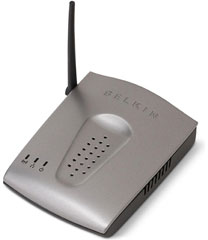
PR: Belkin announces its new Wireless G
Travel Router, a pocket-sized device that lets you wirelessly share
your hotel's wired or wireless broadband access. Providing wireless
freedom and flexibility, the Travel Router allows for sharing of
one broadband Internet connection and files over multiple
computers, so that you and your colleagues can be more productive -
"whether in a hotel or a conference room. This Travel Router will
be shipping in North America at the end of August 2005.
The size of your palm, the Travel Router features 802.11g
technology, network security, and multifunctional capabilities. It
offers a wide working range up to 300 feet and greater
interoperability in mixed networking environments. 802.11g
technology is backward-compatible with the 802.11b Wi-Fi networking
standard.
The Travel Router can also be used as a wireless adapter or an
access point. As an adapter, it adds wireless capabilities to a
computer so you can use it to connect to Wi-Fi hotspots. In access
point mode, the Travel Router expands the coverage area of an
existing network.
Benefits
- Creates a wireless network from an Internet connection in hotel
and conference rooms
- Sets up easily using Belkin's Easy Install Wizard
- Supports router, adapter, and access-point modes
- Supports advanced wireless security
- Includes a convenient travel kit
- Comes with a Belkin Lifetime Warranty and free, 24-hour
technical support
Wireless G Travel Router (F5D7233) - $59.99 ESP
Belkin products are available through Belkin as well as through
a network of major distributors, resellers, and superstores.
- Link: Belkin
SideTrack Advanced Trackpad Driver
PR: SideTrack is a replacement driver for PowerBook and
iBook trackpads. With SideTrack installed your standard trackpad
becomes a powerful multi-button scrolling mouse.
Leave your external mouse at home and take full control over
your trackpad:
- Vertical scrolling at left or right edge of pad.
- Horizontal scrolling at top or bottom edge of pad.
- Map hardware button to left or right click.
- Map trackpad taps to no action, left click, left click drag
(with or without drag lock), or right click.
- Map trackpad corner taps to mouse buttons 1-6 or simulated
keystrokes.
- Extensive control over accidental input filtering.
SideTrack is multiuser aware and fully compatible with MacOS X
fast user switching (FUS). Every user on your PowerBook can have
different settings depending on their needs.
SideTrack supports most G3 and all G4 model PowerBooks and
iBooks. For specific supported PowerBook models see the FAQ.
Extended control over the trackpad button and tap gestures. Use
trackpad taps for left click, drag gestures, or right click.
Complete scrollwheel mouse emulation with customizable scrolling
speed. Place your scroll zones on either side of the pad, or both
sides simultaneously.
Turn the corners of your trackpad into independent tap actions.
Use the corner zones to emulate up to a 6 button mouse or generate
custom keystrokes. Customize SideTrack's sensitivity and accuracy.
Calibrate to your own trackpad style and adjust filtering to reduce
accidental taps while typing. Choose from several mouse
acceleration options.
New in this version:
- SideTrack 1.2 now includes support for the new USB trackpad
hardware found in the 2005 PowerBooks
- Adjustable tap threshold
- Modifier-click support for corner taps
- Miscellaneous minor features and bugfixes
System Requirements
- Apple PowerBook or iBook (for specific supported PowerBook
models please see the FAQ)
- MacOS X 10.2 (Jaguar), MacOS X 10.3 (Panther), or MacOS X 10.4
(Tiger)
SideTrack is $15 shareware. Unregistered copies of SideTrack
will periodically remind you to register. Registered users receive
technical support and free upgrades.
- Link: SideTrack
Free Focused Scroll Advanced Trackpad
Driver
PR: So what is it?
A project to implement an open source driver for Apple
powerbooks. The project was started as an alternative to SideTrack
(which isn't free) and an improvement upon iScroll2. It acheives
its advanced features by running the trackpad in what is called
`absolute' mode. This means that the driver can tell exactly what
part of the pad your finger is touching. The Apple driver (and
iScroll2) both run the pad in `relative' mode, and while that
facilitates a simpler driver because the pad does most of the work,
it is very limiting of what you can do.
Most notably running in `absolute' mode allows the driver:
- Two-finger scrolling like the new Apple laptops with the new
USB trackpads;
- Linear scroll regions that can be placed anywhere. This adds
the functionality of a scroll-wheel;
- Hotspots to bind taps in the corners of the trackpad to
alternate mouse buttons;
- Ability to remap the physical button to perform any type of
mouse click.
The driver is not designed for use with the new 2005
PowerBooks, nor is it based upon the newer driver for them. It is
entirely based upon the original Darwin ADB trackpad driver with
the information for how to activate `absolute' mode taken from the
ScrollPad project. The preferences daemon and the two-finger
scrolling code is taken from the iScroll2 project as we didn't
really want to reinvent the whole wheel. At some point we intend to
remove the iScroll2 scroll code, though. We believe it is possible
to make the code much better if it utilises absolute coordinate
information instead of just relative movement.
The installer will only allow it to be installed on compatible
Macs and the uninstaller is pretty foolproof. Plus it's less than
300 KiB.
New in this version:
- Fixed some minor bugs and changed the driver to use our domain
as the IORegistry entry.
- Also the driver now supports a double-tap tolerance preference
that allows you to filter tap-drags.
- Previously it was possible to start a tap drag in a
significantly different place to your first tap.
System requirements: Mac OS X version 10.3.9 or later
Free focused scroll is freeware.
- Link: Free Focused
Scroll
CPU Director Changes Cache & CPU
Clock Speed on PowerLogix Upgrades
PR: CPU Director allows you to view and configure the
cache and processor clock speed settings on your PowerLogix upgrade
card. The included utilities allow you to enable or disable the
cache "on the fly", change the speed at which your backside cache
operates and automatically enable the cache at this speed at boot
time. If your upgrade uses an IBM 750FX or 750GX processor, you can
also change the processor clock speed "on the fly" as well as the
speed at which to set the processor when rebooting. There are also
options to disable speculative access (a problem with OldWorld
machines that originally did not ship with a G3 or G4 processor)
and enable dynamic power management. Finally, if your upgrade uses
multiple-processors, and you are running Mac OS X, you can view and
change these settings on a per-processor basis.
New in this version:
- Added support for OS X 10.4.2.
- Added DFS support.
System requirements:
- Mac OS 9.x, or Mac OS X 10.1.5 or higher (Tiger
compatible)
- PowerLogix upgrade card
- Link: Downloads,
PowerLogix
7dbi Wireless Antennas for 15" and 17"
Aluminum PowerBooks
PR: PowerBook users with aluminum 15" and 17" computers
can now benefit from the improved signal and range afforded by
these new antennas from QuickerTek. AirPort and AirPort Extreme
users will welcome a new level of removeable antenna
performance.
These two new antennas offer 7dbi of RF power and are an
omni-directional design. This antenna design will work best in most
wireless environments. The signal-grabbing power of this new
antenna is impressive and the omni design also provides the best
performance when using a variety of wireless networks with varying
spatial layouts. When using multiple wireless networks often,
omni-directional antennas are the best performance solution.
Using these new antennas is not difficult - users simply connect
to wireless network as they always have. And now with improved
antenna performance, more wireless networks will be available from
any one location.
The suggested retail price is $110 USD and is backed by a
one-year parts and labor warranty. There are two new antennas: 15"
AL PowerBook 1.33 GHz and earlier & 17" PowerBooks (all); 15"
AL PowerBook 1.5 GHz & 1.67 GHz
This antenna comes with all the installation tools required, as
well as a CD-ROM with additional wireless software.
QuickerTek is a recognized leading innovator of antennas and RF
products for Apple desktop and portable computers. QuickerTek
products can be purchased at Mac dealers such as Small Dog
Electronics, TechnoWarehouse, PowerBook Medic, and many others.
- Link: QuickerTek
Tech Trends
Three New Mobile Chips from Intel
CNET News.com's Michael Kanellos reports:
"On the same day it said it would build its factory in Arizona,
Intel introduced three new mobile chips.
"The Pentium M 780 runs at 2.26 GHz, sports a 533 MHz bus and
comes with 2 MB of cache memory for rapid data access....
"The Celeron M, meanwhile, runs at the same speed and features a
similar bus as the low-powered chip, but it comes with only
1 MB of cache. It also consumes 21 watts.
Bargain 'Books
Bargain 'Books are used unless otherwise indicated. New and
refurbished units have a one-year Apple warranty and are eligible
for AppleCare.
There are two different versions of WallStreet running at 233
MHz, the cacheless MainStreet
version and the later Series II
with a level 2 cache. It's not always possible to determine from
the vendor's listing which is being offered, so we've included
links within this paragraph to the two models. The same goes for
the PowerBook G4/667 (VGA) and
G4/667 (DVI), the titanium vs.
aluminum 15" PowerBook G4 at 1 GHz, and 1.25 GHz to 1.5 GHz
15" PowerBooks.
Special Deals: Apple
Certified
- refurb 12" iBook G4/1 GHz, 256/30/CD-ROM, $699
- refurb 12" iBook G4/1.2 GHz, 256/30/CD-ROM, $799
- refurb 14" iBook G4/1.33 GHz, 256/60/Combo, AirPort Extreme,
$1,099
- refurb 12" PowerBook G4/1.33 GHz, 256/60/SuperDrive, AirPort
Extreme, $1,299
- refurb 12" PowerBook G4/1.5 GHz, 512/60/Combo, AirPort Extreme,
Bluetooth 2.0, $1,299

- 12" iBook G3/500 MHz, 128/20/CD-ROM $345
- 12" iBook G3/500 MHz, 128/20/CD-ROM, AirPort Card, $409
- 12" iBook G3/700 MHz, 256/30/Combo, $539
- 17" PowerBook G4/1 GHz, 512/60/SuperDrive, AirPort, $1,499
PowerBook Guy
Prices reflect 3% cash discount.
- 12" iBook G3/500 MHz, 192/10/CD-ROM, $379.95
- 12" iBook G3/500 MHz, 192/10/CD-ROM, AirPort, $449.95
- 12" iBook G3/600 MHz, 128/20/Combo, $479.95
- 12" iBook G3/600 MHz, 128/20/Combo, AirPort, $549.95
- new 14" iBook G4/1 GHz, 256/40/Combo, PC2100 SO DIMM 512 MB DDR
266, Kensington Microsaver Guaranteed Notebook Replacement Security
Cable, Small Dog Terrier 256 MB Flash Drive, Small Dog Electronics
Nalgene Bottle, $1,149
- new 15" PowerBook G4/1.5 GHz, 512/80/SuperDrive, AirPort,
$2,099
- 15" PowerBook G4/400 MHz, 128/10/DVD, $499.99
- 15" PowerBook G4/500 MHz, 128/20/DVD, $549.99
- 15" PowerBook G4/550 MHz, 256/20/DVD, $599.99!
For more deals on current or recently discontinued models, see
our Best PowerBook G4 Deals,
Best iBook G4 Deals, Best PowerBook G3 Deals, and Best iBook G3 Deals.

Recent 'Book Reviews
- Buy a MacBook Now or Wait?, MacBook touch Patents, Samsung X360 Takes on MBA, and More, 09.05.
Also 20 years of portable Macs, data backup and preservation, universal U-Charge battery charger for Mac 'Books, bargain 'Books from $150 to $2,699, and more.
- New 'Books Likely in September, 17" PowerBook Display Fault Site, SSD Security, and More, 08.29.
Also 6 ways to speed up your MacBook, next generation MacBook Air CPU, MacBook Air Update, LapStrap carrying solution, rise and fall of ultraportables, bargains from $220 to $2,699, and more.
- MagSafe Out of Warranty Replacement, nVidia Flaw Affecting Macs, MacBook Air Revision Soon, and More, 08.22.
Also 160 GB microdrive from Intel, MacBooks on grocer's shelves, Intel future CPU plans, a checkpoint friendly notebook case, bargain 'Books from $220 to $2,699, and more.
- 'All nVidia GeForce 8600 Chips Bad', Subcompact MacBook in 2009?, Instant On Notebooks, and More, 08.15.
MacBooks in high demand in education, first quad-core ThinkPad, Dell notebook claims 19 hour battery life, new Logitech mouse clips to your notebook, bargain 'Books from $200 to $3,069, more.
- More in the .
Links for the Day
- Mac of the Day: Centris 650, Feb. 1993 - The replacement for the Quadra 700 has room for an internal CD-ROM.
- List of the Day: Old Mac MP covers 604-based multiprocessor Macs and clones.
- September 7 in LEM history: 98: Banner exchanges - 00: Tips from the Mac manager - Getting a Mac job - 01: Apple and the gray market - Repositioning the 'Books - 04: Tray loading iMac a good choice for OS X? - Pismo CPU upgrades - 06: Mac mini value equation - Setting up a Mac Classic II - Putting the Intel transition in perspective - 07: Region free DVD viewing, - My Newton - Solving Mac disk and hardware problems - 2 apps every MacBook should have
Recent Content on Low End Mac
- Anticipation: New iPods Now, New Macs Later, Kev Kitchens, Kitchens Sync, 09.05.
The season of new iPods is at hand, but new Macs may wait until 2009.
- Listen to Just the Music with the V-Moda Vibe Earbuds, Tommy Thomas, Welcome to Macintosh, 09.05.
Well built, the noise canceling earbuds will let you hear all the nuances of your music without letting through background noise.
- Source of iPhone 3G Problems, Army Uses iPods as Field Translators, Gains with Business, and More, iNews Review, 09.05.
Also UK bans iPhone ad as 'misleading', iPhone password easy to bypass, GM to offer radios with USB in 2009 models, weather tracking software, and more.
- Macs Gain Ground in August, Consumers Most Likely to Buy Macs, LaCie USB Speakers, and More, Mac News Review, 09.05.
Also migrating Time Machine to a new drive and two new keyboards from Logitech.
- Best iPod touch Deals, Low End Mac Deals, 09.05.
Refurb 8 GB, $199; new, $284; refurb 16 GB, $299; new, $370; refurb 32 GB, $399; new, $453.
- Best 15" MacBook Pro Deals, Low End Mac Deals, 09.05.
Used 1.83 GHz Core Duo, $999; 2.16, $1,125; new, 2.2, $1,450 after rebate; refurb 2.4, $1,699; 2.5, $1,999; 2.6 Santa Rosa, $1,849; rebates on new.
- Best iMac G4 Deals, Low End Mac Deals, 09.05.
Used 15" 700 MHz CD-RW, $279; 800 Combo, $300; 1 GHz $390; 17" 800 MHz SD, $439; 1.25 GHz, $449; 20", $569.
- Overclocking a Mac mini Got Me Hooked on Souping Up Macs, Adam Geller, My First Mac, 09.04.
Stories of hot rodding iBooks, G3 iMacs, and PCI Power Macs on the cheap.
- Apple Will Not Abandon Optical Drives, the Mac Drought, Purposeful Mac Acquisition, and More, Dan Knight, Low End Mac Mailbag, 09.04.
Also Mac OS X 10.5 on a G4-upgraded Blue & White G3 and problems using a flat panel display with a Quadra 700.
- Only Leopard Runs Routine Maintenance Tasks after Startup or Waking from Sleep, Charles W. Moore, Miscellaneous Ramblings, 09.04.
Mac OS X 10.5 runs routine system maintenance scripts as soon as possible after starting up or waking up your Mac. Earlier versions of OS X do not do this.
- Best Mac mini Deals, Low End Mac Deals, 09.04.
Used 1.25 GHz G4 SD, $549; 1.42 Combo, $409; new 1.83 Core2 Combo, $569 after rebate; 2.0 SD, $769 after rebate.
- Tomorrow's Solid State Drives and Notebooks, Dan Knight, Mac Musings, 09.04.
Flash drives are great but have some shortcomings. Some thoughts on building better SSDs and notebooks to use them.
- Best 12" PowerBook G4 Deals, Low End Mac Deals, 09.04.
Used 867 MHz Combo, no APX, $490; 1 GHz, $550; SuperDrive, $625; 1.5 GHz w/o APX, $660; w/APX, $675.
- Best 17" PowerBook G4 Deals, Low End Mac Deals, 09.04.
Used 1 GHz, $779; 1.33 GHz, $799; 1.5 GHz, $859; 1.67 GHz, $910.
- 11 Mac Browsers Compared, Simon Royal, Mac Spectrum, 09.03.
The latest versions of Internet Explorer, Opera, Safari, Shiira, iCab, Radon, Firefox, Netscape Navigator, SeaMonkey, Flock, and Camino tested in Leopard.
- Save Internet Radio, USB and Hard Drives, Hardware Manufacturers vs. Linux, and More, Dan Knight, Low End Mac Mailbag, 09.03.
Also Mac won't book after cleaning, newer versions of OS X improve wake from sleep, downgrading to OS 8.6, unreadable pages on Low End Mac, and more.
- Another Free POP3 Provider, Recharging a Dead PRAM Battery, Current Kanga Value, and More, Charles W. Moore, Miscellaneous Ramblings, 09.03.
GMX email now available in US, Panasonic UJ-841S drive won't burn discs, restoring a dead PRAM battery in a Pismo, and thoughts on Kanga value today.
- Best eMac Deals, Low End Mac Deals, 09.03.
Used 700 MHz Combo, $120; 1.25 GHz SuperDrive, $150; 1.42 GHz, $349.
- Best Mac OS X 10.5 'Leopard' Deals, Low End Mac Deals, 09.03.
Mac OS X 10.5, single user, $99; 5 users, $140; 10.5 Server, 10 users, $395; unlimited, $850.
- Best MacBook Air Deals, Low End Mac Deals, 09.03.
Refurb 1.6 HD, $1,499; new, $1,690 after rebate; refurb 1.8, $1,699; new, $1,919 a/r; refurb 1.6 SSD, $2,099; new, $2,294 a/r; refurb 1.8, $2,299; new, $2,400 a/r.
- Psystar Strikes Back, Countersues Apple, Frank Fox, Stop the Noiz, 09.03.
Psystar is trying to paint Apple as a monopoly and force it to license the Mac OS.
- More links in our archive.
Low End Mac Reader Specials
Memory To Go Special: New 2008 iMac 2GB $42 / iMac Intel Core2 DUO & MacBook Pro 2GB $36 - 1GB $20. MacPro 8 Core Memory 4GB kit $154 / 2GB kit $94 -- Free shipping available.
Download Typestyler, still the Ultimate Styling Tool for Internet, Print and Video Graphics. Works great in Classic with a Native OS X Version on the way. Free Tryout: www.typestyler.com
LA Computer Company: Specials on AppleCare, iMac's, Apple Batteries and Apple A/C Adapters. Also Great prices on Used Apple Computers. Call 1-800-941-7654 Click Here.
OWC: Juice up your iPod w/NewerTech High Capacity Battery from $19.99 Free Installation Videos for most models. Pro Installation Service w/FedEx Shipping From $57.95 (Battery Included). - www.MacSales.com
Mac users can finally play Party Poker for Mac. Not only that, they can also learn how to play PokerStars for Mac.
Laptop Hardware Provided by TechRestore - Overnight Mac & iPod Repairs.
Compare products like desktop computers, laptops, and LCD TVs side by side! All the information and reviews to make the best purchasing decision for a new cell phone GPS products or MP3 players. The Ciao network makes searching products easy for you.
New iMac 800Mhz Memory 4GB $90, 2GB $45 - Click to Maximize your Macs...
Charles Moore - 2005.07.29
This Week's PowerBook, iBook, and Notebook News
General Apple and Mac desktop news is covered in The Mac News Review. iPod news is covered in iPod News Review. News about Apple's transition to Intel CPUs and other Intel developments is covered in The Macintel Report.
All prices are in US dollars unless otherwise noted.
News & Opinion
- Apple Throws in the Kitchen Sink with New iBook
- Radeon 9550 Has Tiger Core Image Support
- What Is ATI's Radeon 9550?
- iBooks Enhance Learning in Broward County Schools
Advice
Products and Services
- iCooked Simple iBook G3 Overclock Software
- PowerBookResQ 120 GB Hard Drive Upgrade Service
- myBattery Battery Information Software
- Portable Travel Router Shares Broadband Internet Wirelessly
- SideTrack Advanced Trackpad Driver
- Free Focused Scroll Advanced Trackpad Driver
- CPU Director Changes Cache & CPU Clock Speed on PowerLogix Upgrades
- 7dbi Wireless Antennas for 15" and 17" Aluminum PowerBooks
Tech Trends
Bargain 'Books
News & Opinion
Apple Throws in the Kitchen Sink with New iBook
Bill Palmer says:
"Let's see what we're getting here with the new [iBook] model that we wouldn't have gotten if we'd bought, say, yesterday: marginally faster processor, twice as much RAM, 33 percent larger hard drive, better video card, built-in Bluetooth, sudden motion sensor, and trackpad scrolling. I think there also might be a kitchen sink in there somewhere. Good thing I waited, eh? I mean, that's an awful lot to throw in for the same $999 price tag. And the deal gets even sweeter for those folks looking for a 14 inch iBook, as (if I'm not mistaken) they now get a SuperDrive standard on top of all the other goodies.
"And in terms of Macintosh history, we just might now be entering the Era of the Kitchen Sink."
Radeon 9550 Has Tiger Core Image Support
Accelerate Your Mac reports:
"Earlier today I mentioned the new iBook line is using the Radeon 9550 graphics chip and guessed it had Tiger Core Image/Video support (since the desktop 9550 is based on the R3xx/9600 series) but wrote a contact at ATI who verified it does."
What Is ATI's Radeon 9550?
Xbitlabs' Anton Shilov reported last year:
"ATI's Radeon 9550 is down-clocked Radeon 9600 featuring 128 MB of DDR SDRAM memory with 128-bit bus.... Graphics cards based on the Radeon 9550 will work at 250 MHz/400 MHz speeds for chip/memory, 75 MHz below core clock-speed provided by the Radeon 9600.
"All graphics cards based on the Radeon 9550 and Radeon 9600-series VPUs are based on processors code-named RV350 and RV360. From architectural stand-point these two chips are same and feature 4 pixel and 2 vertex pipelines, but the RV360 is made using more advanced 0.13 micron low-k fabrication technology."
iBooks Enhance Learning in Broward County Schools
PR: 30,000 new iBook G4s
Apple today announced that it will supply 30,000 new iBook G4s to Broward County Public Schools for use by all of its students in kindergarten through twelfth grade. The iBooks will greatly increase students' access to the latest technology for learning, authoring and communication.
"We're excited to work with Broward County to provide students with the best learning tools available," said Tim Cook, Apple's executive vice president of Worldwide Sales and Operations. "Thousands of schools across the country have improved academic achievement with the help of Apple's education solutions, and the addition of 30,000 iBooks will do much to help provide students with necessary 21st century skills."
"As one of the nation's leading school districts, Broward County Public Schools has long used technology to enhance teaching and learning," said Dr. Frank Till, superintendent of Broward County Public Schools. "The new iBooks are ideally suited to meet the needs of our students, and demonstrate Apple's commitment to education."
Designed with education in mind, the new iBook is encased in a sleek, durable polycarbonate plastic enclosure and offers improved performance with either a 1.33 GHz or 1.42 GHz PowerPC G4 processor. Providing up to six hours of battery life for all-day use in the classroom, iBook features AirPort® Extreme 54 Mbps 802.11g wireless networking. Every iBook also comes preloaded with Mac OS® X and iLife® '05, allowing students and teachers to make the most of digital movies, photos and music in school projects and presentations. The lightweight iBook fits easily in a backpack and its slot-load optical drive has no protruding trays or doors that can break. The new iBook also includes a scrolling TrackPad to easily scroll through long web pages or pan across large photographs and Apple's Sudden Motion Sensor technology to help protect a spinning hard drive if the notebook is accidentally dropped.
Advice
Powerbook Dissection Fixes Display Problem
Blogger Anthony Peña says:
"I work in an Orthopaedic surgery research laboratory and we have a lot of Macs. We have three MDD Powermacs, one B&W 350 MHz Powermac, a Wallstreet PB, a 1 GHz Ti PB, and a couple other miscellaneous old school Macs. Before I even started at the lab the Ti Powerbook was having quite a few problems with the display. It seemed that every time the Powerbook got even slightly hot (I'm talking turned on for maybe 10 minutes with just web surfing), the display would become so garbled that it would be illegible and completely non-functional. The only way to fix the garbled mess was to raise the Powerbook on some metal blocks that we had and put a fan to the side of it to keep it cooled....
"I'm not familiar with the Powerbook's internal architecture, I admit, but I DID notice that when I applied pressure to the upper left portion of the board, the display would flicker more without moving the lid. I deducted from that observation that the video connection must be in that region."
Mod Your iBook
bit-tech.net's Wil Harris says:
"Fancy something a little more . . . fruity than your average Mac?
"A cunning Mac Modder has discovered how to disassemble an iBook and mod the back logo to be a bit more colourful."
- Link: Mod Your iBook
- Link: Modding your iBook's Apple Logo
Products and Services
iCooked Simple iBook G3 Overclock Software
PR: iCooked is a GUI for the iCook kernel extension by Patrick Swieskowski (included in package).
iCook is a small OS X kernel extension that allows simple overclocking of the IBM 750FX processor found in some of the G3 iBooks (600 to 900 MHz).
[Obviously use at your own risk]
- Shows current CPU clock speed in menu bar.
- Keeps user-defined CPU clock speed after sleep.
- Automatically loads iCook.kext at launch.
New in this version: updated for Mac OS X 10.4.2 compatibility
System requirements: Mac OS X 10.4.2 and later (use iCooked 1.1 with Mac OS X 10.3.x).
iCooked is freeware.
- Link: iCooked
PowerBookResQ 120 GB Hard Drive Upgrade Service
PR: PowerBookResQ 24-Hour Nationwide Upgrade: 120 GB Hard Drive Installation & Data Transfer Priority Service for PowerBooks & iBooks
Need more storage space in your PowerBook or iBook? Here's a solution for you. You'll get award-winning PowerBookResQ service, plus all parts and labor required to upgrade to a spacious and fast 5400 RPM 120 GB hard drive. Includes full data transfer.
The program includes:
- Overnight pickup of your PowerBook or iBook at your location in our custom PowerBox
- Overnight shipment of your laptop to PowerBookResQ
- Installation of the hard drive upgrade of your choice
- Transfer of your data and applications to your new drive*
- Return of your old drive to you to use as an external drive, or keep as a backup!
- Overnight return of your laptop to your location
- All this and the upgrade is performed in just 24 hours!
(*)If your data is corrupted or otherwise unable to be transferred via the normal process, you will be contacted as there may be an additional labor charge.
To order, call 1-866-Mac-Repair or simply purchase this item through the online checkout. Choose an optional USB or FireWire hard drive enclosure if you would like us to install your old hard drive in a case at no additional charge!
System requirements: PowerBook G3/G4 or any iBook
Option: CoolMax Gemini 2.5" Portable Aluminum FireWire/USB 2.0 Hard Drive Enclosure (for your 'Books old hard drive), $39.99
myBattery Battery Information Software
PR: myBattery is a tool that reads out the data of your notebook-battery (iBook/Powerbook).
It shows the current charge of your battery as well as the current maximum capacity related to its original.
New in this version: Some GUI bugfixes - added the "I guess the age of your Mac" feature
Since version 0.7 you can save the current maximum capacity of your battery - with just one click! myBattery uses Apple's new and really powerful technology names "CoreData " to realize that.
System requirements: Mac OS X 10.4 or higher
myBattery is freeware.
- Link: myBattery
Portable Travel Router Shares Broadband Internet Wirelessly
PR: Belkin announces its new Wireless G
Travel Router, a pocket-sized device that lets you wirelessly share
your hotel's wired or wireless broadband access. Providing wireless
freedom and flexibility, the Travel Router allows for sharing of
one broadband Internet connection and files over multiple
computers, so that you and your colleagues can be more productive -
"whether in a hotel or a conference room. This Travel Router will
be shipping in North America at the end of August 2005.
The size of your palm, the Travel Router features 802.11g technology, network security, and multifunctional capabilities. It offers a wide working range up to 300 feet and greater interoperability in mixed networking environments. 802.11g technology is backward-compatible with the 802.11b Wi-Fi networking standard.
The Travel Router can also be used as a wireless adapter or an access point. As an adapter, it adds wireless capabilities to a computer so you can use it to connect to Wi-Fi hotspots. In access point mode, the Travel Router expands the coverage area of an existing network.
Benefits
- Creates a wireless network from an Internet connection in hotel and conference rooms
- Sets up easily using Belkin's Easy Install Wizard
- Supports router, adapter, and access-point modes
- Supports advanced wireless security
- Includes a convenient travel kit
- Comes with a Belkin Lifetime Warranty and free, 24-hour technical support
Wireless G Travel Router (F5D7233) - $59.99 ESP
Belkin products are available through Belkin as well as through a network of major distributors, resellers, and superstores.
- Link: Belkin
SideTrack Advanced Trackpad Driver
PR: SideTrack is a replacement driver for PowerBook and iBook trackpads. With SideTrack installed your standard trackpad becomes a powerful multi-button scrolling mouse.
Leave your external mouse at home and take full control over your trackpad:
- Vertical scrolling at left or right edge of pad.
- Horizontal scrolling at top or bottom edge of pad.
- Map hardware button to left or right click.
- Map trackpad taps to no action, left click, left click drag (with or without drag lock), or right click.
- Map trackpad corner taps to mouse buttons 1-6 or simulated keystrokes.
- Extensive control over accidental input filtering.
SideTrack is multiuser aware and fully compatible with MacOS X fast user switching (FUS). Every user on your PowerBook can have different settings depending on their needs.
SideTrack supports most G3 and all G4 model PowerBooks and iBooks. For specific supported PowerBook models see the FAQ.
Extended control over the trackpad button and tap gestures. Use trackpad taps for left click, drag gestures, or right click. Complete scrollwheel mouse emulation with customizable scrolling speed. Place your scroll zones on either side of the pad, or both sides simultaneously.
Turn the corners of your trackpad into independent tap actions. Use the corner zones to emulate up to a 6 button mouse or generate custom keystrokes. Customize SideTrack's sensitivity and accuracy. Calibrate to your own trackpad style and adjust filtering to reduce accidental taps while typing. Choose from several mouse acceleration options.
New in this version:
- SideTrack 1.2 now includes support for the new USB trackpad hardware found in the 2005 PowerBooks
- Adjustable tap threshold
- Modifier-click support for corner taps
- Miscellaneous minor features and bugfixes
System Requirements
- Apple PowerBook or iBook (for specific supported PowerBook models please see the FAQ)
- MacOS X 10.2 (Jaguar), MacOS X 10.3 (Panther), or MacOS X 10.4 (Tiger)
SideTrack is $15 shareware. Unregistered copies of SideTrack will periodically remind you to register. Registered users receive technical support and free upgrades.
- Link: SideTrack
Free Focused Scroll Advanced Trackpad Driver
PR: So what is it?
A project to implement an open source driver for Apple powerbooks. The project was started as an alternative to SideTrack (which isn't free) and an improvement upon iScroll2. It acheives its advanced features by running the trackpad in what is called `absolute' mode. This means that the driver can tell exactly what part of the pad your finger is touching. The Apple driver (and iScroll2) both run the pad in `relative' mode, and while that facilitates a simpler driver because the pad does most of the work, it is very limiting of what you can do.
Most notably running in `absolute' mode allows the driver:
- Two-finger scrolling like the new Apple laptops with the new USB trackpads;
- Linear scroll regions that can be placed anywhere. This adds the functionality of a scroll-wheel;
- Hotspots to bind taps in the corners of the trackpad to alternate mouse buttons;
- Ability to remap the physical button to perform any type of mouse click.
The driver is not designed for use with the new 2005 PowerBooks, nor is it based upon the newer driver for them. It is entirely based upon the original Darwin ADB trackpad driver with the information for how to activate `absolute' mode taken from the ScrollPad project. The preferences daemon and the two-finger scrolling code is taken from the iScroll2 project as we didn't really want to reinvent the whole wheel. At some point we intend to remove the iScroll2 scroll code, though. We believe it is possible to make the code much better if it utilises absolute coordinate information instead of just relative movement.
The installer will only allow it to be installed on compatible Macs and the uninstaller is pretty foolproof. Plus it's less than 300 KiB.
New in this version:
- Fixed some minor bugs and changed the driver to use our domain as the IORegistry entry.
- Also the driver now supports a double-tap tolerance preference that allows you to filter tap-drags.
- Previously it was possible to start a tap drag in a significantly different place to your first tap.
System requirements: Mac OS X version 10.3.9 or later
Free focused scroll is freeware.
- Link: Free Focused Scroll
CPU Director Changes Cache & CPU Clock Speed on PowerLogix Upgrades
PR: CPU Director allows you to view and configure the cache and processor clock speed settings on your PowerLogix upgrade card. The included utilities allow you to enable or disable the cache "on the fly", change the speed at which your backside cache operates and automatically enable the cache at this speed at boot time. If your upgrade uses an IBM 750FX or 750GX processor, you can also change the processor clock speed "on the fly" as well as the speed at which to set the processor when rebooting. There are also options to disable speculative access (a problem with OldWorld machines that originally did not ship with a G3 or G4 processor) and enable dynamic power management. Finally, if your upgrade uses multiple-processors, and you are running Mac OS X, you can view and change these settings on a per-processor basis.
New in this version:
- Added support for OS X 10.4.2.
- Added DFS support.
System requirements:
- Mac OS 9.x, or Mac OS X 10.1.5 or higher (Tiger compatible)
- PowerLogix upgrade card
- Link: Downloads, PowerLogix
7dbi Wireless Antennas for 15" and 17" Aluminum PowerBooks
PR: PowerBook users with aluminum 15" and 17" computers can now benefit from the improved signal and range afforded by these new antennas from QuickerTek. AirPort and AirPort Extreme users will welcome a new level of removeable antenna performance.
These two new antennas offer 7dbi of RF power and are an omni-directional design. This antenna design will work best in most wireless environments. The signal-grabbing power of this new antenna is impressive and the omni design also provides the best performance when using a variety of wireless networks with varying spatial layouts. When using multiple wireless networks often, omni-directional antennas are the best performance solution.
Using these new antennas is not difficult - users simply connect to wireless network as they always have. And now with improved antenna performance, more wireless networks will be available from any one location.
The suggested retail price is $110 USD and is backed by a one-year parts and labor warranty. There are two new antennas: 15" AL PowerBook 1.33 GHz and earlier & 17" PowerBooks (all); 15" AL PowerBook 1.5 GHz & 1.67 GHz
This antenna comes with all the installation tools required, as well as a CD-ROM with additional wireless software.
QuickerTek is a recognized leading innovator of antennas and RF products for Apple desktop and portable computers. QuickerTek products can be purchased at Mac dealers such as Small Dog Electronics, TechnoWarehouse, PowerBook Medic, and many others.
- Link: QuickerTek
Tech Trends
Three New Mobile Chips from Intel
CNET News.com's Michael Kanellos reports:
"On the same day it said it would build its factory in Arizona, Intel introduced three new mobile chips.
"The Pentium M 780 runs at 2.26 GHz, sports a 533 MHz bus and comes with 2 MB of cache memory for rapid data access....
"The Celeron M, meanwhile, runs at the same speed and features a similar bus as the low-powered chip, but it comes with only 1 MB of cache. It also consumes 21 watts.
Bargain 'Books
Bargain 'Books are used unless otherwise indicated. New and refurbished units have a one-year Apple warranty and are eligible for AppleCare.
There are two different versions of WallStreet running at 233 MHz, the cacheless MainStreet version and the later Series II with a level 2 cache. It's not always possible to determine from the vendor's listing which is being offered, so we've included links within this paragraph to the two models. The same goes for the PowerBook G4/667 (VGA) and G4/667 (DVI), the titanium vs. aluminum 15" PowerBook G4 at 1 GHz, and 1.25 GHz to 1.5 GHz 15" PowerBooks.
Special Deals: Apple
Certified
- refurb 12" iBook G4/1 GHz, 256/30/CD-ROM, $699
- refurb 12" iBook G4/1.2 GHz, 256/30/CD-ROM, $799
- refurb 14" iBook G4/1.33 GHz, 256/60/Combo, AirPort Extreme, $1,099
- refurb 12" PowerBook G4/1.33 GHz, 256/60/SuperDrive, AirPort Extreme, $1,299
- refurb 12" PowerBook G4/1.5 GHz, 512/60/Combo, AirPort Extreme, Bluetooth 2.0, $1,299
- 12" iBook G3/500 MHz, 128/20/CD-ROM $345
- 12" iBook G3/500 MHz, 128/20/CD-ROM, AirPort Card, $409
- 12" iBook G3/700 MHz, 256/30/Combo, $539
- 17" PowerBook G4/1 GHz, 512/60/SuperDrive, AirPort, $1,499
PowerBook Guy
Prices reflect 3% cash discount.
- 12" iBook G3/500 MHz, 192/10/CD-ROM, $379.95
- 12" iBook G3/500 MHz, 192/10/CD-ROM, AirPort, $449.95
- 12" iBook G3/600 MHz, 128/20/Combo, $479.95
- 12" iBook G3/600 MHz, 128/20/Combo, AirPort, $549.95
- new 14" iBook G4/1 GHz, 256/40/Combo, PC2100 SO DIMM 512 MB DDR 266, Kensington Microsaver Guaranteed Notebook Replacement Security Cable, Small Dog Terrier 256 MB Flash Drive, Small Dog Electronics Nalgene Bottle, $1,149
- new 15" PowerBook G4/1.5 GHz, 512/80/SuperDrive, AirPort, $2,099
- 15" PowerBook G4/400 MHz, 128/10/DVD, $499.99
- 15" PowerBook G4/500 MHz, 128/20/DVD, $549.99
- 15" PowerBook G4/550 MHz, 256/20/DVD, $599.99!
For more deals on current or recently discontinued models, see
our Best PowerBook G4 Deals,
Best iBook G4 Deals, Best PowerBook G3 Deals, and Best iBook G3 Deals.

About LEM | Support | Usage | Privacy | Contacts