All prices are in US dollars unless otherwise noted.
General Apple and Mac desktops is covered in The Mac News Review. iPod, iPhone, and Apple
TV news is covered in The iNews
Review.
News & Opinion
Reviews
Products
Software
News & Opinion
MacBook Air Overheating Leads to Freezes
MacFixIt
says:
"Though the MacBook Air
is generally one of the coolest Apple notebooks shipped to date in
terms of surface temperature, systems appear to be overheating under
various circumstances for some users, resulting in freezes....
"Overheating issues were extant with early iterations of the MacBook
Pro and MacBook as well. Some postulated the units contained too much
thermal grease, though those theories were seemingly debunked for the
most part, with most users reporting similar temperatures after
re-applying a thinner layer of thermal grease.
"Still, some MacBook Air owners have resorted to scraping excess
thermal grease from their systems' logic boards - a dangerous,
warranty-voiding procedure. This Japanese site has one user's
experience and some instructions for disassembling the MacBook
Air....
"Again, we strongly recommend against attempting a thermal grease
reduction procedure."
Link: MacBook
Air: Apparent Overheating, Leading to Freezes
Excess Thermal Paste Causing High Temps in MacBook
Air?
The Apple Core's Jason D.
O'Grady says:
"Remember the thermal paste problem with earlier MacBook Pros that
was reported back in May 2006? Well, it's back.
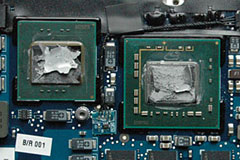 "Chief
Japanese Mac disassembler Kodawarisan took apart his MacBook Air (of
course) and discovered a metric-ass-load of thermal paste (also called
'thermal grease') on the top of the CPU and GPU....
"Chief
Japanese Mac disassembler Kodawarisan took apart his MacBook Air (of
course) and discovered a metric-ass-load of thermal paste (also called
'thermal grease') on the top of the CPU and GPU....
"Temperature Monitor was reporting the temperature of his Core 2 Duo
chip to be running between 50 and 70° (122 and 158 degrees
Fahrenheit). Which is quite toasty...."
Link: Excess Thermal Paste Causing
High Temps in MacBook Air?
PowerBook G4 Econo-Mac Stimulus Plan '08
PBCentral's
Joe Leo says:
"What to do with $600 Check from the Feds? Upgrade your Old Mac!
"A majority of you this week will be the first of many to receive
their share of the government's economic stimulus package in order toboost the economy. We wouldn't suggest buying a new Mac with that money
- which can range anywhere from $300 to $1200 - especially after
yesterday's piece on 'why buy new?' We won't stop you from doing so
either.
"But what if you have an old Mac that's relatively new, that you
don't plan on giving up anytime soon, and just want to level the
playing field a little? Here's a nice econo-Mac package for
you...."
Link:
PowerBook G4 Econo-Mac Stimulus Plan '08
Ultra-thin MacBook Air Also Slim on Profits?
AppleInsider's
Slash Lane says:
"In its determination to deliver the world's thinnest notebook,
Apple admitted to sacrificing some speed and versatility, but a new
analysis suggests that it may have given up some early profits as
well.
"Though the Cupertino-based Mac maker largely beat estimates for its
second fiscal quarter on Wednesday, one sore spot appeared to be gross
margin, which came in at about 100 to 200 basis points below most
analysts' expectations at 32.9 percent.
"...Piper Jaffray analyst Gene Munster offered his own
explanation.
"'We believe the margin outlook may be viewed negatively by
investors, who likely wanted to see more of Apple's significant revenue
upside trickle down to earnings,' he wrote in a note to clients early
Thursday morning. 'The bottom line, we believe the margin was
negativity impacted by a higher mix of Mac Book Air, which we now
believe carries a lower margin.'"
Link:
Apple's Ultra-thin MacBook Air Also Slim on Profits?
Some MacBook Pros Exhibiting Vertical Striping on
Displays
Ars Technica's
David Chartier reports:
"If you have one of the new MacBook Pros (early 2008) and noticed
some vertical display striping and graphic glitches, evidence is
mounting that you may not be crazy after all.
"After picking up one of these machines with the 512 MB Nvidia
GeForce 8600M GT card, I began noticing these glitches myself...."
Link:
Some MacBook Pros Exhibiting Vertical Striping on Displays
STEC Reportedly Wins MacBook Air Solid-State Drive
Biz
Barrons' Eric
Savitz says:
"STEC has reportedly won a contract to replace Samsung as a supplier
of solid-state drives for Apple's MacBook Air, according to B. Riley
analyst Salomon Kamalodine.
"Kamalodine writes in a research note that the finding is based on
'discussions with industry sources.'"
Link:
STEC Reportedly Wins MacBook Air Solid-State Drive Biz
Reviews
MacBook Air 'the Most Attractive Laptop Ever'
The Boston
Globe's Hiawatha Bray says:
"The one-month loan is nearly over, and I'll soon have to pack up a
borrowed MacBook Air laptop and ship it back to Apple Inc. It will
hurt. Apple's vaunted ultrathin computer is the most attractive laptop
ever.
"Not the best, though. The Air's elegant form sacrifices a lot of
functions found on even the cheapest laptops, not to mention its
closest, thinnest rival, the ThinkPad X300 from Chinese laptop maker
Lenovo. Instead, Apple offers gleaming aluminum, and assurances that
nobody will mind the missing features.
"And for the most part, I didn't."
Link:
Apple Air Laptop's Shortcomings Are Easy to Forgive
Does Low Latency Memory Really Make Your Mac Go
Faster?
Bare Feats'
rob-ART Morgan reports:
"Corsair's press release and 'white paper' made a big splash in the
news. They claimed as much as a 19% gain in Photoshop performance when
a 4 GB kit of CAS 5 memory was replaced with their 4 GB kit
of CAS 4 memory. We were skeptical so we tested the Corsair modules
against various brands of 'normal' latency SODIMM memory kits in our
'Penryn' MacBook Pro 2.6 GHz laptop....
"We saw nothing close to the 19% gain in Corsair's Photoshop test
published in their 'White Paper' PDF when they compared a CAS 5 four
gig kit with a CAS 4 four gig kit. I think somebody in their lab either
goofed or moved a decimal point."
Link: Reality Check: Does Corsair's
Low Latency Memory Really Make Your Mac Go Faster?
Performance Showdown: Flash Drives vs. Hard Disk
Drives
Computerworld's Bill O'Brien reports:
"Solid-state disks (SSD) are probably some of the most talked-about
new gadgets of late. They easily distinguish themselves from the
mechanical hard drives of the Jurassic period because they have no
moving parts. Like USB drives, they use nonvolatile flash memory to
store data, but SSDs are wrapped in an enclosure the size of a 2.5-in.
mechanical laptop drive and have a SATA interface for an easy
connection to the internals of your portable....
"So have you ever wondered if it's really worth it to plunk down the
extra $1,300 for an SSD-equipped MacBook Air? Or have you been tempted
to swap the current mechanical hard drive out of your portable and
slide one of these high tech bad boys inside? I did.
"And surprisingly....
"None of [the] results, in my opinion, show any clear and present
advantage to these SSDs - at least not on a price/performance
ratio."
Link:
Performance Showdown: Flash Drives Versus Hard Disk Drives
Products
Fast Worldwide Mobile Internet Access for the
MacBook Air
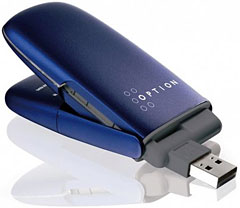
PR: GlobeSurfer ICON HSUPA is a USB-modem to establish mobile
Internet connections with a Macintosh Computer running 10.4.3 or
higher. The ICON supports HSUPA, 3G UTMS speeds as well as EDGE, GPRS
connections around the globe. It connects via USB and includes an USB
extension cord so not to block other ports.
 "This small and lightweight modem is a perfect internet
companion for the MacBook Air", states Jan Fuellemann, PR spokesperson
at nova media. "And since it features an advanced receiver technology,
it is likely to work in places with suboptimal quality of reception as
well."
"This small and lightweight modem is a perfect internet
companion for the MacBook Air", states Jan Fuellemann, PR spokesperson
at nova media. "And since it features an advanced receiver technology,
it is likely to work in places with suboptimal quality of reception as
well."
GlobeSurfer HSUPA includes the internet connect wizard launch2net
for Mac OS X which offers a one-click connection to the Internet
without the need to enter cryptic connection details. launch2net
already includes connection settings for most network operators around
the globe.
GlobeSurfer ICON is available for 299,- Euro plus VAT at the
company's website at http://www.novamedia.de
Link: GlobeSurfer
ICON HSUPA
Neo-Flex Combo Lift Laptop and Monitor
Stand
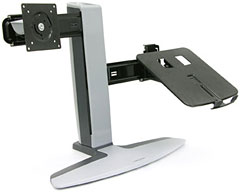
 PR: Simply combine your notebook with an LCD display,
separate keyboard and a mouse to create a productive dual-display
configuration. Save time by viewing multiple applications at once -
eliminate toggling back and fourth on a single screen. With this
stand's height adjustment, tilt and rotation, you'll get desktop
computing comfort combined with the portability of a laptop.
PR: Simply combine your notebook with an LCD display,
separate keyboard and a mouse to create a productive dual-display
configuration. Save time by viewing multiple applications at once -
eliminate toggling back and fourth on a single screen. With this
stand's height adjustment, tilt and rotation, you'll get desktop
computing comfort combined with the portability of a laptop.
Get desktop comfort with notebook portability - the perfect home
base for the business traveler who is constantly on the go
Adjust the height of your notebook and external LCD for maximum
productivity and ergonomic comfort
Superior technical design enables use with or without a docking
station
Create a productive dual-display configuration by placing your
notebook's screen alongside an LCD
Integrated base rollers enable 360° pan rotation of the stand so
you can share your views with others
Patented motion technology produces smooth adjustment
Its small footprint frees up your desktop to increase workspace,
making the addition of a second display an easy fit.
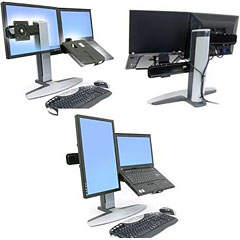 Five-inch (12.7 cm) height adjustment ergonomically
accommodates average range of users
Five-inch (12.7 cm) height adjustment ergonomically
accommodates average range of users
Neo-Flex Combo Lift Stand includes stand, laptop platform, one
sliding monitor bracket, manual, VESA-monitor mounting kit, cable ties,
Velcro kit, clips, non-slip pad
Designed for use with a separate, external keyboard for proper
ergonomics
Combo Lift Stand
Simply combine your notebook with an LCD display and separate
keyboard and mouse to create a productive dual-display configuration.
Save time by viewing multiple applications at once - eliminate toggling
back and forth on a single screen.
With this stand's height adjustment, tilt and rotation, you'll get
desktop computing comfort combined with the portability of a
laptop.
Dual LCD Lift Stand
Affordable, height-adjustable dual-monitor stand for maximum
productivity and comfort. Save time by using multiple applications at
once - eliminate toggling back and forth between documents and
programs. Simultaneously lift LCD screens to proper height for
unsurpassed ergonomic comfort.
Widescreen Lift Stand
Upgrade your widescreen display with five-inch (12.7 cm) height
adjustment, tilt, pan, and portrait-to-landscape rotation for optimum
viewing. Embedded with patented motion technology, this stand enables
light-touch adjustments without any knobs or levers.
All-In-One Lift Stand
Add ergonomic adjustability, portability and save space with this
unique all-in-one stand. The perfect accessory for space-constrained
areas, it enables you to mount both a CPU and display while providing
effortless height adjustment of the monitor
 Highlights
- Position LCD screens for maximum ergonomic comfort - promotes
wellness in any work area
- Small footprint frees up your workspace and increases your
efficiency
- Integrated base rollers enable 360° rotation of the stand so
you can share your views with others
- Embedded with patented motion technology, this stand enables light
touch adjustments without any knobs or levers
- Five-inch (12.7 cm) height adjustment ergonomically accommodates
average range of users
- Easy to use - simple installation and effortless operation
- Everything is included to neatly route cables behind the stand, out
of the way
- Patented Constant Force (CF) lift-and-pivot motion technology - no
levers or buttons
- Five-inch (12.7 cm) height adjustment ergonomically accommodates
average range of users
- Portrait to landscape screen rotation
- Pans 360° side-to-side at base
- VESA compliant
- Three-year warranty
- 8° inward offset angle for optimum parabolic viewing
- Configured with notebook on right side and monitor on left side of
the stand
- Fits most large and small notebooks, with or without docking
station
- Compatible displays: almost any notebook computer, with or without
port replicator, and VESA-compatible displays (up to 20. screen
size)
- Everything is included to neatly route cables behind the stand, out
of the way
Weight Capacity: 12 - 30 lb. (5.4 - 13.6 kg) total; notebook = 6 -
12 lb. (2.7 - 5.4 kg); monitor = 6 - 18 lb. (2.7 - 8.2 kg)
ÝMonitor up/down tilt = +25°/-5°
Mounting Standards: VESA FDMI MIS-D, 100/75, C (hole pattern: 100 x
100 mm & 75 x 75 mm)
UL compliant: Meets UL Specification 1678 Tip Test
Shipping Dimensions: 28" x 23" x 15.6" (710 x 580 x 396 mm)
Shipping Weight: 25 lb. (11.3 kg)
Warranty: Three (3) years
$179
Link:
Neo-Flex Combo Lift Stand
Software
CoolBook Helps Your MacBook Pro/MacBook Run
Cooler
PR: Monitor the CPU frequency, voltage, and temperature of
MacBooks
CoolBook is a tool for the MacBook and MacBook Pro computers. It
lets you monitor the frequency, voltage and temperature of the Core Duo
/ Core 2 Duo CPU.
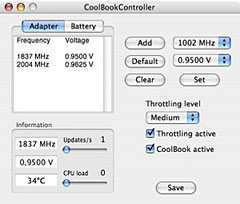 Registered users
can also change the frequency and voltage of the processor. Download
CoolBook to find out more.
Registered users
can also change the frequency and voltage of the processor. Download
CoolBook to find out more.
The "Santa Rosa" / LED MacBook Pro is only partially supported. Read
the manual for more info.
New in version 2.9: Improved support for new "Penryn" MacBooks.
System requirements: MacBook Pro or MacBook. Some support for iMac
and Mac mini.
System Support: Intel
$10 Shareware
Link: CoolBook
coconutBattery Updated
PR: The hottest battery information app out there
. . . got even hotter . . . completely rewritten
. . . preferences menu . . . more languages(coming
soon). . . and it's still freeware(but donations are more
than welcome)
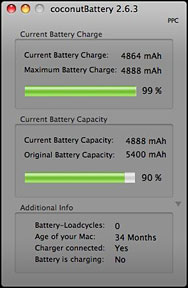 coconutBattery isn't just a tool which shows you only the
current charge of your battery - it also shows you the current maximum
capacity of it in relation to the original capacity your battery had as
it left the factory.
coconutBattery isn't just a tool which shows you only the
current charge of your battery - it also shows you the current maximum
capacity of it in relation to the original capacity your battery had as
it left the factory.
You also get information about the battery-loadcycles (how often did
you fully load your battery), the current charger (coconutBattery even
warns you if you plugged in a wrong charger for your Notebook), and
last but not least information about the age of your Mac.
coconutBattery gives you all this information in real time because
of its live-feedback interface.
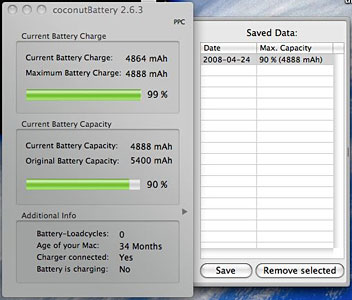
You are able to save the current maximum capacity of your battery -
with just one click. coconutBattery uses Apple's new and really
powerful technology named "CoreData" to realize this comfortable saving
option.
 And last but
not least: coconutBattery is Universal Binary (you can run it on
Intel-Macs)
And last but
not least: coconutBattery is Universal Binary (you can run it on
Intel-Macs)
Many localizations are ready to start but still need some
bugfixes.
If you want to help translating coconutBattery to your language,
just write them an email.
New in version 2.6.3:
- Fixes an issue that could cause a crash of the app on some
machines.
Changes from 2.6.1 to 2.6.2 were:
- Fixed a performance problem at startup
- Fixed an issue which caused a high CPU load while running the
app
- Fixed a problem which caused that the values for "Charger
connected" and "Battery is charging" aren't displayed correctly
System requirements: Mac OS X 10.4.5+)
Link: coconutBattery
Bargain 'Books
Bargain 'Books are used unless otherwise indicated. New and
refurbished units have a one-year Apple warranty and are eligible for
AppleCare.
There are two different versions of WallStreet running at 233 MHz,
the cacheless MainStreet version and the
later Series II with
a level 2 cache. It's not always possible to determine from the
vendor's listing which is being offered, so we've included links within
this paragraph to the two models. The same goes for the PowerBook G4/667 (VGA) and
G4/667 (DVI), the
titanium vs. aluminum 15" PowerBook G4 at 1 GHz, and 1.25 GHz to 1.5
GHz 15" PowerBooks.
PowerBook, iBook, and MacBook profiles linked in our Portable Mac Index.
New this week; just one MacBook Pro 15" model in stock. and the
first refurb. Penryn 2.1 GHz MacBooks arrive. Each model comes with an
Apple one-year warranty, and ground shipping is free. Changes this week
are the addition of a 2.6 GHz 17" MacBook Pro with high-res display and
a 2.2 GHz Black MacBook.
- refurb 2.1 GHz Core 2 MacBook, white, 1 GB/120/Combo, $949
- refurb 2.16 GHz Core 2 MacBook, white, 1 GB/120/SD, $949
- refurb 2.2 GHz Core 2 MacBook, white, 1 GB/120/SD, $999
- refurb 15" 2.2 GHz Core 2 MacBook Pro, 2 GB/120/SD, $1,449
- refurb 17" 2.4 GHz Core 2 MacBook Pro, 2 GB/160/SD, $1,899
- refurb 17" 2.4 GHz hi-res Core 2 MacBook Pro, 2 GB/160/SD,
$2,299
- refurb 17" 2.6 GHz Core 2 MacBook Pro, 2 GB/160/SD, $2,299
- refurb 17" 2.6 GHz hi-res Core 2 MacBook Pro, 2 GB/160/SD,
$2,499
- 12" iBook G3/700, 256/20/Combo, $419.99
- 12" iBook G3/800, 256/20/Combo, $429.99
- 15" PowerBook G4/667 (VGA), 256/30/Combo, $599.99
- 15" PowerBook G4/667 (DVI), 256/30/Combo, $629.99
- 15" PowerBook G4/1.67 GHz, 512/80/SD, APX, $899
- 400 MHz Pismo PowerBook G3, 128/6/DVD, $299.99
- 400 MHz Pismo PowerBook G3, 256/40, $399.99
- 400 MHz Pismo PowerBook G3, 256/60, $419.99
- 500 MHz Pismo PowerBook G3, 128/6/DVD, $349.99
- 500 MHz Pismo PowerBook G3, 256/40, $439.99
- 500 MHz Pismo PowerBook G3, 256/60, $449.99
- 15" PowerBook G4/1 GHz, 256/60/Combo, $599.99
- 15" PowerBook G4/1.25 GHz, 256/60/Combo, $629.99
- 15" PowerBook G4/1.33 GHz, 256/60/Combo, $679.99
- 15" PowerBook G4/1.5 GHz, 512/80/Combo, $699.99
- 15" PowerBook G4/1.5 GHz, 512/80/Combo, $709.99
- 15" PowerBook G4/1.67 GHz, 1 GB/80/SD, APX, $739.99
- 15" hi-res PowerBook G4/1.67, 512/80/SD, APX, $799.99
- 12" iBook G4/800, 640/30/Combo, $379
- 12" iBook G4/800, 640/30/Combo, APX, $410
- open box 2.1 GHz Core 2 MacBook, white, 1 GB/120/Combo, $1,049
- open box 2.16 GHz Core 2 MacBook, white, 1/120/SD, warranty started,
$1,099
- 2.16 GHz Core 2 MacBook, white, 1/120/SD, warranty started,
$1,149
- open box 2.2 GHz Core 2 MacBook, black, 2 GB/160/SD, $1,299
- open box 2.4 GHz Core 2 MacBook, black, 2 GB/250/SD, $1,449
- open box 1.6 GHz MacBook Air, 2 GB/80, $1,749
- open box 15" 2.2 GHz Core 2 MacBook Pro, 2/120/SD, $1,599
- open box 15" 2.4 GHz Core 2 MacBook Pro, 2/160/SD, $1,799
- open box 17" 2.33 GHz Core 2 MacBook Pro, 2 GB/160/SD, $2,288
- refurb 17" 2.4 GHz Core 2 MacBook Pro, 2 GB/160/SD, warranty
started, $2,088
- open box 17" 2.4 GHz Core 2 MacBook Pro, 2 GB/160/SD, warranty
started, $2,399
- open box 17" 2.5 GHz Core 2 MacBook Pro, 2 GB/160/SD, $2,688
- 17" 2.6 GHz Core 2 MacBook Pro, 2 GB/160/SD, $2,699
- clamshell iBook G3/300, Blueberry, 64/3/CD, $149.95
- clamshell iBook G3/300, Tangerine, 64/3/CD, $169.95
- clamshell iBook G3/366 SE, Graphite, 128/10/CD, $199.95
- 12" iBook G3/500, 128/10/CD, $199.95
- 12" iBook G3/500, 256/10/Combo, $279.95
- 12" iBook G3/800, 256/30/CD, $289.95
- Pismo PowerBook G3/400, 192/6/Zip, $269.95
For deals on current and discontinued 'Books, see our 13" MacBook and MacBook Pro,
MacBook Air, 13" MacBook Pro, 15" MacBook Pro, 17" MacBook Pro, 12" PowerBook G4, 15" PowerBook G4, 17" PowerBook G4, titanium PowerBook G4,
iBook G4, PowerBook G3, and iBook G3 deals.
We also track iPad,
iPhone, iPod touch, iPod classic, iPod nano, and iPod shuffle deals.



