This week's MacBook angst is over HDCP digital copy protection in
the October 2008 MacBooks. We've already looked at the issue twice on
Low End Mac: No High Definition
iTunes Video for You and Apple Caves to Hollywood with DRM
on iTunes Videos.
All prices are in US dollars unless otherwise noted.
General Apple and Mac desktops is covered in The Mac News Review. iPod, iPhone, and Apple
TV news is covered in The iNews
Review.
News & Opinion
Reviews
Apple Updates
Tech Trends
Products
News & Opinion
Apple's DisplayPort Includes Digital Copy
Protection
Mac Observer's
John Martellaro reports:
"Apple's new MacBooks and MacBook Pros, which
use the new Mini DisplayPort connector and protocol, appear to include
an industry standard digital copy protection system, HDCP, according to
ars technica on Monday.
"The High-bandwidth Digital Content Protection (HDCP) technology has
been in use with high-definition TV systems for over a year now. It's
included in every modern HDTV that uses the HDMI connector as well as
source devices, like Blu-ray players and advanced Audio/Video receivers
with HDMI. It establishes a secure, encrypted connection between the
source and the HDTV to prevent the theft of HD digital content.
"It appears that Apple is now including that protocol on its new
MacBooks that include the Mini DisplayPort connector...."
Link: Apple's
DisplayPort Includes Digital Copy Protection
MacBook Owners Enraged as Apple Blocks Some
Displays
Cult of Mac's
Ed Sutherland reports:
"MacBook fans are in an uproar after discovering the new laptops
contain hardware-based copyright protection that prevents the viewing
of iTunes movies on some external displays, such as a second monitor or
a projector.
"'This movie cannot be played because a display that is not
authorized to play protected movies is connected,' is the warning
MacBook users receive when using an external display that doesn't
support the High-bandwidth Digital Content Protection (HDCP)
protocol.
"The HDCP technology is part of Apple's Mini DisplayPort Content
Protection built into MacBooks. Hollywood studios looking to protect
their movies appreciate the 128-bit copy protection measures included
in DisplayPort, according to reports."
Link:
MacBook Owners Enraged as Apple Blocks Some Displays
What You Need to Know About DisplayPort
Macworld's
Peter Cohen reports:
"Apple didn't just introduce new laptop . . . it also
introduced a new term to the vocabulary of Mac users - DisplayPort. The
Mini DisplayPort found on new MacBooks, the refreshed MacBook Air and 15-inch
MacBook Pros replaces the DVI and mini-DVI interfaces found on older
models. But is this another proprietary debacle like Apple's failed
Apple Display Connector (ADC) interface? No.
"DisplayPort is, in fact, an open industry standard...."
Link: What
You Need to Know About DisplayPort
Apple Set for Record Mac Sales Despite MacBook
Criticisms
Macworld
UK's Mark Hattersley reports that investment bank Piper Jaffray
believes that Apple is on course for a record quarter of MacBook sales,
notwithstanding that Apple has come under criticism for its latest
refresh to the MacBook line, with many Macworld readers claiming that
the laptops are too expensive while others have panned Apple's decision
to remove FireWire from the MacBook range and to offer a glossy display
on the MacBook Pro.
If Piper Jaffray's figures hold true, Hattersley observes, it would
appear that none of these criticisms have stood between Apple's
customers and a purchasing decision.
Link:
Apple Set for Record Mac Sales Despite MacBook Criticisms
MacBook Trackpad Update Problems
MacFixIt
says:
"Yesterday, Apple released a firmware update for
the glass trackpads on the new MacBook and MacBook Pro computers to
'address an issue where trackpad clicks may not be recognized.' For
most users this update has been a welcome solution the ongoing problem
of glass trackpads periodically losing functionality, but some users
are having trouble with the update.
"Some users are experiencing installation failures, accompanied by
the error message 'The Firmware update did not complete. Communication
with the device failed.'"
Link: MacBook
Trackpad Update Problems
Activate 4-Finger Gestures on Original MacBook
Air
Hardmac's
Lionel reports:
"One of the most practical things of the new trackpad of MacBook
Pro, MacBook and MacBook Air, is the support of 4 fingers gestures that
allows the use of expose and is very practical on screens of small
size.
"Alas, this is not possible on the old MacBook Air. Members of
the forums discovered that this limitation is not due to hardware, but
software. By forcing the installation of certain system libraries on
MacBook Air V1, they succeeded in activating this function...."
Link: Activate the 4 Finger
Gestures on a MacBook Air Rev 1
Major MacBook Surgery Not for Amateurs
The
Baltimore Sun's David Zeiler reports:
"I replaced the optical drive in my MacBook the other day.
"And to my surprise, it still works. Replacing hardware inside a
laptop is not a task for the easily deterred, and I recommend it only
to the most daring.
"Now I'm the type of guy who has never been afraid to open up a Mac
tower for anything from a memory upgrade to a CPU replacement. But
until this week, I had never performed a major hardware upgrade on a
laptop, wary of the complexity of getting the case open and the
fragility of the components within.
"My apprehension - despite my success - turned out to be
justified...."
Link:
Major MacBook Surgery Not for Amateurs
Reviews
MacBook Apple's 'Best Consumer Portable . . . until
the Next One'
MacUser's Dan
Moren has posted a long but interesting dissertation of his
observations and thoughts on Apple's latest (and greatest?) consumer
portable:
"People keep asking me about my new MacBook. The machines came out
about a month ago, but that clearly hasn't been enough time for people
to get their fill of Apple's latest portable lineup. I have to remind
myself that these are, for the most part, civilians: people who don't
eat, drink, breathe, and immerse themselves in all things Apple. Still,
I've fended off envious looks and an assortment of questions, ranging
from whether the performance is a huge improvement to whether the
screen is too reflective.
"In the week that I've been using the new MacBook, it's been my
full-time all-purpose computer, just like its predecessor, and I've had
to learn its ins and outs, collecting observations the whole while.
What follows is a catalog of my assorted thoughts and musings on the
experience. There are a lot of them. Like, 'brew a cup of coffee and
settle in a for a long winter read' lot. You have been warned...."
Link: The
Book of MacBook
Unibody MacBook Pro Full of Reasons to
Upgrade
Canwest News
Service's Murray Hill reports:
"When I had my chance to look at Apple's new line of notebooks, I
had a couple of questions in mind. Sure, I knew they had new graphics
cards, bigger hard drives and a new screen. I also knew about the solid
piece of aluminum the enclosure is milled from. But is there enough of
a difference between these new notebooks and the old ones to make it
worth telling people they should upgrade?
"Yes - in spades.
"The new unibody enclosure is a wonder. I could see and, more
importantly for me, feel how light and incredibly strong the frame is.
I had to apply a considerable amount of pressure to get any kind of
flex at all.
"The new backlit display makes a 15-inch notebook screen look a lot
like a 17-inch screen because of the lack of a metallic bezel
surrounding it . . . and is the best screen yet on a Mac
notebook.
"The new NVDA GeForce video card renders intense graphics with
absolutely no lag, so the MacBook Pro I have for a review is able to
play games unlike any Mac notebook I've ever seen....
"And the speakers on the MacBook Pro have been ramped up in a major
way...."
Link:
New MacBook Pro Full of Reasons to Upgrade
Apple Updates
Apple Releases MacBook, MacBook Pro Trackpad
Firmware Update 1.0
Apple has released a firmware
update that addresses an issue where trackpad clicks may not be
recognized on MacBook (13-inch, Aluminum, Late 2008) and MacBook Pro
(15-inch, Late 2008) computers.
There are two parts to this process: installing the firmware update
application onto your hard drive and using the firmware update
application to update your trackpad's firmware.
Note that if the trackpad firmware update process is interrupted,
your trackpad may become temporarily unusable. See Recovering From an Interrupted
Trackpad Firmware Update.
Link: Apple Releases MacBook, MacBook
Pro Trackpad Firmware Update 1.0
Apple Accepting Orders for 24" LED Cinema
Display
On Tuesday, the online Apple
Store began taking orders for the new 24" LED-backlit Cinema Display
that was announced with the new unibody Mac laptops a few weeks
back.
Targeted specifically for use as an external monitor for the new
MacBook Pros and MacBooks, this 24" LED-backlit widescreen 1920 x 1200
pixel resolution glossy display also incorporates a built-in iSight
video camera, mic and speakers in its thin aluminum and glass
enclosure, as well as integrated MagSafe charger, three self-powered
USB 2.0 ports and the new Mini DisplayPort, making it possible to
quickly connect and power these notebooks as well as run peripherals
while leaving your MagSafe power adapter in your travel bag.
It's more than a monitor, and was touted by Apple's senior vice
president of Worldwide Product Marketing Philip Schiller as "the most
advanced display that Apple has ever made."
Apple also brags that the new LED Cinema Display is "the greenest
Apple display ever," made with mercury-free LED technology,
arsenic-free glass and highly recyclable materials. The LED Cinema
Display meets stringent Energy Star 4.0 requirements and achieves EPEAT
Gold status, contains no brominated flame retardants, all internal
cables and components are PVC-free and its foam packaging has been
reduced by 44 percent.
The new 24" LED Cinema Display carries a MSRP of $899 and requires a
MacBook, MacBook Air or MacBook Pro with the new Mini DisplayPort.
Ship date is still "November," but there's not a whole lot of
November left, so it should be soon.
Link: Apple Store
Tech Trends
Netbooks Not to be Taken Lightly
PC Mag's Dan
Costa says:
"...can the netbook replace the notebook? Here at PC
Magazine, we learn by doing, so I hit the road with netbook in tow.
My test Mini 1000 weighed in at 2.5 pounds with a 10.2-inch screen and
a 60 GB hard drive."
"Most netbooks run on Intel's 1.6-GHz Atom processor. When compared
with traditional notebook processors, Atom is a lightweight but is fine
for basic productivity apps. I had no problem running OpenOffice Writer
or Calc, or browsing the Web with Firefox. Photoshop, however? Not an
option.
"HP isn't the only player in the netbook space; everyone wants a
piece....
"Where does the netbook fit into the market?"
Link: Netbooks:
Notebooks Not to be Taken Lightly
"If you're not thinking about buying a netbook, you should be -
they're powerful, portable, and inexpensive. Here's what you need to
know before you buy."
Link: PC Mag's Netbook
Buying Guide
"Netbook PCs are a triumph partly of technology, but mostly of smart
packaging."
Link: Beware the
Netbook Hype
Give a Laptop. Get a Laptop. Change the World
PR: The recent US election has shown that ordinary citizens
coming together can change the status quo. Now is the time to harness
that goodwill and help the children of the developing world who have
been left behind. Some of the world's poorest countries spend less than
$20 a year on children's education and one in three children won't
complete fifth grade.

Participation in One Laptop per Child's Give 1 Get 1 program will
help bring a modern education to these children and empower them to
build a better future for themselves and their families and their
communities and societies. One Laptop per Child (OLPC) is a nonprofit
whose mission is to provide laptop computers that are sufficiently
affordable and connected to the Internet to every child in the
world.
OLPC first launched Give 1 Get 1 in 2007, raising more than $35
million to fund the delivery of tens of thousands of laptops to
children in countries such as Afghanistan, Iraq, Lebanon, Cambodia,
Ethiopia, Haiti, Mongolia and Rwanda. To date, OLPC has distributed
more than 500,000 XO laptops in 31 countries and is on its way to
delivering one million laptops by the end of 2008.
"The phenomenal success of last year's Give 1 Get 1 program created
tremendous demand from both the public who wanted to give more and from
countries that saw an opportunity to attack poverty through education,"
said Nicholas Negroponte, founder and chairman of One Laptop per Child.
"Renewing the program now will help us scale existing deployments and
expand into many other countries as well."
How to Participate in Give 1 Get 1
Individuals can support the OLPC Foundation through two options:
- Give 1 Get 1: By paying $399 for two XO children's laptops one to
give, one to get. The laptop you give will go to a child in developing
country. The laptop you receive can be used by you or a deserving child
or friend.
- Give a Laptop: For those people who want to give only, you can
donate as many laptops as you want to give at $199 each. In order to
participate:
PCMCIA Announces Release 2.0 of ExpressCard
Standard
PR: PCMCIA, the leading technology trade association for PC
Card and ExpressCard technology, has announced the newest release of
the ExpressCard Standard 2.0. This version has been significantly
updated to accommodate the faster speeds increasingly demanded by
today's high-performance mobile technologies.
ExpressCard technology is the next-generation PC Card technology for
high-performance expansion of desktop and mobile systems. ExpressCard
and PC Card slots can be found in more than 95 percent of notebook
computers.
"ExpressCard technology is closely tied to the PCI Express® and
USB specifications, and the 2.0 release of our standard takes full
advantage of recent advancements in both interface technologies," said
Brad Saunders, chairman, PCMCIA. "Now that the new SuperSpeed USB
specification is ready [see '10x
as Fast' USB 3.0 Specification Finalized], PCMCIA can move forward
to finalize the ExpressCard 2.0 release and make it available to
members in early 2009. Consumers can expect to see new, innovative
products that take advantage of the enhancements offered by the
ExpressCard 2.0 Standard starting in 2010."
"SuperSpeed USB brings a whole new level of performance enhancements
that will drive the next generation of consumer electronics," said Jeff
Ravencraft, USB-IF president and chairman. "Having SuperSpeed USB
support in the latest ExpressCard Standard gives developers an
additional form factor to take advantage of these new features.
ExpressCard technology is a natural extension of USB."
The new ExpressCard Standard will support transfer rates ranging
from two to 10 times faster than ExpressCard Standard 1.2, depending on
the data protocol used. Some of the applications that benefit from the
improved performance are:
Serial Advanced Technology Attachment (SATA) 2.0 adapters supporting
large file transfers between computers and various storage devices;
- USB 3.0 adapters supporting large file transfers between computers
and peripheral devices;
- Very high-performance streaming media and video adapters; and
- Very high-performance storage modules based on flash memory
technologies, e.g. solid-state drive applications.
The ExpressCard Standard is based on the advanced serial I/O
technologies, PCI Express and USB. The Standard is being updated to
comply with the recent release of the PCI Express specification,
Version 2.0, which offers transfer rates of up to 5 Gbps, two times
faster than its previous version. The ExpressCard 2.0 Standard also
supports the new USB 3.0 specification released today. SuperSpeed USB
will support speeds of up to 10 times faster than Hi-Speed USB.
The ExpressCard 2.0 Standard supports backward compatibility with
products compliant with any previous versions of the Standard. Any
compliant ExpressCard product will work in any ExpressCard slot,
regardless of which version of the Standard the product complies with.
A new product compliance and logo program will be phased in once the
ExpressCard 2.0 Standard is released.
Current ExpressCard "plug 'n' play" applications include memory,
local area network (LAN), wireless broadband (WWAN), WiFi, memory
adapters, parallel adapters, serial adapters, TV tuners, smart card
readers, instrumentation, 1394A&B adapters, serial ATA (SATA)
adapters and USB adapters.
PCMCIA) is a nonprofit trade association founded in 1989 to
establish technical standards for PC Card technology and to promote
interchangeability among computer systems. Already a feature in almost
every notebook and palmtop computer, PC Card technology empowers users
to configure systems and create unique, integrated solutions to meet
their computing needs. Based in San Jose, California, the association
has a growing membership of 150 companies worldwide. The PCMCIA also
has a specification development and co-publishing relationship with the
Japan Electronics and Information Technology Industries Association
(JEITA) covering PC Card and Smart Media technologies.
ExpressCard is a registered trademark of PCMCIA. PC Card is a
trademark of PCMCIA. *All product and company names herein may be
trademarks of their registered owners.
Link: PCMCIA
Backlight Makers Expect LED Backlighting Prices to
Drop 40-50% Next Year
DigiTimes' Siu
Han and Yvonne Yu report:
"While major notebook vendors continue to introduce models with LED
backlighting into the market, prices for LEDs are estimated to drop by
40-50% in 2009 as clients will be in a better position to negotiate
prices, according to backlight unit (BLU) makers....
"According to BLU makers, LED backlit notebooks only had a
penetration rate of 5-6% in the first three quarters this year. But the
penetration rate is expected to reach 25% in the fourth quarter this
year, and 30-40% in 2009."
Link: BLU Makers Expect
LED Prices to Drop 40-50% Next Year (registration required)
Products
Cricket Laptop Stand
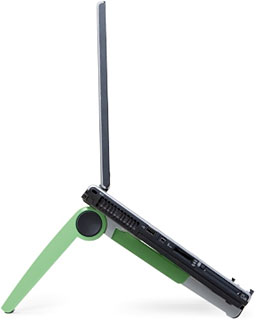 PR: Props for your laptop! Cricket elevates your screen
for cool computing and comfortable viewing. It's a flexible,
height-adjustable stand which allows you to raise your screen to an
ergonomic viewing height. Add a full-size keyboard and mouse to
recreate the comfort and productivity of a desktop computer, or use
Cricket to share your screen for presentations and meetings.
PR: Props for your laptop! Cricket elevates your screen
for cool computing and comfortable viewing. It's a flexible,
height-adjustable stand which allows you to raise your screen to an
ergonomic viewing height. Add a full-size keyboard and mouse to
recreate the comfort and productivity of a desktop computer, or use
Cricket to share your screen for presentations and meetings.
Cricket also enhances airflow around your computer, keeping it cool.
Best of all, Cricket is extremely portable - it collapses to fit in
your pocket or your computer bag.
Cricket adjusts to support laptops of all widths, and supports
weights up to 12 pounds. You can even use Cricket with tablet PC's, by
raising the screen to a more comfortable writing and viewing angle.
- Height-adjustable - elevates laptop screen to comfortable viewing
height.
- Adjusts to support laptops of all widths, and weights up to 12
lb.
- Enhances airflow - keeps your notebook cool.
- Extremely portable - collapses to fit in your pocket or computer
bag.
- Compatible with notebooks as well as tablet PC's.
- Sustainability: Cricket is composed of 70% recyclable
materials.
Ideal for business travelers, students, and anyone who uses a laptop
computer.
$39.95
Link: Cricket Laptop
Stand
Toshiba 500 GB 2.5" SATA Hard Drive
PR: The new Toshiba MKxx55GSX 2.5-inch hard drive series
offers up to one half-terabyte in capacity with quiet acoustics and
enhanced durability, providing a solid storage solution for
high-capacity mobile PCs, game consoles, printers and external storage.
Advanced servo techniques combined with mechanical design changes
minimize noise emanating from the MKxx55GSX drives, making them nearly
inaudible during operation, with the 300 GB, 160 GB and 120 GB models
performing close to the threshold of human hearing.
Further design optimizations have boosted the durability of the
MKxx55GSX series to provide industry-leading robustness against
operating shock. An optional free-fall sensor (FFS) feature further
protects user data against potentially hazardous external shock and
vibration events. Up To 500 Gigabytes* of Storage Capacity 5,400 RPM
Spin Speed
Serial ATA 3.0 Gbps and extended SATA features lightweight, standard
9.5mm, super-quiet seek technology, eco-friendly design in materials,
and low power consumption.
Specifications
- Storage Capacity
- 500 GB
- 400 GB
- 320 GB
- 250 GB
- 160 GB
- 120 GB
- Interface: SATA 3.0 Gb/s (SATA Revision 2.6/ATA-8)
- Rotational Speed: 5,400 RPM
- Transfer Rate to Host: 3.0 Gb/s
Link:
Toshiba MKxx55GSX Specs
nova media Drops Prices for PC Card and
ExpressCard Devices
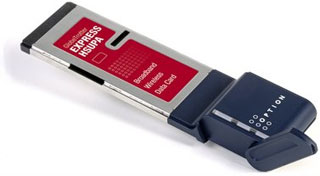 PR: nova media prepares for the holiday season with a
price drop for its complete range of wireless modems for Mac OS X by an
average of 16%.
PR: nova media prepares for the holiday season with a
price drop for its complete range of wireless modems for Mac OS X by an
average of 16%.
"We offer wireless devices for every Macintosh", states Jan
Fuellemann, PR spokesperson at nova media. "PC Datacards for PowerBook,
ExpressCards for MacBook Pro and USB modems for every other Mac running
Mac OS X 10.4.11 and higher. All devices offer fast download speeds
with up to 7.2 Mbit/s and upload speeds with up to 1.4 Mbit/s,
depending on the capabilities of the mobile network providers."
All devices include a full version of launch2net, the internet
connect wizard for Mac OS X. launch2net features a one-click connection
to the Internet without the need to enter cryptic configuration
details. The software already includes connection settings for most
mobile network providers worldwide.
Price information:
- GlobeTrotter MAX HSUPA for PowerBook: Euro 178.00
- GlobeTrotter Express HSUPA for MacBook Pro: Euro 188.00
- ICON 401 USB Modem for MacBook and other Macs: Euro 168.00
All prices plus VAT if applicable and shipping costs.
Link: nova
media
Bargain 'Books
Bargain 'Books are used unless otherwise indicated. New and
refurbished units have a one-year Apple warranty and are eligible for
AppleCare.
PowerBook, iBook, and MacBook profiles linked in our Portable Mac Index.
- refurb 1.6 GHz MacBook Air, 2 GB/80, $1,199
- refurb 1.8 GHz MacBook Air, 2 GB/80, $1,399
- refurb 1.8 GHz MacBook Air, 2 GB/64 SSD, $1,699
- refurb 2.2 GHz Santa Rosa MacBook, white, 1 GB/160/SD, $949
- refurb 2.4 GHz Santa Rosa MacBook, black, 2 GB/160/SD, $949
- refurb 2.4 GHz Penryn MacBook, black, 2 GB/250/SD, $1,049
- refurb 15" 2.4 GHz Core 2 MacBook Pro, 2 GB/200/SD, $1,349
- refurb 15" 2.6 GHz Core 2 MacBook Pro, 2 GB/160/SD, $1,499
- refurb 15" 2.6 GHz MacBook Pro, 2 GB/200/SD, $1,799
- refurb 17" 2.5 GHz Core 2 MacBook Pro, 2 GB/250/SD, $1,799
- refurb 17" 2.5 GHz Penryn MacBook Pro, 2 GB/250/SD, $2,099
- refurb 17" 2.6 GHz hi-res Penryn MacBook Pro, 2 GB/250/SD,
$2,299
Previous Generation - New
- new 1.6 GHz MacBook Air, 2 GB/80, $1,399
- new 2.4 GHz Penryn MacBook, white, 2 GB/160/SD, $1,149
- new 2.4 GHz Penryn MacBook, black, 2 GB/250/SD, $1,199
- new 15" 2.4 GHz Penryn MacBook Pro, 2 GB/200/SD, $1,599
- new 15" 2.5 GHz Penryn MacBook Pro, 2 GB/250/SD, $1,799
- 15" 2.4 GHz Core 2 MacBook Pro, 2 GB/200/SD, $1,399.99
- 15" 2.4 GHz Core 2 MacBook Pro, 4 GB/200/SD, AppleCare, $1,789
- 12" PowerBook G4/867 MHz, 256/40/Combo, $489.99
- 12" PowerBook G4/1.5 GHz, 512/80/SD, $659.99
- 1.83 GHz Core Duo MacBook, white, 512/60/Combo, 60 day warranty,
$594.99
- 2.0 GHz Core Duo MacBook, white, 512/60/Combo, 60 day warranty,
$659.99
- 2.0 GHz Core Duo MacBook, black, 512/80/SD, 60 day warranty,
$719.99
- 2.0 GHz Core 2 MacBook, white, 1 GB/80/SD, 60 day warranty,
$769.99
- 2.0 GHz Core 2 MacBook, black, 1 GB/120/SD, 60 day warranty,
$799.99
- 15" PowerBook G4/1.25 GHz, 256/60/Combo, $599.99
- 15" PowerBook G4/1.33 GHz, 256/60/Combo, $639.99
- 15" PowerBook G4/1.5 GHz, 1 GB/80/Combo, $679.99
- 15" PowerBook G4/1.67 GHz, 1 GB/80/SD, $729.99
- 15" hi-res PowerBook G4/1.67 GHz, 512/80/SD $799.99
- 2.0 GHz Unibody MacBook, 2 GB/160/SD, $1,238.97
- 15" 2.4 GHz Core 2 MacBook Pro, 2 GB/160/SD, $1,399.99
- 15" 2.4 GHz Core 2 MacBook Pro, 2 GB/200/SD, $1,443.99
- 15" 2.4 GHz Unibody MacBook Pro, 2 GB/200/SD, $1,964.96 - $100
rebate = $1,864.96
- 15'' 2.5 GHz Core 2 MacBook Pro, 4 GB/250/SD, $1,598.99
- 15" 2.53 GHz Unibody MacBook Pro, 4 GB/320/SD, $2,308.97
- 17" 2.4 GHz Santa Rosa MacBook Pro, 2 GB/160/SD, matte, $1,849.95
less $150 mail-in rebate = $1,699.95
- 1.6 GHz MacBook Air, 2 GB/80, $1,299.99
- 15" PowerBook G4/1.5 GHz, 1 GB/80/Combo, $645
- 15" PowerBook G4/1.67 GHz, 1 GB/80/Combo, $719
- 15" hi-res PowerBook G4/1.67 GHz, 1 GB/80/SD, $749
- 15" hi-res PowerBook G4/1.67 GHz, 1.5 GB/100/SD, $805
- 15" 2.1 GHz Core Duo MacBook Pro, 512/80/SD, $1,109
- 12" iBook G4/1 GHz, 512/30/Combo, $499.95
- 12" iBook G4/1.33 GHz, 768/40/Combo, AP, AppleCare, $549.95
- 15" PowerBook G4/1.5 GHz, 1 GB/80/Combo, APX, $799.95
- 15" 2.16 GHz Core 2 MacBook Pro, 1 GB/120/SD, APX, $1,499.95
For deals on current and discontinued 'Books, see our 13" MacBook and MacBook Pro,
MacBook Air, 13" MacBook Pro, 15" MacBook Pro, 17" MacBook Pro, 12" PowerBook G4, 15" PowerBook G4, 17" PowerBook G4, titanium PowerBook G4,
iBook G4, PowerBook G3, and iBook G3 deals.
We also track iPad,
iPhone, iPod touch, iPod classic, iPod nano, and iPod shuffle deals.



