General Apple and Mac desktops is covered in The Mac News Review. iPod, iPhone, and Apple
TV news is covered in The iNews Review.
All prices are in US dollars unless otherwise noted.
News & Opinion
Apple Updates
Reviews
Software
Products & Services
News & Opinion
Why an Apple Tablet Will Succeed
Cnet's Brooke
Crothers says:
"The Apple tablet, if it arrives, is an extension of a design that
already has mass appeal - and does not require a leap of faith to
believe it will succeed.
"The Apple iPhone and iPod are arguably small tablets - and
consumers have demonstrated unmistakably that they love these devices.
So, a larger, more versatile version of the iPod makes perfect
sense."
Link: Why
an Apple Tablet Will Succeed
Apple Tablet to Fill Gap Between PC Netbooks and
Mac Laptops
eWeek's
Nicholas Kolakowski says:
"Apple could roll out a tablet PC in early 2010, according to a new
research note by Piper Jaffray. The Apple tablet PC would be cheaper
than a MacBook but still more expensive than the mininotebooks or
netbooks that are currently dominating sales on the lower end of the PC
market. Despite that higher price point, Piper Jaffray sees an Apple
tablet PC as a challenging competitor in the netbook market, as well
for mobile devices from companies such as Amazon.com."
Link: Apple Tablet to Fill Gap Between PC Netbooks and Mac
Laptops
Moving to the 13" MacBook Pro
infrageeks' alphageek says:
"I just upgraded to the latest model of the 13" MacBook Pro as a
replacement for my 2007 15" MacBook Pro.
The major push for the move was a really nice computer bag that I fell
in love with, but is too small for the 15" screen. We had recently
purchased a 13" at the office for someone that decided not to stay on,
so I hijacked the machine."
Link: Moving to the MacBook Pro 13"
Apple Wins Laptop Tech Support Showdown
Cnet's Jim
Dalrymple reports:
"If a top-notch customer support program is high on your list of
features when buying a new computer, you should be looking at a Mac,
according to a new ranking.
"Laptop magazine's
Tech Support Showdown 2009 rates 10 computer companies' tech
support, with Apple coming out the overall winner...."
Link: Apple
Wins Laptop Tech-support Showdown
Apple to Address MacBook Hard Drive Beeping and
Pausing
MacFixIt's
Topher Kessler reports:
"There has been an ongoing issue with new MacBook and MacBook Pro
computers where the system will pause for a second or two and make a
clicking sound, and then continue functioning normally."
Link: MacBook Hard Drive Beeping and Pausing to Be Addressed by
Apple
MacBook Cracks Threaten to Upset Apple Cart
ITWire's Asher
Moses reports that Apple is refusing to formally acknowledge a
widespread design flaw in its polycarbonate-bodied (not the unibodies)
MacBooks that has been a topic on forums for years. Moses says this
could develop into a major PR disaster and spark a recall.
Link: MacBook Cracks Threaten to Upset Apple Cart
Another Look at Mac Hacked Netbooks
Macworld's Rob
Griffiths says:
"After much consideration, I finally dove into the do-it-yourself
Mac netbook pool . . . with a couple of trips coming up, I
wanted to stop lugging around the 15-inch MacBook Pro
for simply reading e-mail and browsing the web while traveling. My
beloved 12-inch PowerBook G4 was an
alternative . . . [but] in the end, the temptation to try one
of the ultra-small PC laptops (but running OS X, of course) was
too great to resist . . . there's just something about
carrying around a full-blown computer that's slightly larger than a
paperback book that appeals to my inner geek."
Griffiths netbook of choice for this is the Dell Vostro
A90.
Link: Frankenbook! Another Look at Hacked Mac Netbooks
Who's to Blame for Poor MacBook Battery Life under
Windows?
Computerworld's Eric Lai says:
"Users running Windows on Apple Inc.'s Intel-based MacBook laptops
have long complained about how quickly they find themselves running on
empty....
"That's not surprising. Virtualization software performs the
extremely CPU-taxing task of simulating an entire PC environment to get
Windows to run. This generates heat that must be dissipated by the
MacBook's fan, which drains the battery even faster...."
Link: Who's to Blame for MacBook's Poor Battery Life under
Windows?
Apple Updates
Apple Adds Antiglare Display Option to 15" MacBook
Pro
In what is a fairly huge development for many 15" MacBook Pro (MBP)
fans, Apple quietly quietly restored a matte display option for the 15"
MBP as a $50 build-to-order option at Apple's online store.
Some may still gripe - and they have a point - that you could get a
matte finish screen on the February 2008 15"
MacBook Pro at no extra charge, but for those for whom this issue
was a real deal-breaker, it will be welcome news, and I expect a lot of
folks will cough up the extra fifty bucks, however grudgingly.
Can the 13"
MacBook Pro be next?
The 15" machine's new matte display matches the standard glossy unit
in resolution at 1440 x 900 pixels and has an LED backlight, but it
incorporates a silver screen bezel instead of the glossy one's
black.
Apple still hypes the glossy version as displaying graphics, photos,
and videos with richer colors and deeper blacks, but now advises: "If
you prefer a display with antiglare coating for a matte rather than
glossy viewing experience, choose the antiglare widescreen
display."
Link: 15" MacBook
Pro at Apple Store
AirPort Client Update for MacBook and MacBook
Pro
This update is recommended for some Intel-based Macintosh computers
running Mac OS X 10.5.8 and addresses an issue with AirPort performance
while running on battery power. It may only be installed on:
- MacBook (13-inch, Late 2007)
- MacBook (13-inch, Early 2008)
- MacBook (13-inch, Late 2008)
- MacBook Pro (15-inch, Early 2008)
- MacBook Pro (17-inch, Early 2008)
- MacBook Pro (17-inch, Late 2008)
1.68 MB
System Requirements: Mac OS X 10.5.8
Reviews
3.06 GHz 17" MacBook Pro vs. iMac and Mac Pro
Bare
Feats' rob-ART Morgan asks:
"Can the MacBook Pro do heavy lifting if it has 8 GB of
RAM?
"We continue testing the only true 'Pro' laptop remaining in the
Apple lineup, the 17" MacBook Pro. We
say 'true Pro' because it's the only Apple laptop with an
ExpressCard/34 slot along with core frequencies equal to the best iMac
and best Mac Pro. Plus the screen resolution is equal to the 24"
screens of the iMac and Mac Pro. Our first CPU Crunch test page shows
the MacBook Pro equaling the top
iMac [editor's note: also 3.06 GHz] on all six tests while it was
beat by the 8-core Mac Pro 2.93
GHz on all six tests."
Link: Mid 2009 MacBook Pro 17" 3.06 GHz versus iMac and Mac
Pro
13" MacBook Pro: Small but Mighty
The Star's
Chong Jinn Xiung says:
"The 13in MacBook Pro may be the tiniest ever in Apple's premium
line of notebooks but there's nothing small about its performance and
price....
"The MacBook Pro, like its predecessor, is a solidly-built notebook
that weighs approximately 2 kg. It is certainly more portable than its
larger 15in and 17in cousins and its smaller screen makes it easy to
slip it into a bag and carry around....
"The glossy screen is also back and the resolution has not changed.
It still feels surprisingly spacious to work on despite maintaining its
1,280 x 800-pixel resolution....
"Along the sides you will find two USB ports, an Ethernet port and
slot-in DVD drive. However, you ll also notice a new SD card slot which
replaces* the old Express Card slot....
"As far as we could tell, the MacBook Pro handled everything we
threw at it without even breaking a sweat....
"It also runs very silently even when it is undertaking the heaviest
of tasks you won't even hear the hard disk spin....
"Fortunately, the new MacBook Pro's heat output is pretty low.
"The . . . price tag is a little on the high side for a notebook but
considering you are getting a full-featured MacBook Pro that's both
powerful as it is portable (not to mention classy), it is worth the
price of admission."
* Editor's note: actually on the 13" MacBook Pro the new SD Card
slot doesn't replace anything. The preceding 13" unibody MacBook was
slotless, although as the reviewer notes, the erstwhile discrete
headphone and microphone jacks have been merged into a single port,
which is also partly due to the restoration of a FireWire port (800).
cm
Link: 13" MacBook Pro - Small but Mighty
13" MacBook Pro Video Review
Hot Hardware's
intro to its video review of the 13" MacBook Pro says:
"A number of other features like a built in iSight webcam, a
SuperDrive (CD/DVD reader and writer), a MagSafe power adapter and for
the first time for Apple a built in SD card reader - all in a package
that's about 4.5 pounds - make this one heck of an attractive little
notebook. The one we tested was the lower end model equipped with a
2.26 GHz Intel Core 2 Duo processor with 1066 MHz frontside bus and
4 GB (two 2 GB SO-DIMMs) of 1066 MHz DDR3 memory."
Link: Apple 13" MacBook Pro Video Review (7 minutes)
Software
DeepSleep Widget Allows 'Books to Sleep without
Using Power, Draining Battery
PR: Many people have a lot applications on their laptop and
they like to simply close the lid to put the laptop to sleep so they
can get back into their applications instantly. But if the laptop is
not used for a while, the batteries on the laptop will be drained while
the laptop is sleeping.
DeepSleep will allow your Mac laptop or desktop to sleep without
using any power or drain the batteries (also known as hibernate for
people that are used to Windows PCs). It saves everything to disk and
stops using power completely. When you wake up your machines by
pressing the power button, DeepSleep will restore everything and wake
up just like you left it. It takes a little longer than normal sleep
but it is a great battery saver when you know you won't be using the
computer for a while. Give it a try, you will love the convenience and
the extra battery life!
Features
- Hibernates your Mac.
- Extends the battery life on your MacBook.
- Saves power when you are not using your desktop Mac.
- Compatible with "Password on wake" feature.
- Easy to use Dashboard Widget.
- Donations
- DeepSleep is freeware, but a lot of effort has been put into it. If
you like it and find it useful please support it with your
donations.
- Requirements
- Mac OS X 10.4.3 (or above).
- Intel based Mac or a Mac that supports Safe Sleep.
- Now works with Mac OS X 10.5 Leopard.
System Requirements: Mac OS X 10.4.3 or later, a Mac that supports
Safe Sleep
Platform Support: PPC/Intel
Freeware
Link: DeepSleep Widget
SideTrack Trackpad Enhancer
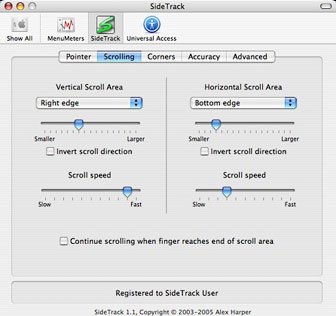 PR: Turn
your trackpad into a powerful multi-button mouse for less than the cost
of a quality external mouse
PR: Turn
your trackpad into a powerful multi-button mouse for less than the cost
of a quality external mouse
SideTrack is a replacement driver for Apple MacBook, MacBook Pro,
PowerBook and iBook trackpads. With SideTrack installed your standard
trackpad becomes a powerful multi-button scrolling mouse.
Leave your external mouse at home and take full control over your
trackpad:
- Vertical scrolling at left or right edge of pad.
- Horizontal scrolling at top or bottom edge of pad.
- Map hardware button to left or right click.
- Map trackpad taps to no action, left click, left click drag (with
or without drag lock), or right click.
- Map trackpad corner taps to mouse buttons 1-6 or simulated
keystrokes.
- Extensive control over accidental input filtering.
SideTrack is multiuser aware and fully compatible with Mac OS X fast
user switching (FUS). Every user on your laptop can have different
settings depending on their needs.
SideTrack supports most Apple laptops, including MacBooks, MacBook
Pros, PowerBooks and iBooks.
SideTrack is not presently compatible with the new trackpad hardware
on MacBook Air and 2008 MacBook Pro models. All previous Apple trackpad
hardware is fully supported. Support for the new models is being
investigated and may appear in a future release.
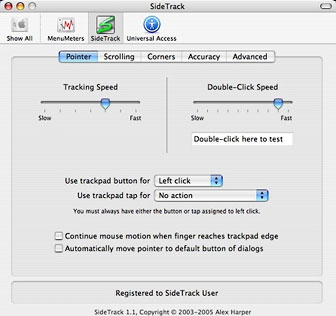 Introduction
- Extended control over the trackpad button and tap gestures.
- Use trackpad taps for left click, drag gestures, or right
click.
- Complete scrollwheel mouse emulation with customizable scrolling
speed.
- Place your scroll zones on either side of the pad, or both sides
simultaneously.
- Turn the corners of your trackpad into independent tap
actions.
- Use the corner zones to emulate up to a 6 button mouse or generate
custom keystrokes.
- Customize SideTrack's sensitivity and accuracy. Calibrate to your
own trackpad style and adjust filtering to reduce accidental taps while
typing.
- Choose from several mouse acceleration options.
System Requirements
- Most Apple MacBook, MacBook Pro, PowerBook or iBook models (for
specific supported models please see the FAQ)
- Mac OS X 10.2 or later, including 10.5 "Leopard"
SideTrack is $15 shareware. Unregistered copies of SideTrack will
periodically remind you to register. Registered users receive technical
support and free upgrades.
Link: SideTrack
Products & Services
Go Mic Portable USB Condenser Microphone
PR: Further expanding on its diverse line of USB microphones,
Samson introduces Go Mic, the ideal portable recording microphone that
clips to your laptop.
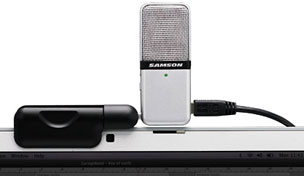 Go Mic is perfect
for recording music, podcasts or field recording, but its range of
functionality extends beyond typical USB microphones. Ideal for voice
recognition software, iChat, web casting and even Voice over Internet
Protocol (VoIP), Go Mic is the ideal solution for recording on the
go.
Go Mic is perfect
for recording music, podcasts or field recording, but its range of
functionality extends beyond typical USB microphones. Ideal for voice
recognition software, iChat, web casting and even Voice over Internet
Protocol (VoIP), Go Mic is the ideal solution for recording on the
go.
Because of its custom, compact design, the Go Mic can clip right
onto your laptop or sit unobtrusively on your desk. Plug and play
operation also means it's completely compatible with a Mac OS or
Windows, with no drivers required.
High-quality components and meticulous engineering ensure the Go Mic
offers remarkably clear, professional audio reproduction. Thanks to its
switchable cardioid and omni polar patterns, you can pick whichever
pattern is more appropriate for your specific situation. Plus, with a
frequency response of 20 Hz 18 kHz and a resolution of 16-bit/44.1 kHz,
you can be sure you're getting professional audio specs in a compact,
multipurpose design.
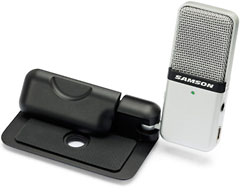 Go Mic is perfect
for anyone who wants to make great recordings on a computer. And no
matter where you go to record, Go Mic goes with you.
Go Mic is perfect
for anyone who wants to make great recordings on a computer. And no
matter where you go to record, Go Mic goes with you.
- Portable USB condenser microphone
- Plug and Play Mac and PC compatible, no drivers required
- Custom compact design that clips to a laptop or sits on a desk
- Perfect for recording music, podcasting and field recording
- Ideal for voice recognition software, iChat, VoIP and web
casting
- Transducer Type: condenser, pressure gradient with USB digital
output
- Frequency Response: 20 Hz 18 kHz
- Polar Pattern: cardioid or omni
- Resolution: 16-bit/44.1 kHz
- 1/8-inch headphone output
Link: Go Mic
Verbatim Tuff-'N'-Tiny Penny-thin USB Drives
PR: Verbatim Americas, LLC has announced its new
Tuff-'N'-Tiny family of ultraportable USB drives with capacities of
4 GB in emerald green and 8 GB in royal purple. Among the
most compact, durable USB flash drives on the market, the new
Tuff-'N'-Tiny drives measure about 1-inch long, one-half inch wide and
are the thickness of a penny. Ideal for storing, backing up, sharing
and transporting data and multimedia files, Verbatim Tuff-'N'-Tiny USB
Drives are available with retail prices starting as low as $30.
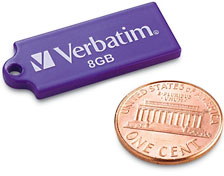 With support for Windows, Mac, and Linux systems, the
Tuff-'N'-Tiny USB Drives also provide true cross-platform compatibility
and a convenient way to transfer files between systems. Verbatim's new
travel-tough USB drives include a key ring lanyard that can be clipped
on a key ring, PDA or cell phone to ensure that the user's data is
always conveniently at hand.
With support for Windows, Mac, and Linux systems, the
Tuff-'N'-Tiny USB Drives also provide true cross-platform compatibility
and a convenient way to transfer files between systems. Verbatim's new
travel-tough USB drives include a key ring lanyard that can be clipped
on a key ring, PDA or cell phone to ensure that the user's data is
always conveniently at hand.
The 8 GB drive can be used to store nearly eight hours of
MPEG-1 video, about 2,000 hours of MP3 music, about 4,000 300 dpi color
photos or 8 GB of personal and business files. The drive's
ultra-portability makes it easy for students to carry research and
project files from school to home and for business people to have
current files with them wherever they go. The drive's small form
factor, durability and high capacity will also appeal to videographers
and photographers who want to collaborate with others on
post-production projects and quickly move work from one system to
another.
Verbatim Tuff-'N'-Tiny USB Drives are significantly more portable
and more rugged than standard flash drives because they feature SIP
technology which encapsulates all of the electronic components into a
single miniaturized and sealed unit. As a result, the tiny drives are
resistant to dust, water and static discharges.
For security conscious PC users, the Tuff-'N'-Tiny USB Drives also
include password security features to protect sensitive data in a
user-defined private zone, while allowing a public zone for open access
and sharing of non-sensitive content. With support for Windows
ReadyBoostô, the Tuff-'N'-Tiny USB Drive becomes a dual-purpose
device for Windows Vistaô users who want to speed system
performance by utilizing a portion of the device's unused flash
memory.
A true Plug-and-Play device, the Tuff-'N'-Tiny USB Drive can be
easily connected through a USB 2.0 or USB 1.1 port of a desktop or
notebook computer. The system automatically recognizes the drive as a
new removable drive as soon as it is connected. Featuring a solid-state
design (no moving parts) and nonvolatile flash memory, the drives will
retain data for 10 years or more.
Designed for Windows Vista, XP or 2000; Mac OS 9.x or higher and
Linux kernel 2.6x or higher, Verbatim Tuff-'N'-Tiny USB Drives are
available through Verbatim retail and distribution channels. Street
prices are about $29.99 for the 4 GB drive and $49.99 for the
8 GB drive. The complete package includes the Tuff-'N'-Tiny USB
Drive, preloaded password security software for Windows systems, a key
ring lanyard and a Quick Start Guide.
Link: Tuff-'N'-Tiny USB Drives
Verbatim Tuff-Clip USB Drives
PR: Verbatim Americas, LLC has announced its new Tuff-Clip
USB Drives. Available now with capacities of 4 GB in turquoise and
8 GB in black, the new flash drives combine clip-and-go
convenience with industrial strength toughness.
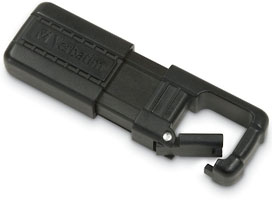 Verbatim's Tuff-Clip USB drives feature an ultra-rugged plastic
enclosure with a convenient retractable slider that protects the USB
connector. Tough enough for active users to carry their data wherever
they go, the innovative design also has an integrated carabiner clip
that can be securely fastened onto a backpack, key chain, belt loop or
notebook.
Verbatim's Tuff-Clip USB drives feature an ultra-rugged plastic
enclosure with a convenient retractable slider that protects the USB
connector. Tough enough for active users to carry their data wherever
they go, the innovative design also has an integrated carabiner clip
that can be securely fastened onto a backpack, key chain, belt loop or
notebook.
The drives come preloaded with password security software for
Windows systems that protects sensitive data in a user-defined private
zone, while allowing a public zone for open access and sharing of
non-sensitive content.
"The Tuff-Clip drive's enclosure is made of ABS plastic and built to
take everyday knocks in stride," explained Mark Rogers, Verbatim
Product Manager. "With the clip-on design, the drives are also less
likely to get lost or misplaced; and with the retractable cover, there
is no cap to lose."
The features that make the Tuff-Clip USB drives both tough and
convenient, also make them ideal for young, active users who want to
share data files, music, photos or videos; and students who want to
transport research and project files between school and home. The
drives will also appeal to on the go business users who must have
current files with them wherever they go.
With support for Windows, Mac and Linux systems, the Tuff-Clip USB
Drives also provide true cross-platform compatibility and a convenient
way to transfer files between systems.
Certified for Windows Vista, Tuff-Clip USB Drives support Windows
ReadyBoost, a feature that allows Vista PC users to allocate a portion
of the device's unused flash memory to speed system performance.
Verbatim's new Tuff-Clip USB Drives measure 2.90" x .45" x 0.90" and
weigh less than 2 ounces. When connected to a USB 2.0 or USB 1.1 port
of a desktop or notebook computer, the system automatically recognizes
the drive as a new removable drive. With its solid-state design (no
moving parts) and nonvolatile flash memory, the drives will retain data
for 10 years or more.
Designed for Windows Vista, XP or 2000; Mac OS 9.x or higher and
Linux kernel 2.6x or higher systems, Verbatim Tuff-Clip USB Drives are
available through Verbatim retail partners and distribution channels.
The suggested list prices are $29.99 for the 4 GB drive and $49.99
for the 8 GB drive. The complete package includes the Tuff-Clip
USB Drive, preloaded password security software for Windows systems and
a Quick Start Guide.
Link: Tuff-Clip USB Drives
iSkin Next Generation of ProTouch Keyboard
Protectors
PR: iSkin, the first company to create the silicone keyboard
protector for Macintosh computer keyboards, today released the next
generation of its ProTouch keyboard protectors. This launch continues
the company's tradition of excellence in delivering products to
Macintosh users who demand premium accessories with functional design
and fashionable flare.
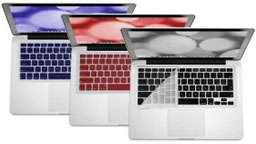 The new lineup,
which includes ProTouch Classic, FX and Vibes, provides enhanced typing
comfort, protection against food spills, dust, key wear and more, while
embedded Microban antimicrobial product protection helps inhibit the
growth of odor and stain causing bacteria on the product. Additionally,
a newly reengineered design optimizes the way each key is protected,
allowing a comfortable, non-obtrusive typing experience that will
appeal to slow and fast typists alike.
The new lineup,
which includes ProTouch Classic, FX and Vibes, provides enhanced typing
comfort, protection against food spills, dust, key wear and more, while
embedded Microban antimicrobial product protection helps inhibit the
growth of odor and stain causing bacteria on the product. Additionally,
a newly reengineered design optimizes the way each key is protected,
allowing a comfortable, non-obtrusive typing experience that will
appeal to slow and fast typists alike.
ProTouch Classic retains the original version's simple, yet
functional design, while adding enhanced refinements. ProTouch Classic
protectors are targeted towards home users and institutions alike who
are seeking effective, yet simple keyboard protection to protect their
investment. ProTouch Classic is available in one color (for MacBook
keyboards) or three colors (for Apple Aluminum Wired/Wireless
keyboards), and retails for a suggested $24.99. Educational
institutions are also eligible for volume discounts when purchasing
directly from iSkin.
The new ProTouch FX, designed specifically for MacBook, MacBook Pro
and MacBook Air users, features color-printed key caps against a
glow-white background for enhanced contrast. It also allows owners of
LED-backlit keyboards the continued benefit of illuminated keys in low
light conditions. ProTouch FX protectors are available in three color
printed combinations, and retails for a suggested $29.99.
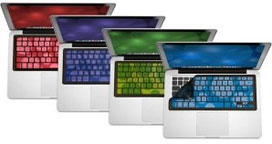 The new
ProTouch Vibes brings colorful design and added convenience for new
Apple iMac keyboard and Apple MacBook customers. Geared primarily
towards those seeking a stylish way to protect and enhance their
keyboards, ProTouch Vibes features larger printed key characters,
printed keyboard shortcut characters and a color-on-color designer
pattern. ProTouch Vibes is available in four color combinations, and
retails for a suggested $34.99.
The new
ProTouch Vibes brings colorful design and added convenience for new
Apple iMac keyboard and Apple MacBook customers. Geared primarily
towards those seeking a stylish way to protect and enhance their
keyboards, ProTouch Vibes features larger printed key characters,
printed keyboard shortcut characters and a color-on-color designer
pattern. ProTouch Vibes is available in four color combinations, and
retails for a suggested $34.99.
Link: ProTouch keyboard protectors
NewerTech Apple Notebook Battery
Charger/Conditioner
PR: NewerTech's Intelligent Battery Charging Station - keep
your batteries at their best
Do you have more than one battery for your notebook? Looking to keep
your laptop's battery or batteries at their best?
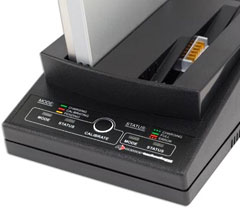 The NewerTech Intelligent Battery Charging Station
is the solution you've been waiting for!
The NewerTech Intelligent Battery Charging Station
is the solution you've been waiting for!
Load two batteries and when first battery is done charging, the unit
"intelligently" begins charging the second battery. Plus, not only does
this product charge your batteries quickly and correctly, but the deep
conditioning feature can both extend the life of your battery, as well
as bring back additional life to a battery that's started to show its
age.
You're probably asking yourself why you need to condition your
batteries. Aren't the Li-Ion batteries immune to the "memory effects"
that plagued the old style NiMH batteries? Yes, they are - to a point!
It is always best to exercise the battery cells to get the longest life
and most runtime possible. And instead of the hassle of charging and
draining, charging and draining, charging and draining, this charger
makes conditioning a simple, painless task!
With such maintenance, you'll be sure to get the longest runtimes
over the longest lifetime possible. Whether for your stock Apple
battery, or for one of our industry leading NuPower batteries, the
NewerTech Intelligent Battery Charging Station will help you to get the
most from your battery by being an extremely convenient way to keep
them charged and ready to go.
Features:
- 2 Bays - 1 Charges, 1 Charges and Conditions
- 2 year warranty Register
- Power Input: 120~240V 50/60 Hz 1.5A
- Power Output: 24V 2.3A, regulated
*Battery not included.
Link: NewerTech Intelligent Battery Charging Station
Kensington Smart Tips and Accessories Help Make
the Grade for Back to School
PR: Kensington Computer Products Group, a worldwide leader in
delivering smart made simple computing accessories for the mobile
consumer, kicks off the Back to School season with smart tips and
products to help you stay connected. The affordable and fun to use
accessories provide students and families with tools to succeed,
whether in a dorm room or in a shared home office environment.
"Back to School season is naturally a very hectic time for any
family. Getting the kids ready to start off a new school year the best
way possible, with the gear and gadgets they need, can add to that
stress level, said Christine Dumery, Director, Marketing Communications
at Kensington. "We have come up with a short list of smart tips as well
as the products we believe can make the school year that much more
enjoyable, while still accommodating the budget consciousness that all
households face.
Kensington's 5 Smart Tips to Ace Back to School
- Take a load off: Carry lightweight and pocketable essentials to
lighten your bag
- Keep it simple: Use plug-n-play technology that doesn't require a
Ph.D. to figure out
- Work smarter, not harder: Be efficient while on the go with
multifunctional accessories
- Expect the unexpected: Prevent battery drain and device theft by
bringing extra power and a lock for your equipment with you
- Kill the clutter: Get gear that will organize your computer
accessories
Must Have Back to School Accessories from Kensington:
Kensington Charging Dock with Mini Battery Pack for iPhone and
iPod - (SKU K33457US; SRP $69.99)
All the power you need and is never far away. The compact dock
recharges your iPhone or iPod so you can leave home or the dorm with it
fully charged. The dock also charges the included Mini Battery Pack so
you can take an extra boost of backup power with you on the go.
- Dock simultaneously charges your iPhone or iPod and Mini Battery
Pack
- Includes detachable USB charging and synching cable, USB wall
adapter, and iPhone 3G dock insert
- Mini Battery Pack extends play time up to 30 hours of music*; 6
hours of video*; 3 hours of talk**
*iPod nano 3rd Generation
** iPhone
Link: Kensington Charging Dock with Mini Battery Pack for iPhone
and iPod, currently $44.65 shipped from Amazon.com
Kensington Nightstand Charging Dock for iPhone and iPod Touch
with Rise Shine Application - (SKU K33458US; SRP $39.99)
The multifunction dock allows you to download, at no extra cost, an
application that transforms your iPhone or iPod touch* into a bedside
clock and weather center. Waking up for class is easy when your iPhone
or iPod touch keeps you on time, is charged and ready to go. Its small
footprint reduces nightstand clutter and the charging dock powers and
holds your iPhone or iPod touch in landscape mode using a kickstand to
clearly display the time and weather.
- Large, landscape display that doesn't go into sleep mode, with
optional screen dimming
- Includes charging cable
- Download Kensington Rise&Shine Clock and Weather application
for clock and weather (Visit www.riseandshine.kensington.com for more
details)
*Application compatible with iPhone 3G, iPhone and iPod touch
only
Link: Kensington Nightstand Charging Dock for iPhone and iPod
Touch with Rise Shine Application, currently $39.99 shipped from
Amazon.com
Kensington ComboSaver Combination Portable Notebook Lock - (SKU
K64560US Steel Grey, SKU K64576US Red; SRP $24.99)
Protect your notebook from theft wherever you go, whether in the
dorm room, college café or in the classroom. This easy-to-use
combination lock has a low-profile design and self-coiling cable for
easy travel to keep notebooks securely anchored.
- Slim-profile lock attaches to 99% of notebooks with patented T-bar
locking mechanism
- 10,000 personalized combination codes
- SAFE-tested for greater security and peace of mind
Link: Kensington ComboSaver Combination Portable Notebook Lock,
Steel Grey currently $20.33 from Amazon.com, Red currently $18.71 from Amazon.com
Kensington ShareCentral 2 (SKU K33900US; SRP $59.99)
Now you can share USB devices between two computers without all that
plugging and unplugging. Simply push a button and the ShareCentral
automatically makes the swap. Conveniently sharing your printer and
other USB gadgets with dorm mates makes those essays and homework
assignments that much easier.
- Simply press a button to switch individual USB devices from one
computer to another
- Easy to set up and easy to use with no network required and one USB
cable
- Both computers have direct access to the printer thanks to
Automatic Printer Sharing
- Eliminates cable clutter and is wall mountable
Link: Kensington ShareCentral 2, currently $45.24 shipped from
Amazon.com
Kensington Contour Backpack - (SKU K62238US; SRP $69.99)
The ultimate in mobility for comfort-minded students. Its unique,
fully adjustable lumbar support uses a contoured panel to hug the back
and help shift weight onto the hips. The curved, shock-absorbing
shoulder straps help keep the load light while the padded SnugFit
sleeve delivers heavy-duty computer protection.
- Padded, contoured shoulder straps ease neck and shoulder
strain
- Flap-free access to quickly reach computer and contents. Convenient
front pocket organizes key items at your fingertips
- Handle doubles as strap to hang case from wheeled bag
- Expandable water bottle holder and headphone port for MP3
player
Link: Kensington Contour Backpack, currently $49.99 shipped from
Amazon.com
The Kensington products are available at select retail stores and
both Amazon.com and Kensington.com.
Link: Kensington
Bargain 'Books
Bargain 'Books are used unless otherwise indicated. New and
refurbished units have a one-year Apple warranty and are eligible for
AppleCare.
PowerBook, iBook, and MacBook profiles linked in our Portable Mac Index.
Factory refurbished units with Apple's full one-year warranty.
- 1.6 GHz MacBook Air, 2 GB/120 HD, $1,099
- 1.6 GHz MacBook Air, 2 GB/64 SSD, $1,199
- 1.8 GHz MacBook Air, 2 GB/80 HD, $1,099
- 1.8 GHz MacBook Air, 2 GB/64 GB SSD, $1,299
- 1.86 GHz MacBook Air, 2 GB/128 GB SSD, $1,449
- 2.13 GHz Intel Core 2 MacBook White, 2 GB/160/SD, $849
- 2.0 GHz Unibody MacBook, 2 GB/160/SD, $899
- 2.4 GHz Unibody MacBook, 2 GB/250/SD, $999
- 2.4 GHz Unibody MacBook, 2 GB/128 SSD/SD, $1,299
- 2.4 GHz Unibody MacBook, 2 GB/128 SSD/SD, $1,449
- 13" 2.53 GHz Unibody MacBook Pro, 4 GB/250/SD, $1,299
- 15" 2.4 GHz Core 2 MacBook Pro, 2 GB/250/SD, $1,349
- 15" 2.53 GHz Unibody MacBook Pro, 4 GB/320/SD, $1,449
- 15" 2.66 GHz Unibody MacBook Pro, 4 GB/320/SD, $1,499
- 15" 2.8 GHz Unibody MacBook Pro, 4 GB/320/SD, $1,699
- 15" 2.93 GHz Unibody MacBook Pro, 4 GB/320/SD, $1,949
- 17" 2.5 GHz MacBook Pro, 2 GB/250/SD, $1,799
- 17" 2.5 GHz hi-res MacBook Pro, 4 GB/320/SD, $1,999
- 17" 2.66 GHz Unibody MacBook Pro, 4 GB/320/SD, $1,949
- 17" 2.66 GHz Unibody MacBook Pro, 4 GB/320/SD, antiglare,
$1,999
- 1.6 GHz MacBook Air, 2 GB/120, $1,124.99
- 2.0 GHz Unibody MacBook, 2 GB/160/SD, $924.99
- 2.0 GHz Unibody MacBook, 2 GB/250/SD $1,024.99
- 17" 2.66 GHz hi-res Core 2 MacBook Pro, 4 GB/320/SD, $1,849
- 1.83 GHz Core Duo MacBook, white, 1 GB/60/Combo, $599.99
- 2.0 GHz Core Duo MacBook, white, 1 GB/60/SD, $629.99
- 2.0 GHz Core 2 MacBook, white, 1 GB/80/SD, $649.99
- 2.0 GHz Core 2 MacBook, black, 1 GB/160/SD, $699
- 2.16 GHz Core 2 MacBook, white, 1 GB/120/SD, $729.99
- 2.16 GHz Core 2 MacBook, black, 1 GB/80/SD, $749.99
- 2.2 GHz Core 2 MacBook, white, 1 GB/160/SD, $7679.99
- 2.2 GHz Core 2 MacBook, black, 1 GB/160/SD, $779.99
- 15" 2.0 GHz Core Duo MacBook Pro, 1 GB/80/SD, $849.99
- 15" 2.16 GHz Core Duo MacBook Pro, 1 GB/200/SD, $899.99
- 17" 2.16 GHz Core Duo MacBook Pro, 1 GB/120/SD, APX, $1,099
- 17" 2.33 GHz Core 2 MacBook Pro, 1 GB/120/SD, APX, $1,269
- 17" 2.4 GHz Core 2 MacBook Pro, 1 GB/160/SD, $1,399
- Lombard PowerBook G3/400, 256/6/DVD, OS 9, $179
- Pismo PowerBook G3/400, 512/10/no optical drive?, AP, $299
- 2.0 GHz Core Duo MacBook, black, 1 GB/80/SD, $879
- Pismo PowerBook G3/400, 128/6/DVD, $299.99
- Pismo PowerBook G3/500, 128/6/DVD, $349.99
- Pismo PowerBook G3/400, 256/40/DVD, $399.99
- Pismo PowerBook G3/400, 256/60/DVD, $419.99
- Pismo PowerBook G3/500, 256/40/DVD, $439.99
- Pismo PowerBook G3/500, 256/60/DVD, $449.99
- Pismo PowerBook with G4/550 upgrade, 256/40/Combo, $529.99
- 12" iBook G3/500, 128/10/CD, $169.99
- 12" iBook G3/600, 128/15/CD, $249.99
- 12" iBook G3/700, 128/20/Combo, $329.99
- 12" iBook G3/800, 256/30/Combo, $399.99
- 12" iBook G4/800 MHz, 256/30/Combo, 60 day warranty, $289.99
- 12" iBook G4/1 GHz, 256/30/Combo, 60 day warranty, $369.99
- 12" iBook G4/1.2 GHz, 256/30/Combo, 60 day warranty, $409.99
- 12" iBook G4/1.33 GHz, 512/40/Combo, AirPort & Bluetooth, 60
day warranty, $489.99
- 14" iBook G4/1.33 GHz, 512/60/Combo, 60 day warranty, $499.99
- 14" iBook G4/1.42 GHz, 512/60/SD, 60 day warranty, $529.99
- 1.83 GHz Core Duo MacBook, white, 512/60/Combo, $594.99
- 2.0 GHz Core Duo MacBook, white, 512/60/Combo, $659.99
- 2.0 GHz Core Duo MacBook, black, 512/80/SD, $719.99
- 2.0 GHz Core 2 MacBook, white Core2 Duo, 1 GB/80/SD, $769.99
- 2.0 GHz Core 2 MacBook, black Core2 Duo, 1 GB/120/SD, $799.99
- 12" iBook G3/800 MHz, 384/30/Combo, $249
- 12" iBook G4/1.2 GHz, 640/30/Combo, $299
- 2.0 GHz MacBook, white, 1 GB/60/SD, scratched, $549
- 2.0 GHz MacBook, white, 1 GB/100/SD, $679
- 15" 2.16 GHz MacBook Pro, 2 GB/100/SD, $999
- 15" 2.33 GHz MacBook Pro, 3 GB/500/SD, $1,299
- 17" PowerBook G4/1.33 GHz, 1 GB/80/SD, scratched, $399
- 17" PowerBook G4/1.5 GHz, 1 GB/80/SD, $699
For deals on current and discontinued 'Books, see our 13" MacBook and MacBook Pro,
MacBook Air, 13" MacBook Pro, 15" MacBook Pro, 17" MacBook Pro, 12" PowerBook G4, 15" PowerBook G4, 17" PowerBook G4, titanium PowerBook G4,
iBook G4, PowerBook G3, and iBook G3 deals.
We also track iPad,
iPhone, iPod touch, iPod classic, iPod nano, and iPod shuffle deals.



