I love my Classic, don't get me
wrong. It's a great little machine, and it helped Apple push a lot of
Macs in the classroom (just like the Apple IIe helped them push a lot
of Apple IIs in the classroom), but it has some severe limitations that
are hard to look over.
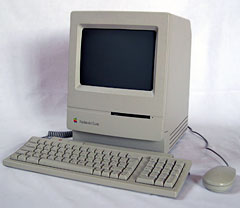
The Macintosh Classic
Perhaps the biggest limitation is the 8 MHz 68000 CPU. This was
the same processor and speed used in the
original Macintosh six years before the Classic. By October 1990,
when the Classic was introduced, 8 MHz was really a bottleneck.
They should have at least doubled the clock rate to 16 MHz, like the
Portable and PowerBook 100 did. That would have been a
noticeable difference.
They also should have kept the expansion slot like the SEs had. It
would have made the machine a bit more expensive, but it would have
made the owner's options for expansion a lot better than just adding a
SCSI device or more RAM.
However, this machine isn't all bad; it has several things going for
it. I really like the way the front curves, just like the Mac LC and IIsi
introduced at the same time. You also have to admire the fact it was
the first sub-$1,000 Mac, something that didn't happen again until
the 350 MHz blueberry slot loading iMac
introduced in October 1999.
Another thing this machine had going for it was that instead of the
standard (at the time) 256 KB ROM, every Classic shipped with a larger
512 KB ROM, which was loaded with a stripped down copy of System 6.0.3
and was fully bootable. Granted, it can't do much more than boot, but
if you want to get the very most out of this machine, you can boot off
the ROM (hold down Cmd-Opt-X-O during startup) and load your apps from
a floppy disk or hard disk, saving space by not having to install a
system.
However, 6.0.3 is rather limited, and you'll get a much better
machine by running System 6.0.8 through 7.1. (System 7.1, however is
not free and legal to download.)
I don't recommend 7.5.5 on this machine, even with 4 MB of
RAM.
My Mac Classic
My Macintosh Classic was actually my first and only (to date) free
liberation. I lucked out this one, as it already had the now hard to
find RAM expansion card and the maximum 4 MB of RAM. I wiped the
hard drive and installed System 7.5.3 followed by the 7.5.5 update over
a serial connection using disk images mounted on my PowerBook 1400. It worked, but it was a slow
install.
Here's the general opinion of 7.5.5 on the 8 MHz Classic: It
is slow. Booting alone takes at least 5 minutes. After that, most
actions, such as clicking on a menu and waiting for it to be drawn or
opening a Finder window, takes 10-20 seconds. If you're looking for
speed, run System 6.0.8 or 7.0.1, even if you have 4 MB of
RAM.
What can you do with a Mac Classic today? I use mine as a light
writing machine. I have been thinking of installing it in the kitchen
and using it as a recipe machine (actually, that was my original use
for this machine, but you know how things go when you get a new
addition to your collection...).
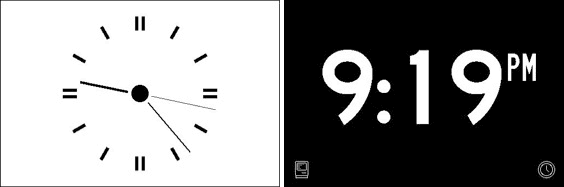
HappyPlusClock can display time in analog or digital form.
One of the things I've been thinking of doing is using one of the
creations from Retrochallenge
2007, called HappyPlusClock, which essentially
turns your Mac in to a giant clock, which is another great addition to
a kitchen. These machines are so cheap however, you may want to get a
trio of them, and have two running HappyPlusClock - one in analog and
one in digital - and have the third Classic pulling recipe duty. That
would be the ultimate Mac collector's kitchen. Sounds like my dream
kitchen. :-)
In many ways Classic was a reissue of the Macintosh Plus in a new case and with a few
additions, like an internal 40 MB hard drive. For a machine designed to
replace the very popular Macintosh SE,
it was a poor choice to compete with the champ as it lacked the SE's
expansion slot.
Despite being a tad slow in it's day (and even today), the Mac
Classic can still be used as an appliance. Don't expect it to go on the
Internet - unless you are really daring, that is. 
Resources



