Further Thoughts on Apple Alienation
In a dialogue with my comments in Apple vs. Microsoft
Upgrades, Peter da Silva responds:
The classic Mac OS may feel klunky for someone used to Unix or
Amiga, but to those who have worked with Macs for 5, 10, or 15 years,
it's a comfortable old shoe. It's far from perfect, but it's pretty
stable, pretty fast, and very familiar to millions of Mac users.
Yeh, but it's the hundreds of millions of Windows users that Apple
needs to win over, and they need those millions of Mac users onboard to
do that.
Mac OS X may feel slow and look full of "eye candy" to longtime Mac
users, but it's remarkably stable (one kernel panic here - during an OS
upgrade) and creates new types of efficiencies (faster waking from
sleep, less need to reboot and wait for that, etc.).
The big one is, you don't have to stop when an application's
launching or otherwise busy. Even if your computer is a slow piece of
junk like mine, you can click on a doc and not care if it launches an
app or not - even if it takes a minute to open you can keep working on
other things while that's going on.
I don't see Apple porting to Wintel hardware, but I wouldn't rule
out OS X running on Itanium or AMD's x64 processors.
I wouldn't rule it out, but I would be utterly stunned if it were to
happen. I can't see the Apple that dropped out of CHRP doing that.
I think Power4 is much more logical for an upgrade from OS X
Server.
Still, although I'm sold on OS X, not everyone has the hardware for
it, nor would every Mac user profit by upgrading until there's a
compelling reason (usually a program, sometimes just the need for an
up-to-date computer) to do so.
It's a pity they didn't follow through with their previous attempts
to upgrade the OS. While I really like having a real Unix desktop, a
baby step to a realtime kernel (rolling their own, or buying Be or
Amiga) would have left them in a far better place.
You make a good point: Apple needs to first win over classic Mac
users if they really want to win over Windows users. As long as people
who have the hardware for OS X are holding back or complaining
about it, the Mac community will not provide a united front. Without
that, Windows users must wonder why they should switch if Apple's own
user base won't.
Because of its BSD roots and Darwin open source components, a lot of
pieces are in place that Apple could use to support multiple hardware
platforms if they ever chose to do so. I agree that the PowerPC 970 is
probably Apple's best future, but porting OS X to Power4, Itanium
2, and AMD could give Apple a real presence in the server market,
breaking down the resistance of IT departments.
I agree that it's a pity that Apple declared OS 9 dead. They made some
great improvements in the core of the OS between System 7.5.x and
9.2.2, but once they purchased NeXT, the future was carved in stone.
Mac OS X is probably more like the NeXT operating systems than any
traditional Mac OS - which isn't a bad thing. After all, nobody really
had anything bad to say about NeXT (or BeOS or OS/2) except that there
wasn't much software available.
I'd still love to see Apple acquire Palm for their OS and all the
clever engineering that went into BeOS, which is now owned by Palm, but
that's another story for another time.
Why Power Mac Sales Are Down
After I commented that iBook and
PowerBook sales increases probably had something to do with the decline
in Power Mac sales, Tom Burke wrote:
In your last mailbag you suggest that one reason Power Mac sales are
down is because of the desirability and success of the portables -
PowerBook & iBook. That's probably so, but I think there's another
reason - the secondhand market.
The G4 Power Mac line is very desirable, and there are lot of
two-year-old models available. I bought a s/h [400 MHz] Power Mac last
autumn for £400 (that's GB pounds); this is the first model with
AGP graphics. I'm not a professional user, just an enthusiast, and this
suits me fine.
Since buying it, I've added a 80 GB HD and a bit of RAM, but that's
all. I specifically didn't want an iMac because I have a perfectly good
Iiyama 19" monitor that I'm still using. I've bought a (household) copy
of Jaguar - my wife & I have a pair of PowerBook G3s between us, as
well as the Power Mac - and if I eventually find that the Power Mac is
a bit slow, I can buy a Sonnet or PowerLogix upgrade CPU (800 MHz,
perhaps) to double the speed.
All in all, much more cost-effective than a new Power Mac, which
last autumn would have set me back around £1,200.
True, there's a very good secondhand market for the Power Mac G4
(see our weekly price
tracker for examples), but I would guess that almost every G4 on
the secondhand market has been replaced by a newer Power Mac G4. Like
you, the people who use them have good monitors and are mostly looking
for a speed upgrade.
Of course, for the low-end Mac user, this creates a wonderful
opportunity to buy G4s that are only a few years old for a fraction of
their original price....
Recasing Old Macs
Mark Hooker writes:
My project to re-can a Beige G3 was canceled this
morning when I found a Beige G3 Minitower (300 MHz/96
MB/4 GB/ethernet) at my local university surplus sales store for $130.
The price was too attractive to pass up. It was a little more than my
original budget to re-can the Beige G3 in an ATX case, but not much.
Now I will be selling off the parts I had started to collect on
eBay.
The purchase of the G3 Minitower is also a response - of sorts - to
the suggestion in today's mailbag that "the guy with the 7300/200"
(must be me) upgrade to a G3. The writer's budget for that was $155. I
am under that and get to use ATA drives as well, but I don't think that
I will rush right out and upgrade to OS X, though. I am quite
happy with OS 9.2 at home. I will wait until OS X has matured a
little, just like I did when Apple migrated to the PPC. Maybe one day
they will make Aqua an option that you can turn off to speed things up.
That would attract my attention.
Abandoning my G3 re-canning project does not mean that I am
completely out of the re-canning business. I have an iMac 333 MHz motherboard that
will be going in a Power Computing DT case.
The discussion on Slashdot about re-canning Mac motherboards was
interesting, but it did not look like it would be too productive. It
rightly points to the good write-ups on re-canning Apple motherboards
on xlr8yourmac, which is what made me want to give it a try in the
first place. The soft power on/off is the hard part, but there is a
good hack for that in the article on using an ATX power supply in an
8600 <
http://www.xlr8yourmac.com/systems/ATX_PS_in_8600_9600/
ATX_supply_in_8600_9600.html>.
You were right in mailbag about the quality control issues at Apple.
Sure it is "great" for me that I got a cheap iMac motherboard from a
machine with a failed display, but the display simply should not have
failed, especially in an all-in-one machine. Apples are just
supposed to work (period).
I really wish Steve Jobs would be so concerned that every Mac user
have the same Aqua look and feel on the desktop. I'm sure Aqua is
wonderfully fast with AGP 4x video cards, dual processor G4 systems,
and even iBooks with Quartz Extreme - but what about the rest of
us?
If Apple could do one thing to help convince old timers to buy
OS X for their older hardware, it would be to either offer a
simpler appearance (how about Platinum?) or a simplified version of
Aqua. At the very least, maybe some user controls such as changing the
drop shadow from something fuzzy to something the computer could
display more quickly.
I'm probably beating a dead horse, but if Apple wants current Mac users
to buy new Macs next time around, they should do their best to get as
many of us as possible used to OS X before we make an investment
in new hardware. Once we've become accustomed to OS X, I think
we'll be more likely to buy the hardware that best supports it. Until
then, the inability to boot into the classic Mac OS remains an obstacle
for a lot of old timers.
Picking Jaguar and an iBook
Responding to comments in New Mac Plans
on Hold, Ken Cavaliere-Klick writes:
It took me about a day to get used to Jaguar. But then again, I have
used so many OSes over so many years I can easily drift from one to the
other without much effort. Jaguar is different, a little obtuse in some
areas (Printers are in Applications?), a little rough in others, but
overall quite nice. It's hard to rate the stability, since I had no
problems in 9.2.2 on my Bondi.
The iBook was definitely a good choice for me. The next best choice
would have been an iMac snow or graphite. Oddly, had an eMac or an iMac
FP been available at the same price, I doubt I would have gone that
route. Something is a bit off about the aesthetics; they simply are not
as attractive or organic to my eye.
Portability is a very nice feature in a computer. Just as I don't
think I could ever go back to the classic Mac OS as my full time OS, I
don't think I'd be happy with a computer I couldn't take with me.
Yes, OS X is still rough around the edges. Everything seems to be
there, but everything hasn't been polished yet.
Two LaserJets in OS X?
After seeing my Printer List in Third
Tray on HP LaserJet, John Christie writes:
I saw your photo in today's article showing your LaserJet twice.
That is because of printer sharing. You have printer sharing on, and
the machine with it on is running Jaguar.
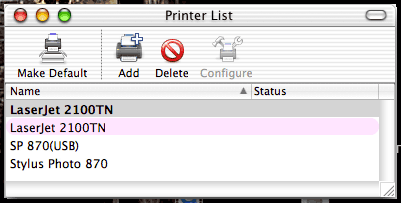
The pink printers are Rendezvous printers. When it is rerouted
through Rendezvous, the OS cannot tell it is the same printer just
because it has the same name (lots of printers might have the same
name), so the printer appears twice. Either turn off the printer
sharing on the network or remove the black printer from your list (you
cannot remove the pink one). That is the only way to get it down to one
printer copy of the printer visible.
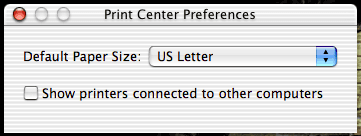
Thanks for the tip. I went to Applications > Utilities >
Print Center and selected Preferences. There was the option to stop
showing printers connected to other computers, and turning it off got
rid of the "pink" LaserJet listing.
The odd thing, of course, is that this is a networked printer that
isn't connected to another computer, nor did I ever enable the option
to show printers connected to other computers. Must be a default
behavior for Jaguar, but it's certainly an odd thing for an operating
system to show the same printer twice.
Replying to my comments in Mac OS X
Observations, John Christie says:
It's not clear from your letter, but were you using Personal File
Sharing on all of the Macs in your lab? I once worked in that kind of
setting with almost a dozen Macs on LocalTalk (this was back in the
IIci era), and it was horrid. Personal File Sharing is okay for
short-term use or for use on a single dedicated server; it's never a
good idea to have a lot of Macs running Personal File Sharing on a
network. Not only does it bog down the network, but each Mac is also
wasting CPU time keeping connections live, broadcasting its presence on
the network, and tracking shared resources.
In our old set up we had file sharing just on the beige G3, and it was killing it
just keeping it on. However, there was a larger department wide LAN
with a lot of machines with file sharing on. The performance was
impacted whether there was actual file sharing or not. But I get your
point. In the new setup we can have file sharing on every machine with
0 impact in performance even while casually sharing with 1-3 users.
But how well OS X works depends on the user. Mail has got to be the
slowest email client I've ever used. It takes several seconds to
display the contents of a folder and a few seconds just to open a
single message. AppleWorks is less efficient, but for the most part X
apps hold their own against classic software.
I haven't found this but I imagine it is a size issue. On a white
iBook 800 I open a 1300 message mailbox in a little over a second. Any
message comes up instantly. You must have much more mail in a mailbox
than I. Or, perhaps you are using IMAP; I seem to remember things being
slower using that, but that would be true on any client depending on
how the interactions with the server were set up. I agree that
AppleWorks is less efficient, but to me this is more of a version issue
than just OS X.
I'll definitely have to consider putting OS X on our file
server here. It's an old SuperMac C600, and I've got an ancient 5-user
copy of OS X Server v1.1 from 1999 that just might work on it
without all the workarounds people have had to come up with to get 10.0
and later installed on unsupported hardware. The more I read, the more
I learn that OS X is much better at sharing files than the classic
Mac OS.
As for Mail, how long it takes to open a mailbox seems directly related
to the number of items in it. It can take 3-4 seconds to open a mailbox
with less than 100 emails (all stored on my hard drive).
Well, it did until just now. Maybe it has to do with caching,
but all of a sudden I can switch between the five mailboxes for the
five accounts I use on Mail in a flash.
Then again, when I download new messages, it takes an awfully long time
before it shows them in their destination folders. I'm sure it will get
better as Apple tweaks the software.
Well, I tested the cache theory. That's it. If I quit Mail and then
launch it, it still takes several seconds to open a different mailbox
the first time.
More on the Doubled LaserJet
Zach Tuckwiller writes:
In response to "Third Tray on HP LaserJet," you wrote:
"Print Center has got to be the most counterintuitive part of Mac
OS X. It really makes me miss the good old Chooser. For instance,
right now Print Center on my Mac shows my LaserJet twice: I have no
idea why. "
One of the printers is in pink which means you are seeing it shared
on another computer in your house(on your network) or OS X is
treating the Jet Direct like it is a computer . . . if you
want to disable this, open Print Center, go to Preferences and uncheck
the box that says "Show printers connected to other computers." That
should clear up the duplicate printer situation.
"And it has two listings for my Epson Stylus Photo 870 - one using
the Apple supplied drivers and the other tied to the latest drivers
from Epson."
Odd, and unfortunately I can't think of a solution for this one.
I've never had a situation where I couldn't delete a printer and
recreate it. Maybe if Printer Sharing is on in your Sharing
Preferences, you can't delete printers, but this is just an assumption
. . . just something for you to try.
On another note, I'm sure hear this a lot, but I cannot express to
you my appreciation of all the hard work you and your contributors have
put into Low End Mac. In a school system
that uses many, many different models of Macs (from Macintosh LC 575s to Power Mac G4 Mirrored Drive Door
867s and almost everything in between), I have found your site to
be my one-stop place for specs on all of the computers I support. I'd
most definitely be lost sometimes without this resource. Thank you.
Have a nice day!
Thanks for the additional insight into the LaserJet. It must be
that Rendezvous sees the ethernet interface in the LaserJet 2100TN as a
computer.
As for the Epson, I don't have Printer Sharing enabled, since I've read
it doesn't work across operating systems and everyone else in the house
is using the classic Mac OS. Besides, everyone can print to the
LaserJet, and inkjet printing is expensive.
LEM got its start when I worked as a book designer/IS Manager for a
local publisher. (I was hired as a book designer, but as we added more
Macs, I became more and more an IS Manager, eventually leaving book
design completely behind.) I created the site because I had to support
Macs as old as a Plus and
Mac II; I figured my knowledge and
research could benefit others as well - especially in situations where
there's little or no money to upgrade or replace existing
hardware.
Putting CD-RW in a Slot-Loading iMac
Julian O'Connor writes:
I have read that you are not familiar with the insides of the slot
loading iMac, so I was hoping that you could throw this one out to the
good people of the web for me!
I can get hold of a CD writer as an upgrade, and I know that with
some modification it can be made to physically fit. The slot loading
iMac has a single connector for both the hard disk and the CD-ROM on
its logic board. It is about the length of an old SCSI connector and
requires that Apple fit a special cable.
At the far end of the chain is the hard disk. It has a standard IDE
connector and ribbon cable leading to connector for the CD-ROM. It is
powered by a standard hard disk power connector. So far so good.
But the CD-ROM has a connector similar in width to the old SCSI
type, and the ribbon cable that emerges is just as wide. The cable then
connects to the SCSI-like connector on the logic board. The CD-ROM has
no power cable, so I assume that power is being fed along the extra
lines in the ribbon cable. Also, there is no connector for the sound
signal, so presumably that is being carried by the extra cable lines,
too.
Apple's special ribbon cable will not reach to the new CD writer, so
I am asking if any kind soul out there knows whether a standard IDE
cable can be attached to the CD writer and hard disk and then be
plugged into the relevant portion of the logic board connector. I can
use a splitter on the hard disk power cable to power both drives. I
realize that I won't get sound out of the CD writer this way, but it's
a start, and I can always run wires to the relevant pins if someone has
a diagram of the logic board drive connector.
I'd just love it if a low end solution like this worked!
Clever engineering to eliminate the sound and power cables by
combining them with the data cable. Too bad it makes things so
difficult for anyone who wants to replace the CD-ROM and doesn't want
to spring for one designed for the iMac.
I'll post this in the Mailbag, but you might want to join the iMac email list and ask for help there. With
a community of 600 iMac users, someone is bound to have some answers
for you.
Gigabit Ethernet Cards
David Klaus writes:
In response to Ed Hurtley's
request for gigabit ethernet cards, I just wanted to pass on to you
that I saw an add in MacTech magazine from Asante for gigabit cards for the Mac.
Didn't check any further, but they do exist.
Thanks for the tip. I popped over to Asante's website and found the
GigaNIX
1000TA card, which supports 10, 100, and 1000 Mbps ethernet
using copper instead of fiber optics. The card retails for US$259 and
supports Jaguar.
Vampire Video on the Dark Side
Tim Harness writes:
I recently bought a HP Pavilion at Wal*Mart, with dead power supply,
cheap. A few observations:
- 1.99 GHz doesn't guarantee a speedy desktop.
- Intel extreme graphics, aren't very.
- 256 megs of DDR RAM isn't enough for WinXP.
- Don't expect to enjoy watching DVD movies on such a system (They
play great on a friend's 128 meg iBook 700).
- Windows XP is "less worse" than Win98.
I think my flower
power iMac will continue to be my primary computer, since working
with Windows can stress me out enough that I sound like the late Sam
Kinison.
Thanks for writing. A lot of cheap Windows PCs don't have dedicated
video memory - they share it with the rest of the computer. (See
The Power of Kawaii: How a
Dot-Bomb Casualty Won My Heart on Low End PC for more on that.) At
my last job we had a Compaq PC with "vampire video" - it really
sucks.
If you have to use a Windows PC, at least get one with dedicated video
RAM. The only real fix for your Pavilion is a real video card.
On the other hand, the iBook has dedicated video circuitry with 16-32
MB of VRAM, and if your friend is running OS X, Quartz Extreme is
fully supported. Macs may cost a bit more, but even the least expensive
ones aren't cheap.
Dan Knight has been publishing Low
End Mac since April 1997. Mailbag columns come from email responses to his Mac Musings, Mac Daniel, Online Tech Journal, and other columns on the site.



