Apple TV More of a Mac than the iPhone?
Ed Hurtley writes:
While the Apple TV "out of the box" may be more limited than the
iPhone, as a Mac it is significantly more useful. First, because it
runs on Intel chips, it can run the full blown Mac OS (as has
already been shown), whereas the iPhone apparently uses a non-x86,
non-PPC chip (I still haven't seen 100% confirmation, though) and
is limited only to the iPhone version of the OS.
Someone has already run the standard OS X Intel build of
World of Warcraft on the Apple TV, using its own custom OS,
not even "full" Mac OS X. (This retains video acceleration.)
And I'm sure it's only a matter of time before someone finds how to
transfer the Apple TV video drivers over to a "full" copy of
OS X. And USB support has already been fixed, including
support for USB optical drives.
As it stands, if you're willing to do a minor amount of work,
you can have a fully functional Mac out of an Apple TV.
Although the limited amount of RAM is a major limitation and
adding a USB optical drive would be a bit silly, making a Mini a
significantly more cost effective "full computer" if you want "full
computer" specs. But if you just want a minimal OS X machine,
the Apple TV would be great. (I don't have an HDTV, but I do have a
DVI monitor, and I'm seriously considering one just for playing
with OS X on it on the monitor. It would be a great little Web
browsing machine to replace the old iMac
G3 in the kitchen.)
Ed Hurtley
Hi, Ed, and thanks for the update on the status of
Apple TV as an OS X computer. It's very much a moving target -
the last I read, Mac sound wasn't supported and the USB port didn't
work.
With its built-in display and WiFi, I think the
iPhone will be a better OS X machine than Apple TV, but that's
just conjecture at this point. I like the idea of a small, portable
device that will let me surf the Web and check email anywhere.
Not to knock Apple TV, which could become a great
way to surf the Web from your TV once you interface a mouse and
keyboard. It's fascinating to see the progress in turning Apple TV
into a full blown OS X machine.
Dan
OpenGL Will Be Lots Faster in Leopard
Steve Geary writes:
Hello Dan,
First off I want to thank you for such a wonderful website! I
have frequently visited LEM ever since I stumbled onto it after
purchasing a Performa 630 CD back
in 2001 (which was my first Mac experience). Over time I have
switched almost completely from the Windows world over to Mac!
The reason I'm mailing you now is about your recent article
[Leopard Delayed to October. And
the Bad Thing Is?] in Mac Musings. I suppose for most people,
having Leopard delayed 6 months is no big deal, however I've been
eagerly awaiting it because I've heard and read that Leopard has a
much better implementation of OpenGL.
I've been very interested in the world of Second Life (SL). My first experience
with this virtual world was on my USB 2.0
iMac G4. At first, it wasn't so bad, but as time went by, I
noticed how slow and sluggish things were. I saw how well SL
performed on a Windows PC and decided my next step would be to buy
a dual core Power Mac G5 with the
Nvidia GeForce 7800GT graphics card and 2.5 gigs of memory.
The result? Oh, a bit better than the G4 iMac, but nothing even
close to the performance that I saw on a Windows PC. I was
devastated that my superior Mac couldn't do as well and was still
sluggish compared to a lesser equipped Windows PC.
I heard that it was because Windows handles OpenGL much better
than OS X. I'm still trying to find out if this is true -
whether or not I will be pleasantly surprised with Leopard or will
it be another disappointment?
As much as I've invested in my Power Mac G5, I really don't want
to cast it aside and upgrade, but find a way to improve its
performance in Second Life.
I'm curious what your thoughts are?
Again, thanks for LEM. I have learned more about the Mac world
through your website than any other. I try to help out by checking
out your advertisers and making purchases now and then
:)
Best regards
Steve Geary
Hi Steve,
I have no experience with Second Life, but a
little online research tells me that the Mac version of the SL
viewer isn't nearly as optimized as the Windows version, although
Linden Labs has made the viewer software open source, which
means programmers around the world can work on tweaking it.
Living a Second Life in Macworld suggests that for the best SL
performance, you should have a fast Mac, have nothing but the SL
viewer running, and not have other computers using the bandwidth in
your broadband connection.
It's pretty consistent that Windows games will run
more smoothly than Mac games - even if both computers have
comparable configurations and the same graphics processor. Several
sources claim we may see double the OpenGL performance when Leopard
ships, as it embraces the newer OpenGL 2.1 specification which
includes pixel buffers and some other improvements.
I can't say whether that will be enough to make
you completely happy with the SL experience on your Mac, but
between viewer updates and OpenGL 2.1, Leopard might get you where
you want to be.
Dan
Leopard Better Delayed than Buggy
JR writes:
Dan
Hello,
I am in general agreement with your comments that OS X 10.5
shipping in October is not a bad thing.
For me it is a little different . . . I only buy every
other OS (since Apple charges full price each time). My version of
OS X for both my Pismo
PowerBook and my 20 inch G5 iMac
is version OS X 10.3.9.
I am more concerned that when it is shipped it is an excellent
version requiring few updates each year. I am planning on buying a
copy once version OS X 10.4.1 comes out.
Thanks
JR
JR,
I debated long and hard whether to buy Tiger
(10.4) - and finally ordered it about a month after it shipped.
Although I don't benefit much from Spotlight and haven't yet found
a Dashboard widget that I find useful, there have been enough
Tiger-only apps that I'm glad I made the move. It was an especially
good choice since Tiger is going to have an active life of 30
months - the longest of any version of OS X.
As for Leopard, I think Apple is discovering how
long the development cycle can become, and I wouldn't be at all
surprised to see it active for 2-3 years before 10.6 comes out.
With that long an active life, you may want to rethink upgrading
every other version.
Also, anyone with two or more Macs should be aware
of the OS X Family Pack, which lets you buy a five-user license for
US$199. It's how I kept my eMacs, PowerBook G4, and Power Mac up to
date with Tiger for less than the cost of two single licenses.
Dan
'Book with WiFi an Alternative to
Broadband?
Bob Navarro writes:
Dan -
I hope you will have a moment to take - what is, to you,
probably - a really basic question...
Me - I was working with Mainframes and PC's since ~1980. Several
years ago - burn out... I, now, try to deal with technology as
little as possible... A few years back I decided to switch to Mac
(the main impetus had to do with audio/video choices and
simplicity, at the time). Since then, the Mac has been the
"household" computer.
My situation - Recently moved... Where I am currently living
there is no access to broadband. What I am thinking is to get a Mac
laptop - anything of the cheapest variety (a couple/few hundred
bucks) that will allow basic functions (Word/Excel...) - that is
"WiFi ready". This way I can go out for all my surfing/downloading,
etc., then come back and transfer what I would like to the "home"
computer.
The Questions -
- Is my "solution" the best way to go?
- If the "solution" is correct, the only thing that has been
holding me back is locating something cheap (a couple/few hundred
bucks) and already "WiFi ready". (one issue is everything I find
online doesn't indicate whether the system is "WiFi ready")
- What is the best way to share the data between machines?
External memory device that connects to anything?
- Would it be better/easier to find a cheap PC laptop with an
external memory - for the transfer of data between computers
(though I would prefer to stay with Mac)?
Sorry to bother you with this - greatly appreciate if you
are able to provide direction/answers....
Thanks,
Bob
Bob,
It sounds like a clever solution to me. Any
MacBook, iBook, or PowerBook with AirPort should do the job for
you. (I'd do my best to avoid a cheap Windows laptop. You'll be a
lot more comfortable and productive with a Mac.) Just pop over to
your nearest Starbuck's, Panera Bread, or other free WiFi source,
do what you need to do, and take your 'Book home.
For moving those files to your other Macs, your
options are:
- Set up an ethernet network. Depending on how spread out your
Macs are, running wires could be a pain.
- If your Macs support AirPort/WiFi, set up sharing on your new
'Book and let the other Macs log into it.
- If your Macs all have USB, pick up a USB flash drive
for moving files between computers.
- Buy a CD-RW disc and burn your data to it. All but the oldest
Macs with CD drives should be able to read it, and you can erase
and reuse a CD-RW disc countless times.
- If you've been looking for an excuse to buy an iPod, it would
be a great way to transport lots of files between your machines,
give you plenty of room to backup important files, and a great
music player.
As for which 'Book to choose, I'd avoid the
titanium G4 PowerBooks because of their poor AirPort reception -
unless you use a third-party WiFi card. If you're looking for a
solution on the cheap, I don't think you can do better than a dual
USB iBook G3 with a Combo drive (if you want to be able to burn
CDs) and an AirPort card. See our Best White iBook G3 Prices for the
latest deals.
You can pick up a 12" iBook G3/700 Combo plus
AirPort card from Baucom for $360 today. That might be your best
choice.
Dan
When a Disk Image Won't Mount, Try
FileSalvage
davidf writes:
There is hope for those disk images which won't mount!
SubRosa's FileSalvage (V6 finishes beta in June 07) will offer
the option to rescue "embedded" files from a flaky DMG - which was
a feature previously available only in SubRosa's flagship $1000
product,
MacForensicsLab. Yes, there might be other solutions for
rescuing files from unmountable disk images (e.g. Micromat?), but I
didn't have the time or the money to experiment with all of them (I
was in a hurry to get the data!).
FileSalvage V6 beta runs as a Universal app ($80); it worked
just fine & pretty quickly too! (Mind you, the number of files
was small - only a couple dozen media files "stuck" inside a 400 MB
dmg).
What remains unsolved, of course, is the cause of this mystery!
The Finder returns an error message "no mountable filesystem"; and
Disk Utility is only a little less vague - it allows the dmg to be
attached as a virtual device but then is silent (no useful
error message in Console log) when one tries to Mount or Verify the
(contained) volume.
The Apple page for hdutil offers some very limited guidance for
CLI [command line] poking around, but not very much actual
hard-core telemetry.
Unfortunately, FileSalvage didn't produce an explanation for the
problem either (though it is diligent about keeping good log files
of its own - but strangely these are not aliases into a
system-defined place [var, etc.] but reside instead in the
application directory [though entries are posted inside the system
log] - but that isn't saying much! Since the console format isn't
xml, there is no simple way of segmenting any of the content into a
structured representation (and no, using a keyword in the search
box doesn't count!!) i.e. to separate the wheat from the chaff.
The fresh news that Leopard is going to be delayed nearly 6
months (on account of the iPhone) might be a blessing in disguise!
Message To Apple: forget the "top secret" features! How about
shipping a platform that has seriously rigorous telemetry in every
part of the system so that meaningful answers can be provided! What
good is a "plug 'n' play" franchise if you are forced to
troubleshoot in the dark?!
David,
Thanks for the tip. I'll share it in the next
mailbag column.
I have to agree with you that Apple needs to
improve the Mac's file system, which is antiquated by any standard.
Of course, if Apple were to adopt a robust file system, Alsoft
wouldn't sell nearly as many copies of DiskWarrior, which is a
great tool for fixing directory problems.
Dan
Low End Mac Forums
Cody Kloepfer writes:
Hello!
I'm Cody Kloepfer, I've been a reader of Low End Mac for a few
months now, since I have recently acquired an iMac G3 350 MHz from my friend. I was looking
around, and the Google
Groups I have looked at aren't that great.
I am a forum addict, if there is such a thing. I know forums
left and right. I was thinking, Low End Mac could benefit and grow
with a forum. ...I think it will be a pretty good and active place
for people to talk about their "Low End Macs". It will be great.
Email me back....
Cody Kloepfer
Hi, Cody, and thanks for writing.
Low End Mac has been running email lists since November 1997, and we're
generally pleased with Google Groups as a system for handling our
lists, archiving content, and giving us the ability to ban
troublesome posters and spammers.
We've never had any kind of forum or comments
system, although I would like to implement that some day. Our host
works with some sites that have both comments and forums, and I've
sent them an email to inquire about the possibility of adding
either or both to Low End Mac.
I'll keep you in mind if/when we go in that
direction.
Dan
Help Identifying Upgrade in a Mac 128K
Matt Radtke writes:
Good morning Dan
I recently found a gentleman selling a "Macintosh Classic" on
Craigslist. One look at the picture, however, and I saw a Mac 512K - and a link to a second
"Macintosh Classic." The second Mac had no picture, but based on
his previously mislabeled Mac, I figured I might get lucky. And I
did. It was an M0001 - Macintosh
128K, or at least it was once. It appears to have the original
motherboard, as the serial ports are not Mini DIN-8 serial ports
that a Mac Plus would have.
There the similarities end. There is a SCSI port installed over
the power switch in the rear. It has been upgraded to 1 MB of RAM.
The seller included an external hard drive, an 800K floppy drive,
and a special boot folder on the hard drive.
I can work on getting pictures, but does any of this sound
familiar on what I might have gotten?
Oh, and in case you're wondering: Both machines appear to work
just fine. The "128K" boots right up. The 512K has a dead internal
floppy, so if I can get my hands on a new one or fix this on up,
all will be fine. (It does have an external 800K drive, but I'm not
positive that it has the more modern ROMs, and I don't have any
800K boot disks at the moment.)
Thanks for you help Dan. I love the site, I've been a loyal
reader since late 2000!
-Matt
Hi Matt,
Quite the find! It's not easy finding a Mac 128K
that hasn't been upgraded in some way - 128 KB of RAM just wasn't
enough. (Even Steve Jobs knew that - the first Mac he showed the
world was already upgraded to 512 KB.)
There were a fair number of Macintosh upgrade
cards for the original, some with SCSI, some with RAM disks, some
with other features. This was all before I got involved with Macs,
so I have no guess as to what upgrade may be inside yours.
Dead 400K floppies can be a hardware failure (see
Vintage Mac 400K Floppy Drive (Model
#M130) Repeating Click of Death for one suggestion on fixing
that) or due to the piece of felt that holds the disk against the
read/write head (see Bringing My
Apple Lisa Back to Life).
I don't know how these older Macs will work with
800K drives, but I believe they will treat them as single-sided
400K drives.
FireWire/USB Card for TAM
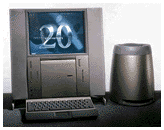 Marv Weide asks:
Can you help me find a USB/FireWire PCI card for 20th
Anniversary Mac?
Hi Marv,
Some online research finds one good possibility:
the $50 Sonnet Tango 2.0
FireWire/USB 2.0 card. The IOGear
USB 2.0/FireWire PCI card and
Belkin Hi-Speed USB 2.0 and FireWire PCI Card are also likely
candidates, as both companies generally provide good Mac support,
although the company website doesn't list which Macs are compatible
with it. There was also an Orange Micro card that may work, but the
company is no longer in business.
The only one I find that you should avoid is a
seemingly discontinued MacAlly
USB/FW card, which states that it does not support the 20th
Anniversary Mac.
Your best bet is probably to contact these vendors
directly.
Dan
Dan Knight has been publishing Low
End Mac since April 1997. Mailbag columns come from email responses to his Mac Musings, Mac Daniel, Online Tech Journal, and other columns on the site.



