Bring Back the 12" 'Book
From Mark Garbowski, following up on PowerPC vs. Intel Macs:
I agree Dan
I believe that folks like us that would fight for a mid tower from
Apple are not as many as Apple believes would justify releasing this
"beast to the wild", and I guess the whole "think different" philosophy
may be a part of the reason why we have not seen mid tower lately.
Inexpensive mid towers may look too much like a PC that you can pickup
anywhere. As for the rest of the lineup, all of Apple's products scream
"I'm unique, I'm Apple".
Although I am not in the crowd looking for a mid tower from Apple, I
must join in with the voices of others asking for a 12" PowerBook
reincarnation. I use a 12" G4 iBook around the house and love this
little laptop more than any other portable I have ever owned.
Cheers,
Mark
Mark,
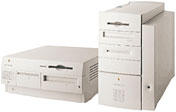 Even in the era of beige
computers, Apple's designs managed to stand out from the crowd. Then
and now, PC designs were just variations on a theme while Macs had
lines and curves and no ugly black-faced optical drives. Looking at the
design of the beige G3
minitower, the blue
& white G3 and subsequent G4 Power Macs, and the Power Mac
G5/Mac Pro designs, not to mention the Mac mini, I can't imagine Apple
designing a midtower Mac that doesn't stand apart from the pack.
Even in the era of beige
computers, Apple's designs managed to stand out from the crowd. Then
and now, PC designs were just variations on a theme while Macs had
lines and curves and no ugly black-faced optical drives. Looking at the
design of the beige G3
minitower, the blue
& white G3 and subsequent G4 Power Macs, and the Power Mac
G5/Mac Pro designs, not to mention the Mac mini, I can't imagine Apple
designing a midtower Mac that doesn't stand apart from the pack.
As far as a 12" MacBook goes, count me in as someone
who would love to see it. If Apple could do a 1280 x 800 widescreen
notebook about 2" narrower than the nearly 13" wide MacBook, a lot of 12" iBook
and PowerBook users would be ready to go Intel.
Dan
Prosumer Mac: Mac mini with FireWire 800 and
eSATA
From Liam Greenwood:
Hi Dan
I'm someone who would like something along the lines of what you
describe as a prosumer Mac - and am building up a Quicksilver to run
Apple Server because there is nothing in the current lineup for
creating a home server.
What would work for me though is a simple change to the Mac mini -
add FW800 and eSATA ports. Even better would be to make the internal
hard drive a delete option.
Cheers, Liam
Liam,
I tend to use eMacs and iMacs with external FireWire
400 drives, and I don't think you'll find much real world difference
between FireWire 400 and FireWire 800 on your home network. This is one
way you could use a modern Mac mini as a small server.
If you're serious about eSATA, erebos.net has an
article detailing how to
put an eSATA port on the Mac mini - which will void the warranty.
(I can't see Apple ever putting FW800 or eSATA on the Mac mini, but
they should at the very least be build-to-order options on a midrange
Mac.)
Dan
Prosumer Mac Recommendations: Simplify
From Dwain Elliott:
Dan,
You were off to a great start in your recommendations for a midrange
modular Mac, but I think you got a bit carried away. Apple must
offer this configuration, but I offer the following changes and
simplification:
I think an "under-the-monitor" design is obsolete and unnecessary. A
SuperDrive should be standard - especially with Blu-ray on the horizon.
Include 2 GB of RAM standard, expandable to 8 GB. And I'd love a
socketed CPU for future expansion, but a GPU/video card must be
standard - no X3100 graphics.
I think a "Bare Bones" option will not (and should not) ever happen.
A huge part of Apple's appeal is that of a computer that's ready to
work "right out of the box." The lack of a keyboard, monitor, and mouse
(as with the Mac mini) is already a huge compromise that only makes
sense to keep the price down.
A summary of my recommended "minimum" midrange Mac is as
follows:
2.4 GHz Penryn tower, 2 GB of RAM, 250 GB hard drive (w/2nd HD bay),
SuperDrive, Nvidia GeForce 8800 GT graphics, 2 or 3 PCIe slots and
built-in Bluetooth plus 802.11n WiFi. IMHO, anything more is gravy, and
I think Apple could sell millions of these "Macs" even for as much as
$999 (just below the psychological $1,000 barrier).
Love your writing!
Dwain Elliott
P.S. - I think the generally accepted understanding of the word
"prosumer" is that it is a hybrid of "professional" and "consumer" -
not "producer."
Dwain,
Thanks for writing. And there are two derivations for
prosumer - producer and consume emphasizes that the focus
is on producing content, whereas professional and
consumer points to someone who doesn't quite fit either category
but has a real passion for and knowledge of the field.
I agree that "under the monitor" PCs are rare these
days because most PCs either sit next to the monitor or on the floor,
but there is a new focus on the family room PC, which might be stacked
with a DV-R and other components in a home theater where the monitor is
used for both computer work and watching videos and television. I don't
think it would be a biggie, but there's not much involved in designing
two cases for the same hardware - Apple was doing it 15 years ago.
Your proposed specifications are probably the ones
that would sell the most, but I think Apple needs a low-end Mac to
bring value customers into stores. Most of them will see the value of
the $200 more costly model.
BTW, you used to be able to buy an almost bare Mac.
Back when hard drives were horribly expensive, you could buy a Mac
IIcx, SE/30, or IIci with just 1 GB of RAM and no hard drive. At
the ComputerLand where I worked, we made good money installing
third-party hard drive with five-year warrantees at a lower price than
ones with smaller drives from Apple and just a one-year warranty (90
days before that). I don't expect a big market for such a stripped Mac,
but why not provide the option?
Dan
Why We Need a Prosumer Desktop Mac
From Bert Altenburg:
Hi Dan,
Thanks for the great read.
I'm with you on the prosumer desktop, although I would employ it in
my company rather than for home. I had to buy my secretary a MacBook Pro last
year, because it was the cheapest Mac that supports a 30" screen. A
secretary with a laptop that doesn't leave its desk? Yes, don't ask. It
is really silly that no semi-tower is available from Apple.
Don't be surprised about a secretary with a 30" screen. Like more
and more companies, we use web-applications, and web-apps love a big
screen (A4 page with work on one half of the screen, database on the
other, that sort of stuff). She had a Mac mini before. Great machine,
didn't take desktop real estate (the real desktop, not the Mac
desktop), but doesn't support 30". While the mini could be a tad
faster, I don't feel it is necessary that a secretary uses a quad core
(left alone an octa-core) to do typing-related stuff and destroy the
planet in the process. Apple doesn't supply what more and more
businesses need.
On a positive note: As a bonus of the choice I made, the internal
camera of the MacBook Pro is used for videoconferencing (my company is
a virtual office, so every employee works from home). Where are the new
displays with built-in camera? Apple could have released a 30" iMac,
which also would fill the need described above. However, I still prefer
the semi-pro tower, because I prefer to replace only the stuff that
needs replacing. That is good for the planet too.
Have a nice day,
Bert
Bert,
Sometimes there's no understanding Apple. They had a
great FireWire webcam, the killed it off because they started building
webcams into iMacs and notebooks. No option from Apple for the Mac mini
or Mac Pro. No iSight built into Apple's monitors. No USB 2.0 version
of iSight. Demand is so high that it sells for up to $225 on
eBay - 50% more than its original price.
Crazy that the only options for driving Apple's 30"
display are a MacBook Pro or a Mac Pro. And that Apple has cut USB
power on aluminum iMacs and Santa Rosa notebooks so between all of
those ports there's only support for a single full power USB device,
not to mention the 18-bit display on the 20" aluminum iMacs.
So much better for Apple to offer a midrange Mac with
full USB 2.0 power on its ports, a graphics card that supports (or can
be replaced to provide support for) the 30" Cinema Display, and lets
you choose whatever size and quality monitor you want.
At least your secretary has a great UPS built into her
computer.
Dan
Prosumer Macs Because the Mac Pro Is Overkill
From Matthew Wright:
Dan the Man, I'm just lettering to the editor like crazy this
month.
Just wanted to say I second that emotion when it comes to pretty
much everything you said in that Prosumer model article. I have the
G5 Power Mac that was
essentially a headless iMac (the one with a 1.8 GHz processor on the
600 MHz bus) as my primary computer. It is upgraded like crazy - 256 MB
Video Card, 2 GB RAM, extra USB card, close to a TB of storage
occupying the two drive bays, a new 20x SuperDrive - all of which I've
upgraded over time as I needed it. It's my media center and remains my
primary machine even though I have a MacBook Pro that is about five
times faster. Why? one world my friend: expandability.
The iMac is no replacement. I need a lot of storage for my 435 gigs
of music and video. And with that much media to back up, I need a
second internal hard drive. Maybe not need, but prefer to even FireWire
drives. I can back up my media library in a relatively short period of
time between those two SATA drives. I like all my hardware in one
place, you know? I don't want to have to worry about an external
drive.
The Mac mini is also no replacement for all the same reasons and
then some. I can accept the compromises and shorter lifespans of laptop
hard drives- in laptops. I think having them in a desktop, all for the
sake of maybe a quarter inch of space, is shameful. I've never liked
the mini in any form for that reason. It's just right up there with
integrated graphics in the lame
things-PC-makers-do-that-Apple-should-never-have-adopted
department.
The Mac Pro, for my purposes, would be like killing a housefly with
a machine gun. My Core Duo MacBook Pro
is already about as much power as I can use. What the heck am I going
to do with the current Mac Pros that can probably handle traffic for a
small airport?
For now the G5 is fine, but I have to admit that since switching
over to Leopard I am getting the spinning beach ball more often than I
ever did in Tiger. I've even thought about switching back for the sake
of speed, but I just love too many aspects of Leopard (I need my
screen-sharing, I need Back To My Mac, I need Spaces). I'll be looking
to upgrade I'm sure by the time 10.6 rolls out, and I just don't feel
like there is a comparable machine to my prosumer G5 - it's either too
much or not enough.
Where's the just right?
best amigo,
Matthew Wright
Matthew,
Sounds like Goldilocks. I agree with everything you're
saying. Maybe by the time 10.6 comes out and you're ready to move to
Intel, you'll find some awesome deals on used Mac Pros.
Ignoring the needs of established customers is just
bad business.
Dan
Getting a Prosumer Mac Out the Door Quickly
From James Phipps:
Good article. I agree. I was even one of the Mac Cube victims. Unlike what
you are suggesting, the Cube was cool but was simply a bad design. When
it worked it was okay, but the reliability and etc. was poor. The Mini
Tower is not cool but is a good design. That takes it out of the
routine Mac Designs where Industrial Design is important and
performance is secondary.
To your comment, the Mini Tower will not fit the Matrix as perceived
by Steve Jobs. The questions is, will common sense prevail over Apple
(read that Steve Job's) emotions or will status quo be the word of the
day. The situation is that the modular Mac for prosumers can result in
a whole series of new markets untouched right now for Apple. This will
include more of the business world (a weak area for Apple), gamers
(weak area for Apple), and tinkerers (also a weak area for Apple).
From a design perspective if Apple want to do this on the cheap,
this is a potential project management plan:
- Get the team together and define the design
- Have a board made by ASUS or someone else using their existing PC
technology with very minor Apple software on the board
- Have their industrial designers take an existing case (they may
have one) and make it look Apple cheaply
- Select the options that will be on it based on the potential market
(CPU, graphics card, hard disk, input and output, sound card or on the
board, and etc.)
- Use an existing Apple mouse and keyboard
- Use any display Apple or others with a DVI output
- Ascertain what aftermarket goodies to offer at the Apple Store
- Blu-ray
- Modem
- All kinds of disk drives
- More graphics cards
- Etc.
- Design project time is no more than 6 weeks (Mac and the case)
- Breadboard and test (2 to 4 weeks)
- Line up a contractor to make it (2 weeks)
- Contractor tooling up so to speak (2 months max)
- Suppliers tooling up (2 months max)
- Introduce it and market it
That is my guess at a schedule assuming that nothing is in place.
However, my bet that there are designs and prototype already in place.
Reduce the schedule by two months.
Anyway, that is my idea. I am hopeful that Apple will do this.
Jim Phipps
Jim,
I agree. The idea of a middle Mac can't have escaped
Apple, and such a Mac would find myriad uses as a home computer, as a
dedicated video workstation, as a server, as an average office
computer, etc.
I don't think Steve Jobs can think that different,
though.
Dan
F-keys vs. Preprogrammed OS X Functions
From Philip High:
Hi Dan,
I recently bought a 2.4 GHz iMac which I've been
very pleased with. It has the aluminum keyboard (which grew on me and
now I love it), I had this problem with my first generation Core Duo iMac as well. I work
from home often and use a few terminal emulators that require extensive
use of the F-keys. I know you can change the F-keys from the OS X
functions to the F-keys, but it's a pain to open system prefs and
change it back and forth. I know the trick on my PowerBook to hold the
function key and use the F-keys, but I'd much rather work on my 20"
screen than the 15" screen. I tried Shift, Opt, Control, and Command
and various combinations to no avail (who really wants Exposé to
work so slowly anyway?). Is there some super simple solution I missed
in a Google search? I'm looking for a way to switch between using the
F-keys as F-keys and as volume, brightness, Exposé, etc. at the
keyboard level.
Totally unrelated to the first question, but why does Leopard take
so long to actually reboot when I restart the machine? I noticed this
as soon as I started using Leopard, but with the 2.4 GHz processor and
4 GB of RAM I don't think I should get the beach ball and have to
wait for a restart (it's not just this machine, my previous iMac did it
too)
On another tangent, I've successfully used Leopard on my G4/800 MHz PowerBook and my
Digital Audio
G4/533. It's probably just in my mind, but I felt like Leopard ran
better on my Digital Audio (using it mostly through ARD) than it did a
1.5 GHz mini. All three machines went back to Tiger, the PowerBook's
battery has been flaky but Leopard seemed to kill it, I'm luck if I get
30 minutes (down from ~2 hours).
Thanks.
Philip High
Philip,
I'm stumped. You'd think this would be an option in
the Keyboard and Mouse system preference, but when I go under the
Keyboards Shortcut tab, there's no option to assign a keystroke - only
a menu item. If the program you're using has menu items for F1 through
whatever, you could create an application specific set of keystrokes by
clicking on the plus (+) button and choosing the app from the menu.
There should be an easier way, and there probably is,
but I don't know it.
As for Leopard, I'm still living with Tiger, so I have
no idea what it would so long to startup, or why Leopard would be
happier on a 533 MHz G4 than on the much faster Mac mini.
Dan
Cleaning Pismo's Screen
From John Meshelany Jr.:
Dan,
In response to John's article [A Very Pismo Christmas in
April], I have found that you can remove the keyboard marks pretty
good with something like Windex. I know this to be true because I had
some superglue on my screen, along with the keyboard marks (don't even
ask about the superglue), and I was able to remove it with Windex, and
it caused no ill-effects to the screen. Thanks!
John Meshelany Jr.
Lid Closed Video Mode on the Pismo
From Eli Fleming:
Dan,
Regarding [Pismo with an External
Widescreen Monitor]. I was once told by an Apple tech that the
Pismo could operate in
a special lid closed mode that delegated all available video RAM to the
external display. Gerald might want to give that a shot if he hasn't
already . . . might work, might not.
Regards,
Eli
Eli,
I've forwarded your email to Gerald. We'll see what
happens...
Dan
Dan,
Okay, I'm operating my Pismo in the lid closed mode. It's hooked up
to a Sun Microsystems GDM-5510 CRT, an external keyboard, mouse, and
plugged in to AC. Attached is a screen shot of the highest res and
refresh rate available (1792 x 1344 at 60.0 Hertz and Thousands of
Colors - very hard on the eyes). Maybe the lid closed mode would drive
the higher res on Gerald's LCD at at least thousands of colors?
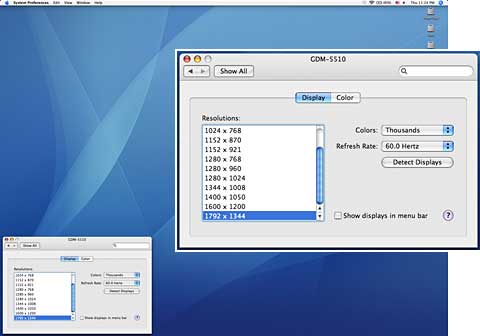
Just a refresher for those unfamiliar with the lid closed mode:
Attach all of the above with the lid open (don't forget the AC adapter)
and then shut the lid. Your Pismo will go to sleep, but a mouse click
or press of a key on the external keyboard will wake the machine back
up and all of its VRAM resources will be devoted to the external
display. I can drive this 21" CRT at 1600 x 1200, 75.0 Hertz, and
millions of colors with the lid closed vs. 1600 x 1200, 75.0 Hertz, and
thousands of colors with the lid open and Pismo LCD active.
Incidentally, either way, the CRT display is not as crisp as when
driven by my G4's FX5200
video.
Hope this is useful info,
Eli
Eli,
Thanks for the additional info and screen shot. You're
the first to tell me about lid closed mode (as I've never owned a
Pismo), and I'll be sure to update our Pismo profile with this
information. I've forwarded this to Gerald as well.
I can imaging 60 Hz is pretty bad with a relatively
modern CRT. Fortunately Gerald is using an LCD monitor, so he shouldn't
have that problem.
Dan
Dan Knight has been publishing Low
End Mac since April 1997. Mailbag columns come from email responses to his Mac Musings, Mac Daniel, Online Tech Journal, and other columns on the site.



