I've used PhotoWorks
(formerly Seattle FilmWorks) for most of my photo finishing needs since
the early 1980s. In those days, their "house brand" film was Eastman
52xx 35mm movie film repackaged in standard 35mm still camera
cassettes, the idea being that you could get prints and slides from the
same negative. The movie film thing was partly economics - surplus
movie film was cheap.
I was reasonably satisfied with the respooled 35mm movie film stock,
but more recently PhotoWorks switched their house brand film to
standard C-41 negative film as well (for both prints and slides), and
the new PhotoWorks film, which is made by a European supplier, is
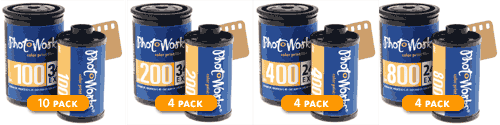
actually quite good. It is available in ISO 100, 200, 400, and 800
speeds. For all-round general use I like the ISO 200 stuff.
I have a (very) small digital camera now, but for high-quality work
I still use my trusty old 1974 Olympus OM-1, for which I have a small
but nice collection of lenses.
SFW's service also a means of getting my 35mm shots digitalized
conveniently.
When you mail exposed film to PhotoWorks, a few days later they
email you a URL at which you can view your developed photos on the Web.
The physical prints and/or slides are returned to you by mail. You can
also forward this URL to family members and friends so they can enjoy
your snapshots.
PhotoWorks will store your photos for free on its server in
"Standard Resolution" (768 x 512 pixels) so long as you send them film
for processing at least twice a year. Your PhotoWorks photo archive is
password-protected, and PhotoWorks claims that they archive more
personal images than any other company in the world. They also offer
higher-resolution (1500 x 1000 pixel) scans for download on CD-ROM for
customers who want to include their photos in online documents,
greeting cards, or to print with their computer printer.
At a 1.5 megapixel scanning resolution, SFW's Hi-Res Pictures On
Disk are suitable for printing smaller images (up to 5" x 7" should
look tack sharp) from your computer. If you order prints and/or slides
but do not purchase a Pictures on Disk CD or pay a surcharge for
high-resolution, your Website images will be scanned at the lower 768 x
512 resolution. Both versions provide a 24-bit color depth (16,777,215
colors).
Image files downloaded from SFW's PhotoMail are compressed into a
single file using the company's proprietary PWP file format. This way,
you can download your entire roll at once (although it is also possible
to download single images or a selection). Once you download a PWP
file, you will need PhotoWorks' free PhotoWorks Desktop software, which
can be downloaded from their Website, to decompress it into individual
images. No browser plug-ins are required for downloading PhotoMail.
For Macintosh users, PhotoWorks offers two software solutions to
help you manage your PhotoWorks files:
PhotoWorks v1.0.1 (a 300k download) opens and converts .PhotoWorks'
proprietary pwp and .sfw files.
- Minimum requirements for the Mac version include OS 8.6 or greater,
with the Quick Time extension installed, a 150 MHz 604 PowerPC
processor or higher, 16 MB of available RAM (64 MB or greater
recommended), 100 MB of available hard disk space, and color or
grayscale monitor.
An Adobe Photoshop Plug-In (142k download) enables you to open .sfw
files in Photoshop
For more information, visit the PhotoWorks website.
Unfortunately, PhotoWorks Desktop - at least the Mac version - is
not the most polished or user-intuitive graphics software. It does the
job it's intended to do and can export photos in compatible formats so
you can work with them in your favorite Mac image editing program.
There is also a third-party PWP Plug-in module from Brian Beardmore
for the Macintosh version of GraphicConverter. The plug-in extracts and
opens individual pictures from PWP archive files.
The current PWP Plug-in release is version 1.0b2. There is support
for both 68K and PPC versions of GraphicConverter.
System Requirements
- Macintosh operating systems version 7.6 through 9.1 supported.
- Both 68K and PPC GraphicConverter versions are supported.
- The plug-ins work with GraphicConverter v4.0.8 and various other
older versions.
PWP Plug-in Version 1.0b2 (68K & PPC) is a 196k download, and
available from Realistic
Software.
PWP Plug-in is freeware, but donations are appreciated.
Brian Beardmore also used to distribute a free beta of an
application called SFW Helper, which was a more user-friendly
substitute for PhotoWorks' own Mac application. However, Mr. Beardmore
posted a notice on his website earlier this month noting:
- "Most all of the software here expires today. It is currently
unknown if I will be publicly re-releasing the software. For those of
you who have supported me, I will try to get a private release together
for you soon.... Unfortunately, giving the software away for free and
asking for donations has not been successful in covering the rising
costs of the expenses (web host, domain name, software development tool
upgrades, new Mac OS upgrades, and new MacOS hardware). I am open to
new ideas of how to cover the expenses.
"I do understand that some of you users are frustrated that the
software is no longer usable. I simply do not have the time to do
another release of the software right now... If and when I do have new
releases, I will update the web site. If you feel that 'SFW Helper'
application keeps you using the services of photowork.com, then email
photoworks and let them know you need application like it."
PhotoWorks offers the following services:
- Film Developing - 35mm color print film, preloaded cameras and APS.
You can still get prints and slides, or just prints, or just slides
from the same film.
- Pictures on CD
- Prints from Digital images on Digital Media Cards or CD-ROM
- Upload photos from you digital camera for storage or printing
- Online Albums
- Traditional Reprints from negatives
- Traditional Enlargements
A nice touch for Canadian customers like me, PhotoWorks provides
pricelists and order forms in Canadian dollars and has a Canadian mail
drop in Vancouver, B.C., for their Canadian film mailers.
For full details and prices, visit <http://www.photoworks.com/Info/Details.aspx>.



