SilverKeeper is a
freeware backup utility from hardware specialist LaCie. It doesn't have
as deep a range of features and options as some other backup utilities,
but for basic backups and folder synchronization, it gets the job done
- and in fine style.
SilverKeeper can be used with Mac OS X 10.2.8, 10.3.1-10.3.9, and
10.4, as well as Mac OS 9.2.2, which makes it a good choice in backup
software for low-end Mac users as well as folks with the latest
hardware. And the price is certainly right.
Don't discount SilverKeeper because it's freeware. It's actually a
very capable little application. SilverKeeper will backup, compare, or
synchronize folders on Mac computers. It can copy or compare folders of
any writeable device that is visible as a volume mounted on the
desktop, including hard drives, Zip drives, DVD-RAM drives - almost any
internal or external Macintosh disk or flash device connected to the
IDE, SCSI, USB, or FireWire busses. The only requirement is that the
drives must have at least one mounted, writeable volume.
SilverKeeper uses the Finder to perform copy operations, so backups
are always readable files that can be used as-is on another computer
without resorting to a special restore application. No special
application software is necessary to read backup files.
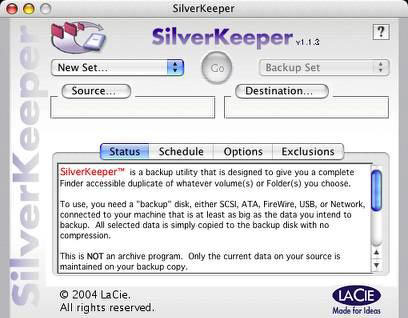
On Friday, LaCie released a SilverKeeper version 1.1.3, a minor
update to correct issues with Tiger (Mac OS X 10.4) that includes
the following changes:
- Correct timeout error -50
- Correct "Date Not Set" error when backing up locked files
- Additional checks to assure proper creation of bootable backup
- Added timeout for dialog prompting user input when file is newer on
the destination, when compared to the source. Dialog will close after
waiting 60 seconds, and continue; file will be copied from source to
destination after timeout
I like the aesthetics of SilverKeeper's simple, compact user
interface, although, it does have some file size and label character
limitations that you should check out before using this solution. It is
simple and intuitive to use, and it may be all you ever need in a
backup application if you're happy to forego automation.
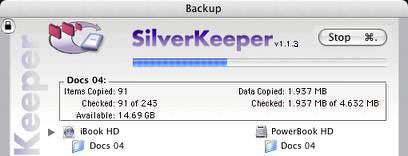
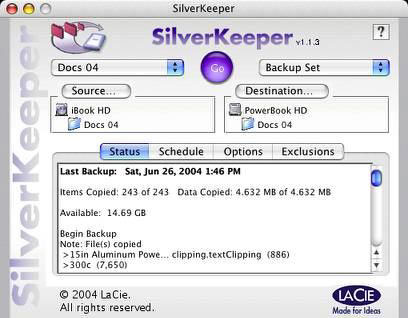
SilverKeeper will copy, compare, synchronize, or restore files and
directories from a source directory to a destination directory. It will
ease backups from one hard drive to another.
Optimized for hard drives, SilverKeeper is also compatible with
network drives and removable drives such as Zip and DVD-RAM discs.
Compatible drives may be connected to the IDE, SCSI, USB, or FireWire
busses of Macintosh computers. The only requirement is that the drives
must have at least one mounted, writeable volume.
SilverKeeper is not directly compatible with tape drives, or CD-R/RW
and DVD-R/RW drives.
SilverKeeper can also make a bootable backup of your internal boot
drive. Proceed as follows.
1. If your external drive is considerably larger than your internal
boot drive, it would be best to partition your external drive:
- make one partition on the external drive the same size as your
internal drive
- the remainder of the drive can be left as one additional large
partition, or you can make several partitions. For example a second
partition can be dedicated to your music files, and another partition
can be dedicated to your video files.
- the first partition that is the same size as your internal boot
drive will be dedicated to a complete system backup
2. Format each of the partitions as Mac OS Extended using Apple Disk
Utility (OS X) or LaCie's Silverlining (OS 9); Note: Silverlining
password protected partitions cannot be used in OS X. You can't make a
bootable backup to an external drive that is formatted as UFS, NTFS, or
FAT32. You also can not make a bootable backup if the destination is a
volume on a file server.
3. To make a complete System backup ("cloning"):
- reboot your system and be sure no other applications are
running
- format and erase the destination volume. A complete System backup
works best if the destination is completely empty. Format and erase
assures that the destination is truly empty, and contains no hidden
files that can affect a successful clone.
- set the source by dragging the icon for your Boot drive to the
SilverKeeper Source window
- set the destination by dragging the icon for your external volume
that will contain the clone to the destination window
- save the SilverKeeper settings; if you have not already unlocked
SilverKeeper and provided the admin password to authenticate, be sure
to do so and save this setting, too.
- click on Go to start the clone process
Performing Backups
With SilverKeeper's Exclusions tab, after you have defined the
Source for SilverKeeper, you can choose files and folders within the
Source that you do not want to copy during the backup operation.
There is also the SilverKeeper "noRemove" folder on the destination
disk. Any file or folder in this "magic" folder will not be removed
during Backup if they have been removed from the Source.
SilverKeeper does not directly support backing up to a CD or a DVD
using a burner, but you can indirectly do this in several steps using a
CD or DVD that is supported by the Disk Burning support within OS X.
You can determine if your drive is supported by the status given for
your drive in the Apple System Profiler. It will state if Disc Burning
is supported for your drive. You can insert a blank CD-R or DVD-R disc
into your drive and let the Finder use it as a writeable volume. Once
mounted and named, the disk will appear on your desktop as a writeable
volume which can be used as a destination for SilverKeeper
It should be noted that SilverKeeper cannot span a large backup
across multiple discs, so you must size your backup folders manually.
If your drive is not supported by Apple Disc Burning, you can use Toast
(if you have it available) to create a disk image that can be manually
burned to a disk.
More detail and Q&A can be found on the SilverKeeper web
page.
System requirements:
- SilverKeeper requires OS X 10.2.8 or OS 9.2.2 or later. This
includes compatibility with Panther OS X 10.3.9 and Tiger OS X
10.4.
- Mac OS 9 users should be sure to have CarbonLib 1.6 installed
(link). It is recommended that you update to 9.2.2.
SilverKeeper is freeware provided by LaCie, Ltd.



