There are plenty of really good FTP (file transfer protocol)
client programs available for Mac OS X, both shareware and
freeware. Some of the best include Captain FTP, Transmit, Fetch, and are RBrowser (which is offered in both
freeware and shareware configurations), and that's by no means an
exhaustive listing.
However, an FTP program I keep coming back to is Interarchy, which can trace its
linage back to the early days of the public Internet.
Actually, just calling Interarchy an FTP client is a major
understatement. This is a tremendously capable program with a deep
feature set that has a great deal to offer to serious Web developers,
but even for my own much more pedestrian FTP needs - essentially sample
file uploads and downloads - there are two qualities that particularly
endear Interarchy to me: this baby is fast, and it's solidly dependable
in the best "just works" Mac tradition.
In using Interarchy for years, my only real complaint about is that
its user interface was a bit cumbersome and non-intuitive for both
setup and operation, although once you got it set up and learned the
drill, it was satisfyingly low-hassle to use. However, those criticisms
have been substantially addressed in the latest version 9 of
Interarchy, which has a fresh new interface that nicely harmonizes with
standard OS X conventions and works like you'd expect. This makes
this already excellent program even nicer to use.
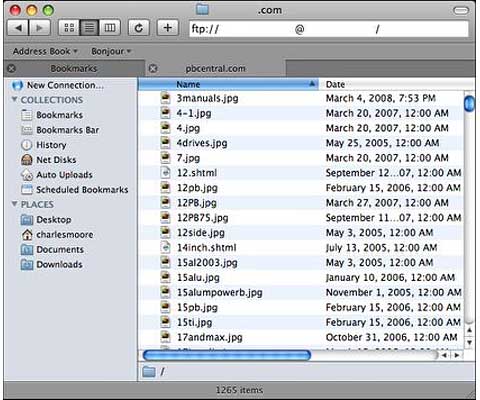
Interarchy now supports drag-reordering of tabs. In addition to
being able to reorder tabs in the current window, you can also drag
tabs to a new window. "Move Tab to New Window" and "Merge All Windows"
commands have been added to the Window menu, and most windows -
bookmarks, listings, history, etc. - can now be placed in a tab.
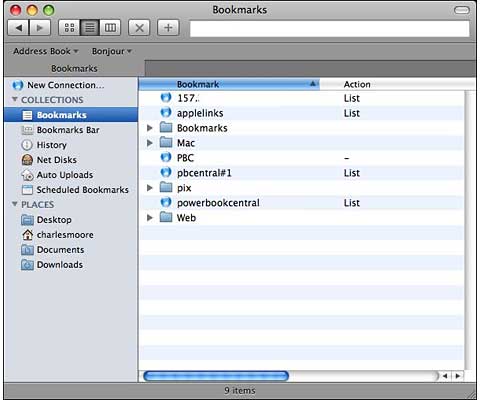
Interarchy 9.0 also adds a Side Bar to listing windows that
functions similarly to the Finder's Side Bar. From the Side Bar you
can:
- Initiate a new connection.
- Access your Bookmarks, the Bookmarks Bar, History, Net Disks, Auto
Uploads, and Scheduled Bookmarks.
- Access other Macs that broadcast availability by way of
Bonjour.
- Access local folders such as your Downloads folder.
For example, rather than opening in a new window when summoned, as
was the case before, they are now displayed in a tab in the main
interface window when you click on Bookmarks in the sidebar.
The developer, Nolobe Software, say that Interarchy 9 introduces
over one hundred new and improved features, a brand new protocol built
upon SSH
(secure shell), numerous enhancements to the product's interface, and
much more.
The new SSH protocol is a major addition to Interarchy's already
comprehensive range of supported protocols. SSH provides a number of
advantages over incumbent protocols such as FTP and SFTP (secure FTP).
According to Nolobe, not only is it faster than SFTP, but it offers
much greater flexibility. The protocol is based on Perl and should be supported
any server running Perl version 4 or later. You can check out the Interarchy 9 release
notes for more details.
Interarchy supports pretty much every file transfer feature you can
imagine: long file names, long URLs, long files, automatic and manual
mirroring, Dashboard widgets, Automator actions, Bonjour, AppleScript
(including recording) merge folder uploads, and a combined input
window. It can download and upload files via FTP, SFTP, WebDAV
(including iDisks), and FTP over SSH (FTP/SSH), HTTPS, and SSL-TLS. In
addition, it can download files or whole websites using HTTP (the
Hypertext Transfer Protocol), provide a wealth of information about
your Internet connection, and help you work with remote servers across
the Internet.
Being very much a "low-end" FTP user, I haven't the frame of
reference to evaluate all of Interarchy 9's comprehensive feature set,
but I can say that if you're looking for speed in an FTP client,
Interarchy is it - a claimed 35 Megabytes per second or more than 2 GB
per minute (if you have the Internet hookup to support such speeds). I
haven't done any formal timed comparisons with other FTP applications,
but my gut tells me that even over my poky
dialup connection, Interarchy is the fastest FTP client that I've
ever used, and it's the one I turn to most often for its combination of
speed and user-friendly reliability. Interarchy "just works" - and it
works well.
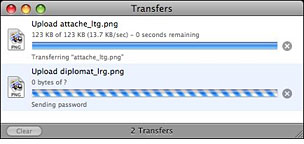 Interarchy's interface is highly functional, and
can display directory contents in icon, list, and column views - just
like the OS X Finder.
Interarchy's interface is highly functional, and
can display directory contents in icon, list, and column views - just
like the OS X Finder.
Formerly known as Anarchie and Anarchie Pro, Interarchy was one of
the very first Internet applications for the Mac, with a lineage going
back over a dozen years. Well over 100,000 copies have been sold, and
it received the 1999 and 2000 Macworld Editors' Choice Awards.
Interarchy currently has an estimated 650,000 users, and the Interarchy
User Group has an active user base of over 1,000 members, making it the
most popular software of its class.
Interarchy can use "Interfaces" (skins), providing a wide variety of
alternative control layouts. They can also provide customizable
application launchers for all your Internet programs, and they can use
URLs to control other programs, just like web pages. Interfaces are
versatile and flexible user interface elements and have diverse
applications.
If your FTP requirements are fairly basic (like mine are), the power
of Interarchy is arguably overkill, but in this instance the powerful
capabilities of this program are no hardship to have available - this
is not a complicated or ponderous application to use for simple FTP
uploads/downloads, and the speed is delightful. And if you're a heavy
FTP user, you really owe it to yourself to check out Interarchy.
I've been using Interarchy version 9 for several weeks now, and it's
still a smooth, fast, and reliable tool that does what I need it to do
with a minimum of hassle and bother - primary virtues in any software
application as far as I'm concerned. It's just better than it was
before.
Interarchy 9 requires Mac OS X 10.4.11 or later. Mac OS X 10.5 is
recommended. For more information on Interarchy, or to download a fully
functional trial version, please visit the Nolobe's website.
Interarchy 9 sells for $59, and registered owners of Interarchy
8.5.4 or earlier can upgrade for the discounted price of $29.
Go to the Miscellaneous Ramblings Review index.




