Because of the number of relatively large images
(especially in the Firefox section), this article has been split over
two pages. Safari, Opera, and iCab are covered on this page, and
Firefox 3 Beta 5 is covered on page 2.
We OS X users are truly privileged to have available such a rich and
varied selection of web browsers - most of them free. In some respects,
the browser wars are over in the sense that just about all of the
alternatives are now satisfyingly fast and stable, so choosing really
boils down to which set of features suits you best - or even which
interface you find easiest on the eyes.
Personally, I don't bother to choose. I keep at least three browsers
running most of the time, a mode that is facilitated elegantly by
OS X 10.5 Leopard's Spaces feature, and I don't always run the
same three.
Safari 3.1
My operational browser triad pretty well always includes Safari,
which I rarely used prior to the release of version 3, but which is now
so smoothly integrated with Leopard - and so fast and stable - that I
can't resist, even though I still think the interface appearance is as
dull as dishwater.
Safari is still a memory hog too, especially on middle-aged hardware
like my 1.33 GHz
PowerBook G4 with just 1.5 GB of RAM, and compared with the
slickness of Opera's and Firefox 3's respective session restore
features, Safari 3's version is clunky and inconvenient, requiring you
to manually execute the "Reopen All Windows from Last Session" command
hidden away in the History menu. I also dislike the page load progress
bar in the URL field, which just looks messy to me.
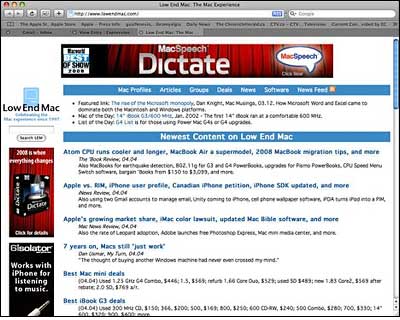
Apple claims that Safari 3.1 is the fastest browser currently
available, loading web pages 1.9 times faster than IE 7 and 1.7
times faster than Firefox 2, and running JavaScript up to six
times faster than other browsers. I'm not going to dispute that,
although all OS X browsers are fast these days.
Safari is the first browser to support the latest web standards
needed to deliver the next generation of interactive Web 2.0 features.
Where Safari does have substantial bragging rights is in how fast it
starts up, eclipsing all other browsers except iCab, which is about as
quick - and possibly faster out of the blocks.
Some folks have reported bugginess and instability with Safari 3.1
to a degree that MacFixIt has posted instructions for downgrading to
the previous version (not simple), but it's been completely stable and
reliable on my old PowerBook.
Safari 3.1 for Mac OS X requires Mac OS X Leopard or Mac
OS X Tiger version 10.4.11, a minimum of 256 MB of memory. It is
designed to run on any Intel-based Mac or a Mac with a PowerPC G3, G4,
or G5 processor and built-in FireWire.
Safari 3.1 is available as a free download for both Mac OS X and
Windows.
Link: Get Safari from
Apple
Opera 9.27
My other browser stalwart is Opera, version 9.27 of which was just
released last Friday. Opera is fast, I like the interface look and
layout, it's exceptionally stable, and it has some particular features
I find especially convenient, like the easy-access button that lets you
toggle image loading on and off without leaving the main window -
something that looms large when you're stuck with a bog-slow Internet
dialup connection like I am.
I also like the session restore feature that Opera pioneered, which
obviates the bother of manually reloading open website tabs after a
restart, and the fact that when I have a dozen or fifteen tabs loaded
in a single window, they all stay visible (albeit very tiny) rather
than confusingly scrolling out of sight as with Firefox and the other
Mozilla browsers. With my upgrade to Leopard, Opera used in this mode
has finally superseded my old WannaBe
text-only browser standby, which is Classic-only. Opera also has
what is in my estimation the best Download Manager in the category,
with a convenient interface and reliable pause and resume that can even
survive logging off the Web and back on.
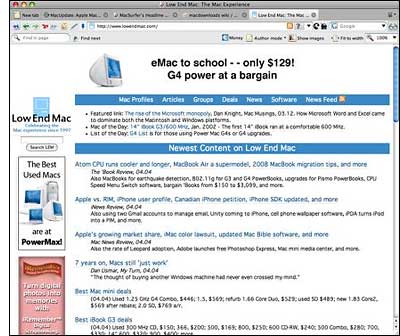
New in Opera version 9.27 for Mac:
- This release is a recommended security and stability upgrade.
Changes Since Opera 9.26
- Security
- Fixed an issue where newsfeed prompts could cause Opera to execute
arbitrary code, as reported by Michal Zalewski. See our advisory.
- Solved an issue where resized canvas patterns could cause Opera to
execute arbitrary code, as reported by Michal Zalewski. See our
advisory.
- Improved keyboard handling of password inputs, as reported by
Trystan S.
- Miscellaneous
- Fixed a BitTorrent transfer stability issue.
- Resolved stability issues with the Acid 3 test.
- Additional stability fixes.
- Mac-specific changes
- Fixed the print dialog on OS X (Leopard).
I downloaded version 9.2.7 on Friday and have been running it ever
since. No obvious differences with the last several 9.2.x builds, all
of which have been very polished performers, but the latest tweaks and
enhancements are probably to the good.
If I had to limit myself to one browser, Opera would be close to the
top, if not at the top of my short list, so I find it exceedingly
curious that according to the latest
Hitslink market share stats, Opera only has a measly 0.25% portion
of the pie. Folks, Opera merits much wider usage than it's getting. It
even has a built-in POP3 email client and BitTorrent client for folks
who like suite applications, and it's still smaller than most browsers.
[Editor's note: At Low End Mac, 1.5% of our pages are served to people
using Opera. dk]
Opera incorporates a full-featured POP3 email client, news reader,
mailing list organizer and RSS/Atom newsfeed reader, an IRC chat
client, and a BitTorrent client to download large files. It supports
Secure Socket Layer (SSL) version 3, and TLS 1.0 and 1.1, as well as
256-bit encryption, the strongest standard encryption for the Web.
Other features include mouse gestures, allowing you to perform certain
movements with the mouse to access commonly used features, and one of
Opera's coolest features is fast and easy Google search direct in the
address field: just type 'g "search term" (without the quotation
marks)' and press Enter. A Google search page of returns will appear.
Slick.
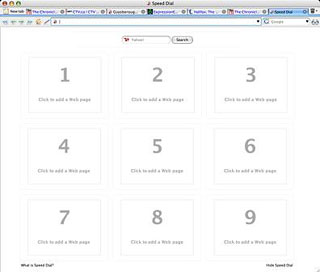
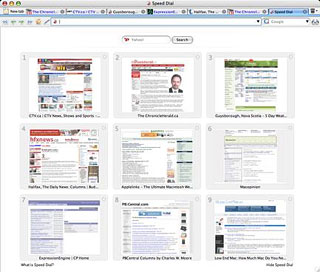
Speed Dial is an Opera feature that lets users transform their top
sites into nine visual bookmarks that are immediately available in any
new tab. With each blank tab, Speed Dial presents a thumbnail preview
of the top nine sites as selected by the user. In addition to fast
access through Speed Dial, users can also enter the number
corresponding with each bookmarked Speed Dial page in Opera's address
field to access the page. Every time you open a new tab, the Speed Dial
buttons will be displayed. You can, of course, also use the
conventional Bookmarks menu as well.
And that just scratches the surface. Opera is chock full of nifty
touches like that. You really have to use Opera for a while to truly
appreciate its capabilities, although the speed will be immediately
apparent.
Incidentally, importing your Bookmarks/Favorites from other browsers
is simplicity itself.
Link: Opera
iCab 4.0.1
Another browser I use a lot is iCab, which (at version 4.0.1) has
finally caught up with the pack in terms of speed. iCab has always had
a rich, innovative, and somewhat unique feature set. It is quite stable
and a very likable browser. It is also one of the last two browsers
that remain for-fee commercial software (the other is Omni Group's
OmniWeb), although there is still a free nagware version.
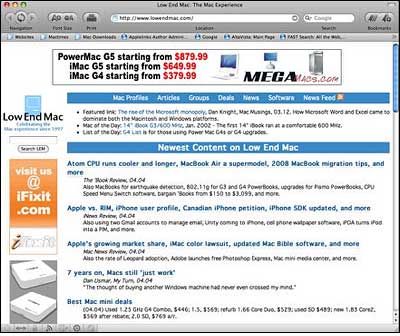
iCab developers Alexander Clauss and Oliver Joppisch have found ways
to inject even more rabbit elixir into version 4.0.1, and while I have
not conducted formal benchmarking, my gut tells me that it's now
playing in at least the same general neighborhood speed-wise as Firefox
and Safari.
The download file has grown from 3.8 MB for version 4.0 to 6.3 MB
with 4.0.1, so one can assume that there has been extensive tweaking,
and it has paid off in the speed department.
New in iCab 4.0.1:
- The GUI is now available in the following languages: Danish,
Norwegian, Russian, Chinese, Japanese, Spanish, German, English
- Since Mac OS X 10.4.11 the "Web Inspector" is now available
- Since Mac OS X 10.5 there are new menu items for PDF files in the
contextual menu available
- Since Mac OS X 10.4.11 TEXTAREA fields in web pages can be
resized
- It's now possible to use small icons in the browser toolbar
- Language-specific quote characters are now supported
- Many other improvements
- Many bug fixes
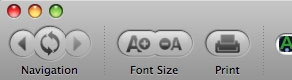 The original
iCab interface was clean and uncluttered, and in place of IE's and
Netscape's somewhat pretentious animated logos at the upper right of
the browser window, iCab featured a little animated cartoon car (cab)
driving through the window blowing puffs of cartoon smoke. A nice,
lighthearted, self-effacing touch, although it has been gone since iCab
3. I miss the little taxi, bit iCab 4's contemporary-looking
black-on-grayscale interface theme is attractive and functional enough,
but still distinctive. Here are the navigation buttons, which have a
somewhat innovative configuration.
The original
iCab interface was clean and uncluttered, and in place of IE's and
Netscape's somewhat pretentious animated logos at the upper right of
the browser window, iCab featured a little animated cartoon car (cab)
driving through the window blowing puffs of cartoon smoke. A nice,
lighthearted, self-effacing touch, although it has been gone since iCab
3. I miss the little taxi, bit iCab 4's contemporary-looking
black-on-grayscale interface theme is attractive and functional enough,
but still distinctive. Here are the navigation buttons, which have a
somewhat innovative configuration.
iCab has had a great feature set from the get go. It was highly
configurable with what was and arguably still is the best Preferences
in the industry, and its save function was also topnotch, with the
ability to save Web archives as well as HTML files and plain text. iCab
has also always had a good downloads manager and was one of the first
browsers to support tabbed browsing, with the best implementation of
tabs in the browser category, and Bookmarks . . . sorry
. . . the Hotlist are easily and intuitively manageable.
There's also the ineffable quality of "feel". I've always liked the
user experience with iCab. It was small, fast, lean, and nimble -
everything Netscape of the day and Internet Explorer weren't. Some
complained that the appearance theme was antiquated, but I always
thought it sort of charming, and iCab was one of the first browsers to
support appearance theme skinning, with a variety of downloadable
themes offered on the iCab Website.
System requirements:
- Mac with G3, G4, G5, or Intel processor
- Mac OS X 10.3.9 and newer. Mac OS X 10.4.x or 10.5.x recommended (a
few features won't work under 10.3.9)
iCab is $29.95 shareware.
Link: iCab
Go to Page 2 for Firefox 3 Beta 5
coverage.
Go to the Miscellaneous Ramblings Review index.



