Notwithstanding Steve Ballmer's bilious remonstrations, more and
more small businesses have been tossing their PCs and switching to
Macs, according to Jason R. Rich, author of
Mac
Migration: The Small Business Guide to Switching to the Mac,
the book that's the subject of this review, adding that reasons to make
the transition to Mac can be credited to more than just
advertising.
 "For years," Rich
says, "Apple was known for offering computers useful to students and to
creative people who dealt with graphics, animation, music and images.
But now, due to their ever-growing lineup of popular business-oriented
applications and their focus on compatibility, Apple's Mac computers
are now in high demand by business people working in all jobs and
industries."
"For years," Rich
says, "Apple was known for offering computers useful to students and to
creative people who dealt with graphics, animation, music and images.
But now, due to their ever-growing lineup of popular business-oriented
applications and their focus on compatibility, Apple's Mac computers
are now in high demand by business people working in all jobs and
industries."
Mac Migration's 350 pages are organized in 11 chapters, plus
a forward by AppleInsider Editor-in-Chief Kasper Jade, a preface, an
introduction, two appendices, and an index.
Fairly extensive preambles explore the general topic of how Macs are
now more appealing to business users than ever, setting the agenda for
Mac Migration to provide all of the information needed to make
the switch from Windows PCs as quick, effortless, and trouble-free as
possible, regardless of the reader's level of technical acumen.
The book's mission statement is to help the small business user to
choose what desktop or notebook computer is best suited to their
individual needs and budget, and help business users new to Macs
configure their systems and select and install the most suitable
software for their needs, to transfer critical data from the outgoing
PC to the Mac, and then get up to speed with proficiency and
productivity on the Mac as quickly as possible.
A Recent Convert
The author himself is a relatively recent convert from PCs to the
Mac, having only made the switch a couple of years ago.
As he relates: "About two years ago, my PC-based notebook computer
that ran Windows XP suddenly and unexpectedly crashed. Needless to say,
I wasn't happy. During the time I spent visiting computer retailers and
consumer electronics stores shopping for a new PC -based notebook
computer, I kept seeing those 'Get a Mac' ads, and they piqued my
interest. So I visited a local Apple Store, played around on a MacBook
for awhile, and ultimately took one home.
"I still relied heavily on my desktop PC to do my writing and
computer work, but while I was on the road, I used my Mac and found
that transferring data between the two computers that relatively easy.
About a year later I had to upgrade my desktop PC. Needless to say, my
first stop this time was my local Apple Store, where I tried their one
of the seek-looking on iMac desktop computers. Again, I was hooked
. . . Within a week, I gave my remaining PC-based computer
and have never looked back or regretted the decision."
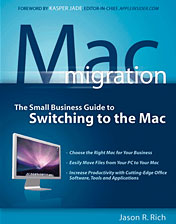
Mac Migration: The Small Business Guide to Switching to the
Mac is attractively designed with a very striking multi-blue cover
color theme, an easy-to-read page layout, lots of Mac Tips sidebars,
and plenty of screen shot illustrations.
- Chapter 1 is titled "Finding Your Inner Mac" and starts with a
basic crash tutorial on what's available in Mac hardware (up to the
book's mid-2008 publications date, so the MacBook Air is included, but
not the Unibody MacBooks or the most recent revisions of the iMac and
Mac Pro) and how to define your computer needs, tips on how and where
to purchase your new Mac, and where to find information and get
service.
- Chapter 2 assumes that you have made your hardware purchase and
gets down to business helping you with "Setting Up Your New Mac" -
everything from unpacking the new computer, using the Setup Assistant,
making sure you have the latest Mac OS X update, configuring the
machine and installing software, using the Finder and Dock, connecting
peripherals, and getting acquainted with your new Mac computer.
- Chapter 3, "Introduction to Mac OS X Leopard", focuses directly on
Mac OS X 10.5 in all its glory, noting that if you're already
familiar with Windows XP or Vista, the biggest challenge you will face
as a switcher is getting used to the Mac OS interface.
- Chapter 4, "Personalizing Your Mac Experience", goes about helping
you smoothly transfer your PC-based data to your new Mac, choosing the
right Mac software, and includes short tutorials on adding peripherals
and accessories.
- Chapter 5, "Transferring Your Data to a New Mac", observes that
most searchers will want to import data and files from their old PC. It
explains various methods of accomplishing this, from taking the machine
to the Apple Store and paying an Apple Genius to port your files to
doing it yourself via drag and drop/cut and paste. There is a section
on importing contacts and schedule data, using various file transfer
utilities (like O2M, iTornado, and Move 2 Mac), moving your email
archives, setting up iChat, and synching your iPhone, iPod, Blackberry,
or other smartphone/PDA.
- Chapter 6 has an "if you must" tutorial on "Running Windows
Programs on a Mac" - in particular Windows XP or Vista and associated
applications.
- Chapter 7 is all about "Address Book, iCal, and Safari", software
that comes bundled with OS X.
- Chapter 8 is essentially a tutorial on using Microsoft Office 2008
for Mac - Word, Excel, PowerPoint, Entourage, and Messenger - plus a
discussion of potential Office compatibility issues between the PC and
Mac editions of the software. There's also an introduction to Apple's
iWork '08 and the open source OpenOffice suites as business
productivity software alternatives.
- Chapter 9, "Apple iWork '08, iLife '08, and MobileMe", delves
deeper into the Apple office suite alternative, with tutorial sections
on the Pages '08 word processor and desktop publishing program, Keynote
'08 presentation software, the Numbers '08 spreadsheet program, as well
as the iLife suite of lifestyle applications - iPhoto '08, GarageBand
'08, iMovie '08, iWeb '08, and iDVD '08, plus Apple's new MobileMe
online service.
- Chapter 10 is "Additional Mac Software Ideal for Business
Professionals", including what are billed as "14 must-have
business-oriented software applications" for your Mac: Adobe Acrobat 8
Professional, Bento and FileMaker Pro 9, Endicia Postage Solutions,
iTunes, MacSpeech dictate, MacJournal 5, Neat Receipts for Mac,
PageSender, Personal Data Pro, Photoshop CS3 and Photoshop Elements 6,
QuarkXPress 7, QuickBooks for Mac and QuickBooks Pro, Stox, and
Skype.
- The last chapter of Mac Migration (chapter 11), "Backing Up
Your Critical Data", could be the most important chapter in the book,
so long as you heed its advice. It contains sections on using Apple's
Time Capsule, backing up to an external hard drive (my personal
favorite method), backup software solutions and remote backup options,
creating backup CDs and DVDs, and data restoration services and
software.
- Appendix A is a Record-keeper Worksheet to help track and record
your transition to the Mac with useful reference information.
- Appendix B is a brief discussion of Mac Compatible Apple
Alternatives - the controversial Psystar Open Computer Mac clone and
the not controversial (i.e.: Apple blessed) Axiotron Modbook tablet
computer, and also a glossary of "100 Mac-related Terms You Want To
Know". A seven-page Index finishes things out.
Mac Migration: The Small Business Guide to Switching to the
Mac manages to a pretty much cover all of relevant bases inside of
350 pages, and if you're making such a switch or just trying to figure
out whether it's the right alternative for your business, I think
you'll find it $17.95 will spent.
LEM rating: 3 out of 4.
This book is available at major bookstores and online booksellers,
including Amazon.com,
as well as from the publisher's website.
- Mac Migration
- Jason R. Rich
- October 2008
- Entrepreneur Press
- ISBN 13: 9781599182711
- ISBN 10: 1599182718 $17.95
Jason R. Rich is the best-selling author of more than 37 books that
cover a wide range of topics, including computers, ecommerce, personal
finance, career-related topics, travel and entertainment. He also
contributes regularly to major daily newspapers, including the New York
Daily News, as well as national magazines and popular websites.




