For the past dozen years or so, I've used a little
mini-database/notepad application called Notepad Deluxe as a place to park and organize
transient research data for work-in-progress articles and news stories.
NotePad Deluxe offers the advantages of having a compact interface
(important when you work on small laptops) and the happy facility to
store material in discrete notes that can be quickly accessed from a
column list of titles. It supports word search and basic text
editing.
Unfortunately, it's no longer being developed, and moving to an
Intel Mac from PowerPC a few months ago broke the application (it
starts and works, but the registration key refuses to stick through a
quit and restart), which put me in the hunt for a substitute.
What I've settled on is Peter Borg's freeware text editor Smultron, written in Objective-C
using Apple's Cocoa API, which is standing in for NotePad Deluxe quite
agreeably.
There are literally dozens of small text editing, data-parking, and
snippet-collecting solutions available for OS X, but what commends
Smultron for my particular requirements is that it displays all open
Smultron documents (the program can edit and save many different file
types as well as popular programming languages including C, C++, LISP,
Java, Python, Ruby, HTML, XML, CSS, and D) in a list with Quick Look
icons in a sidebar to the left of the main window, similar to the
iTunes interface, so you can easily switch between documents (you can
also choose to display them as tabs if you prefer).
Its user interface can be shrunk down to a scale that makes it
usable on my MacBook's 13.3" display with text wrapping, thus without
cramping functionality. The user interface window is clean and
functional and the button selections useful. The little wild strawberry
application icon is whimsically attractive as well!
I do miss NotePad Deluxe's database-type storage of notes. With
Smultron, each item is saved to the hard drive as a separate document,
which is more cluttered, but I can live with it.
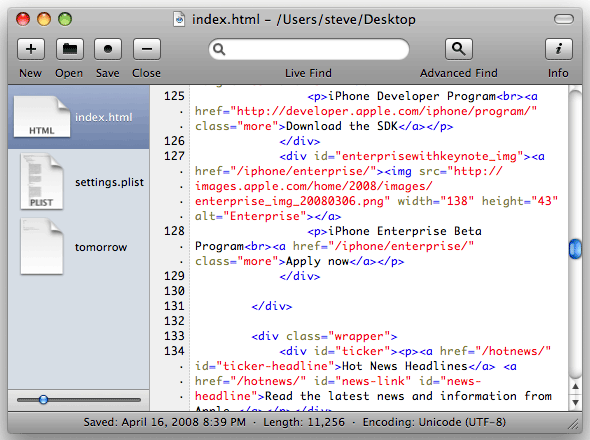
Smultron color codes your text, as in this HTML document.
Because Smultron is a full-fledged text editor, it has more
comprehensive and powerful word crunching capabilities than NotePad
Deluxe. For instance, it colors text content in different colors
depending on what the code does (for example, text between quotation
marks rendered in red), and works with OS X's Services menu and
built-in spell checker. You also have many ways to search for words,
including a quick entry search field always ready on the UI toolbar,
including multi-document find and replace with regular expressions, and
line numbers to help finding the text you're looking for. You can split
the window in two to display two parts of the same document or to
compare two different documents side by side or vertically stacked.
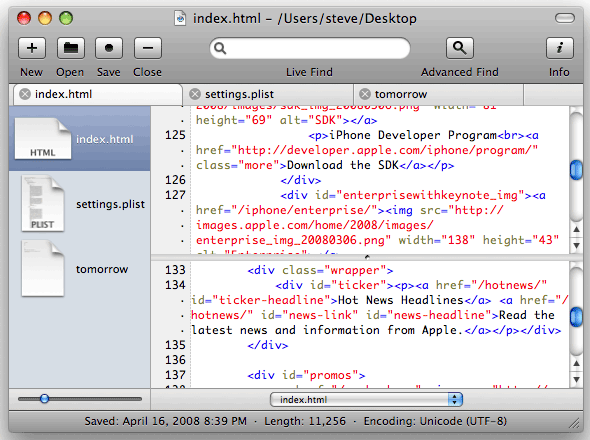
Smultron can split a pane to show two parts of the same document.
You can also preview HTML files directly in Smultron and save
snippets of text and insert them simply with a shortcut. And if you
don't want to be disturbed by other applications or the desktop, you
can let Smultron cover the whole screen to let you concentrate on your
work, although that's the diametrical opposite of the way I use
Smultron in a minimized window.
For the more advanced users, Smultron can find all those system
files that are normally hidden and can run commands and scripts. All of
Smultron's features are explained in a basic but thorough Help
document.
In more than three months of daily production use, I've found
Smultron stable and unbuggy, and I haven't found much to complain
about. A relatively minor issue is that for some reason, Windowshade X's windowshading
function does not work with Smultron, and double-clicking on the
Smultron title bar just collapses the open window to the Dock.
A deeper set of text cleaning and manipulation features would be
nice, as would easy AppleScriptability a la Tex-Edit Plus. However, Smultron is quick and
doesn't hog a lot of system resources, which helps make it easy to
like.
Smultron is released as open source freeware under an Apache
license, but if you find it useful, Peter Borg appreciates donations to
stimulate and help support further development of this application.
System requirements:
- Version 3.5.1 (latest): Mac OS X Leopard 10.5
- Version 3.1.2, Mac OS X 10.4.9 or later
- Version 2.2.7, Mac OS X 10.4.5 or later
- Version 1.2.7, Mac OS X 10.3.9 or later




