PowerBook, iBook, MacBook, and other portable computing is covered
in The 'Book Review. iPod, iPhone,
and Apple TV news is covered in The iNews
Review.
All prices are in US dollars unless otherwise noted.
News & Opinion
New Mac mini Rumors
Reviews
Products
Software
News & Opinion
Beginning of the End for the iMac?
The Standard's Ian Lamont says:
"Ten years ago, Apple released a product that marked the start of
its remarkable turnaround under Steve Jobs. The product was the iMac....
"Ten years later, the iMac has cemented itself in the Apple product
lineup . . . iMacs can now run Windows, and many owners do
just that to use Windows-only apps or play PC games....
"However, while Apple has been able to keep the iMac on the leading
edge of design and consumer demand, its future doesn't look so
bright....
"Even before the economic crisis hit, there had been an ongoing
shift to notebook computers. Apple's 2008 10-K reflects this - overall
Apple notebook sales more than doubled from 2006 to 2008, compared to a
70% rise in Apple's desktop sales....
"...the writing is on the wall. The iMac won't be able to survive a
recession, or the unstoppable trend toward cheaper, smaller, and more
powerful computing hardware."
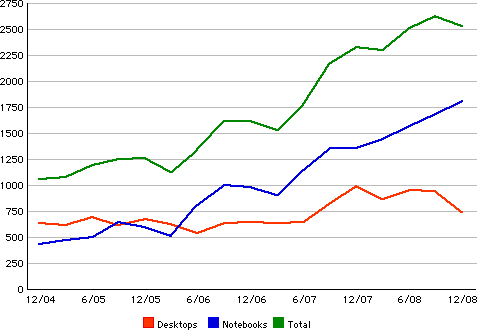
Macintosh Unit Sales, holiday quarter 2004 through holiday quarter
2008.
Editor's note: For our take on the "ongoing shift to notebook
computers", see Why Mac
Desktop Sales Are on the Decline. dk
Link: The
Beginning of the End for the Apple iMac?
The Best Mac Ever
Macworld's
staff says:
"The 25th anniversary of the Mac is bound to spark debates,
particularly when it comes down to the ultimate question for Mac
aficionados: Which system was the greatest Mac ever? We put that
question to five Mac luminaries, with a majority throwing their support
behind one system in particular - though not without some strong
dissenting opinions.
"Three out of our five experts came up with the same answer to our
question. The best Mac of the last quarter century is...."
The Macintosh SE/30 got
the nod from Adam C. Engst of TidBITS, Daring Fireball's John Gruber,
and John Siracusa - famous for his extremely thorough product reviews
on Ars Technica.
Which is not to say that's a universally-held opinion. Two Mac
experts offered their own picks for the greatest Mac: Macworld's
Christopher Breen voted for the Power
Computing PowerTower 180e, and veteran Mac commentator Andy Ihnatko
said the Macintosh
512Ke.
Link: The
Best Mac Ever
Opera Comes Out on Top in Web Browsers
Comparison
The
Atlanta Journal Constitution's Bill Husted says:
"...these days there are many choices when it comes to browsers, and
even casual Internet users should be aware of the alternatives.
"Beyond Microsoft's Explorer, the roster of major players now
includes Safari (from Apple but usable on PCs), Firefox (from Mozilla),
Chrome (a new entrant from Google) and Opera (from Opera Software). And
there are relatively obscure choices such as Camino, Epiphany and the
cute-sounding SeaMonkey....
"So I've spent some time with each of the major browsers to find my
favorites....
"Explorer seems - and tests back this up - downright slow vs. the
others....
"Subjectively, Opera felt the fastest of any of the browsers I used,
with Firefox, Chrome and Safari in the middle....
"Me, I wound up an Opera fan. It's fast and has features I like,
which make it my personal choice in the browser derby...."
Editor's note: Let me second that motion. Opera is the class of web
browsers, evidently on the PC (Mr. Husted) as well as the Mac.
cm
Link:
Web Browsers Compared; Opera Comes Out on Top
Will Obama Bring a Mac to the White House?
Cult of Mac's
Nicole Martinelli says:
"Barack Obama is a Mac. At least that's how the NYT described his
style, approach, manner - naming rival Hillary Clinton a PC about a
year ago.
"The soon-to-be 44th president of the United States, who addresses
citizens via YouTube and Twitter, is also a Mac user who has been
spotted flashing an iPhone, keeps up with his family via iChat, whose
'O' logo was designed on a Mac and whose campaign was powered by
MacBooks...."
Link: Will
Obama Bring a Mac to the White House?
3 Things OS X Should Learn from the Classic Mac
OS
Macworld asked
John Gruber of Daring Fireball to list some Classic Mac OS features
that Apple should revive in OS X. Here's what he came up with:
"WindowShade
"WindowShade debuted as a standard OS feature in System 7.5. (Before
that, it was available as a third-party system extension.) The idea was
simple: double-click in the title bar of any window, and that window
"rolled up" to show nothing but the title bar....
"Predictable Finder window behavior
"Before OS X, Apple had inherited two approaches to file management:
In the classic Mac OS Finder, each folder could be opened as one, and
only one, window, which always remembered its size, location, and
display options.
"File names were just names
"The rules for naming files in the classic Mac OS were wonderfully
simple. You weren't allowed to use a colon, and that was about it."
Editor's note: Let me say that I agree with John 1000% on all of
these points - and especially WindowShade. I struggled along with
Leopard for a few months before Unsanity Software got its wonderful
little lifesaver third-party add-on utility working with OS X
10.5, and it wasn't a happy experience. Collapsing files to the Dock is
just plain lame and so useless that I never use it. I still use Mac OS
Classic regularly in Classic Mode on my older computers, and its Finder
is still a treat to work with in several respects. cm
Link:
Three Things OS X Could Learn from the Classic Mac OS
New Mac mini Rumors
Next Mac mini to Be Based on Nvidia Ion
Tom's
Hardware's Tuan Nguyen says:
"A large portion of the Apple Mac community is waiting for Apple to
refresh the Mac mini line.
We learned today that the next generation of Mac mini computers will be
based on Nvidia's Ion platform.
"An Nvidia partner confirmed to us that Apple was the first to
receive samples of Nvidia's Ion platform, which we covered extensively
during CES. In fact, Apple received prototype units long before Nvidia
partners who opted to work on Ion. We're told that some partners still
only have blue prints of Ion.
"Apple's MacBook and MacBook Pro unibody notebooks already use
Nvidia's 9400M GPU for graphics duties, and this GPU is precisely what
Ion uses...."
Link: Apple
Mac mini to Be Based on Nvidia Ion
Apple Rumored to Adopt Nvidia's Ion Platform
AppleInsider's
Prince McLean reports:
"Based on reports from an unnamed Nvidia partner, a PC Enthusiast
website has controversially concluded that Apple's next Mac mini will
be use Nvidia's Ion platform, which pairs Nvidia's 9400M system
controller and integrated GPU with Intel's low power Atom
processor.
"Writing for Tom's Hardware, Tuan Nguyen said that Apple was among
the earliest recipients of Nvidia's Ion samples, reporting that the
company 'received prototype units long before Nvidia partners who opted
to work on Ion.' The article's headline calls the move to Ion in the
Mac mini 'confirmed,' but earlier reports from trusted sources seem to
conflict with this notion...."
Link:
Apple Rumored to Adopt Nvidia's Ion Platform
Mac mini Said to Get Ion Innards
Register Hardware's
Rik Myslewski reports:
"Courtesy of Tom's Hardware comes the 'confirmation' from 'an Nvidia
partner' that the long-awaited Mac mini upgrade is coming as soon as
March, but that it won't be powered by either an Intel Core 2 Duo or a
low-power Core i7.
"And no, it won't be an AMD chip.
"Instead, according to the rumor du jour, the Mac mini will
be based upon Nvidia's Ion platform, and will have at its heart an
Intel Atom processor....
"The Ion pairs the same Nvidia 9400M system controller cum graphics
processor that's in Apple's unibody MacBook and MacBook Pro lines with
Intel's Atom 330."
Link: Mac mini Said
to Get Ion Innards
Reviews
EFi-X USB V1 OS X on PC Machine Reviewed
Test Freaks
Blog report:
"Getting a stock x86 machine to be recognized as running EFI is the
Holy Grail of running OS X on a standard PC. If this could be
accomplished, then a purchased authentic copy of OS X can be
installed on a PC without any need for hacks or patches. Until
recently, the only way to get the Mac experience on a standard PC was
to hunt down patches to use with a purchased OS X install disc or
a patched OS X version. Finding these usually meant going to
torrent sites or other less savory parts of the net.
"That is until now; a company called Art Studios Entertainment has
created a Boot Processing Unit (BPU) called the EFi-X USB V1. This
device attaches onto an internal USB header on the PC's
motherboard.
"It works by running a version of EFI that lets OS X function on the
PC architecture. The EFi-X is composed of an embedded CPU with several
gigs of onboard memory, and a USB connector. It features its own
firmware, which is constantly being upgraded by the creators to improve
features and address any discovered hardware issues."
Link: EFi-X
USB V1 OS X on PC Machine Reviewed
Products
New Ergonomic Acer Monitors Designed Specifically
for Business Customers
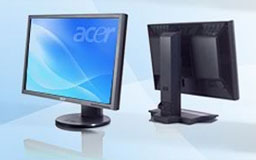
PR: Acer has announced two new models in its Business Series
(B Series) monitor line for professionals. The new Acer B Series
monitors - B233HU bmidhz and B273HU bmidhz - feature a stylish
ergonomic design and state-of-the-art features, making them perfect for
the office.
 "With these new monitors, Acer is continuing to provide our
business customers with products that offer advanced technology, assure
dependability and offer a positive return-on-investment," said Chris
White, Director of Product Marketing - Peripherals, Acer Group. "The
flexible adjustment and ergonomic design of the monitors maximize
productivity and increase overall user satisfaction."
"With these new monitors, Acer is continuing to provide our
business customers with products that offer advanced technology, assure
dependability and offer a positive return-on-investment," said Chris
White, Director of Product Marketing - Peripherals, Acer Group. "The
flexible adjustment and ergonomic design of the monitors maximize
productivity and increase overall user satisfaction."
Sleek Design and Advanced Features
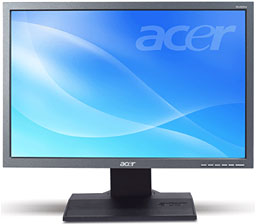
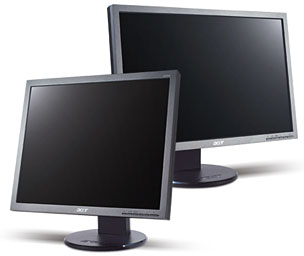
The new 23-inch and 27-inch Acer B Series monitors feature a stylish
dark grey bezel with a sturdy, black base. Control buttons on the front
panel allow easy and intuitive use while enhancing the monitors' sleek
look.
Both new monitors feature flexible height adjustment, tilt and
swivel, to optimize the best viewing angles. Users can tilt the
monitors 15° up or 5° down, swivel 35° to the right and
left, and adjust the height up to 11 cm. These new viewing angles are
not only great for a single user, but excellent for multiple people to
view content on the monitors, such as presentations or videos.
 The
new displays boast a 16:9 aspect ratio and a 2048 x 1152 resolution,
providing excellent high-definition picture quality and the ability to
multitask. The ultrahigh 2048 x 1152 resolution allows the monitors to
display two pages at the same time, presenting twice the length of a
web page on a 1024 x 768 resolution monitor. The 16:9 aspect ratio
allows professionals to view high-definition digital content without
image distortion that arises from incompatible aspect ratios.
The
new displays boast a 16:9 aspect ratio and a 2048 x 1152 resolution,
providing excellent high-definition picture quality and the ability to
multitask. The ultrahigh 2048 x 1152 resolution allows the monitors to
display two pages at the same time, presenting twice the length of a
web page on a 1024 x 768 resolution monitor. The 16:9 aspect ratio
allows professionals to view high-definition digital content without
image distortion that arises from incompatible aspect ratios.
Professionals can clearly view detailed images and crisp graphics
due to the system's 40000:1 (ACM) contrast ratio. The Acer Adaptive
Contrast Management (ACM) features advanced technology that allows
users to adjust images frame by frame to optimize contrast by enhancing
detail and gradation. Additionally, Acer ACM enables the new monitors
to use less power and save energy while providing a superior viewing
experience.
Both Acer B Series displays feature rapid 5ms response times for
viewing high quality moving images. The 23-inch model has a 300 cd/m2
brightness and the 27-inch has a 400 cd/m2 brightness, further
improving the visual performance of the two monitors.
Acer's unique software solutions boost usability. The eColor
Management onscreen interface allows users to tailor the performance
characteristics of the display, such as brightness, saturation and
contrast. The Empowering Key enables users to switch between viewing
scenarios and create their own to compensate for application and
environmental constraints. The eDisplay Management function is a
powerful color enhancement and display rotation tool.
Specifications, Pricing and Availability
 Acer's newest displays are available through authorized
resellers and online retailers. The B233HU bmidhz display is available
for an MSRP of $289 and the B273HU bmidhz display is available for an
MSRP of $409. Following are the featured configurations:
Acer's newest displays are available through authorized
resellers and online retailers. The B233HU bmidhz display is available
for an MSRP of $289 and the B273HU bmidhz display is available for an
MSRP of $409. Following are the featured configurations:
Acer B233HU bmidhz 23-inch LCD display: Available now for a MSRP of
$289
- 23-inch Widescreen
- 0.265mm Pixel Pitch
- 2048x1152 Maximum Resolution
- 62Hz (Maximum) Refresh Rate
- 5ms Response Time
- 40000:1 Max (ACM) Contrast Ratio
- 300cd/m2 Brightness
- 160° (H)/160° (V) Viewing Angles
- 16.7 Million Colors
- 6 + Hi-FRC Bits
- 1x HDMI, 1x DVI (HDCP), 1x VGA Inputs
- (2) 1.5 W Speakers
- Vesa 100mm Wall Mount
- Internal Power Supply
- Energy Star Compliant
Acer B273HU bmidhz 27-inch LCD display: Available now for a MSRP of
$409
- 27-inch Widescreen
- 0.291mm Pixel Pitch
- 2048x1152 Maximum Resolution
- 62Hz (Maximum) Refresh Rate
- 5ms Response Time
- 40000:1 Max (ACM) Contrast Ratio
- 400cd/m2 Brightness
- 160° (H)/160° (V) Viewing Angles
- 16.7 Million Colors
- 6 + Hi-FRC Bits
- 1x HDMI, 1x DVI (HDCP), 1x VGA Inputs
- (2) 1.5 W Speakers
- Vesa 100mm Wall Mount
- Internal Power Supply
- Energy Star Compliant
Link: Acer B Series
Monitors
Software
Eudora 8.0.0b5 Released
PR: Mozilla's Penelope Project has released the latest public
beta of their Thunderbird-clone Eudora 8 Open Source email client,
version 8.0.0b5 which is based on Thunderbird 3.0b1.
Eudora 8.0.0b5 includes the Penelope extension version 0.5a2. It's
been a long gestation, since the first beta of Penelope (Eudora
8.0.0b1) was released in September, 2006.
Whereas "Eudora" is a branded version of Thunderbird with some extra
features added by the Eudora developers, "Penelope" is an extension
(also called an "add-on") that can be used with either Eudora or
Thunderbird. The Eudora installer includes the corresponding version of
Penelope along with it so there is no need to install Penelope if you
are installing Eudora. Most features in Penelope can be accessed when
used with Thunderbird, but there are a few that require Eudora in order
to work correctly and it's not something that gets tested.
Changes in this version include:
Mailbox Window
- "Show message preview pane" setting added to Penelope pref panel.
If on (which it is by default), then the preview pane is shown at its
last saved position. If it's off then both the preview pane and the
splitter before it are hidden.
- Fixed bug where double-clicking on a mailbox in a folder view other
than "All Folders" (i.e. "Unread", "Recent", or "Favorites") would not
open the mailbox.
- Added prefs for opening mailboxes/messages in tabs rather than
separate windows.
- Fix for Bug 466046 - MsgOpenNewTabForMessage() broken when
specifying a message
- Added middle click to open folder/message in a tab.
- Fixed bug 429440 - Preview pane must be visible for tabs to
render.
- Tabs are now hidden in the Mailboxes window.
- Prevent opening windows in tabs in the Mailboxes window.
- Added mail.tabs.autoHide setting, which hides the tab if there is
just one in a window (default value is true).
- Fix for Alt+click for group selection causing the menu to get the
focus.
- Fixed bug where double-clicking on the scroll bar of the thread
pane would cause a message to be opened in a new tab.
- Fixed Transfer menu and Transfer mailbox buttons on toolbar.
- Added shift key modifier to the Transfer menu items and toolbar
buttons to do copy vs. move.
- Holding down alt/option when clicking on an open mailbox toolbar
button will now do a transfer.
- Keep thread pane scrolled to same place when switching tabs and
back.
Toolbars
- Fixes to Mac Customize Toolbar dialog to allow it to open multiple
times.
- Added "Cancel" functionality to the Customize Toolbar dialog on the
Mac.
- Added the Restore Default Set button to Windows and Linux Customize
Toolbar dialog.
- The default Penelope toolbar doesn't show text on the buttons, so
when restoring the toolbar to the default state set the mode to icons
only.
- Fixed bug 417081 - Send Later toolbar button mapped
incorrectly
Importing
- Extra settings now imported from Classic Eudora: default mail
check, mail check interval, skip big messages, skip big message
threshold, submission port send, and SSL send and receive.
IMAP
- Fix for Bug 369964 "subscribe to IMAP folders window doesn't allow
subscribing to folders below 2nd level". Turns out Exchange doesn't
like LIST commands without a trailing % on the path.
Miscellaneous
- Fixed open In/Out mailbox toolbar buttons.
- Added Babelfish language translation to the default list of
Selected Text URL tools.
Mac system requirements:
- Operating Systems - Mac OS X 10.4.x and later
- Minimum Hardware
- Macintosh computer with an Intel x86 or PowerPC G3, G4, or G5
processor
- 128 MB RAM (Recommended: 256 MB RAM or greater)
- 200 MB hard drive space
Link: Penelope
Desktop Mac
Deals
Low End Mac updates the following price trackers monthly:
For deals on current and discontinued 'Books, see our 13" MacBook and MacBook Pro,
MacBook Air, 13" MacBook Pro, 15" MacBook Pro, 17" MacBook Pro, 12" PowerBook G4, 15" PowerBook G4, 17" PowerBook G4, titanium PowerBook G4,
iBook G4, PowerBook G3, and iBook G3 deals.
We also track iPad,
iPhone, iPod touch, iPod classic, iPod nano, and iPod shuffle deals.



