All prices are in US dollars unless otherwise noted.
General Apple and Mac desktops is covered in The Mac News Review. iPod, iPhone, and Apple
TV news is covered in The iNews
Review.
News & Opinion
Apple Updates
Tech Trends
Products
News & Opinion
WiMax Option Likely for MacBook, MacBook Pro
Computerworld's Seth Weintraub reports:
"Over the weekend, the FCC leaked out a bit of exciting news. Intel
is soon releasing the 5350 WiFi/WiMax combo card that fits into Mini
PCI Express card slots.
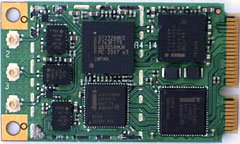 "To Mac hardware hackers this mini PCI slot card might look
very familiar. It has the same form factor as the WiFi cards in MacBook
and MacBook Pros.
"To Mac hardware hackers this mini PCI slot card might look
very familiar. It has the same form factor as the WiFi cards in MacBook
and MacBook Pros.
"Does this mean you will be able to swap out your WiFi Card for a
combo WiFi-WiMax card? Yes!"
Editor's note: WiMax is a long distance
wireless protocol that can deliver 10 Mbps performance at 6 miles/10 km
from a base station - and up to 70 Mbps at close range. dk
Link:
WiMax Option for MacBook and MacBook Pros
'My Next Notebook Might Not Be an Apple'
Green ZD Net blogger Heather
Clancy says:
"I'm thinking I owe GreenTech Pastures readers an update on the
state of my Apple PowerBook G4, which now is resting comfortably on the
desk behind me, although it's in a bit of rehab with some applications
that have disappeared. (Yes, I have two computers, so shoot me.) One of
them was given to me and is four years old, so I'm doing my part when
it comes to reuse. In any event, it seems as if disaster has been
averted, although I now have a new philosophy toward file management
and de-dupe after this scare.
"Nonetheless, I did some preliminary research on my options for
buying a new green notebook, because that seemed the right thing to do
as someone who is writing about green tech. And, to my dismay but not
really to my surprise, I found that Apple wouldn't meet my needs in
that department."
Link: Disaster Averted: But (Sob)
My Next Notebook Might Not Be an Apple One
Apple Laptops Require Just as Much Repair as
Everyone Else's
MacUser's
Cyrus Farivar reports:
"Granted, we're a little late to the game on this one, but Fake
Steve Jobs points us to a Consumer Reports piece on the computer
industry. The part that caught CNET's eye, though, was the section on
frequency of computer repair.
"So how does Apple stack up against Lenovo, HP, Dell and all the
rest? On this chart, it appears that Apple is down at the bottom. Not
so fast, turbo...."
Link: Consumer
Reports Says Apple Laptops Require Just as Much Repair as Everyone
Else's
Specing the Rumored MacBook Update
Ars Technica's
Charles Jade says:
"Another piece of the puzzle in the rumor about the redesigned
MacBook has fallen into place. AppleInsider, Macrumors, and pretty much
everyone starved for news on a Friday is mongering the latest gossip
from the Mac OS Rumors of Asia, DigiTimes.
"AU Optronics and Chi Mei Optoelectronics will evenly split the LCD
panel orders from Apple for the company's new MacBook consumer notebook
PCs to be launched in the third quarter, according to the
Chinese-language Commercial Times."
"An Apple Event introducing a substantially redesigned MacBook in
time for back-to-school shopping is a given, early August being likely.
The real news would be what that MacBook looks like...."
Link:
Specing the Rumored MacBook Update
MacBook Upgrade Set for Q3
9to5Mac's Andy
Space reports:
"Apple is moving toward the release of a redesigned MacBook, a new
report emanating from the company's Asian Mac manufacturers claims.
"AU Optronics Corp. and Chi Mei Optoelectronics Corp. have been
signed-up to produce flat-panel screens for the new MacBook models,
confirmed the Commercial Times this morning, citing 'sources'."
Link: MacBook Upgrade Set
for Q3
Apple Plots New MacBooks for Q3?
Macworld UK's
Jonny Evans says:
"Apple is placing orders with component manufacturers that suggest
updated MacBook models will ship in the third quarter....
"The news emerges as Mac industry chatter speculates Apple may have
a complete redesign of its consumer laptops planned, perhaps
introducing aluminium, rather than plastic, case designs."
Link: Apple
Plots New MacBooks for Q3?
AU Optronics, Chi Mei Optoelectronics Receive
MacBook Orders
MarketWatch
reports:
"Taiwan's top two flat-panel makers by revenue, have obtained
flat-panel orders for Apple Inc.'s new MacBook, the Commercial Times
reported Friday, citing industry sources."
Link:
AU Optronics, Chi Mei Optoelectronics Get Apple MacBook Orders:
Report
Hon Hai to Enter Contract Notebook PC Business
Reuters
reports:
"Taiwan's top electronics maker, Hon Hai Precision Industry Co.,
will soon enter the notebook contract manufacturing business, looking
to take a piece of the fast-growing sector, local media reported on
Monday.
"Hon Hai will join the business next year, the Commercial Times
quoted company chairman Terry Gou as saying, putting it in direct
competition with local players such as Quanta Computer and Compal
Electronics, the world's two largest contract laptop makers.
"Hon Hai counts Apple, Hewlett-Packard, Dell, and Nokia as major
clients...."
Link: Hon
Hai to Enter Contract Notebook PC Business - Report
LED Backlit Displays in All MacBooks by 2009
DigiTimes'
Yvonne Yu reports:
"Apple plans to use LED backlight units (BLUs) in all of its
MacBooks in 2009, which will benefit Taiwan-based BLU maker Kenmos
Technology, according to the Chinese-language Economic Daily News
(EDN).
"Kenmos was Apple's main suppler for LED BLUs in 2007, according to
the paper...."
Link: BLU LED Displays in
All MacBooks by 2009 - Paper
How to Cool Down Hot Laptops
A new MacFixIt
tutorial says:
"We previously reported on MacBook Airs that appear to be
overheating under various circumstances for some users, resulting in
freezes. Overheating laptops collectively represent a recurring theme
across Apple's line. We've gathered some tips for cooling the systems
down.
"For some users, laptops seem to get exceptionally hot with general
use, or when put to sleep. This happens randomly, though with ever
increasing frequency, and can lead to crashes or other faulty system
behavior. It is exceptionally important to deal with overheating, and
not allow your computer to get to the point where it is uncomfortable
to pick it up or hurts to the touch...."
Link: Hot
Laptops: How to Cool Them Down (subscription required)
Apple Updates
MacBook Air: Migration Tips and Tricks
A new Apple Knowledge Base
article says:
"Here are some things to consider before migrating data to your new
MacBook Air.
"Both the source and target computers must be plugged into power
prior to starting the migration process. Ensure both are plugged into
an AC outlet before you start.
"If you would like to reduce the amount of time required for system
migration, consider using a USB Ethernet adapter on your MacBook Air
and a wired Ethernet connection to your migration source for your data
migration. This should be faster than using a wireless connection. For
the best experience, be sure to attach your source and target computers
to the wired network before you start.
"If you are having issues with your Ethernet or wireless network,
another method that can be used for migration is Internet Sharing from
your source."
Link: MacBook Air: Migration Tips and
Tricks
Resetting a MacBook's System Management
Controller (SMC)
A new Apple Knowledge Base
article says:
"Learn more about the MacBook, MacBook Pro and MacBook Air's System
Manager and how to reset it.
"This article refers to Apple's Intel-based portables manufactured
February 2006 or later. For PowerPC-based products manufactured before
that date, see 'Resetting
PowerBook and iBook Power Management Unit (PMU)'.
"The System Management Controller is an integrated circuit (computer
chip) that is on the logic board of the computer. As the name implies,
it is responsible for power management of the computer. It controls
backlighting, hard disk spin down, sleep and wake, some charging
aspects, trackpad control, and some input/output as it relates to the
computer sleeping.
"Over time, the settings in the System Management Controller may
become unusable, which can result in operational anomalies with the
computer. Examples include not turning on, not waking from sleep, not
charging the battery, or not recognizing the AC Adapter, among
others."
Link: Resetting an
Apple Portable's System Management Controller (SMC)
Tech Trends
One Laptop Per Child Plans Next Generation
of Revolutionary XO Laptop
PR: One Laptop per Child (OLPC), a nonprofit organization
focused on providing educational tools to help children in developing
countries "learn learning," announced today that work is already
underway on a second- generation version of its revolutionary XO laptop
computer. Leveraging new advances in technology, the primary goal of
the "XO-2" will be to advance new concepts of learning as well as to
further drive down the cost of the laptop so that it is affordable for
volume purchase by developing nations.
 "Based on feedback from
governments, educators and most important, from the children
themselves, we are aggressively working to lower the cost, power and
size of the XO laptop so that it is more affordable and useable by the
world's poorest children," said Nicholas Negroponte, founder and
chairman of One Laptop per Child. "The delivery of the first generation
XO laptop has sparked tremendous global interest in the project and
provided valuable input on how to make the XO laptop an even better
learning tool moving forward."
"Based on feedback from
governments, educators and most important, from the children
themselves, we are aggressively working to lower the cost, power and
size of the XO laptop so that it is more affordable and useable by the
world's poorest children," said Nicholas Negroponte, founder and
chairman of One Laptop per Child. "The delivery of the first generation
XO laptop has sparked tremendous global interest in the project and
provided valuable input on how to make the XO laptop an even better
learning tool moving forward."
"One Laptop per Child and the XO laptop are crucial to the
fulfillment of the proposed UN Ninth Millennium Goal: to ensure that
every child between the ages of 6 and 12 has immediate access to a
personal laptop computer by 2015," said Nirj Deva, Member of the
European Parliament. "It's only through access to education that young
people will be able to develop the skills necessary to compete globally
and to develop the solutions required to break the cycles of poverty,
disease and malnutrition. Learning unites the child with the world,
binds the village into a community, and joins that community to the
global village."
The first generation XO laptop went into production in early
November 2007, and there are approximately 600,000 units in deployment
in a number of countries including Peru, Uruguay, Mongolia, Haiti,
Rwanda, Mexico, Cambodia, Ethiopia, Ghana, Iraq, Afghanistan, and the
US and Canada (as a result of the Give One Get One charitable giving
campaign that ran last November 12 - December 31, 2007). Key goals for
the XO-2 include:
- Cost Reduction - Set in early 2005, the original target price of
the XO laptop was $100. Although that target has not yet been met (it
is now at $188), it is clear that OLPC must aim for an even lower
target price of $75. New developments in display, processor and other
hardware and software technologies will make it possible to achieve the
$75 target in the future.
- Lower Power Consumption - While the first generation XO laptop
already requires just one-tenth (2-4 watts versus 20-40 watts) of the
electrical power necessary to run a standard laptop, the XO-2 will
reduce power consumption even further to 1 watt. This is particularly
important for children in remote and rural environments where
electricity is scarce or nonexistent. Lowering the power consumption
will reduce the amount of time required for children to generate power
themselves via a hand crank or other manual mechanisms.
- Smaller Footprint - The XO-2 laptop will be about half the size of
the first generation device and will approximate the size of a book.
The new design will make the XO laptop lighter and easier for children
to carry with them to and from school or wherever they go. The XO-2
will continue to be in a green and white case and sport the XO logo in
a multitude of colors that allow children to personalize the laptop as
their own possession.
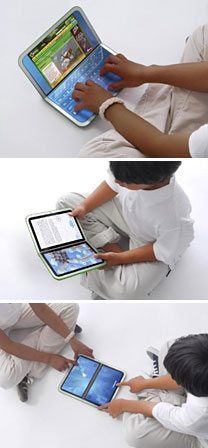
- Enhanced Book Experience - Dual-touch sensitive displays will be
used to enhance the ebook experience, with a dual-mode display similar
to the current XO laptop. The design provides a right and left page in
vertical format, a hinged laptop in horizontal format, and a flat
two-screen wide continuous surface that can be used in tablet mode.
Younger children will be able to use simple keyboards to get going, and
older children will be able to switch between keyboards customized for
applications as well as for multiple languages. The dual-touch display
is being designed by Pixel Qi, which was founded in early 2008 by Mary
Lou Jepsen, former chief technology officer of One Laptop per Children
and a leading expert on display technology.
"It's crucial that the design of the XO laptop produce something
that is both highly functional and a lot of fun for children to use,"
said Yves Behar, founder of the fuseproject, a San-Francisco-based
design and branding firm, and the industrial designer of the XO laptop.
"Children have an amazing capacity to let us know how they use the
laptop and what they want. The design of the next-generation XO is in
response to their passion for learning, for sharing with each other,
and for self-expression."
Availability of the XO-2 is planned for delivery in 2010. XO-1.5
will be released in the spring of 2009 with the same design as the
first generation but with fewer physical parts and at a lower cost than
XO-1.
About One Laptop per Child
One Laptop per Child (OLPC) is a nonprofit organization created by
Nicholas Negroponte and others from the MIT Media Lab to design,
manufacture and distribute laptop computers that are sufficiently
inexpensive to provide every child in the world access to knowledge and
modern forms of education. These XO laptops are rugged, open source,
and so energy efficient that they can be powered by a child manually.
Mesh networking gives many machines Internet access from one
connection.
Link: One Laptop per
Child
Enterprise SSDs to Match High-end Disk
Prices in 2010
The Register's
Austin Modine reports:
"EMC predicts the end is nigh for rotating drives dominating data
center storage.
"Speaking at EMC's annual conference in Las Vegas, David Donatelli,
boss of EMC's storage division said he expects enterprise solid state
drives to match the price of its spinning magnetic media counterpart
within only two years.
"'By 2010, flash will have reached parity with high-speed fibre
channel disks. The enterprise flash drive will significantly change the
way storage products are designed.'"
Link:
EMC: Enterprise SSDs to Match High-end Disk Prices by 2010?
Acer Aspire 16" and 18.4" Gemstone Blue
Notebook Series Available in North America
PR: Powered by Intel Centrino Duo processor technology, the
Aspire Gemstone Blue notebook series offers the latest dual-core
processing capabilities allowing users to effortlessly multitask.
Targeted for home users seeking Full HD, 16:9 entertainment with
centralized multimedia management, for gamers who want high-resolution
support with superior display quality, and for creative professionals
and SOHO users who require maximum multimedia resources and powerful
communication, the Aspire Gemstone Blue notebook PC series is an
excellent choice for everyone.
The 18.4" Aspire 8920 features:
- 2.6 GHz Intel Core 2 Duo Processor T9500
- Mobile Intel PM965 Express chipset
- 1 or 2 hard disk drives, up to 320 GB each
- Integrated Blu-ray Disc drive or 8X DVD Super Multi double-layer
drive
- 18.4" Full HD 1920 x 1080 resolution Acer CineCrystal display
- Discrete Nvidia GeForce 9650M GS or Nvidia GeForce 9500M GS
- 6-in-1 card reader
- Express Card/54 slot, HDMI port with HDCP support
- 802.11a/g/n WLAN, Bluetooth, gigabit LAN, V.92 modem, integrated
webcam
- Street price: $2,400
The 16" Aspire 6920 features:
- 2.5 GHz Intel Core 2 Duo Processor T9300
- Mobile Intel PM965 Express chipset
- Hard disk drive up to 320 GB
- Integrated Blu-ray Disc drive or 8X DVD Super Multi double-layer
drive
- 16" Full HD 1920 x 1080 resolution Acer CineCrystal display
- Discrete Nvidia GeForce 9500M GS
- 6-in-1 card reader
- Express Card/54 slot, HDMI port with HDCP support
- 802.11a/g/n WLAN, Bluetooth, gigabit LAN, V.92 modem, integrated
webcam
- Street price: $1,850
Both the Aspire 8920 and Aspire 6920 notebooks include the second
generation Dolby Home Theater technology with powerful audio
technologies - CineSurround, Tuba CineBass booster, and up to five
integrated speakers for True5.1 sound output - the new standard for the
notebook sound and the ideal choice for Full HD movies and gaming.
The Aspire Gemstone Blue notebooks ship with Microsoft Windows Vista
Ultimate or Windows Vista Home Premium preinstalled. Additional
installed software includes Acer Empowering Technology (Acer eAudio,
ePower, eDataSecurity, eRecovery, eSettings Management), Acer Arcade
Deluxe featuring Cinema, Album, Music, Acer HomeMedia, Acer InstantOn
Arcade; Acer Bio-Protection; Acer Crystal Eye; Acer GridVista; Acer
Launch Manager; Acer GameZone; Acer Video Conference Manager; Acer
Video Conference Manager featuring Video Quality Enhancement (VQE);
Adobe Reader; CyberLink PowerDirector trial version; Norton Internet
Security; NTI Media Maker; Microsoft Works 9.0 with Office Home and
Student 2007 Trial.
The new Aspire Gemstone Blue notebooks are now available through
Acer authorized resellers and selected retailers throughout North
America, with pricing beginning at $1,299 for the 1.83 GHz Aspire 8920
and $849 for the 1.83 GHz Aspire 6920.
[Editor's note: Be sure to read today's MacBook Holds Its Own Against
Dell and HP Notebook Pricing to understand how the PC industry
markets such inexpensive notebooks by providing lots of affordable
options that eventually put them in the same price range as Apple's
MacBooks. dk]
All Acer notebooks come with a standard one-year parts and labor
warranty, which includes concurrent International Traveler's Coverage
that can be extended to three years with the Acer Advantage service
that also covers accidental damage to the notebook. Additionally, all
Acer notebooks are backed by toll-free service and support.
Products
FastMac U-Charge Universal Battery Charger
for Apple Notebooks
PR: FastMac has announced "U-Charge," a universal battery
charger for multiple Apple laptops including iBooks, MacBooks &
PowerBooks. The new U-Charge works externally & connects directly
to the battery's terminals to recharge the battery quickly and
efficiently, 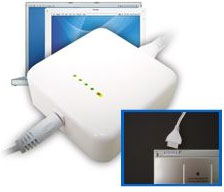 without
the need for a laptop. Batteries from multiple Apple laptops can be
recharged using this single, compact, lightweight and portable charger.
FastMac's U-Charge is scheduled to ship within 30 days and can be
preordered from fastmac.com for a special introductory price of $69.95.
Each U-Charge carries a 1-year warranty and a 30-day money back
guarantee.
without
the need for a laptop. Batteries from multiple Apple laptops can be
recharged using this single, compact, lightweight and portable charger.
FastMac's U-Charge is scheduled to ship within 30 days and can be
preordered from fastmac.com for a special introductory price of $69.95.
Each U-Charge carries a 1-year warranty and a 30-day money back
guarantee.
"U-Charge simplifies the battery charging process for those who have
more than 1 battery or more than 1 type of Apple laptop," said Michael
Lowdermilk, Business Development Manager of FastMac Performance
Upgrades, Inc. "This may very well be the last battery charger you will
ever buy."
Specifications
FastMac's U-Charge is a 45W external battery charger that connects
directly to the battery's terminals to recharge batteries quickly and
efficiently, in some cases faster than Apple's AC adapters. Unlike
other external battery chargers 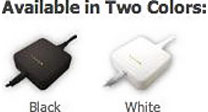 that are powered by higher wattage
AC adapters, the energy efficient U-Charge supplies exactly the power
needed to charge only the battery, bypassing the need to power the
laptop. Its main housing features battery indicator charge LEDs that
mirror Apple's own battery charge indicators- with one glance, you can
quickly determine the charge status & battery level. Like all of
FastMac's TruePower products, each U-Charge is individually tested and
includes safety features to protect against overcharge, overheating,
short circuits and power surges. Weighing in at less than 6 ounces and
with dimensions that match those of the Apple AC adapter, FastMac's
U-Charge is the 1st external battery charger that can truly be called a
portable battery charger.
that are powered by higher wattage
AC adapters, the energy efficient U-Charge supplies exactly the power
needed to charge only the battery, bypassing the need to power the
laptop. Its main housing features battery indicator charge LEDs that
mirror Apple's own battery charge indicators- with one glance, you can
quickly determine the charge status & battery level. Like all of
FastMac's TruePower products, each U-Charge is individually tested and
includes safety features to protect against overcharge, overheating,
short circuits and power surges. Weighing in at less than 6 ounces and
with dimensions that match those of the Apple AC adapter, FastMac's
U-Charge is the 1st external battery charger that can truly be called a
portable battery charger.
Compatibility
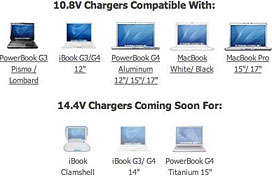 FastMac's
U-Charge Universal Battery Charger is compatible with the following
Apple laptop computers:
FastMac's
U-Charge Universal Battery Charger is compatible with the following
Apple laptop computers:
- iBook G3 12-inch
- iBook G4 12-inch
- MacBook 13-inch
- MacBook Pro 15-inch
- MacBook Pro 17-inch
- PowerBook G3 Bronze (Lombard)
- PowerBook G3 Pismo
- PowerBook G4 12-inch
- PowerBook G4 15-inch
- PowerBook G4 17-inch
Link: FastMac
U-Charge Universal Battery Charger for Apple Laptops
Slim External USB 2.0 SuperDrive Alternative
for MacBook Air, Other Notebooks
PR: Very compact and less than 2 cm thick, easily
transportable, this slim external DVD burner is the perfect companion
for your laptop. It's ideal for a MacBook Air, which does not have an
internal drive, but also works with any other portable computer, which
Apple's external MacBook Air optical drive doesn't.
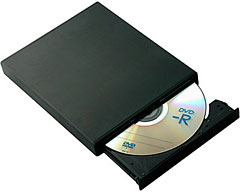
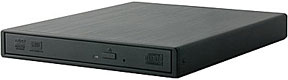 With its fast USB 2.0 interface and
internal mechanical Panasonic UJ-870 mechanism, you can rapidly burn
DVDs (including multilayers) and CDs. The recorder has a tray load,
which also allows it to read and write mini CDs and 8 cm DVDs.
With its fast USB 2.0 interface and
internal mechanical Panasonic UJ-870 mechanism, you can rapidly burn
DVDs (including multilayers) and CDs. The recorder has a tray load,
which also allows it to read and write mini CDs and 8 cm DVDs.
The drive's aluminum body is both elegant and robust and enjoys
excellent heat dissipation, will provide excellent lifetime and
reliable burning.
Offering high performance, this recorder supports both Macs and PCs
and can be an indispensable tool for mobile users.
 Specifications:
- Supported by Mac OS X 10.5 (or via downloadable PatchBurn for earlier versions of Mac OS
X)
- aluminum
- USB 2.0 Interface
- Compatible with 8 and 12 cm CD and DVD
- Mechanics: Panasonic DVD burner UJ-870
- Speeds burning: 8x DVD-R, DVD + R 8x, 6x DVD-RW, 8x DVD + RW, DVD +
/-DL 6x, DVD-RAM 5x, 24x CD-R, CD-RW 24x
- I/O: via one or two USB plugs (cables), according to the computer
model, no AC adapter (but sold as an option in case your USB 2.0 ports
will absolutely not bus power)
System requirements:
- 1 or 2 USB 2.0 ports depending on the type of computer (one port
for example MacBook Air, which delivers enough power)
- Operating systems: Mac OS X 10.2 (Jaguar) | Mac OS X 10.3 (Panther)
| Mac OS X 10.4 (Tiger) | Mac OS X 10.5 (Leopard) | Windows XP |
Windows 2000 | Vista
Specifications:
- Interface: USB 2.0
- Ports: 1 x USB B
- DVD: 8x
- Read/write CD: 24x
- Types of recordable discs: CD-R | CD-RW | DVD + R | DVD + R DL |
DVD + R9 | DVD + RW | DVD-R | DVD-R DL | DVD-RAM | DVD-RW | DVD-RW
DL
- Dimensions (LxWxH): 168 mm | 136 mm | 20 mm
- Net Weight: 513g
Unit prices sliding scale (Quantity/Price):
- 1/74.00 euro TTC (US$117.75 at today's exchange rate)
- 2/70.84 euro TTC
- 5/69.25 euro TTC
- 10/67.67 euro TTC
- 20/64.51 euro TTC (US$101.78)
For more information, visit (site in French - use machine
translation):
Link:
Graveur DVD Slim Externe USB 2.0 (mécanique UJ-870) (site in
French - use machine translation)
Cool Feet for Your Laptop
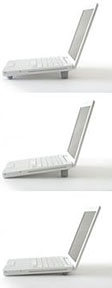 PR:
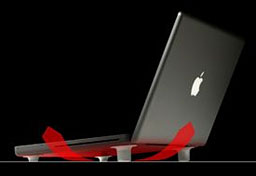
BlueLounge designed Cool Feet as compact and removable supports that
temporarily fix to the bottom of your laptop with suction cups.
Elegant, simple to attach and detach, they raise the laptop just enough
to allow a constant cooling airflow
PR:
BlueLounge designed Cool Feet as compact and removable supports that
temporarily fix to the bottom of your laptop with suction cups.
Elegant, simple to attach and detach, they raise the laptop just enough
to allow a constant cooling airflow
 No doubt about it laptops get
hot, often very hot. So hot in fact that manufacturers like Apple now
prefer the term "notebook" or "portable computer" since you can't use
them on your lap without a risk of injury.
No doubt about it laptops get
hot, often very hot. So hot in fact that manufacturers like Apple now
prefer the term "notebook" or "portable computer" since you can't use
them on your lap without a risk of injury.
In search of the simplest possible design solution to this dilemma,
BlueLounge designed Cool Feet as compact and removable supports that
temporarily fix to the bottom of your laptop with suction cups.
Elegant, simple to attach and detach, they raise the laptop just enough
to allow a constant cooling airflow.
Not only do Cool Feet raise your laptop for cooling, they also
create a comfortable ergonomic angle for the keyboard. In fact, this
bonus feature is one many of our users appreciate the most. After
typing on an angled keyboard, it's really hard to go flat again.
 Find Your Best Angle - The
Cool Feet package includes two tall feet and two short feet allowing
user customization in three different angles and positions.
Find Your Best Angle - The
Cool Feet package includes two tall feet and two short feet allowing
user customization in three different angles and positions.- How It Works - Cool Feet attach directly to any laptop with a
smooth underneath surface such as an iBook. For all others, BlueLounge
includes four ultra-thin clear smooth adhesive plates to be glued under
the computer to which suction cups will latch tightly, while remaining
easily removable.
- To remove, simply pull the small tab then store the feet until
required in the provided carrying pouch.
- USB powered cooling pads, cooling trays and cooling stands can be
noisy, bulky and not very portable. Cool feet are the total opposite,
small, silent and handy.
$12.95
Link: Cool Feet
Logitech V450 Cordless Laser Mouse for
Notebooks
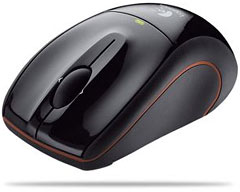 PR: You're always on the go, always
looking for the next opportunity. With its laser precision, 12 months
battery life, and ergonomic design, the V450 Nano gives you everything
you need to get the job done.
PR: You're always on the go, always
looking for the next opportunity. With its laser precision, 12 months
battery life, and ergonomic design, the V450 Nano gives you everything
you need to get the job done.
Be more productive.
- Laser precision: Enjoy smoother cursor control on virtually any
surface (Laser sensor does not work on mirrors or clear glass). The
V450 Nano outperforms ordinary optical mice.
- Powerful, reliable connection: Logitech's advanced 2.4 GHz wireless
dramatically reduces interference with 300 times faster data
rate.**
- Virtually no delays or dropouts. Enjoy all the benefits of a cord
with the convenience of cordless.
- 12 months battery life: Minimizes hassle and helps you stay more
productive.
- Convenient on/off switch saves even more power.
- Battery-indicator light eliminates surprises.
 Be more mobile.
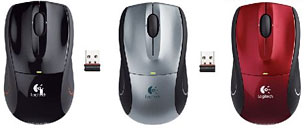
- Plug-and-Forget Nano-receiver: Barely larger than a coin - the
Nano-receiver is so small that once you plug it into your notebook, you
can forget about it. Your mouse is always ready to use.
- Storable Nano-receiver: Store the Nano-receiver inside the mouse,
if necessary. When stored inside the battery compartment, the mouse
turns off automatically.
Be more comfortable.
- Sculpted, ergonomic design with soft rubber grip: Work longer in
more comfort.
- Sculpted keys: Position fingers naturally.
The Logitech V450 Cordless Laser Mouse for Notebooks sells for
$49.99.
Link:
Logitech V450 Cordless Laser Mouse for Notebooks
Marware CEO Envi Leather Slipcase for
MacBook Air
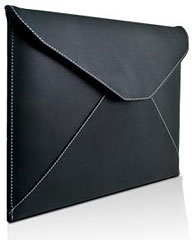 PR: Marware Inc., designer and manufacturer of
innovative products for the Apple market, announces the CEO Envi for
MacBook Air. The CEO Envi is the ultimate in luxury for the MacBook
Air. Top quality leather, a premium finish and sleek profile, gives the
Envi its visual appeal.
PR: Marware Inc., designer and manufacturer of
innovative products for the Apple market, announces the CEO Envi for
MacBook Air. The CEO Envi is the ultimate in luxury for the MacBook
Air. Top quality leather, a premium finish and sleek profile, gives the
Envi its visual appeal.
The soft-lined interior hugs the MacBook Air and reduces smudges and
fingerprints associated with normal use. The Envi is lightweight and
ideal for hand-carrying. It also protects the MacBook Air when placing
it inside a briefcase, messenger bag or travel case.
 Features include:
- Smooth, black leather sleeve with with white stitching
- Secure magnetic closure system
- Ultra-sleek and lightweight
- Snug fit without added bulk
"This sleeve is as amazingly thin as the MacBook Air," said Jose
Fuentes, Sales Executive for Marware Inc., "and the premium black
leather is the perfectly stylish companion for your ultra-thin Apple
notebook."
The CEO Envi is available in black smooth leather, with white
stitching. It retails for $89.99 and is available for purchase online
or select retail stores. Marware is a leading provider in Laptop,
iPhone, iPod Cases, Clips and Accessories.
Link: CEO
Envi Leather Slipcase for MacBook Air
Up to 1 TB Storage Now Available Inside
Your MacBook, MacBook Pro, or PowerBook G4
w
PR: The
new MCE OptiBay Hard Drive was created for users who want as much hard
drive space as possible inside their MacBook Pro, MacBook, or PowerBook
G4....
The new MCE OptiBay Hard Drive was created for users who want as
much hard drive space as possible inside their MacBook Pro, MacBook, or
PowerBook G4 . . . period. The MCE OptiBay Hard Drive
replaces your machine's internal SuperDrive with a high performance
hard drive. Now you can have unheard of capacities in laptop disk
storage space for everything you need to store . . . digital
video, music, photos, etc. Two bootable hard drives inside your system
provide a freedom and flexibility never before experienced in a Mac
laptop... have one disk a scratch disk and the other your
system/applications disk, RAID configurations, one disk Mac and the
other PC, extra music storage for digital DJ's, and more. Plus, you
have the option of including an external SuperDrive or optical drive
enclosure for your removed SuperDrive or Combo drive so you'll still
have CD/DVD read/write functionality anytime you want for loading
system software or applications, as well as burning, playing, or
ripping CDs and DVDs.
Take your SuperDrive out and put an OptiBay Hard Drive in and give
yourself up to an extra 500 GB of high performance hard drive space to
use however you'd like. Combine it with up to a 500 GB internal hard
drive and find out what a dream it is to have up to 1 TB of hard
drive space inside your laptop.
OptiBay Hard Drive At a Glance
- Up to 500 GB additional internal hard disk storage
- Up to 1 TB total internal hard disk storage!
- Can be used as an individual volume, as part of a RAID array, or
combined with internal hard drive as one very large volume
- Bootable
- Easy setup using Apple's Disk Utility program
- Negligible impact on battery life
- S.M.A.R.T. drive status compliant
- Optional FireWire SuperDrive or optical drive enclosure
- 3 Year Warranty
- OptiBay: 100% MCE Support
The MCE OptiBay Hard Drive is a high performance laptop hard drive
inside a specially designed, lightweight case that's been engineered to
the exact same dimensions as your laptop's SuperDrive or Combo drive.
We made the case so lightweight, in fact, that replacing your optical
drive with an MCE OptiBay Hard Drive will actually shave up to a
quarter pound off the weight of your MacBook Pro, MacBook or PowerBook
G4! Besides just appearing different, laptop optical drives and hard
drives have very different data connectors as well, so an adapter was
developed allowing the hard drive to communicate with your MacBook Pro,
MacBook, or PowerBook G4 through the optical drive connector on the
motherboard. Since they already speak the same language, ATA, not one
bit of speed or performance is lost in adapting the drive's
connector.
Features:
- Capacities of 100 GB, 120 GB, 160 GB, and 250 GB
- High Performance Spindle Speeds of 5400 RPM and 7200 RPM
- Bootable
- S.M.A.R.T. Status Compliant
- Sets up easily using Apple's Disk Utility program
- Can be set up as a single volume, partitioned, or made part of RAID
array
- External Enclosure for SuperDrive or Combo drive compatible with
iDVD, DVD Studio Pro, iTunes, iPhoto, and Finder Burning
- Compatible with All MacBook Pro, MacBook and PowerBook G4
Systems
The MCE OptiBay Hard Drive is compatible with the 17" and 15"
MacBook Pro, the 13.3" MacBook and also the 17", 15", and 12" Apple
PowerBook G4.
System Requirements: MacBook Pro (15" or 17") or MacBook (13.3")
running Mac OS 10.4.x or later. PowerBook G4 (12" Aluminum, 15"
Aluminum or Titanium, or 17" Aluminum) running Mac OS 9, Mac OS 10.2,
Mac OS 10.3, Mac OS 10.4 (or later) Full Disc Burning compatibility
with FireWire or USB 2.0 enclosure requires Mac OS 10.4 or later.
PowerBook G4 15" Titanium DVD-ROM only drive not compatible with
FireWire Enclosure.
Order direct from MCE 24-hours a day, or call 1-800-5000-MAC.
OptiBay Hard Drive At a Glance
- Up to 500 GB additional internal hard disk storage
- Up to 1 TB total internal hard disk storage!
- Can be used as an individual volume, as part of a RAID array, or
combined with internal hard drive as one very large volume
- Bootable
- Easy setup using Apple's Disk Utility program
- Negligible impact on battery life
- S.M.A.R.T. drive status compliant
- Optional FireWire SuperDrive or optical drive enclosure
- 3 Year Warranty
- OptiBay: 100% MCE Support
Link: MCE
OptiBay Hard Drive
OWC Announces Lowest-cost Mercury On-the-go
FireWire + USB 2.0 Portable Storage Drives
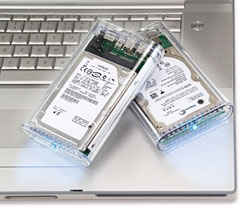 PR: Other World Computing has announced the lowest cost
line of OWC Mercury On-The-Go FireWire + USB 2.0 storage drives, with
500 GB capacity priced at $329. The new line of OWC Mercury On-The-Go
high-performance FireWire 400 + USB 2.0 drives are fully bus powered
with no additional external power or secondary powering cable
required.
PR: Other World Computing has announced the lowest cost
line of OWC Mercury On-The-Go FireWire + USB 2.0 storage drives, with
500 GB capacity priced at $329. The new line of OWC Mercury On-The-Go
high-performance FireWire 400 + USB 2.0 drives are fully bus powered
with no additional external power or secondary powering cable
required.
Immediately available and priced starting at $95.99, the Mercury
On-The-Go portable drive is a palm-sized performer with a huge capacity
up to 500 GB that fits in a shirt pocket. Built with the latest
reliable, high-performance drive mechanisms and interfaced with OWC's
custom bridge solution featuring the Oxford chipset, the Mercury
On-The-Go is the portable solution you can count on.
Pricing for OWC Mercury On-the-Go FireWire + USB 2.0 models:
- 40 GB 5400 RPM $ 95.99
- 80 GB 5400 RPM $109.99
- 120 GB 5400 RPM $119.99
- 160 GB 5400 RPM $129.99
- 250 GB 5400 RPM $157.99
- 320 GB 5400 RPM $179.99 - NEW
- 500 GB 5400 RPM $329.99 - NEW
- 100 GB 7200 RPM $139.99 - NEW
- 200 GB 7200 RPM $189.99 - NEW
Built for the "On-The-Go" Road Warrior
Geared to the demanding "on-the-go" professional road warrior that
requires dependable, high-performance storage, OWC Mercury On-The-Go
portable drives are compatible with virtually all computers with an
available FireWire or USB port, including all Macs and PCs. They also
work with all FireWire and USB gadgets, including digital cameras,
camcorders, and other gear, for an instant on-the-go portable storage
solution to quickly and safely store all your digital photos and video
while on the road.
Bring Your Computer Everywhere You Go
With the Mercury On-The-Go, you can back-up your entire desktop
computer and bring it with you everywhere you go. For easy backup, the
drive also includes the full retail software versions of the latest
award-winning Prosoft DataBackup III for OS X and NovaStor NovaBackup
for Windows. In addition, the Mercury On-The-Go is "Time Machine"
ready, meaning that it keeps an up-to-date copy of all of your files
and documents under OS X Leopard™, so you can go back in time,
anytime, to recover anything with ease.
All Mercury On-The-Go portable drives are available immediately
through OWC and other retailers. The drives ship with a carrying case;
cables for all interfaces supported by Mercury On-the-Go models;
Prosoft DataRescue III for OS X; and NovaStor NovaBackup for Windows.
All portable drives are covered by a one-year warranty and are
compatible with Apple OS Versions 8.5 through 9.2.x; Apple OS X 10.0.3
and higher (including the latest OS 10.5.x); and Microsoft Windows
98SE, ME, 2000, XP, and Vista.
Special OWC Exclusive Hitachi Rebate is available now and through
May 23rd on all OWC Mercury On-The-Go 200 GB 7200 RPM Models. Save an
additional $30 per unit on up to 5 drives on qualifying purchases.
Qualifying models and more information online.
Link: OWC Mercury
On-the-go FireWire + USB 2.0 Portable Drives
Bargain 'Books
Bargain 'Books are used unless otherwise indicated. New and
refurbished units have a one-year Apple warranty and are eligible for
AppleCare.
There are two different versions of WallStreet running at 233 MHz,
the cacheless MainStreet version and the
later Series II with
a level 2 cache. It's not always possible to determine from the
vendor's listing which is being offered, so we've included links within
this paragraph to the two models. The same goes for the PowerBook G4/667 (VGA) and
G4/667 (DVI), the
titanium vs. aluminum 15" PowerBook G4 at 1 GHz, and 1.25 GHz to 1.5
GHz 15" PowerBooks.
PowerBook, iBook, and MacBook profiles linked in our Portable Mac Index.
New this week; a $50 price drop on the 15" 2.4 GHz Penryn MacBook
Pro model, $100 lower for the 2.5 GHz model, and $100 lower on the 17"
2.4 GHz MacBook Pro. The three Penryn MacBooks offered are also down
$50, as are 2.2 GHz Santa Rosas. Each model comes with an Apple
one-year warranty, and ground shipping is free.
- refurb 2.1 GHz Penryn MacBook, white, 1 GB/120/Combo, $949
- refurb 2.2 GHz Core 2 MacBook, white, 1 GB/120/SD, $9999
- refurb 2.4 GHz Santa Rosa MacBook, white, 2 GB/160/SD, $1,099
- refurb 2.4 GHz Santa Rosa MacBook, black, 2 GB/250/SD, $1,299
- refurb 15" 2.4 GHz Core 2 MacBook Pro, 2 GB/160/SD, $1,699
- refurb 15" 2.5 GHz Core 2 MacBook Pro, 2 GB/250/SD, $2,149
- refurb 17" 2.4 GHz Santa Rosa MacBook Pro, 2 GB/160/SD, $2,099
- refurb 17" 2.6 GHz hi-res Core 2 MacBook Pro, 2 GB/160/SD,
$2,499
- 12" iBook G3/700, 256/20/Combo, $419.99
- 12" iBook G3/800, 256/20/Combo, $429.99
- 15" PowerBook G4/667 (VGA), 256/30/Combo, $599.99
- Pismo PowerBook G3/400, 128/6/DVD, $299.99
- Pismo PowerBook G3/400, 256/40/DVD, $399.99
- Pismo PowerBook G3/400, 256/60/DVD, $419.99
- Pismo PowerBook G3/500, 128/6/DVD, $349.99
- Pismo PowerBook G3/500, 256/40/DVD, $439.99
- Pismo PowerBook G3/500, 256/60/DVD, $449.99
- 15" PowerBook G4/1 GHz, 256/60/Combo, $599.99
- 15" PowerBook G4/1.25 GHz, 256/60/Combo, $629.99
- 15" PowerBook G4/1.33 GHz, 256/60/Combo, $679.99
- 15" PowerBook G4/1.5 GHz, 512/80/Combo, $699.99
- 15" PowerBook G4/- 1.5 GHz, 512/80/Combo, $709.99
- 15" PowerBook G4/1.67 GHz, 1 GB/80/SD, APX, $739.99
- 15" hi-res PowerBook G4/1.67 GHz, 512/80/SD, APX, $799.99
- 15" PowerBook G4/1.5 GHz, 1 GB/80/Combo, APX, $689
- 15" PowerBook G4/1.67 GHz, 1 GB/80/Combo, APX, $799
- 15" 2.0 GHz Core Duo MacBook Pro, 512/80/SD, APX, $1,129
- open box 2.2 GHz Core 2 MacBook, white, 2 GB/160/SD, warranty
started, $1,049
- open box 2.2 GHz Core 2 MacBook, black, 2 GB/160/SD, $1,299
- open box 2.4 GHz Core 2 MacBook, black, 2 GB/250/SD, $1,449
- open box 1.6 GHz MacBook Air, 2 GB/80, $1,749
- open box 15" 2.4 GHz Core 2 MacBook Pro, 2/200/SD, $1,949
- open box 17" 2.33 GHz Core 2 MacBook Pro, 2 GB/160/SD, $2,288
- refurb 17" 2.4 GHz Core 2 MacBook Pro, 2 GB/160/SD, warranty
started, $2,049
- open box 17" 2.4 GHz Core 2 MacBook Pro, 2 GB/160/SD, warranty
started, $2,349
- 17" 2.4 GHz Core 2 MacBook Pro, 2 GB/160/SD, $2,449
- open box 17" 2.5 GHz Core 2 MacBook Pro, 2 GB/160/SD, $2,688
- 17" 2.6 GHz Core 2 MacBook Pro, 2 GB/160/SD, $2,699
- 12" iBook G3/500, 256/10/Combo, $279.95
- 12" iBook G3/600, 128/20/CD, $229.95
- Pismo PowerBook G3/400, 192/6/Zip, $269.95
- 15" PowerBook G4/1.67 GHz, 1 GB/80/SD, $1,099.95
- 15" 2.16 GHz Core 2 MacBook Pro, 1 GB/120/SD, $1,599.95
For deals on current and discontinued 'Books, see our 13" MacBook and MacBook Pro,
MacBook Air, 13" MacBook Pro, 15" MacBook Pro, 17" MacBook Pro, 12" PowerBook G4, 15" PowerBook G4, 17" PowerBook G4, titanium PowerBook G4,
iBook G4, PowerBook G3, and iBook G3 deals.
We also track iPad,
iPhone, iPod touch, iPod classic, iPod nano, and iPod shuffle deals.



