2006's migration of Macs to Intel CPUs revolutionized the
ability of Macs to run Windows and other PC operating systems. Macs
were originally based on first Motorola 680x0 CPUs and later
PowerPC CPUs.
The Intel x86 family of CPUs spoke what was, in effect, a
foreign language; it was possible to run an operating system
designed for an Intel-style CPU on a Mac, but it could only be done
with emulation. In effect, emulation translates low-level OS
commands designed for one CPU to the equivalents for another. It
works, but like translating a foreign language newspaper one word
at a time, dictionary in hand, it's slower than speaking the
language like a native.
In order to build Macs on Intel-powered hardware, Apple needed
to recompile OS X so it would work with the Intel instruction
set. In effect, the new Macs are now native x86 speakers.
Ever since 1986's 80386 processor, these CPUs have had built-in
support for "virtual 86" sessions.
Virtualization software has become increasingly popular on PCs
of late to allow a single network server to replace multiple
servers by running virtual sessions, to allow software developers
to test their products with multiple operating system versions, and
to allow large organizations to safely test new software and
patches before rolling it out to their users.
Virtualization products like VMware offer both Windows and Linux
versions, allowing Windows users to run Linux in a window or Linux
users to run Windows (or other Linux distributions) in a
window.
Last year, Macs got to join the party.
In the spring, Apple released the first betas of its Boot Camp,
allowing Intel Mac users to relatively easily set up their system
to dual-boot to Windows XP SP2. And at about the same time,
newcomer Parallels released preview versions of Parallels Desktop
 ,
allowing Intel Mac owners to run their choice of Windows, Linux,
and other PC operating systems in virtual sessions without
needing to reboot their Macs.
,
allowing Intel Mac owners to run their choice of Windows, Linux,
and other PC operating systems in virtual sessions without
needing to reboot their Macs.
(I wrote about the early Parallels beta on Low End Mac in
Running Windows in Parallel on Your
Intel Mac [April 2006] and then returned with a look at their
release version in Parallels
Revisited: Release Version far More Polished than Beta
[Nov.].)
Parallels Desktop works well, running Windows and other PC
operating systems at nearly full speed. Released by a small company
at a time when Microsoft (with versions of Virtual PC for PowerPC
Macs and for Windows) and VMware seemed to be merely making excuses
why they didn't have a product for the new Intel Macs, it quickly
won favour with reviewers and Mac users.
The New Game in Town
As of this winter, however, Parallels is no longer the only game
in town. VMware, developer of the most polished virtualization
software for Windows and Linux, released a public beta of a product
for Intel Macs: VMware Fusion.
For now, Fusion is available for free download.
Would-be downloaders have to register with VMware and receive an
installation code. Once installed, like Parallels Desktop, Fusion
can be used to create new virtual machines running any of a wide
range of PC operating systems.
As well, users can download and run any of the hundreds of
"virtual appliances" available online from VMware's Virtual Appliance Marketplace; despite
its name, most of the contents of this library of preinstalled
virtual systems are available for free, tending towards various
Linux distributions. Nicely, VMware virtual machines are cross
compatible, running on any of the various Windows, Linux, and now
Intel Mac VMware versions.
I tried out the Fusion beta with a pair of Linux distributions
(Fedora Core 6 and Ubuntu 6.10) and with Microsoft Windows Vista.
Despite it's being officially a beta, I found it quite usable. It
proved easy to get up and running with the downloaded Fedora
virtual appliance, and it was almost as easy to install Ubuntu and
Vista from scratch. Answering a quick set of questions created a
new virtual hard drive, and a quick click on "Advanced Installation
Options" let me choose between using an ISO image file (as I did
with Ubuntu) or an installation CD (as I did with Vista).
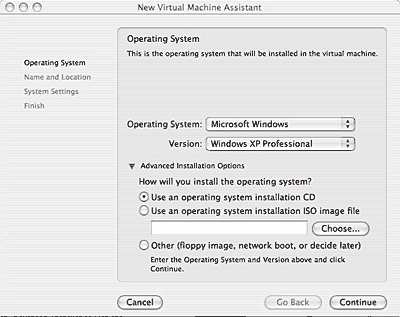
Virtual Machine Assistant
Later choices let you alter the default values of hard drive
size, and (again by choosing the Advanced Options) also the virtual
system's RAM and whether it uses one or more processors. Worth
checking those advanced options - VMware's defaults of 256 MB RAM
and 1 processor are perhaps too conservative when new Intel Macs
are now all built on dual-core processors (and typically now have
1 GB or more RAM).
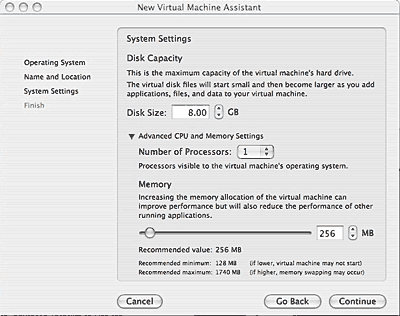
Virtual Machine Assistant
The installed systems all booted up without problem and were
able to access the Internet, my home network, and USB devices
attached to my Mac including my printer and USB flash drives. As
with Parallels Desktop, the virtualized video adapter doesn't have
3D acceleration; neither virtualized system will satisfy anyone
wanting to play the latest Windows games on their Mac.
In a process familiar to users of the old Virtual PC or the new
Parallels Desktop, post-installation, VMware recommends installing
a set of VMware tools with improved display and network drivers, to
enable drag and drop between the Mac and virtual desktops, and to
smoothly merge the mouse cursor going back and forth between the
Mac and virtual PC. While both Virtual PC and Parallels only
provide such tools for virtual Windows sessions, VMware includes
tools for Linux as well.
I have only one complaint. VMware's window puts a set of icons
along the top. You can see at a glance that ethernet, sound
adapter, my Canon i860 printer, and more all have green lights
indicating that they've been recognized and are working. While
handy, locating these at the top is a bit of a problem.
My 17" iMac display runs at 1440 x 900 pixels; if I set a
virtual session to run at the common 1024 x 768 pixel resolution,
there's not enough vertical room to display the whole window unless
I hide my Mac's Dock. Having to scroll the window up and down to
get to often-used features like the Windows Start Menu and Taskbar
is annoying - and prior to installing the VMware Tools a real
pain.
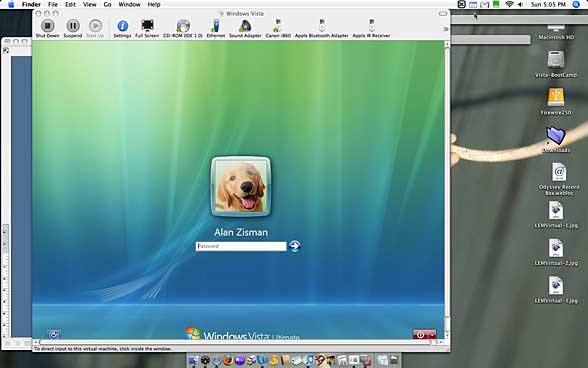
Parallels Desktop displays its tools along the right-side of the
program window - a more usable use of screen real estate.
By the way - if you choose the menu option to view your virtual
system full screen, pay attention to the keyboard shortcut to get
back - the Command + Tab keyboard shortcut to switch between
running programs doesn't seem to work with VMware running
full-screen, and if you forget the Command + Enter shortcut to
return VMware to a window, you may be stuck that way!
While the VMware Fusion beta works well, it's time limited like
other such public betas. Ultimately VMware is going to want users
to buy the program when it's released. And at this time, pricing
has not been announced.
Competition
Lately, there's been a bit of a price war among PC virtualizers.
First, VMware released a free VMware Player; software for Windows
and Linux able to run existing virtual machines - including
downloads from VMware's Virtual Appliance library, but not (easily
at least) create new ones. Microsoft responded by making its
(Windows only) Virtual PC available for free. VMware hit back by
making its VMware Server free, while keeping its VMware Workstation
a paid (US$189) product. The free VMware Server, while having a
somewhat awkward interface, works quite nicely on a single-user
computer, allowing creation and customization of new virtual
sessions.
While it would be nice to have VMware Fusion released as a free
product for Mac users, I think that's unlikely; instead, I would
expect pricing to be competitive with Parallels Desktop
(US$79).
At about the same time that VMware released its freely
downloadable beta of Fusion, Parallels released a feature-rich
beta updating its Desktop for Mac.
The beta improves Parallels USB support with full-speed support
for USB 2.0. It also includes Transporter, a utility to convert
existing VMware and Virtual PC virtual drive images to Parallels
drives. It's now possible to drag and drop between Mac and Windows
desktops. Graphic performance is improved.
Many of these features seemed aimed at ensuring that Parallels
keeps up with VMware, but the beta also includes several features
that up the ante on the (not yet released) competition. For
instance:
Parallels is promising that users can use an existing Boot Camp
partition as a Parallels virtual hard drive. I was unable to test
this - while I've got a working Boot Camp partition, it's running
Windows Vista, and the software that needs to get installed onto
the Boot Camp Windows installation only works with XP (at least at
the time of testing - since this is beta, it may change by release
time).
Another beta feature, which Parallels calls Coherence, has been
getting a lot of attention. Parallels describes it as "a way to run
Windows applications without seeing Windows". In other words, if
you need to use Internet Explorer 6 to connect to your financial
institution, you could just have an IE window freely floating on
your Mac desktop.
It works as advertised, but I'm underwhelmed. In order to get
that free-floating IE window, you need to boot Windows and load
your application. Then, with the application running as the
foreground window, click on the Parallels' View menu and select
Coherence (below).
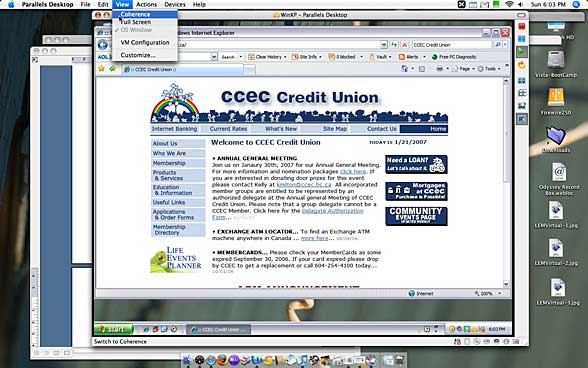
The end result isn't much different from simply maximizing the
program window within the Windows session.
While Coherence seems over-hyped to me, I'm pleased that the
Parallels team isn't resting on its laurels and is continuing to
improve performance and add features. The ability to convert
existing VPC and VMware virtual drives allows Parallels users to
make use of the hundreds of downloadable virtual installations from
VMware's appliance library, removing that software's major
advantage.
Parallels also deserve bonus marks for coming early to the Mac
platform.
After publication, Parallels' marketing manager Benjamin Rudolph
wrote in to say:
A few notes on Coherence:
- You can load Windows apps straight from the Mac
dock. Just load the app and you'll see it appear in the Mac dock.
Click and hold and select "keep in dock", and it will stay there as
a quick-launch icon. No more loading in windowed mode, then going
to coherence.
Check out the attached dock pic for an example.
You can also go into your Parallels folder on your Mac and browse
through the "windows apps" folder. Just drag an app to the dock to
make it a quick-launch icon.
- You can now drag a word file or text file from
your Mac directly to an office app in Coherence. Just drag it on to
the app, and it will load . . . edit it and click "save",
and it saves right back to your Mac.
- Coherence now works with Windows 2000, 2003, XP
and Vista.
Wither Virtual PC?
That raises the question: "Where's Microsoft?"
Virtual PC pretty much defined the market for PC emulation for
PowerPC Macs,but they seem to have dropped the ball on the new
virtualization technologies. If little startups like Parallels can
develop a Mac virtualization product pretty much from scratch and a
medium-size company like VMware can bring its product over to the
Mac platform, what's keeping the software superpower?
Reader Michel Salim offers a correction:
Nice article! I'm thinking of moving back to a Mac
in a few months time (waiting for Leopard and the next MacBook
iteration), and from your article it seems that VMware should be
more than capable of running Fedora Linux (as a developer, the
snapshot feature might actually make running it virtualized better
than running it native)
One single nitpick: your description of the
virtual 86 mode is incorrect - it actually allows the running of
DOS-esque "real mode" applications under a protected mode OS:
http://computing-dictionary.thefreedictionary.com/virtual+86+mode
You're probably thinking of Intel-VT (Intel
virtualization tech) and the corresponding AMD-V (a.k.a.
"Pacifica") that were only available starting with Intel Core and
AMD x2 respectively. Those allow full hardware virtualization to
allow two OSes to run concurrently without the virtualization
software (like VMware) having to intercept certain machine
instructions and simulate them. IBM's had this feature for decade
on their mainframes, and the good ol' Digital Alpha apparently only
had one instruction that cannot be virtualized. It took the PC
world ages!"
Thanks,
Michel! 
VMware's enduser license agreement prohibits doing
reviews of beta software, something we were not aware of when
preparing this story. Apologies for the oversight.



