We've been receiving a lot of "unsupported" Leopard
reports, and today we're taking a break from them. We're getting back
to our roots - running a PowerBook 540c from Compact Flash, using a
Newton as a mobile phone, PCI video cards for older Macs, and Leopard
on supported hardware. We've got more unsupported Leopard
reports for tomorrow. dk - Tip Jar
Refurbished 17" iMac Deals
From Mike Perry:
Dan,
Someone should point out that about twice a week Apple's refurb
pages offer an excellent deal on the better spec'd of the last
model of the white 17" iMacs. For
someone with a limited budget or desk space, it's quite a deal,
offering almost all the power and features of their 20" model,
including the 4 meg cache and DVD-RW, for $250 less. And in my
case, since I already had a 19" inch flat panel I was using with my
PPC Mac mini, I ended up with more
screen space than the 20" model anyway. And that Apple screen is
marvelously sharp.
The improvement is quite impressive. My Mac mini was a dog with
multiple applications such as InDesign
open and 1 gig of memory,
so I thought this iMac, which ships with 1 gig, would be too. Not
so! It's fast enough I can't see any reason to buy more RAM now. And if
things start to slow down later, it'll take up to 3 gig. All those
features are perhaps why Amazon is still managing to sell them from a
third party to those who don't know about Apple Refurb for $1,459 - and
why it still earns a sales rank of 286 at that inflated price.
Someone at Omni pointed out to me that Apple is no longer packaging
third-party software on their iMacs. Notice that this former iMac,
because it's a refurb, ships with OmniOutliner and Comic Life. Also
Apple (but not Amazon) is now slipping a DVD with Leopard in their
refurb boxes for free, giving you Tiger as a companion until you feel
safe with Leopard. (When I ordered mine a couple of weeks ago, I had to
pay an added $10 for Leopard.) Add the roughly $100 value of
OmniOutliner and Comic Life as well as that free $130 copy of Leopard,
and you're getting a quite powerful, well-equipped machine for roughly
$850 - $230 = $610. That is an impressive deal.
The down side is that when this model appears, it doesn't last long.
When I ordered two weeks ago, their posting managed to survive a
weekend. The last two times I've seen it, it popped up in the morning
and was sold out by late afternoon. In comparison, the 20" and 24"
versions remain available day after day.
I've attached the Apple spec sheet from when it appears and a screen
shot of what's Amazon's getting for them right now.
- Michael W. Perry, author of Untangling
Tolkien
Mike,
Thanks for your take on the value of refurbs -
especially the 17" iMac. I was in a musical over the weekend,
and one of the guys works in a local school, where they're just
thrilled to get those 17" iMacs because they don't need anything bigger
or more costly.
If I were buying a desktop Mac today, I'd probably try
to score one myself. I'm used to a 1280 x 1024 display, would love the
extra width of 1440 pixels and could probably adjust to a screen "only"
900 pixels high by moving my Dock from the bottom of the screen (which
makes more sense on a conventional display) to the right (which makes
more sense on a widescreen display). At $849, when available, it's a
steal.
Alas, I'm still using Classic and find that SheepShaver
doesn't work for me. Although it will probably work for most users,
Classic Mode has spoiled me with the ability to use the whole screen
and see OS X apps that are also running. If SheepShaver did that,
I'd be ready to go Intel.
Dan
PowerBook 540c Running from Compact Flash
From William Rice:
Hi Dan,
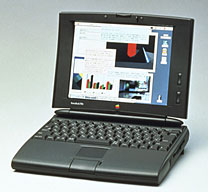
Just to let you know, the Addonics
2.5" IDE-Compact Flash adapter does work on the PowerBook 540c. Several years ago, I acquired a
1 GB Apple-IBM drive, which was actually a standard IDE drive
attached to an IDE-SCSI converter sled. I think these were commonly
used on late model Duo PowerBooks, as 2.5" SCSI drives went out of
production. I bought the single-slot Addonics model, as I wasn't sure
the SCSI protocol could handle more than one drive on a single device
ID. I also bought a high speed 1 GB flash disk.
 The biggest
challenge was transferring my old System and files to the flash drive,
since the 540c is my only remaining Mac and I have no PC card adapter
for it. Anyway, what I did was connect the old IBM drive to my Linux
box by a USB-2.5" adapter I had lying around, and then image the disk
using dd: dd if=/dev/sda of=whole_drive.image Once the drive
was imaged, I connected the flash drive in the same way and reversed
the process: dd if=whole_drive.image of=/dev/sda
The biggest
challenge was transferring my old System and files to the flash drive,
since the 540c is my only remaining Mac and I have no PC card adapter
for it. Anyway, what I did was connect the old IBM drive to my Linux
box by a USB-2.5" adapter I had lying around, and then image the disk
using dd: dd if=/dev/sda of=whole_drive.image Once the drive
was imaged, I connected the flash drive in the same way and reversed
the process: dd if=whole_drive.image of=/dev/sda
I connected the adapter to the IDE-SCSI converter sled, connected
that to the internal drive port on the PowerBook, and booted. VOIP!
Silent computing - and a fair upgrade in drive performance. The drive
performs very well at about 120% of the old drive according to Norton
4.5, and it's nice not to have to hear the old drive spin up and down
anymore.
Bill
Bill,
Thanks for your report. That IDE-SCSI adapter is a
fairly rare beast, and I've heard that it doesn't work with anything
bigger than 1 GB. Of course, on older Macs, a gigabyte is a lot of
room!
Dan
Using the Newton as a Phone
From Marin Balabanov:
Hi Dan,
 Great job on the website. I read it every weekday and enjoy the
thoughtful and informed features.
Great job on the website. I read it every weekday and enjoy the
thoughtful and informed features.
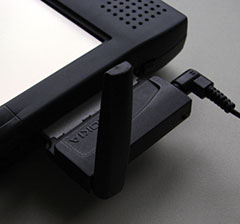
I found something interesting, that is not quite new: A hack for
using the Newton as a Phone (unfortunately only on European
GSM-networks): Rig
of the Week: Newton as Telephone.
Please use this information in any way you see appropriate.
Best Regards
Marin Balabanov
Marin,
Amazing what people continue to come up with for those
glorious old Newtons!
Dan
PCI Video Cards for Macs
From Benito Flores-Meath:
You were collecting a list of AGP video
cards for a guide. If you get information on decent PCI cards,
could you include them too for those of us with G3 B&Ws?
Will it be similar to this one: http://lowendmac.com/video/index.html ?
Ditto for a listing of G4 upgrades to bring Leopard to G3s?
Benito
Benito,
I've already begun profiling PCI
video cards, but it's a work in progress. It may be some months
before I get anywhere close to finished. To the best of my knowledge,
the ATI Radeon 9200 PCI Mac
Edition is the best PCI video card ever made for the Mac.
As for G4 upgrades for G3 Macs, see our Guide to G4 ZIF Upgrades.
Dan
No Such Thing as a Dual 933 MHz Digital Audio Power
Mac
From Joseph Burke:
I cannot see where this can even be a remote possibility. If Apple
had access to 933 MHz G4s during the Digital Audio generation, I am
sure they would have released them to combat the 'megahertz myth'. I am
sure we would also have heard about at least one being found in the
wild before now. To install them in a dual configuration would also
have been prohibitively expensive, because they only would have existed
in very small quantities, if they existed at all.
With all the trouble Apple was having getting faster speeds out of
it's PowerPC partners in those days, it is far more likely that this
machine is misreporting the CPU speed. I was at first thinking that
maybe someone overclocked a dual 800 Quicksilver board, but this
machine is reporting 1 MB level 2 cache, which the 800 MHz dual
would not have had. The faster dual CPU boards from Apple can be
eliminated from consideration for this same reason. Also, any G4 less
than 733 MHz would not have been able to stand being overclocked to 933
MHz, which eliminates the dual 450, 500, and 533 boards.
It might be a good idea to get this person to forward all the
information written on the CPU and board and take photographs of the
front and back of the entire CPU board so we can see if any of the
resistors have been moved. Some CPU benchmark scores would also be
helpful, as they can be compared to scores from other dual processor
machines. If the benchmarks aren't consistent with the reported speed,
then you know there is a problem with this person's OS X install
not reporting properly.
Now that I think about, it could be possible this machine housed an
aftermarket CPU upgrade at one time and still retains the software from
that upgrade - and that is impairing OS X's ability to report the CPU
correctly. Everything is worth investigating, but I seriously doubt
that Apple had access to even a limited run of 933 MHz chips based on
the 7410 design.
Joseph,
Thanks for writing. I hadn't realized that "CPU Type:
PowerPC G4 (11.3)" meant the PowerPC 7410 version of the G4, which
topped out a 533 MHz. Even with overclocking, 667 MHz would have been
pushing things. 933 MHz would have been out of the question.
It's a shame Apple's System Profiler doesn't return
the CPU type the rest of the world uses (7410) instead of some cryptic
number that doesn't seem to correlate with anything. Why is the 7410
reported as "11.3" while the 7455 in my G4 is called "2.1", the 7450
"2.0", and the 7457 "1.1"?
Dan
XPostFacto for Leopard?
From Adam:
Hey Dan,
I was reading in your mailbag about XPostFacto and Leopard, and how
you expected that it would be able to work. I have both a G3 Pismo 500
MHz and a G4 tower at 700 MHz, both of which don't meet Leopard's
minimum standards. Is there any recent news on the ability to get these
old machines working on the new operating system?
Thanks
- Adam
Adam,
Leopard has been full of surprises - it seems to run
on any Mac designed around a G4 CPU and at least one G3 model (the
Pismo PowerBook) if it has a G4 upgrades. The only trick is getting
past the installer, which refuses to run on a Mac without at least an
867 MHz G4.
There are two workarounds: If you have access to a
supported Mac, you can use it to install Mac OS X 10.5 to your
unsupported Mac using FireWire Disk Mode, using an external FireWire
drive, or cloning the drive from the supported Mac to the unsupported
one. The second method is to hack the installer so it looks for a lower
CPU speed.
We have a lot more about both, along with success
stories, in our article on Unsupported Leopard
Installation.
With such simple workarounds, at this point I think
it's unlikely that we'll see a version of XPostFacto for Leopard,
although I won't go so far as to say that someone might not duplicate
it for really old Macs, such as PCI Power Macs and Beige G3s.
Dan
Leopard on My 867 MHz Power Mac G4?
From Steve Mishket:
Dan,
I think I know the answer based on several comments on your "low end
Mac" site but I'd like to be sure before I go out and buy Leopard. Do
you know if a G4 (Desktop) 867 MHz with 1.12 GB of memory is able to
run the Leopard operating system?
Thanks in advance,
Steve Mishket
Steve,
Yes. The system requirements are an 867 MHz G4 or
better, at least 512 MB of memory, and 9 GB of free hard drive
space.
Dan
Low End Mac Mentioned on Roughly Drafted
From John Muir:
Hi,
Roughly Drafted, a fairly long running one-man journal on Apple and
especially debunking silly pundits, posted an article citing Ted
Hodges' 60 Mac Models Left Behind: The
Ridiculously High Cost of Leopard. Thought you might want to link /
weigh in. I posted my opinion as a comment at the end:
Ten Myths of Leopard: 7 Premature Death for Existing Macs!
Also: I've a G3 Leopard report. A negative one that is,
unsurprisingly! Tried a simple FireWire clone and boot from my
supported PowerBook, and it's a no show. You get the startup bong, the
Apple logo and the spinning roundel, but that's it; it just gets stuck.
Verbose mode (Command + V) doesn't seem to work, so I can't read any
messages to see what they make of finding themselves on a G3! But I
suspect vector processing is essential to Leopard, so no AltiVec / SSE
= no desktop.
10.5 is just fine on my minimum spec 12" 867 MHz PowerBook G4 (640
MB) and this 1 GHz 15" (1.5 GB). As good as I could have best expected.
The G3 iMac then stays where it's more comfortable in 10.4!
John Muir
John,
Thanks for the heads up on Roughly Drafted. While
anyone can contest the exact number of models no longer supported
(should the 400, 450, and 500 MHz iMacs be counted as separate models
when they have the same motherboard?), the simple fact is that a lot of
older Macs are locked out of Leopard.
One other point: People love to mention that the 1986
Mac Plus was supported by the Oct.
1997 System 7.5.5 software, neglecting the fact that the Plus remained
on the market until Oct. 1990 and that 7.5.5 was an incremental upgrade
to 7.5, which came out in late 1994 when the Plus had only been
discontinued for four years.
Time to leave a comment on Roughly Drafted....
Dan
Leopard on an Intel Mac mini and MacBook
From Arthur Mickel:
Hi, Dan,
I just loaded Leopard on my hot-rodded mini (2.33 GHz Core 2 Duo, 7200 rpm 200 gig
hard drive, 2 gigs RAM) as well as my 2 gig MacBook. Although I'd read
all the warnings on MacFixIt about doing only Archive and Install
installations, for some reason I couldn't find that option. No matter,
everything worked fine the first time, and I'm enjoying learning the
ends and outs of 10.5.
One question: has anyone experienced audio problems following an
upgrade? My mini's sound system appears to have gone bad last evening,
blasting me out of my office with a load of static. Changing to the
internal speak or the ones in my flat screen display made no
difference, leading me to believe the problem's in the mini. Haven't
used the MacBook enough to see if it has a similar problem.
Thanks for the good info and articles. Keep up the good work.
Arthur Mickel
Arthur,
We've only been collecting reports from unsupported
Leopard installations, and outside of sometime being a bit sluggish and
not having all the "eye candy", things seem to be working well.
The only report I've found online about sound problems
says it was solved by creating a password (some of us like to create
user accounts with no password). Weird, but worth a try.
Dan
Dan Knight has been publishing Low
End Mac since April 1997. Mailbag columns come from email responses to his Mac Musings, Mac Daniel, Online Tech Journal, and other columns on the site.



