While Intego's announcement of "the first OS X Trojan horse" last
week was more than a bit alarmist, spam remains a plague to Mac users
as well as PC users. There are a couple of cool little shareware
applications that make coping with spam much less of a hassle and
time-waster, especially if you, like me, are on a dialup
connection.
Mail Beacon
Mail Beacon allows
you to read, delete, and filter email on the server without downloading
it. Mail Beacon is both a mail checker and online email client.
Mail Beacon checks an unlimited number of POP3, IMAP, and Hotmail
accounts and instantly notifies you of new messages. You can then read,
reply, and delete email from the server without downloading a single
message. This means less wasted time downloading spam or unwanted
attachments.
You simply open Mail Beacon, clean out any spam, and quickly respond
to important messages, all before opening your regular email client and
downloading your messages to hard drive. Mail Beacon alerts you when
new messages arrive and/or when messages are deleted.
The first time Mail Beacon is launched, it will gather information
from your System settings and display an "Add Account" window. In that
window you'll see two tabs: General and Sending. Note that Mail Beacon
allows you to check an unlimited number of accounts, and that
additional accounts can be added later by pressing the "Add" button in
the main window.
Setup is pretty much the same procedure you use to configure email
accounts in any email client.
Next to each account in the main window (titled "Mail Beacon"),
there's a checkbox, which is used to indicate whether or not the
account should be checked for new mail. To check for new mail
immediately, simply click the "Check Now" button. Scheduling options
can be found in the Preferences window.
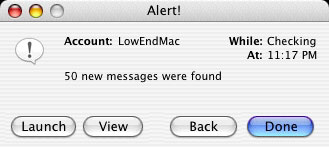
When Mail Beacon finds new mail, any account containing new messages
will be displayed in bold, and Mail Beacon may present a dialog or play
a sound, depending on your Alert options. Alert options can be
customized from the Preferences window.
To view an account, just double-click it in the main window. Mail
Beacon lets you access the mail on server, deleting spam before
downloading to your hard drive. New in v2.1, Mail Beacon will attempt
to detect spam automatically; messages it thinks are spam will appear
in red.
You are presented with a window with two buttons: Read and Trash.
You'll also see a list of messages in your account, with new messages
appearing in bold.
The Read button retrieves the selected message for viewing. Note
that this button will be disabled if the message is larger than 50K, as
Mail Beacon is currently unable to download attachments. Mail Beacon
has some interesting options related to reading messages in the
Preferences window.
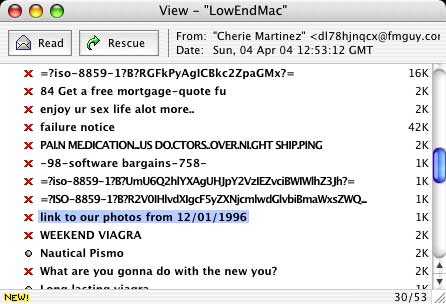
The Trash button tells Mail Beacon that you want to delete this
message. When you close the window, you'll be prompted to confirm your
deletions before they're actually deleted. You can also change your
mind and "Rescue" a trashed message at any time before you close the
window (which executes the delete), which has saved me from deleting
wanted mail a few times. It works well, but I really wish there were a
way to change the default selection in this dialog to the affirmative
(trash), which would save some clicking and let you dump the garbage
just by hitting the Return or Enter key.
The view window will display special icons next to messages you've
replied to, forwarded, or redirected.
I've been using Mail Beacon for a couple of months now and like it a
lot. It's very fast, and I like the high degree of manual user control
over the various function options Mail Beacon offers.
I would, however, prefer there to be a one-click method for checking
just one account at a time, rather than the cumbersome checking and
unchecking of checkboxes. I also wish there was a progress bar and text
readout during a mail check.
I've also found that highlighting of some messages in the view list
for deletion does not always show until you click the trash button,
although functionally it works fine.
If you need to reply to a message but don't have time at the moment,
or if you feel it's important in some way, you can highlight it from
the Message menu. The message will be displayed in bold blue with a red
star icon.
Messages can be sorted by Date, Subject, or Sender; in either
ascending or descending order. The default is ascending, with messages
appearing in chronological order. To toggle the sort order, or change
the sort field, use the "Sort" submenu under the "Message" menu.
Mail Beacon keeps track of a variety of information about messages.
To access this information, select a message, and choose "Message
Info..." from the "Message" menu.
- Mail Beacon automatically saves message headers/text to disk so
they don't have to be retrieved the next time you view that account. If
you're offline and need to refer to a message, you can view Mail
Beacon's cache. To do this, select an account, and use the "View"
submenu under the "Accounts" menu. The "Cache" window is virtually
identical to the "View" window; you'll be able to read any message
you've already seen, view message information, reply to messages,
etc.
Mail Beacon also keeps track of messages you send. To access these
messages; select an account from the main window, and use the "View"
submenu. This window is also identical to the "View" window.
Mail Beacon also has the facility to send email messages as well as
preview and edit incoming email.
To compose a new message, choose "New Message" from the File menu.
The "New Message" window looks pretty much like those found in other
mail programs, with a few additions. Choose the account you'd like to
send this message with from the menu next to the "From" field. The
message will be sent through the SMTP server specified in that
account's settings. The default account, which is selected
automatically when you compose a new message, can be specified in the
Preferences window.
You can add your buddies to the "Friends" list for easy access,
which can be found next to the "To" field.
Mail Beacon includes a handy "Reminders" tool to help you keep track
of your schedule. You check your mail every day, so what better place
could there be for reminders? To access this feature, choose "Show
Reminders" from the File Menu.
If security is a concern, Mail Beacon can prompt the user for a
password at launch. To enter a password, choose "Set Password" from the
File menu.
Mail Beacon is shareware, so you can check it out for 30 days before
making any financial commitment. A great little spam-fighting tool.
Features
- Checks an unlimited number of email accounts
- Supports both POP3 and IMAP4
- Built-in address book, reminders, and password protection
- Filters email on server
- Sort by Date, Subject, or Sender
- Easy-to-use interface
System Requirements: Mail Beacon supports any Mac running Mac OS 8.0
or later, including Mac OS 9 and Mac OS X 10.3.
Mail Beacon is $15 shareware (30 trial uses)
POPmonitor
POPmonitor,
Vechtwijk Automatisering's email filtering and management application,
is available in both OS X and Classic versions. It allows you to
not only preview the contents of your mailboxes before downloading but
also to instantly create blocking filters that can automatically delete
subsequent messages from blocked addresses without ever previewing
them. You can also "bounce" previewed messages that you want returned
to the sender.
You can configure POPmonitor to automatically delete messages from
blocked senders or match any filter, and set POPmonitor to switch
directly to your email application after it has checked and filtered
your mailbox. POPmonitor will first remove any unwanted messages from
your mailbox and then tell your email application to receive the
remaining messages.
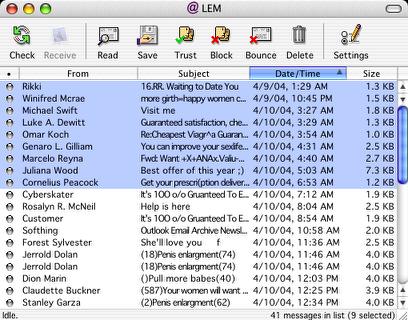
You can display selected messages in separate windows. POPmonitor
will not show the entire message but just downloaded part of it. You
can specify the size of the downloaded part in the Account Settings
window under Read X lines of the message body. You can also save
selected messages to your hard drive using POPmonitor alone.
POPmonitor can also act as an automatic filter between your ISP's
mailbox and your email application, check and filter your mailbox at
scheduled intervals, and afterwards instruct your email application to
receive the remaining messages.
Creating filters In POPmonitor is easy: select Filters from the Edit
menu to open the Filters overview window, then click the Add button to
create a new filter. Give the filter a name, select the appropriate
criteria from the pop up menus, and enter keywords or a "regular
expression" in the text fields. There is also a selection of ready-made
filters that can be downloaded
from the POPmonitor website, including the new mydoom/novarg filters.
Just drag downloaded filters into the POPmonitor Filters dialog.
New in POPmonitor 2.1.3:
- Improved existing filters and added new powerful filters
- Improved ISO character set decoding to properly deal with encoded
characters
- Fixed bug where ISO character set decoding was not carried out
while applying message body filters causing some filters to
incidentally skip messages that should have been flagged or
deleted
- Fixed issue where the Check All Accounts menu item would be enabled
only if at least one account window was visible
- Fixed cosmetic issue where message without subject is now titled
'Untitled message' when shown in a separate window
- Enlarged text fields in the Create Filter window to allow easier
editing of keywords
- Added warning dialog to the Create Filter window to notify when a
filter's keyword string exceeds the 243 character limit
- Fixed bug where multiline subject would be truncated
- Fixed bug where missing From email address could cause unexpected
message actions
- Fixed bug where incorrectly formatted email addresses could be
shown in the Select Bounce Address window
- Fixed bug where canceled bounce messages would get deleted if
Automatically Delete Mail After Bouncing It was enabled
- Added Apple Mail 1.3 and Eudora 6 to the list of supported email
applications [Mac OS X]
- Added support for Mac OS X 10.3's Address Book [Mac OS X]
- Improved vCard support [Mac OS X]
- Fixed cosmetic issue where two Help menus would appear when running
Mac OS X 10.3.0 or newer [Mac OS X]
- Fixed bug where POPmonitor would show a 'Where is?' dialog window
after selecting the User Guide option from the Help menu [Mac
OS X]
System requirements:
- Any Apple Macintosh computer with a PowerPC processor
- Mac OS 8.x, 9.x, or X 10.x
- AppleScript system software (to communicate with your email
application)
- Stuffit Expander software (to process downloaded attachments)
- A connection to the Internet or to your local network
- A POP3 compatible email account (POPmonitor does not work with
Hotmail and AOL)
POPmonitor is compatible with Emailer, Entourage, Eudora, Magellan
Pro, Netscape Communicator, Outlook Express, and PowerMail, as well as
the latest release of Apple Mail (version 1.2, part of Mac OS X
10.2). However POPmonitor is not compatible with Netscape 6/7 or
Mozilla, because they do not support email related AppleScript
events.
POPmonitor includes a 19-page user's manual and troubleshooting
guide in PDF format.
POPmonitor is $25 shareware. The unregistered version of POPmonitor
lets you work with one mail account, three trusted senders, three
blocked senders, and three custom filters. After registering you can
create an unlimited number of each.
Which do I like best? Well, they're both very good.
I used POPmonitor for a couple of years before I discovered Mail
Beacon, which is what I've been using lately. As I noted above, I like
the speed and degree of manual control Mail Beacon offers. If you
prefer a higher degree of automation and everything happening in one
window, you may incline toward POPmonitor. On the other hand, Mail
Beacon has basic email client features, although I don't think I've
used them except to check them out.
Both support OS 8 and later, so that won't be the deciding
factor. The price difference might be the clincher for some.
Since they're both shareware and relatively small downloads, I would
suggest checking out both and then deciding which you like best.



