Low End Mac Reader Specials
TypeStyler For Mac OS X is Now Shipping! Download The Free Fully Functional 60 Day Tryout at www.typestyler.com
Don't install Parallels to play poker online! Poker Mac will show you how
to download and install a native Mac poker application such as Full
Tilt Poker Mac.
Compare products like desktop computers, apple laptops, apple macs, and LCD Monitors side by side! All the information and reviews to make the best purchasing decision for new mobile phones, sat nav systems, or MP3 players. The Ciao online shopping community makes searching products easy for you.
Miscellaneous Ramblings
Miscellaneous Ramblings Mailbag
Multiple Input Bug in OS X 10.5.8, Where to Buy a Cheap USB 2 CardBus Card, and More
Charles Moore - 2009.16.09 - Tip Jar
Follow Low End Mac on Twitter.
Popularity: ![]()
![]()
![]()
Tweet this article. Short link: http://bit.ly/D0SWk
- Multiple Input Device Bug in Mac OS X 10.5.8
- 10.5.8 Mouse Issue Also Impacts Trackpad
- Cheap USB 2 CardBus on eBay
- Multicolor vs. White Apple Logo on PowerBooks
- Printer for Older PowerBook
Multiple Input Device Bug in Mac OS X 10.5.8
From Ken in response to OS X 10.5.8 Update Provides Incentive to Get 10.6:
Hello Mr. Moore,
Thanks for your article describing how the multiple input device bug in Mac OS X 10.5.8 affects your Mac usage. In case you haven't already heard, the same problem is also present in Mac OS X 10.6.
This particular problem also affects users of software that I have written - software that allows users to create virtual mice for various purposes. I have filed reports with Apple to make them aware of the problem. Although I could explain the bug to Apple in technical terms, I did not have a user scenario that adequately demonstrates why it is important to have it fixed. Your article provides just such an example. I hope you don't mind, but I have appended an excerpt from your article to my original bug reports (and provided a link to your full article).
Hopefully your words will help accelerate a fix from Apple for both Leopard and Snow Leopard.
Regards,
Ken
Hi Ken,
Well, that's profoundly depressing news, but thank you for the heads up. As I said in the article, I was already apprehensive that might be the case. The problems with multiple input device support in the early versions of OS X were persistent, and Apple didn't seem very interested in hurrying to fix them. For a while, my only workaround was to use a Wacom tablet mouse with the foot mouse, which for some reason circumvented the problem and allowed tandem input. I suppose it's possible I might have to revert to that, although I am sorely tempted to just downgrade to OS X 10.5.6 until the bug is eventually squashed.
Of course that's not a terribly attractive option, since I would like to be able to write about Snow Leopard non-vicariously.
I'm very pleased that you've brought this matter to Apple's attention, and I have no objection to you appending my comments to your report. Hopefully that might help a bit.
I'm not sure my words carry much weight with Apple, and this is a relatively esoteric issue, but it is one that is driving me batty in practice.
Charles
10.5.8 Mouse Issue Also Impacts Trackpad
From Paul:
Hi Charles,
Since installing the 10.5.8 upgrade, if I press the trackpad button and just use the mouse to do the drag, the drag randomly releases after a few seconds. This may related to the same bug. Can this behavior be replicated on your hardware.
Thanks for your response.
Paul
Hi Paul,
It certainly seems to be replicable. I just tried the method you describe on the Unibody MacBook using my Logitech V550 wireless mouse and the trackpad button, and the drag does randomly release just as I've experienced using my foot mouse, so this is not just an esoteric issue afflicting foot mouse users.
Unhappily, another reader has just informed me that this behavior also exists in OS X 10.6, so Snow Leopard is not going to be the answer until they get around to fixing this bug. Have you tried OS X 10.6.1 yet?
Charles
Cheap USB 2 CardBus on eBay
From Scott, following up on Cheap and Unobtrusive USB 2 CardBus Solution:
[The AKE BC168 card] is all over eBay. Most of the suppliers are in Hong Kong. I only found one in the US, and that's the one I ordered from. Sorry I can't remember his URL - if he even had one.
Scott Cook
Hi Scott,
Thanks for the information. Looks like just a search on eBay's search dialog or even a Google search for the name of the item would do the trick.
Charles
Yes, it's not difficult to find. There are a bunch of sellers on eBay, mostly in Hong Kong. The card is still working well. I'm using it now to send this message from my Pismo through a USB Bluetooth dongle, which my cell phone is tethered to. I'm at my mom's house in Maine, and my cell phone is the my only Internet connection here. I'm appreciating my cable connection in Dallas much more as I deal with the near dial-up speed of my cell phone. I guess you deal with that every day . . . I feel fer ya buddy! haha
Scott
Hi Scott,
I'm delighted to report that on Sept. 10, I finally got hooked up to a wireless broadband service. They just got the tower operational last week, and I'm one of the first customers in the area. It works extremely well so far.
Charles
Multicolor vs. White Apple Logo on PowerBooks
From Rick in response to Mac OS 9.x and Kanga:
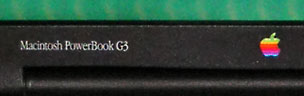

White logo on WallStreet's outside, color inside.
Hello Charles,
You were mostly correct in your reply:
[Kanga] was also the only G3 PowerBook to sport the traditionally colored Apple logo; future PowerBooks would have a plain white logo.
That is true of the Lombards onward. The WallStreet models fudged a bit on the matter with the white logo on the outside while maintaining the traditional version on the screen bezel.
-Rick
Hi Rick,
You are correct, of course. Must be brain fade that I forgot about staring at that multicolored Apple logo on the screen bezel of my Wall Street for half a dozen years.
Thanks for the correction.
Charles
Printer for Older PowerBook
From Nick:
Charles,
Just got ahold of a 867 MHz G4 PowerBook for a double saw buck - needs a new hard drive.
Anyhow, can I use my old LaserWriters, like the 16/600, with it?
If not, then can you suggest a 'newer' type inkjet or laser printer that the G4 can handle, without a lot of Mickey Mouse?
thxs
Nick
Hi Nick,
I can't say with 100 percent certainty, but I think your should be able to use the LaserWriters with your PowerBook.
Charles
Charles Moore has been a freelance journalist since 1987 and began writing for Mac websites in May 1998. His The Road Warrior column is a regular feature on MacOpinion, and he is a news editor and columnist at Applelinks.com. If you find his articles helpful, please consider making a donation to his tip jar.
Recent Miscellaneous Ramblings
- WPA for Original AirPort, Stainless Browser, Multiple Input Bug Persists in Snow Leopard, and More, 03.11. Also kudos for Shiira, G3 vs. G4 upgrade for Pismo PowerBook, and 17" PowerBook still suffices.
- Shiira Browser Is Lightning Fast, 03.08. "...I'm finding myself not in any hurry to stop using Shiira 2.3 and go back to Safari 4 as my WebKit browser pick."
- The Mac-PC Divide, Apple vs. Smut, WiFi Troubleshooting, Planned Obsolescence, and Pismo Upgrades, 03.03. The differences between Mac and PC users, the 'latest and greatest' syndrome, clearing corrupt WiFi preferences, and more.
- Handshoe Mouse a Good Ergonomic Option, 03.02. "If you suffer from mousing pain, they should prove well worth the price."
- More in the Miscellaneous Ramblings index.
Links for the Day
- Mac of the Day: Power Mac G5/2.7 GHz, Apr. 2005 - The fastest G5 CPU Apple ever used, this model included a 16x SuperDrive and shipped with 'Tiger' (OS X 10.4).
- Group of the Day: MacBook List for those using a MacBook or MacBook Pro.
- March 12 in LEM history: 01: When should I replace my Mac? - 02: Who stole my domain? - Happiness is a new Power Mac - 03: USB for wireless networking - 04: PowerBooks have some room for improvement - 07: 11 ways to optimize Mac performance - Finding older software for Macs - Booting PowerPC Macs from USB - Installing Leopard from an Intel Mac
- Support Low End Mac
Recent Content on Low End Mac
- Consumer Reports Rates Apple Tops, Macs Cost Less to Manage than PCs, 6 Core Mac Pro Soon?, and More, Mac News Review, 03.12. Also dreaming of a Mac mini on steroids, focus on word processiong, Ubuntu ditches brown for more Mac-like appearance, and more.
- OS X 10.4 Tiger Still Very Usable on a 500 MHz G3 Mac, Simon Royal, Mac Spectrum, 03.11. For writing and basic Internet access, a 500 MHz G3 provides sufficient power and Tiger provides fairly up-to-date software.
- iPad Gaming Potential, Dan Bashur, Apple, Tech, and Gaming, 03.11. Two years of developing games for the less powerful iPhone and iPod touch has prepared developers to unleash the iPad's potential.
- Apple Now Sees Microsoft as Less Evil than Google, Frank Fox, Stop the Noiz, 03.10. With Android threatening the iPhone's dominance, Apple views Microsoft and Windows 7 Mobile as the lesser threat.
- More links in our archive.
Recent Deals
- Best iPod classic Deals, 03.12. Used 20 GB, $119; 40 GB, $139; 60 GB, $159; 30 GB video, $129; 60 GB, $159; 80 GB, $169; refurb 120 GB, $189; new, $214; 160 GB, $228 shipped.
- Best G3 iBook and AirPort Card Deals, 03.12. 366 MHz 12" clamshell, $89; 466, $125; 500 white CD, $100; 600, $199; 800 Combo, $239; 14" 900, $225.
- Best Xserve Deals, 03.12. Used 1 GHz dual G4, $499; 2.0 dual G5, $599; 2.3, $749; refurb 2.26 4-core Nehalem, $2,499; new, $2,699; 8-core, $3,449; refurb 2.66, $4,299; new, $4,799; more.
- Best iPod touch Deals, 03.11. Refurb 8 GB, $149; 16 GB, $199; 32 GB, $249; 64 GB, $339; new 3G/8 GB, $184; close-out 2G/16 GB, $229; 3G/32, $270; 64, $355. Shipping included.
- Best Mac OS X 10.5 Deals, 03.11. "Leopard" one user, $180; upgrade from 10.4, $150; 5 users, $400; Server, 10 users, $493; unlimited users, $600.
- Best 17" MacBook Pro Deals, 03.11. Used 2.33 GHz, $1,099; 2.5, $1,349; refurb 2.66, $1,949; 2.93, $2,199; new 2.8, $2,249 after rebate; 3.06, $2,749.
- Best iPod nano Deals, 03.10. Refurb 4G/8 GB, $99; 16 GB, $119; 4G/8 GB, $129; 16 GB, $139; new 5G/8 GB, $134; 16 GB, $160. Shipping included.
- Best 15" PowerBook G4 Deals, 03.10. 1 GHz Combo, $400; 1.25 GHz, $460; 1.33 GHz SuperDrive, $539; 1.5 GHz, $550; 1.67 GHz, $589; hi-res, $800.
- Best iPod shuffle Deals, 03.10. New 3G/2 GB, pink, $53; other, $55, 4 GB, blue, $71; other, $73. Shipping included.
- More deals in our archive.
About LEM | Support | Usage | Privacy | Contacts
Navigation
Used Mac Dealers
Apple History
Video Cards
Email Lists
Favorite Sites
MacSurfer
MacMinute
MacInTouch
MyAppleMenu
InfoMac
Macs Only!
The Mac Observer
Accelerate Your Mac
RetroMacCast
PB Central
MacWindows
The Vintage Mac
Museum
DealMac
DealsOnTheWeb
Mac2Sell
ramseeker
Mac Driver Museum
JAG's House
System
6 Heaven
System 7 Today
the pickle's Low-End
Mac FAQ
Abandonware
Petition
Mac vs. PC Info
Affiliates
The Apple
Store
Mac
Connection
B&H
MacMall
TechRestore
ExperCom
Crucial
Memory
batteries.com
MacMinute
MacInTouch
MyAppleMenu
InfoMac
Macs Only!
The Mac Observer
Accelerate Your Mac
RetroMacCast
PB Central
MacWindows
The Vintage Mac
Museum
DealMac
DealsOnTheWeb
Mac2Sell
ramseeker
Mac Driver Museum
JAG's House
System 6 Heaven
System 7 Today
the pickle's Low-End
Mac FAQ
Abandonware
Petition
Mac vs. PC Info
Mac Connection
B&H
MacMall
TechRestore
ExperCom
Crucial Memory
batteries.com



