Compiled by Charles Moore
and edited by
Dan Knight
- 2006.10.06
PowerBook, iBook, MacBook, and other portable computing is
covered in The 'Book Review.
All prices are in US dollars unless otherwise noted.
News
News & Opinion
Use Any Networked Computer as an Additional
Display in Mac OS X
PR: Recycle your old iMac, PowerBook or even Windows
PC.
Most Mac users have a spare computer sitting right next to their
main computer on their desk. ScreenRecycler now enables you to use
this spare computer as second display for your Mac. You can even
use an idle machine for that purpose.
Just start ScreenRecycler on your Mac then connect to
ScreenRecycler via VNC from your old machine.
Free prerelease download.
Link: ScreenRecycler
Logitech Pushes the Edge with New Keyboard
Design
PR: It's more than a keyboard - it's a minimalist work of
high-technology art. Logitech has unveiled the Logitech diNovo Edge
keyboard, a cutting-edge blend of refined design and breakthrough
innovation. Following the design legacy of Logitech's original,
award-winning diNovo Media Desktop (2003), the diNovo Edge reflects
the growing importance and visibility of the PC in today's
home.
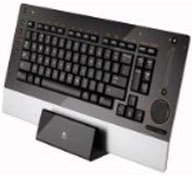 Meant to be seen and touched,
the comfortable new keyboard, with a high-gloss finish, is laser
cut from a single, semi-translucent piece of black Plexiglas and
set into a brushed-aluminum frame. Its minimalist style is further
evident in the limited number of buttons and the dynamic,
backlighted icons embedded within the keyboard, which are invisible
when not illuminated. Considering the keyboard's many innovations
and advanced technology, this eye-catching design seems impossibly
thin at only 3Ú4" (19.05 mm) thick.
Meant to be seen and touched,
the comfortable new keyboard, with a high-gloss finish, is laser
cut from a single, semi-translucent piece of black Plexiglas and
set into a brushed-aluminum frame. Its minimalist style is further
evident in the limited number of buttons and the dynamic,
backlighted icons embedded within the keyboard, which are invisible
when not illuminated. Considering the keyboard's many innovations
and advanced technology, this eye-catching design seems impossibly
thin at only 3Ú4" (19.05 mm) thick.
Breaking new ground in technology, the diNovo Edge is Logitech's
first rechargeable keyboard, features an integrated touch-sensitive
navigation and scroll panel, and includes embedded Bluetooth
wireless technology. Its fusion of premium technology and
aesthetics adds a sense of prestige to any den or office. It also
makes the keyboard a perfect addition to the living room, where an
increasing number of people are using their computers.
"The diNovo Edge is the most beautiful and elegant keyboard
we've ever made," said Denis Pavillard, vice president of product
marketing for Logitech's keyboards and desktops. "It elicits an
immediate emotional connection the first time you see it - and that
connection only gets stronger when you place your hands upon it.
The diNovo Edge delivers a premium experience in every way, from
how it looks in the office or living room, to how it feels and
performs in the hands of its owner."
The diNovo Edge is the newest member of Logitech's premier
family of Advanced Peripherals. It's designed to perfectly
complement the equally stunning and powerful Logitech MX Revolution
Cordless Laser Mouse. To further create the best-of-the-best
computer system, people can add the Logitech Z-10 2.0 Interactive
Speaker System, which matches the diNovo Edge with a soft-orange
liquid-crystal media display and a pristine glossy black
surface.
Logitech's first-generation diNovo keyboard design, introduced
in 2003, reflected the growing minimalist tastes among consumers -
with sharp angles and an ultra-slim profile that complemented
flat-panel monitors. The new diNovo Edge keyboard takes the
approach even further by reducing the number of seams and buttons
on the keyboard, offering touch-sensitive technology and controls
that are flush with the keyboard surface, and using dynamic
soft-orange backlighting behind the single Plexiglas panel.
The semi-translucent surface enables the dynamic backlighting of
icons embedded within the keyboard, which are invisible without
illumination. Pressing the function key illuminates icons for
secondary F-key functions, including media controls and
application-launch keys. After the function key is released, the
icons above the F-keys disappear and the keyboard's top panel
returns to its pristine black state.
The keyboard rests completely flat, with a low profile, on a
desk or coffee table, or on a lap. Several studies have shown that
lower-profile keyboards reduce wrist extension and thereby reduce
the risk of hand and forearm discomfort.
The navigation features of the diNovo Edge keyboard are
carefully designed to deliver premium performance, whether with a
PC in the office or in the living room - using Windows XP, Windows
XP Media Center Edition, or the upcoming Windows Vista™
operating system. For example, the keyboard has a special start key
that launches the Vista start menu, and an F-key search button
provides one-touch access to Vista's search feature.
The keyboard includes the first-of-its-kind touch-sensitive
TouchDisc, which enables people to scroll and navigate a graphical
user interface without having to reach for a mouse - perfect for
leaning back from the desk, for making a small adjustment when
working at the desk, or for using a media PC in the living room.
Moving a finger up and down or across the disc moves the cursor on
the computer screen, and moving the finger in a circular motion
around the perimeter of the TouchDisc enables people to scroll
horizontally and vertically through documents.
Located above the TouchDisc, the keyboard's touch-sensitive
volume slider makes it easy to quickly adjust the computer's
volume. And on the left-hand side of the keyboard, three zoom
buttons - zoom in, zoom out, and 100 percent view - enable people
to navigate and edit digital photos with ease. A pointer button,
used with the TouchDisc, enables two-hand navigation.
With the diNovo Edge, each keystroke feels fluid and stable with
Logitech's PerfectStroke key system, featuring precision
micro-scissor mechanisms that distribute force evenly across key
surfaces. On many keyboards, when pressure is applied to a key's
edge, the key sticks and requires more force to engage. On the
diNovo Edge, whether one pushes the center of the key or one of the
key's edges, the keystroke feels the same. Logitech also has
carefully calibrated the tension and travel required for
keystrokes, optimizing each specification to deliver the best
performance.
With Bluetooth wireless technology, the diNovo Edge can connect
directly, without the included USB micro-receiver, to PCs that have
built-in Bluetooth technology. For computers without built-in
Bluetooth technology, people need only plug in the micro-receiver
to a USB port to connect the keyboard to the PC; the keyboard and
receiver are pre-paired during manufacturing so that they
automatically connect when plugged in.
Bluetooth wireless technology provides the keyboard with a
longer range (up to 10 meters, or 33 feet) than for many cordless
keyboards - important for use in the living room.
The rechargeable diNovo Edge comes with a stylish stand that
serves as both a recharging station and a display base; when
inserted in the stand, the keyboard rests perpendicular to the
desk, showing off its slim design and freeing up valuable desk
space. A two-hour charge yields up to two months of battery
life.
The Logitech diNovo Edge keyboard is expected to be available in
the U.S. and Europe beginning in November. Its suggested retail
price is $199.99 in the U.S. More information about the keyboard is
available in the Advanced Peripherals section of Logitech's
website.
Link:
Logitech diNovo Edge keyboard
zCover Pro Tools Program Keyboard Cover
PR: zCover Inc, manufacturer of fashionable silicone
protective cases, has announced the release of their zPrinting Pro
Tools Program Keyboard cover.
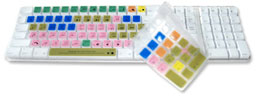 With precision moulding
and printing process, the zPrinting Pro Tools Program Keyboard
cover turn your normal keyboard into a fully functional Pro Tools
audio editing keyboard. This zPrinting Pro Tools Program Keyboard
cover designed for Mac users to run pro tools with pre-printed
program shortcut icon and key letters on their Apple Keyboard or
the Apple Wireless Keyboard.
With precision moulding
and printing process, the zPrinting Pro Tools Program Keyboard
cover turn your normal keyboard into a fully functional Pro Tools
audio editing keyboard. This zPrinting Pro Tools Program Keyboard
cover designed for Mac users to run pro tools with pre-printed
program shortcut icon and key letters on their Apple Keyboard or
the Apple Wireless Keyboard.
zPrinting Pro Tools Program Keyboard cover is made of high
quality silicone and is applying high printing know-how. The
printing will not peel off or fade. It fits every contour of your
keyboard and it won't slip or slide while you work. This durable
short cut key cover offers more flexibility for the editors.
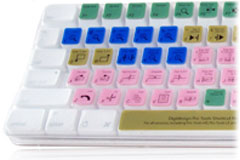 This durable Keyboard
skin can be cleaned quickly and easily. It protects from dust,
spills, staples and many other contaminates that could damage your
keyboard as well.
This durable Keyboard
skin can be cleaned quickly and easily. It protects from dust,
spills, staples and many other contaminates that could damage your
keyboard as well.
"It took us years to develop printing technology for our
silicone covers. zPrinting is one of our key business." said Sean
Sa, vice president of zCover Inc. "The editors can now use the
zPrinting covers with the best value for their money. The printings
will not peel off or fade as they are blended prior to moulding.
Its extraordinary durability and perfect fit will win your lasting
affection and loyalty"
Features:
- zCover silicone skin are crafted from non-toxic, durable
high-grade silicone rubber. It is safe.
- Ultra thin (0.6mm) skin touch feeling, durable,
- Made of 100% high grade silicone,
- Multicolor and glow-in-dark fashionable design,
- Full shock-absorbing, tear-resistant protection,
- Molded to specifically fit every point,
- removable easy on and off for cleaning,
- Stays in place and does not shift around,
- Washable - you can wash zCover silicone typeOn skin by hand,
washing machine, or dishwasher. Make sure it's dried out before put
it on your keyboard. Dry it in room temperature. Please avoid
direct fire and direct bright sunshine.
The zPrinting Pro Tools Program Keyboard cover is compatible
with all versions, including Pro Tools 7, Pro Tools HD, Pro Tools
LE and Pro Tools Free
The zPrinting Pro Tools Program Keyboard cover fits Apple
Keyboard & Apple Wireless Keyboard.
(note: this keyboard skin does not compatible with Apple Pro
Keyboard and older version Apple USB Keyboard.)
The zPrinting Pro Tools Program Keyboard cover retails for
$49.95
Link: zCover
Pro Tools Program Keyboard Cover
MondoMouse Gives Your Mouse Super Powers
PR: MondoMouse is a mouse enhancement for Mac OS X 10.4.
It adds cool new capabilities to your mouse.
- Move any window without clicking it, and without bringing it to
the front.
- Resize any window without clicking it, and without bringing it
to the front.
- Focus Follows Mouse Automatically switch to whatever
application the mouse hovers over.
But wait, there's more! Ever have trouble finding a window?
MondoMouse identifies the window under the mouse for you via a
floating text box. Find just the right window from the dozens that
may be open, without all that tedious mucking about with
Expose!
New in version 1.1.1:
- Fixes a bug where Delicious Library would occasionally crash
while MondoMouse
New in version 1.1:
- Adds visual indication of which MondoMouse action is active at
any given time. Also numerous performance enhancements and bug
fixes have been included.
System requirements: Mac OS X 10.4 or later.
System support: PPC/Intel
$14.95 shareware
Link: MondoMouse
Solving AirPort Problems with Mac OS X
10.4.8
A new Apple Knowledge Base article says:
"After upgrading to Mac OS X 10.4.8, some Intel-based computers
may not auto-connect to remembered networks that use WPA2 security.
This article explains how to correct this behavior.
"Products affected
- Macs with Intel Core Duo-based processors:
- MacBook
- MacBook Pro (all models)
- Mac mini (Early 2006)
- iMac (Early 2006)
- Mac OS X 10.4.8
"Solution
"To restore the auto-connect feature:
- From the Apple menu, choose System Preferences.
- Select the Network pane.
- From the 'Show:' drop-down menu, choose 'AirPort'.
- Make sure the 'By default, join:' pop-up menu is set to
'Preferred networks.' (If it was set to 'Automatic networks', you
can set it back to Automatic after the next step.)
- Select any network that shows WPA2 security and use the minus
(-) button to remove those networks from the list.
- Once all WPA2 networks have been removed from the list, use the
plus (+) button to add them back. (You will need the appropriate
passwords for the wireless network.) If it's more convenient, you
can wait to re-add the networks until you use them--when you use a
network, it will be added to the list automatically.
- If in step 3, your default was Automatic rather than Preferred,
go ahead and change your default back to Automatic."
Link: Mac OS X
10.4.8: AirPort Does Not Auto-connect to Existing Networks after
Restart or Wake from Sleep
Mac Pro Power Consumption and Thermal
Output
A new Apple Knowledge Base article says:
"Learn about the power consumption and thermal output of Mac Pro
computers.
"Power Consumption Thermal Output
"Idle /CPU Max/ Idle/ CPU Max
"171 W 250 W 584 BTU/h 1519 BTU/h"
Link: Mac Pro:
Power Consumption and Thermal Output (Btu) Information
Desktop Mac
Deals
Low End Mac updates the following price trackers monthly:
For deals on current and discontinued 'Books, see our 13" MacBook and MacBook Pro,
MacBook Air, 13" MacBook Pro, 15" MacBook Pro, 17" MacBook Pro, 12" PowerBook G4, 15" PowerBook G4, 17" PowerBook G4, titanium PowerBook G4,
iBook G4, PowerBook G3, and iBook G3 deals.
We also track iPad,
iPhone, iPod touch, iPod classic, iPod nano, and iPod shuffle deals.



