Compiled by Charles Moore
and edited by
Dan Knight
- 2007.03.23
This week's top story is the opposite of news - it's the fact
that "security experts", used to the world of Windows, are stumped
by the lack of OS X malware. It's no mystery: Mac OS X is
secure by design; security isn't an afterthought.
They say the only thing we have to fear is fear itself - or
perhaps Apple. Unsanity has uncovered a flaw in the Software Update
process that can potentially render an OS X installation
unbootable. There's a consistent bug in the prebinding process
("100% reproducible" according to Unsanity) that can zero out a
file in the right (or wrong) circumstance.
PowerBook, iBook, MacBook, and other portable computing is
covered in The 'Book Review.
All prices are in US dollars unless otherwise noted.
OS X Security
The Update Bug
News & Opinion
Products
iPod Accessories
Software
OS X Security
You Can't Beat Mac OS X for Security
ZD Net's Adrian Kingsley-Hughes says:
"Today I came across a very interesting post over by Marius van
Oers on McAfee's Avert Labs blog which looks at the malware count
for Windows, Linux and Mac platforms:
"Today we know of over 236,000 malicious malware items. These
are mostly meant for the MS-Windows environment. Only about 700 are
meant for the various Unix/Linux distributions. Current known Mac
OS X malware count is even less with 7, so pretty much
non-existent at the moment.
"Let's take a second or two to digest those numbers. 236,000 v.
700 v. 7...."
Editor's note: Not a single piece of OS X malware has ever been
found in the wild. These 7 are just proof-of-concept laboratory
specimens. dk
Link: For
Security, You Can't Beat Mac OS X
Security Experts Befuddled by Lack of OS X
Malware
MacUser's Dan Moren reports:
"Those poor security experts! They've been telling us for ages
and ages that malware on OS X was imminent. That it was right
around the corner, lurking like some sort of . . . er
. . . lurker. Any day now.
"And yet, despite attempts to showcase OS X's vulnerability,
we've seen nary a single serious widespread exploit in the wild. No
wonder those experts are questioning their faith.
"In an article for the McAfee Avert Labs blog, security
researcher Marius van Oers pointed out that Mac malware is 'pretty
much non-existent at the moment'.
"The researcher said that out of 236,000 known pieces of
malicious software, only seven affect Mac OS X."
Link:
Security Experts Befuddled by Lack of OS X Malware
The Mac OS X Virus Report: Why the
Disconnect?
Gene Steinberg, the Mac Night Owl, says:
"For months, you've been hearing the same old story. As Mac
OS X becomes more and more popular, and Windows users continue
to switch to Apple's platform, the rise of malware is inevitable.
Before you know it, Mac OS X will be subject to some of the
same irritants that are inflicted on the Windows platform."
Link:
The Mac OS X Virus Report: Why the Disconnect?
The Update Bug
Prebinding Bug in OS X Updates Can Make Your
Mac Unbootable
Unsanity.org says:
"Yes, I am fully aware that I just told every one to update to
Mac OS X 10.4.9 and I know this may be construed as me telling
people not to.
"When you see the 'Optimizing System Performance' phase of a
software update, Mac OS X is really updating prebinding.
Updating prebinding has a very, very nasty bug in it (look at
_dyld_update_prebinding). If multiple processes are updating
prebinding at the same time, then it is possible for a system file
to be completely zero'd out. Basically, all data in the file is
deleted and it is replaced with nothing. This bug is usually
triggered when updating Mac OS X and every update to Mac
OS X has the potential to render your system unbootable
depending on if the 'right' file is deleted or not. It's triggered
during the 'Optimizing System Performance' phase of installing an
update. This phase is actually just running update_prebinding. If
you launch an application that links to libraries that are not yet
prebound, there is a chance one of those files will be zero'd out
as dyld automatically redoes the prebinding on that file.
"I've been tracking this particular bug for about 18 months now.
Most of the real 'random' failures reported on various Mac
OS X 'troubleshooting' sites after a user has installed an
Apple software update are actually manifestations of this bug. By
real I mean not imagined problems or ones that have been there for
a very long time but the user is just now noticing it and
artificially connecting the cause to the recent update (it's called
Pareidolia). Yes, this nasty prebinding bug has been reported to
Apple and yes, it is 100% reproducible if you want to reproduce
it.
"Every single time you install an update to Mac OS X whether it
be an iTunes update, a QuickTime update, an update for daylight
saving time, a security update, an Airport update, or an actual Mac
OS X update, you can be hit by this bug."
Link: Shock
and Awe: How Installing Apple's Updates Can Render Your Mac
Unbootable and How You Can Prevent it
How I Learned to Stop Worrying and Love the
Update
Ars Technica's Grover Saunders says:
"Over the weekend, Unsanity posted this article http://www.unsanity.org/archives/mac_os_x/shock_and_awe.php
describing how every Mac OS X update has the potential to
destroy data, including files that are required for the Mac OS to
boot. The crux of the bug is in how Software Update handles
prebinding, also known as 'Optimizing System Performance.'
"If multiple processes are updating prebinding at
the same time, then it is possible for a system file to be
completely zero'd out. Basically, all data in the file is deleted
and it is replaced with nothing.
"If you launch an application that links to
libraries that are not yet prebound, there is a chance one of those
files will be zero'd out as dyld automatically redoes the
prebinding on that file.
"Ouch. I've always just clicked 'Install' and carried on my
merry way, so this is fairly alarming news to me. Along with
several rather unpleasant ways of diagnosing and repairing your
system (including enabling verbose mode and manually replacing the
broken files with copies from a working system), the article
presents a simple preventative measure:
"When 'Optimize System Performance' appears during
the update process do not touch your computer and definitely do not
launch any applications. Just back away from your computer box as
if it were a swarm of bees...."
Editor's note: Perhaps this explains why I've never encountered
any difficulty with system updates. I always use a standalone
installer (never Software Update), shut down all applications, and
leave the computer alone while the update install runs.
cm
Link:
How I Learned to Stop Worrying and Love the Update
Tips for Avoiding Problems with Software
Update
Daring Fireball's John Gruber says:
Last week, Jeffrey Zeldman shared the procedure used at his
design studio for updating Mac OS X system software. I
hesitate to call his tips 'advice', because he doesn't use that
term - rather, it's simply a statement of fact. Here's what we did,
and we avoided any problems.
Some of his steps are quite sound, and I highly recommend them.
Others, I suspect, are entirely superfluous, hinging mostly on
superstition. I think it's a list worth examining.
First, though, here's the procedure I use when installing system
updates (e.g. from 10.3.6 to 10.3.7) and security updates.
- Wait at least one business day after the release of the
update.
- Run a full backup.
- Log out. Then log back in while holding the Shift key.
- Run Software Update. While it runs, don't use other apps.
- As soon as Software Update is done, restart.
Link: Software Update
Tips and Voodoo
News & Opinion
10 Reasons You Should Buy a Mac
The Register's Tony Smith says:
"Yes, you can accept Apple's logic that 'it all just works'
straight out of the packaging, but there are better reasons for
moving to a Mac than a factor that's just as true of modern PCs
these days.
"...Time to reconsider the once expensive, always stylish, now
Unix-based Mac platform? We say yes.
- Not-so-heavy metal
- Core Comedy Duo
- FireWire and Target Disk Mode
- Smart-phone smarts
- Intel Inside
- Bundled apps good, nagware bad
- Sleeping and waking
- Bill Gates ate my GUI
- Still need Windows? No problemo
- Smug-tastic
"It's impossible to feel smug after buying a PC. Can't be done.
Won't ever happen. Never going to be a factor. But then no one ever
got fired for buying Lenovo. Or something like that...."
Link:
Ten Reasons Why You Should Buy a Mac
Products
OWC Launches Blu-ray DVD/CD Drives
 PR: Other World Computing (OWC) has announced new
OWC Blu-ray Internal and External Drive Solutions that are 100%
compatible with any Windows or Mac system with an available
IDE/ATAPI bay port (for internal drives), or any FireWire or USB
2.0 system port (for external drives).
PR: Other World Computing (OWC) has announced new
OWC Blu-ray Internal and External Drive Solutions that are 100%
compatible with any Windows or Mac system with an available
IDE/ATAPI bay port (for internal drives), or any FireWire or USB
2.0 system port (for external drives).
Blu-ray High-Capacity 50 GB Storage per Disc
The OWC Blu-ray drives are the ideal solution for consumers with
large amounts of data to archive or retrieve using optical media -
perfect for high-definition or other video, large photo, music, and
data files. The Blu-ray drive solutions read and write Blu-ray,
DVD, DVD-RAM, CD and virtually every optical media. The drives
provide the advantages of Blu-ray, including high-capacity storage
(up to 50 GB per disc!) with write-once and rewritable media at a
speed up to 24x, full high-quality HD Picture, and Surround Sound
capabilities.
Create your own High-Capacity DVDs using family and friends as
the stars
Blu-ray, the next generation of storage technology developed by
Sony, gives you the freedom to create home movie and photo memories
on long lasting discs with the highest video resolution now
available on the market. Blu-ray has a broad base of industry
support, with seven of the eight major movie studios and leading
consumer electronics and IT hardware manufacturers providing a
broad selection of Blu-ray disc™ products.
The OWC Blu-ray Drive Solutions feature:
- Burn up to 50 GB of data or high-definition video per Blu-ray
disc or up to 8.5 GB using standard DVDs.
- True Plug & Play, it's never been easier to get started
creating your own DVDs.
- Supports FireWire and USB 2.0 (USB 1.1 backwards compatible)
ports!
- Includes two 25 GB Blu-ray media discs.
- Available bundled with full retail version of Toast 8 DVD/CD
Authoring software.
Priced from $559.99 for Internal Drives (with standard IDE/ATAPI
interface) and from $649.99 for External Drives, these solutions
are available with the full retail version of Toast 8 DVD/CD
Authoring software (with Blu-ray Support), two 25 GB Blu-ray media
discs, and are covered under a 1 year warranty. All External drive
solutions also include all required connecting cables. The OWC
Blu-ray drive solutions are available immediately from OWC. For
more information, see the website.
Link: Blu-ray
products at OWC
Software
iEmulator Upgrade Path for Virtual PC
Users
PR: iEmulator 1.7.9, a leading high-performance emulation
solution, is again available to all Microsoft Virtual PC owners at
the special price of $19.95. This upgrade price includes the full
iEmulator application, comprehensive documentation, a version of
DOS, unlimited no-charge updates to iEmulator and rapid-response
technical support.
Since last September when this special offer first expired,
iEmulator.com has received many requests from former Virtual PC
users asking us to make it available again, which we now have for a
limited time.
iEmulator offers an incredible feature set, including the
ability to assign up to 1 GB of RAM to each emulated PC,
virtually instantaneous PC state saving and loading, full-screen as
well as windowed mode, printing support (to both USB and networked
printers), support for international keyboards, CD image as well as
physical CD-ROM support, the ability to access and share Mac files
and folders with Windows, audio support and support for running
multiple emulated PCs simultaneously.
In addition, iEmulator can import Virtual PC 7 emulated PCs that
use static-sized hard disk images, in many cases without requiring
any editing of the imported PC.
Finally, iEmulator 1.7.9 is a Universal Binary, which can run
natively on both PowerPC and Intel-based Macs, offering an upgrade
path to all Mac users who need to run DOS, Windows or PC Linux
software.
iEmulator.com continues to set the benchmark for customer
support and service. From simple thank-you's for a quick tip to
comments like "iEmulator is fantastically easy to use. I was so
glad to find such an affordable, user friendly program.", "your
support is second to none: friendly and amazingly quick!",
"(iEmulator.com has) been very responsive and helpful" and "I am
dubbing iEmulator - the best way to run Windows."
iEmulator.com is proving that it has consistently set customer
satisfaction as the number one goal above all else.
iEmulator is a high-performance PC emulator for the Mac
OS X platform that has been available since November of
2004.
iEmulator 1.7.9 requires a PowerPC G3 or later and Mac OS X
10.3 or later.
Editor's note: Some Low End Mac readers have noted that
iEmulator appears to be a rebadged
version of Q, an open source Cocoa port of the QEMU open source
processor emulator, albeit with a nicer front end. iEmulator is
said to violate
Q's licensing terms. Several iEmulator users have called the
program "dog slow" and Gene Steinberg says it's "lethargic", which
seems to be the nature of emulators in general. dk
Liquifile File Browser Replaces File Size and
Date Columns with Dots
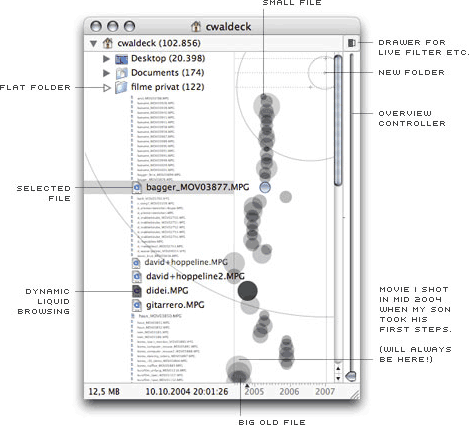 PR:
Liquifile is a new file management tool for Mac OS X. An
alternative Finder, if you will. It is designed for visual thinkers
who want to get a bigger picture of their files and feel them more
directly. But not only for them.
PR:
Liquifile is a new file management tool for Mac OS X. An
alternative Finder, if you will. It is designed for visual thinkers
who want to get a bigger picture of their files and feel them more
directly. But not only for them.
Did you ever wonder why searching and browsing is so separated
in today's interfaces? Ever wished you had a bigger screen when
finding or organizing your files? Ever lost files in deep
hierarchical structures? Ever wondered what the next big thing in
file browsing might be...? Well, maybe you should have a look at
this:
Liquifile is a tool that needs a few minutes of introduction
(because it is quite different) but then delivers a lot of
advantages over the common browsing methods.
Please keep in mind: This is just the beginning. There is still
a lot to come in future versions... But what ever will come: The
license you buy now will be also valid for all the next versions
(up to 1.X minimum, maybe more). We want to support our early
supporters! If you have wishes or comments, please let us know. We
would love to know what you think. Help us to build your favorite
Finder alternative.
By the way: meet us at the CeBit 2007 in Hannover. We will have
a stand there (hall 9, stand 37A) and will show lots of liquid
browsing stuff. We would love to talk to you, hear your thoughts
and wishes and get you really liquifiled.
We will share the CeBit stand with iStuff (maker of the Shell
hardcase sleeve for notebooks and the iSaver microfiber cloth. Did
you know that iStuff is supporting Liquifile? This means you can
also help us by buying iStuff products.
New in version 1.5.1:
- Dots for folders and packages
- Keyboard Navigation
System requirements: Mac OS X 10.4 or later.
System support: PPC/Intel
$9.90 - 30-Day-Trial
Please support the development of Liquifile by purchasing a
license. A license is personal and can be used on all computers
owned by the license owner.
International Liquifile License (v.1.5): $12.90
Link: Liquifile
Smart Scroll X Add Scrolling Options to
OS X
PR: Smart Scroll X brings new scrolling options and
enhancements to Mac OS X:
- Super Wheel - smoother, more comfortable scroll wheel
action.
- Grab Scroll lets you scroll by clicking and dragging anywhere
in a window. Currently for Cocoa applications.
- A "High Gear" for your scroll wheel, so you can have super-fast
scrolling when you need it.
- Universal Scroll Keys to scroll without having to reach for the
mouse. Scroll keys are the same in every application, giving you
fast & dependable scrolling right from the keyboard.
- Adds Scroll wheel support to FileMaker Pro 6 and 7 (as well as
live scrolling).
- Adds Live Scrolling and proportional thumbs to AppleWorks
6.
Grab Scroll
Grab scroll works with any mouse or pen or trackpad, etc. It is
essentially the same feature as the hand tool available in many
graphics programs, but now you can use it for scrolling in any
Cocoa application (support for Carbon applications is
forthcoming).
- With a single-button mouse, a scroll key lets you turn the
cursor into an open hand: hold the first key and tap the second
one. To scroll, click and drag with the mouse. Grab scroll mode
ends when you release the first key (the 2nd key is used to
activate grab scroll, and also to scroll faster when you
want).
- With a multiple-button mouse, you just press one of the buttons
(select one) to grab the page and slide it inside its window.
- With a graphics pen, you'll probably want to setup the extra
buttons so that the first one does a middle-click (so you can use
it to grab scroll) and the 2nd one does a right-click. Since the
pen lets you move the cursor farther with less effort and more
precision than a mouse, you can keep the normal speed at 1x for
maximum control and set the other speeds to some high value.
Two extra scrolling speeds are available, in addition to the
normal speed. One by holding a user-selectable key while dragging,
and the second by starting to drag near an edge of the area to
scroll.
Faster Scroll Wheel
You can make your scroll wheel faster when you hold down a
user-selectable key, up to 12 times faster. In addition, the speed
multiplier you choose is applied on top of the acceleration already
provided by the Keyboard & Mouse preference pane: this means
you keep the same level of control as you have now, but you can
scroll farther and without having to spin the wheel nearly as
much.
Universal Scroll Keys
A welcome alternative to always having to reach for the mouse,
Scroll Keys are a real time saver for anyone who types a lot!
With automatic scroll focusing, all you do is press a Scroll Key
and Smart Scroll X automatically selects and scrolls the correct
pane. Scroll Keys also feature their own adjustable scrolling
speed, with optional progressive acceleration, so that you can
easily scroll multiple pages simply by holding down a key.
Scroll Keys are the same across all applications: no need to
remember different keys for each app. Because of this, and because
Scroll Keys are conveniently located in the corner of the keyboard,
you can even scroll without having to look at the keys.
Scroll Keys are made possible by the new kind of keyboard
shortcut used in Smart Scroll X, which doesn't involve hitting
letter keys (hence avoiding conflicts with existing key
combinations). Instead, you hold down one of the four corner keys
and you scroll by hitting one of the others (some keyboards have
these keys on both sides, letting you scroll with either hand)
:
FileMaker Pro & AppleWorks Enhancements
Smart Scroll X brings scroll wheel support and live scrolling to
FileMaker Pro 6 and 7. You can now use your scroll wheel mouse for
scrolling FileMaker Pro documents. Note: With some layouts you may
need to click one of the scroll bars once before the scroll wheel
works. A fix will be available in the next version of Smart Scroll
X.
AppleWorks 6 users get live scrolling and proportional thumbs,
as well as scroll wheel support.
Live scrolling updates the document while you drag the scroll
bar thumb. Proportional thumbs show how much of the document is
being displayed, and they make it easier to see which part you are
viewing. They are also easier to grab with the mouse.
Scroll Next
If a window has two or more scrollable panes, it is the one
under the mouse pointer that scrolls. Automatic scroll focusing
will select one of the panes for you when you press a Scroll Key to
start scrolling, but chances are it won't be able to guess the
correct pane every time. To let you scroll another pane without
reaching for the mouse, Smart Scroll X adds the Scroll Next
feature: hold down Control and hit Shift to select the next pane in
the window for scrolling. The mouse pointer jumps to the selected
pane too, providing visual feedback.
Scroll Next is quite useful in applications such as Mail for
example, where one often wants to alternatively scroll the list of
messages and the text of an email.
Note: In the current version of Smart Scroll X, scrolling in
Carbon applications only works if the mouse pointer is above the
pane to scroll. An upcoming version of Smart Scroll X will
remove this limitation, and also enable the Scroll Next feature for
Carbon applications.
Other Features of Smart Scroll X
Finally, Smart Scroll X lets you select a comfortable scrolling
speed for Scroll keys (including optional acceleration), and offers
a larger selection of scrollbar arrows positions (still useful from
time to time, although with Grab Scroll and Scroll Keys you won't
need to click on arrows very often anymore). You do not need to
restart applications for these changes to take effect.
New in version 2.1.2:
- Intel-based Macs: the Smart Scroll X installer automatically
removes Rosetta TuneUp, as this utility is no longer needed on Mac
OS X 10.4.9.
- Various other fixes and improvements.
New in version 2.1.1:
- Super Wheel and Scroll Keys are now automatically turned off
for some incompatible apps (MS Office). Thanks to Aydin Yulug for
his assistance!
- Various minor fixes and improvements.
New in version 2.1:
- Super Wheel improvements for the Finder, Firefox and other
Carbon applications.
- Smoother horizontal scrolling for Super Wheel and Grab Scroll,
in Carbon applications.
- Various minor fixes and improvements.
New in version 2.0x:
- New Super Wheel feature.
- New Coasting feature for Grab Scroll.
- New Grab Scroll feature for Carbon applications.
- Universal binary.
- Includes Rosetta TuneUp, a utility for preventing
Rosetta-related crashes on Intel Macs.
- Streamlined preference pane.
- Various fixes and improvements.
System requirements: Mac OS X 10.3.9 or later.
System support: PPC/Intel
$29 shareware
Link: Smart Scroll
X
Download:
Desktop Mac
Deals
Low End Mac updates the following price trackers monthly:
For deals on current and discontinued 'Books, see our 13" MacBook and MacBook Pro,
MacBook Air, 13" MacBook Pro, 15" MacBook Pro, 17" MacBook Pro, 12" PowerBook G4, 15" PowerBook G4, 17" PowerBook G4, titanium PowerBook G4,
iBook G4, PowerBook G3, and iBook G3 deals.
We also track iPad,
iPhone, iPod touch, iPod classic, iPod nano, and iPod shuffle deals.



