PowerBook, iBook, MacBook, and other portable computing is covered
in The 'Book Review. iPod, iPhone,
and Apple TV news is covered in The iNews
Review.
All prices are in US dollars unless otherwise noted.
News & Opinion
Products
News & Opinion
Apple Releases Mac OS X 10.5.3 Update
On Wednesday, Apple released the much-anticipated Mac OS X 10.5.3
major bugfix update, which is available via Software Update or (my much
preferred mode) as a standalone installer from Apple's Software
Download site.
The Mac OS X 10.5.3 Update is recommended for Mac OS X 10.5, 10.5.1,
and 10.5.2 Leopard, and includes general operating system improvements
that enhance the stability, compatibility, and security of your
Mac.
These versions of the standalone installers are available from Apple
Downloads.
- The delta update [420 MB] lets you update from Mac OS X 10.5.2 to
10.5.3 only.
- The combo update [536 MB] lets you update from Mac OS X 10.5,
10.5.1, or 10.5.2 to 10.5.3
My advice in general, but especially for this update, being as the
file sizes are "only" 116 MB apart in size, is to go with the Combo
Update even if you're only moving up from version 10.5.2. Historically,
many users have anecdotally reported that they encounter fewer issues
using the Mac OS X Combo updaters, than with the incremental
Deltas or Software Update.
For an example of a cautionary tale, see
Warning: Apple Update May Brick Your Mac.
May I also suggest using Disk Utility to Repair Permissions, or even
better, a System maintenance utility like OnyX (free), Cocktail,
MacPilot, or many others to run a full slate of system maintenance
routines (repair permissions, cron scripts, cache dumps, system
optimization) to make sure the 10.5.3 update is installing over a
cleaned-up system.
My 2 cents.
Reliving the Clone Wars
Macworld's Rik
Myslewski says Psystar's efforts have rekindled Mac clone talk - but
don't expect Apple to join in
"...last month's emergence of Psystar - a company offering to sell
PCs capable of running Mac OS X - has rekindled memories of the days
when Apple's own machines weren't the only hardware capable of running
the Mac operating system. Because of that, we thought we'd take a look
back at the Mac clone era, examining their rise and fall - and why
we're unlikely to see the re-emergence of any sanctioned clones any
time soon."
Link:
Reliving the Clone Wars
Apple Is BMW
Great White North Prognostications says:
"I have finally figured out who Apple is. They are BMW. That is
everybody either wants a BMW or has a BMW or is in denial that they
want a BMW. By BMW generically mean the higher end Germanic cars such
as Audi, Porsche. Basically Apple's cost more are considered cool and
tend to have extra features and be of a generally higher quality.
Whereas Dell and HP are like GM and Ford with the Sony Vaio series
perfectly matching the Japanese car manufactures. Using this
interpretation it allows me to predict the future of Apple. Like BMW
Apple will never take over a majority of the car market but they will
hold on to the high end high profit margin of the business
. . . a few who's time is worth too much for the hassles of
Vista or just have the money to buy a better machine or just want to
look cool will buy an Apple...."
Link: Apple Is
BMW
Net Cost for Leopard or iLife: $30
My First Mac's
Chris Kerins says:
"Even though to all my friends I seem to happily buy every Apple
consumer item soon after it becomes available, I still agonize over
spending the money. I wonder, 'Can the little bits of Leopard really
add up to $129 worth? How about the new themes that come with each
iLife release? Are they worth $79?' I wrestle with it for a while and
then usually end up buying it at one of my local Apple stores.
"Little did I know at the time, when I bought Tiger and iLife '06 it
would only cost me $30 each. Yes, I paid full retail at my Apple store,
but what I never factored in was resale value because it never occurred
to me to sell them later....
"Boy was I surprised to see the average selling price of Tiger was
$100 and iLife '06 was $50. That's only $30 less than retail!"
Link:
Pssst... Want to Buy Leopard or iLife for $30?
Copyright Police Threaten iPods, Portable
Computers
Macworld UK's
Jonny Evans reports:
"Draconian new copyright protection laws would give border guards
the right to seize iPods and mobile phones on suspicion they contained
illegal downloads.
"That's the very real threat of new legislation currently being
worked out by the G8 nations, of which the UK is a part, according to
Canadian reports.
"These reports claim the Canadian government is secretly negotiating
to join the US and the EU in an Anti-Counterfeiting Trade Agreement
(ACTA). Alongside the introduction of an international copyright law
enforcement body, the deal would also see ordinary police given the
right to search your digital devices for stolen files, and would also
allow them to confiscate such devices...."
Editor's note: How are they going to be able to distinguish a
legally ripped or purchased files from illegal ones? Are you going to
have to carry copies of your receipts from the iTunes Store along with
all the CDs you're ripped into your iPod? If this passes, your computer
or MP3 player
Link:
Copyright Police Threaten iPod, Mac
10 Things We Miss from OS 9
MacLife's
Michael Simon says:
"For millions of post-iPod Mac users, OS X is the alpha and omega of
the Apple desktop. Unlike Microsoft - which has basically kept the same
arrangement and appearance for its task bar and icons despite updating
the overall feel of Windows over the last decade or so - Apple took its
OS in a completely new direction back in 2001 and has never looked
back, integrating a new processor architecture and building a
revolutionary mobile platform around its sleek engine and slick
curves....
"But those of us who remember OS 9.2 will recall with varying
degrees of fondness the last serious update to Classic, which added
some 50 new features to OS 8.6 to create what Steve Jobs hailed as 'the
best Internet operating system ever.'
"And while the OS X experience is vastly superior to its
predecessor, there are still a few nostalgic elements that we longtime
Mac fans will always have a soft spot for:
- WindowShade
- Happy Mac
- Desktop Tabs
- VoicePrint
- Themes
- Print Window
- Internet Explorer
- Bomb
- Clarus the Dogcow
- Coffee Breaks
- Desktop Stickies"
Link: 10
Things We Miss from OS 9
Aluminum Keyboard Loses Its Luster
Macworld's
Jonathan Seff says:
"When Apple first released the aluminum iMac in August 2007, I wrote
in my review that:
"'In some ways, I think the keyboard design is more of a triumph
than the iMac itself . . . and I highly suggest giving it a
chance before writing it off as being too different.'....
"Recently, I replaced my aging dual-processor Power Mac G5 tower with latest
generation of 24-inch
iMac. And on the whole, I couldn't be happier with my purchase. But
I think I may have changed my mind - the one aspect that doesn't leave
me completely satisfied is that keyboard."
Link: Aluminum
Keyboard Loses Its Luster
How to Fix a High CPU Usage Issue with
Quicksilver
Mac OS X Hints
contributor marco.trive says:
"There's one application I particularly love on my Mac: it's
Quicksilver. This week, for the first time ever, it started behaving
oddly - my PowerBook was getting hot very quickly, and a check on
Activity Monitor showed me that CPU utilization was at 100%, with
Quicksilver using a varying amount from 20% to 90%."
Link: How to
Fix a High CPU Usage Issue with Quicksilver
How to Pull Stuck Hard Drive Sleds from the Mac
Pro
Mac OS X Hints
contributor joeholmes says:
"I've been swapping hard drives in my Mac Pro a lot lately, and they
kept getting more and more difficult to pull out once they'd been
soundly seated, to the point where I was in danger of bending the lip
of the sled."
Link: How to
Pull Stuck Hard Drive Sleds from the Mac Pro
Apple USB Modem Causes Hangs, Crashes
MacFixIt
reports:
"When the Apple's external USB modem is in use, users may experience
what appears to be a system hang after a few minutes of being
connected. For some users the computer must be reset multiple times
before the modem will initialize properly and connect....
"On a similar note, as described in a thread on the Apple discussion
boards, other users who have not experienced crashes have experienced
dropped connections with the modem after a few minutes, indicating
either the modem itself may be faulty or there may be a modem driver
conflict in Leopard.
"The 'crashes' experienced appear to be from a conflict between the
Apple modem and other devices sharing the same USB bus....
"Since the problems with the USB modem seem to have appeared in
Leopard, hopefully a software update from Apple will be
forthcoming."
Link: Apple
External Modem Causes Apparent Freezing (subscription required)
Products
OWC's Faster SuperDrive DVD/CD Burners for
All Macs - from $31.99
PR:
Other World Computing (OWC), a leading Mac and PC technology company,
announced today new SuperDrive optical drives with the newest, fastest
and quietest SuperDrive technology. OWC SuperDrive solutions feature
faster Read/Write DVD, Dual-Layer DVD, CD, and DVD-RAM burn speeds of
up to 20x for DVDs and 48x for CDs; with LightScribe 'Laser Labeling'
technology for producing specially coated laser-etched CD/DVD labels
with text or graphics.
OWC has solutions available for nearly every Mac model over the last
decade, including Mac Pro; PowerBook G4 Titanium 15", 12/15/17"
Aluminum; iBook G4; PowerMac; PowerMac G3, G4, G5; iMac G4; and
eMac.
Whether upgrading from a read-only drive, replacing an older
SuperDrive, or for additional optical drives, the latest solutions from
OWC are quiet, low-cost and Plug & Play ready. OWC makes it easy to
upgrade to the new SuperDrive models with the latest software,
including Apple iLife, Roxio Toast, NTI Dragonburn, and other CD/DVD
authoring applications preconfigured directly in the drives. The easy
online guide lets you select the right SuperDrive model for your Mac
system.
SuperDrives for desktop and tower model Macs are priced from $31.99
and offer up to 20x DVD, 12x Dual-Layer DVD (8.5 GB per disc), and 48X
CD burning speeds. DVD-RAM burn capability and LightScribe are also
available. SuperDrive 8x DVD, 6x DVD Dual-Layer, 24x CD-RW, 5x DVD-RAM
slot loading drives are now available from $99.95 for Apple iMac G5,
iMac Intel, G4 Cube, PowerBook G4, and iBook G4 computers
Link: SuperDrive
Your Computer
Google Apps: The Missing Manual
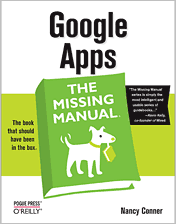 PR: Google Apps, which includes a word processor,
spreadsheet, and other office productivity programs, now poses serious
competition to Microsoft Office's dominant position on business desktop
applications. And Google Apps gives everyone plenty of bonus reasons to
switch - collaborate on documents with others at the same time, whip up
a web page stocked with downloadable files, and work on it all from any
web-connected computer. About the only thing Google doesn't offer is an
authoritative, reader-friendly guide like Nancy Conner's "Google Apps:
The Missing Manual" (O'Reilly Media, $39.99).
PR: Google Apps, which includes a word processor,
spreadsheet, and other office productivity programs, now poses serious
competition to Microsoft Office's dominant position on business desktop
applications. And Google Apps gives everyone plenty of bonus reasons to
switch - collaborate on documents with others at the same time, whip up
a web page stocked with downloadable files, and work on it all from any
web-connected computer. About the only thing Google doesn't offer is an
authoritative, reader-friendly guide like Nancy Conner's "Google Apps:
The Missing Manual" (O'Reilly Media, $39.99).
"Google's individual programs, like Gmail and Google Docs, have been
popular with people since they launched," notes Conner. "But more and
more businesses - over half a million of them - are now putting Google
Apps to work for their organization."
"My book can help anyone interested in using individual applications
for personal use or as employees," she adds. "Administrators setting up
a Google Apps account for their organization will find detailed
chapters on how to set up and manage a Google Apps account across the
enterprise."
"Google Apps: The Missing Manual" teaches you how to:
- Use Gmail, Google Docs, Google Calendar, Google Talk, and quickly
create word processing files, spreadsheets, and slideshow
presentations.
- Share and co-edit files - including revision histories and instant
notifications every time a change gets made.
- Move your files back and forth between Google Apps and Microsoft
Office.
- Set up and manage your entire organization's switch to Google
Apps.
- Create a wiki - an editable, collaborative website.
Of course, as remarkable as these applications are, Google's office
suite is definitely a work-in-progress. Navigating what you can and
can't do and - more importantly - understanding how to do this isn't
always easy. And good luck finding enough help online. Thankfully,
"Google Apps: The Missing Manual" makes getting the most out of this
increasingly useful part of the Google empire much, much easier.
Author Nancy Conner has a Ph.D. in English from Brown University and
has taught writing, including technical writing, to college students
for more than a dozen years. She is currently a freelance copyeditor,
specializing in technical books covering topics ranging from the MS
Office suite to programming languages to advanced network security.
- Google Apps: The Missing Manual
- Nancy Conner
- ISBN: 9780596515799,
- $39.99 US
- order@oreilly.com
- 1-800-998-9938
- 1-707-827-7000
- 1005 Gravenstein Highway North
- Sebastopol, CA 95472
Link: Google
Apps: The Missing Manual (currently available at $26.39 with free
shipping from Amazon.com)
Desktop Mac
Deals
Low End Mac updates the following price trackers monthly:
For deals on current and discontinued 'Books, see our 13" MacBook and MacBook Pro,
MacBook Air, 13" MacBook Pro, 15" MacBook Pro, 17" MacBook Pro, 12" PowerBook G4, 15" PowerBook G4, 17" PowerBook G4, titanium PowerBook G4,
iBook G4, PowerBook G3, and iBook G3 deals.
We also track iPad,
iPhone, iPod touch, iPod classic, iPod nano, and iPod shuffle deals.



