Some programs seem to do a thousand different things. Others are one
trick ponies.
 HyperDither falls
in the second category, and compared to image editing powerhouses like
Photoshop and even Photoshop Elements, its feature-set is incredibly
sparse. In fact, it only does one thing - it dithers images.
HyperDither falls
in the second category, and compared to image editing powerhouses like
Photoshop and even Photoshop Elements, its feature-set is incredibly
sparse. In fact, it only does one thing - it dithers images.
You may think that's nothing special, as even low-end programs like
Photoshop Elements and GraphicConverter include a dithering option. Not
only do they have a dithering option, but you can adjust it over a wide
range of settings. Some may appear sharper than others. Some may appear
smoother than others. And you can spend quite a bit of time adjusting
the slider.
HyperDither eliminates all of that bother. You launch the program,
drag an image to it, and it dithers it. You have precisely two options:
sharpen the image and change contrast. Sharpen is on or off. Contrast
is normal or higher (higher usually looks better). There is no step
3.
If Photoshop can already dither, why bother with HyperDither - even
though it's free? Because it does one thing, and it does it better than
Photoshop.
John Balestrieri, the programmer behind HyperDither, rediscovered
the dithering algorithm developed by Bill Atkinson, the father of
MacPaint, QuickDraw, and HyperCard. This routine produces a sharper,
smoother dithered image than the Floyd-Steinberg filter that Photoshop
uses. "Atkinson dithering" was last used in Apple's HyperScan software
and was pretty much forgotten after that.
But Balestrieri didn't forget it, and he contacted Atkinson in
January 2003 to ask for details of his algorithm. Atkinson was more
than happy to provide the routine, and that became the basis of
HyperDither, which is now at version 1.2.
How well does it work in practice? Very well indeed!
A while back a reader emailed me a high resolution color photo of
his Mac 128K demo at the Orlando
Apple Store. I included a reduced color version of that photo and
then created a dithered version at 512 x 342 pixels, the same
resolution as the original Mac's display, using Photoshop Elements.
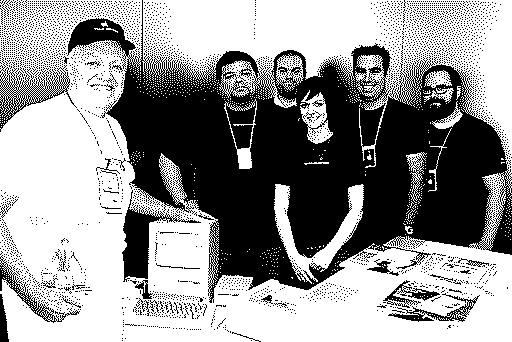
Image dithered in Photoshop Elements.
I fiddled around quite a bit with the slider - and ended up exactly
where I started, at 88%. I thought it looked pretty nice. Well, until I
did the same thing in HyperDither. Using the default settings, I ended
up with the image below:
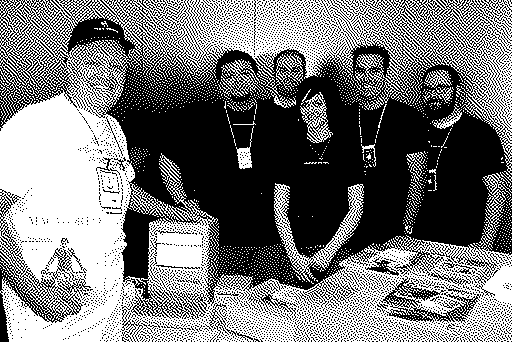
Image dithered in HyperDither with default settings.
You can see a lot more detail: the Mac itself isn't washed out, the
wall in the background has smoother gradients, and you can better make
out the T-shirts and magazine covers. The only drawback compared with
the Photoshop version is that the faces are not nearly as sharp.
Time to use HyperDither's sharpen filter:
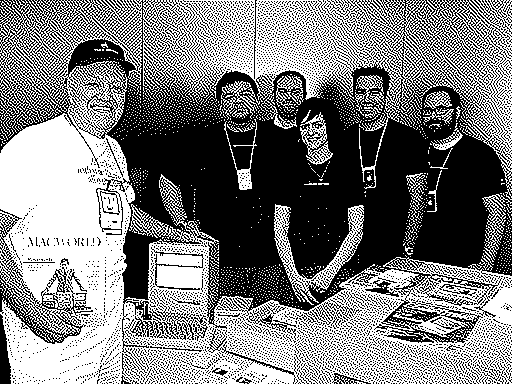
Image dithered in HyperDither with increased sharpness.
We've regained the facial detail lost in the default HyperDither scan,
retain the smoother gradients that Photoshop lost, and have cleaner
edges than either of the earlier images. If anything, it may sharpen a
bit too much, but overall this is a great image.
Why Dither?
Dithering is a neat way of creating images that look like they
belong on an ancient Mac with a 1-bit black and white display, but
there's another reason dithering can be useful.
Have you ever printed out a document with a photo in it and then
made photocopies for that document? If so, you've probably noticed that
the image tends to get darker, increase in contrast, and sometimes lose
smooth gradients. As Jeff Adkins pointed out in Preparing Images for Better Reproduction on Laser
Printers and Photocopiers, by using a dithered image in your
original, you can minimize or even eliminate the problem of copies
getting darker, gaining contrast, and loosing smooth gradients.
In his article, Adkins suggested taking your image, opening it in
GraphicConverter, resizing it
to exactly the size it will be when printed, and choosing to dither it
at 600 dpi resolution. That worked pretty well.
Now we have an even better tool. Here are the steps I would
take:
- Open the image in the image editor of your choosing. I use
Photoshop Elements, but almost anything will do.
- If necessary, do a little image fixing, maybe adjusting the color,
fiddling with contrast, etc.
- Resize the image to the exact size it will be when printed and set
resolution to one your printer easily supports (that might be 300 dpi,
360 dpi, 600 dpi, or at most 720 dpi). You don't want to go too high or
the copier may have problems with such small dots.
- Save the image, preferably with a new name so you don't overwrite
the original.
- Launch HyperDither and drag your image to it.
- Fiddle with contrast and sharpness to see if another setting works
better.
- Save your image. (HyperDither saves as PNG.)
Now print it out, take the printed page to the copier, and make a
copy. It should look nearly identical to the original.
Thoughts on HyperDither
This is a remarkably simple program - drag, drop, adjust, save. It
has precisely two options: contrast and sharpness. It produces great
dithered images and doesn't cost a penny.
There is room for improvement. It would be nice if it had two more
Save options: GIF for use on the Web (some older HTML editors such as
Claris Home Page corrupt uloaded PNGs) and PICT for use with old Macs
that don't support PNG. You can use another image editing program or
Preview to make the conversion, but it would be nice if you could avoid
the extra step.
It would also be nice if you could change the image size and
resolution, as well as contrast and brightness, within HyperDither.
That would eliminate the need to do that work before dragging your
image into HyperDither. With that, it would be a one stop dithering
solution.
HyperDither does what it does very well, and while there are a few
features that could be added to make it even more useful, that doesn't
detract from what it does. Adding GIF export would be icing on the cake
(the GIF algorithm has been free from patent protection since late
2006).
For its elegant simplicity and the quality of the images it
produces, HyperDither earns 3-1/2 LEMs. It's nearly perfect and has
little room for improvement. 
Manufacturers and distributors: Interested in having your product
reviewed? Please read our review policy.




