Except as noted, prices are in US dollars, bold links are to
outside sites, and regular links lead to 'Book profiles on Low End
Mac.
PowerBook G4 Gets Slot-loading DVD-ROM/CD-RW Combo
Drive, Retrofit Upgrade Program Coming January 14
The big 'Book news this week was Apple's announcement that it has
made slot-loading Combo (CD-RW/DVD-ROM) optical drives standard across
the PowerBook G4 line. And if you recently purchased one of the
Revision B 550 MHz or
667 MHz TiBooks, don't
feel bad. Starting January 14, 2002, Apple will also offer current
PowerBook G4 550 MHz and 667 MHz owners the opportunity to upgrade
to the new Combo drive for US$299.
The PowerBook G4's slot-loading DVD-ROM/CD-RW Combo drive plays
CD-ROM, audio CD, DVD video, DVD-ROM and DVD-RAM discs. You can use
iTunes to burn audio files and the Disc Burner feature in Mac OS 9
or Mac OS X to burn data CDs.
The PowerBook G4 line is now available in two standard
configurations:
The 550 MHz PowerBook G4, for a suggested retail price of $2,299,
includes:
- 256 MB SDRAM
- 20 GB Ultra ATA/66 hard drive.
The 667 MHz PowerBook G4, for a suggested retail price of $2,999,
includes:
- 512 MB SDRAM
- 30 GB Ultra ATA/66 hard drive; and
- AirPort Card for wireless networking.
The PowerBook
G4 Combo Upgrade Program will be offered worldwide from January
14 to March 30, 2002. Customers should check the Apple Web site
starting January 14 for further details on how to place an order.
Only the 550 MHz and 667 MHz PowerBook G4 systems with
DVD-ROM or CD-RW drives are eligible for this upgrade. The Combo drive
does not fit in the structure of the PowerBook G4 400 MHz and
5 MHz systems.
Portrait Displays' PivotPro 6.0 Laptop Display
Rotation Software
In last week's report on the Plasticsmith
Lapvantage laptop computer stands, one of which is designed to support
viewing in Portrait mode, I erroneously noted, "Unfortunately, to the
best of my knowledge, Apple laptops do not support portrait mode
viewing."
Not so. Portrait Displays'
PivotPro 6.0 offers one-click rotation software, allowing you
to switch from landscape to portrait with a hot key combination, and it
supports Mac OS 7.1 to 9.x. Mac OS X is not yet supported.
Plasticsmith's Eric Beerbohm
writes:
- I myself am a dedicated Mac user genuinely torn between the
Portrait mode in OS 9.2 and the beauty/stability of Mac OS X. In
fact, I came up with the idea of Lapvantage: Portrait Edition by
putting my TiBook on its right side and imagining all the vertical real
estate it would provide in a "long-screen view."
The design of the computer display was originally based on the
landscape shape of the television. We're accustomed to viewing
information on a display that is wider than it is tall. While the
landscape orientation works for television, it's not well suited for
working with documents.
Since the advent of WYSIWYG (what you see is what you get)
technology, computer document handling has followed the portrait
orientation of the 8.5" x 11" or A4 paper document standard. Over 70
percent of the documents computer users work with are in portrait
orientation. Research has shown that over 60 percent of those users who
set up their rotating computer displays in portrait orientation, keep
it there.
For most computer users, the standard computer display contains a
substantial amount of wasted space along the right-hand side of the
display. Since only a few types of documents call for landscape
orientation, the portrait view makes better use of the desktop space by
allowing you to see and work with more of your document without
constant scrolling.
Pivot software allows you the advantage of changing the orientation
of your computer display. Get your free trial now to experience the
power of the portrait view.
An independent survey by Jon Peddie Associates found that nearly
half the users of Pivot® software spend 90% of their time in a
portrait orientation.
PivotPro 6.0 features:
- Supports all rotating LCDs
- Supports stationary LCDs with VESA-compliant rotating mounting
kit
- Supports all rotating orientations: 90, 180, 270, and
landscape
- Dynamically switches from portrait to landscape, and back
- Dynamically resizes windows and applications
- Pivot is resolution independent, supporting the highest resolution
that the graphics card can output
- Automatically adapts to the language version of the operating
system (language support: English, Japanese, French, German, Spanish,
Dutch, Italian, Korean, and Chinese, traditional and simplified)
Portrait Displays' Pivot for Macintosh is not compatible with Mac
OS X, and there are no plans for supporting it in the future. If
you plan to upgrade to OS X in the near future, be aware that
Pivot for Macintosh will only support up to Mac OS 9.2.
Other known issues:
- Drag and Drop will exhibit some redraw errors in 9.x. When dragging
an icon over a folder while in portrait mode, the image of the folder
will become distorted. Refreshing the affected area by dragging the
cursor or window over it will restore the image. These errors do not
occur with versions of Mac OS prior to 9.0.
- Window Tabs will exhibit redraw errors in 9.x. Dragging a folder to
the bottom of the screen will create a tab. Opening and closing this
tab in portrait mode will cause redraw errors within the window.
Refreshing the affected area by dragging the cursor or window over it
will restore the image.
Pivot for Macintosh is fully functional with all Mac applications.
The above mentioned anomalies only occur under Mac OS 9.x and are
related to the same redraw issue.
Pivot Mac Software v6.25 sells for $49.95
Willow Design Releases New Walmopiztreet
Slipcase
Willow Design
president Nigel Peck says that after multiple requests, Willow has
introduced the Walmopiztreet
Slipcase, designed for everyone still carrying around Pismo or
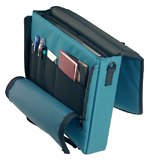 WallStreet PowerBooks. The Walmo is not
included in Willow's
Year End Sale, now extended to Dec 31st, but purchasers will
get half-price rates on ground shipping in the US and Canada to the end
of the year.
WallStreet PowerBooks. The Walmo is not
included in Willow's
Year End Sale, now extended to Dec 31st, but purchasers will
get half-price rates on ground shipping in the US and Canada to the end
of the year.
The Walmo is the first of a new line of Willow slipcases, featuring
a contoured protective flap, large mesh accessory pocket, zippered
organizer pocket and convenient back map or magazine pocket. "The
amazing thing is that although the slipcases only weigh about a pound
and a half, they really do offer excellent protection," commented
Peck.
"We've built into the Walmo all the suggestions of Willow slipcase
users over the last eight months", said Peck. "One simple but logical
improvement was luggage feet for the bottom of the slipcase. If heavily
loaded, the case may not stand upright on its own, but its riveted
rubber luggage feet allow you to lean it against items, up off the
ground".
Asked why the new slipcase line is being launched with a slipcase
for an old PowerBook, Peck quipped that he is one of those still
carrying around a Pismo and his wife hauls around a WallStreet. "We
needed slipcases, and G3 PowerBook slipcases coalesced into an exciting
new design."
Available Colours: black, charcoal, navy, teal, purple, royal,
mauve
Walmopiztreet Slipcase Pricing: $65 U.S./$98 Cdn.
Dr. Bott's iPod Connection Kit II with Tape
Adapter
Dr. Bott's
iPod Connection Kit II with Cassette Adapter includes
everything you might need to bring your music anywhere you might want
it. iPod Connection Kit provides most every option for connecting to
iPod's 3.5 mm stereo headphone jack to automobile stereo systems, home
stereo systems, mic input of computers and other devices, boom boxes,
and tape players.
Dr. Bott's iPod Connection Kit includes:
- Auto Charger for iPod
- Cassette Tape Adapter
- Mini Stereo Extension Cable (male/female)
- Mini Stereo to RCA Cable
- Mini Stereo Connection Cable (male/male)
- iPod Carry Pouch
iPod Connection Kit II w/ Tape Adapter sells for $47.95
Availability: Dr. Bott's iPod Connection Kit II will be shipping in
January and can be pre-ordered today.
Bargain 'Books
There are two different versions of WallStreet running at 233 MHz,
the cacheless MainStreet version and the
later Series II with
a level 2 cache. It's not always possible to determine from the
vendor's listing which is being offered, so we've included links within
this paragraph to the two models.
New Revision A iBook 500s
Jeff Hubert of ipowerlease.com in Victoria, BC,
Canada, has a line on about 200 brand new Revision A iBook 500s that he is
offering for US$998. These units are covered by a full one year
warranty and will ship from Canada. Jeff will be purchasing these units
from a very large Canadian Apple reseller that recently made a special
deal on these units.
For more information, email: jhubert@ipowerlease.com
Club Mac drops
prices on pre-combo drive Revision B PowerBook G4
Buy a select PowerBook 667 or 550 MHz from Club Mac and get...
- Apple's Double Your RAM Promo
- Free Iomega Zip 100 MB Value Line
- Targus Carrying Case
- Free Lexmark Z23 Printer (after the Lexmark and Club Mac mail-in
rebate)
- iBook 500 MHz, 128/10
GB/DVD, Factory Refurbished,1 year warranty, $1089
- iBook, Key Lime, 366
MHz, 192/10 GB/FireWire/CD, used, 90 day warranty, $899
- PowerBook G4/500,
256/20 GB/DVD/56k, three years of AppleCare (worth $299), $1,899



