Miscellaneous Ramblings Review
New Iris 1.0 Image Editor Not Quite Ready for Prime Time
Charles Moore - 2008.07.14 - Tip Jar
Popularity: ![]()
![]()
![]()
![]()
![]()
![]()
Low End Mac Reader Specials
Memory To Go Special: New 2008 iMac 2GB $42 / iMac Intel Core2 DUO & MacBook Pro 2GB $36 - 1GB $20. MacPro 8 Core Memory 4GB kit $154 / 2GB kit $94 -- Free shipping available.
Download Typestyler, still the Ultimate Styling Tool for Internet, Print and Video Graphics. Works great in Classic with a Native OS X Version on the way. Free Tryout: www.typestyler.com
LA Computer Company: Specials on AppleCare, iMac's, Apple Batteries and Apple A/C Adapters. Also Great prices on Used Apple Computers. Call 1-800-941-7654 Click Here.
OWC: OWC Mercury On-The-Go FW400/800/USB2/eSATA Portables High Performance A/V Rated, **Bus Powered** **Up to 500GB in the Palm of your Hand** Macworld Editor's Choice, CNET 'Very Good' - from $75.99!
Mac users can finally play Party Poker for Mac. Not only that, they can also learn how to play PokerStars for Mac.
Laptop Hardware Provided by TechRestore - Overnight Mac & iPod Repairs.
Compare products like desktop computers, laptops, and LCD TVs side by side! All the information and reviews to make the best purchasing decision for a new cell phone GPS products or MP3 players. The Ciao network makes searching products easy for you.
New iMac 800Mhz Memory 4GB $90, 2GB $45 - Click to Maximize your Macs...
The Mac OS X user community is beginning to have an embarrassment of choice in lower-priced bitmap image editing software.
The Competition
King of the hill is still Adobe's big and powerful $89.95 Photoshop Elements, which is better than ever in Version 6. A new, up-and-coming contender is Pixelmator, which is not in PSE's league features-wise yet, but sells for $59.95 and offers a lot of capability for the money. Then there's Flying Meat Software's $49.95 Acorn, which I haven't cottoned to as much as I have Pixelmator, but many people seem to like it and the price is right.
Actually, I still find myself gravitating back toward the venerable $59.95 Color It! 4.5 application, especially for light-duty stuff when I'm in a hurry. Color It! is well behind the cutting edge in image editing technology, being a Carbon port of an ancient Mac OS app that dates back well into the 680x0 era and doesn't have layers support, but it's lightning-fast, amazingly powerful, and full-featured (it even supports Photoshop plugins), and IMHO no other image editing program can match it for user-friendliness and just plain niceness to use.
Color It! developer Digimage Arts also offers what appears to be an "on steroids" version of the software called Enhance 4.0, for $99.95 that supports 16 levels of Undo/Redo, multiple layers, full support for Photoshop-compatible filters, export and acquire plugins (including multiple-acquire), pressure-sensitive tablets, and drag-and-drop. Professionals will appreciate CMYK four-color separations, advanced 8-bit masking, 33 built-in filters including convolution filters, levels, curves, and unsharp masking, and the ability to paint patterns as easily as solid colors. Sounds great, although I haven't had the opportunity to test it. Color It! and Enhance are almost certainly your best bet if you're running a legacy Mac OS, which they still support, but don't overlook them even if you're on an up-to-date machine.
Then there are the free, open source alternatives, including Seashore, The GIMP, and ImagJ, all of which offer a ton of useful functionality at no cost. I particularly recommend checking out Seashore if you're looking for a relatively lightweight and user-friendly free image editor with lots of power and features.
Enter Iris 1.0
Does the Mac community need another bitmap image editor?
With the introduction of their new $79 Iris graphics application, Nolobe Software hopes so. Nolobe is the developer of may favorite FTP client software, Interarchy, so I had high hopes for Iris, but I'm constrained to report that Iris has a considerable way to go yet before its a credible challenger to Photoshop Elements - or even Pixelmator and Acorn.
However, to accentuate the positive, there are some things to like about Iris. First, it's refreshingly small - a 3.5 MB download and just 7.1 MB when expanded, compared with Pixelmator at 50.7 MB and 112.5 MB respectively, or the humongous 779.3 MB Photoshop Elements 6.
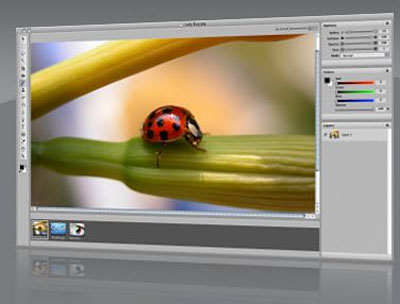
Iris also starts up almost instantly, even on my slow old 1.33 GHz G4, and I like the convenient scaling slider in the right upper corner of the image editing window. There is also a handy small pane at the bottom of the Iris window that displays thumbnails of current open images. And like all modern image editors, Iris supports layers. However, from there things went downhill.
One major problematical issue is that Iris 1.0 shipped without any Help files. Developer Matthew Drayton says that was an error on his part and promises Help files with version 1.1, but in the meantime early adopters are left to fend for themselves - and there are no tooltips on mouseover either.
Drayton says Iris has been created for previously overlooked Mac users who simply wanted an accessible and easy-to-use image program that provides professional results without the professional price tag.
One Window
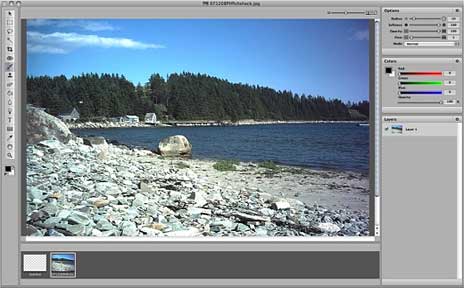
Iris distinguishes itself from the competition by taking a different approach to its user interface: Instead of scattering palettes about on your Desktop, it presents everything in a one-window interface with a fixed tool palette on the left, a fixed documents bar on the bottom, and fixed inspector palettes on the right. This is nice if you like one-window interfaces. All three of the latter can be independently hidden to create more image-editing space when needed.
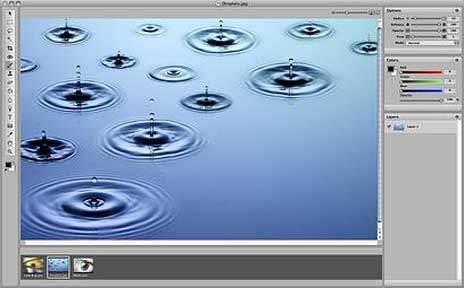
Iris includes many of the usual image editor features, including image correction tools, layers, filters, selection tools, shapes, and so forth, but the selection is not especially deep by comparison with PSE and Pixelmator, and I found that not even everything that is there works terribly well - some being essentially unusable in practical terms. I found that response to some of the image correction tools was jumpy and erratic.
There are also stability issues. Iris 1.0 has the dubious distinction of being the only software application ever to crash my 17" PowerBook in its 30 month tenure with me to a degree that it required a hard restart - and that happened while I was attempting to execute a routine image editing function. I wasn't amused.
An example of the program's feature-deficiency is that there is no free-rotate command, or at least none I could find, which segues us to the matter of Iris 1.0 shipping without any help files. There are no Tool Tips on mouseover of tool icons and no Preferences settings either, so one is left to one's own intuitive devices.
I think it would have been better to release Iris initially as a free public beta and wait for a bit more polish (and some Help files!) before launching a 1.0 release. Iris is competing in a space already being vigorously contested by Photoshop Elements, Pixelmator, and Acorn, and attempting to do so at a price disadvantage with all of them (except Elements, and it's only ten buck more expensive for a vastly deeper feature set and a lot more power).
Frankly, while I wish Drayton well with Iris, I think he will have a tough row to hoe with Iris at $79.95 compared with Elements at $89.95, Pixelmator at $59.95, and Acorn at $49.95. It doesn't help that Iris is closer to Acorn in feature depth and capability than it is to either Pixelmator or Elements.
That said, I'll continue to watch Iris with interest as it develops, and if you are a fan of iLife-type one-window user interfaces, that may be a factor tipping in Iris's favor.
System requirements: Mac OS X 10.5 or later. Mac OS X 10.5.3 is strongly recommended.
You can download a free trial of Iris 1.0.
Other Image Editors Mentioned
- Photoshop Elements 6 for Mac (currently $79.99 with free ground shipping at Amazon.com)
- Pixelmator
- Acorn
- Color It! 4.5
- Enhance 4.0
- Seashore
Charles Moore has been a freelance journalist since 1987 and writing for Mac websites since May 1998. His The Road Warrior column is a regular feature on MacOpinion, and he is a news editor and columnist at Applelinks.com.
Recent Miscellaneous Ramblings
- Only Leopard Runs Routine Maintenance Tasks after Startup or Waking from Sleep, 09.04. Mac OS X 10.5 runs routine system maintenance scripts as soon as possible after starting up or waking up your Mac. Earlier versions of OS X do not do this.
- Another Free POP3 Provider, Recharging a Dead PRAM Battery, Current Kanga Value, and More, 09.03. GMX email now available in US, Panasonic UJ-841S drive won't burn discs, restoring a dead PRAM battery in a Pismo, and thoughts on Kanga value today.
- Resurrecting a Dead Pismo, Spotlight Search Tip, and EasyFind a Good File Finder, 08.27. Lots of tips on bringing a comatose Pismo back to life, a Spotlight file name search tip, and EasyFind as an alternative to Spotlight.
- Does Running OS X System Maintenance Routines Really Do Any Good?, 08.26. Mac OS X is designed to run certain maintenance routines daily, weekly, and monthly - but can't if your Mac is off or asleep.
- More in the Miscellaneous Ramblings index.
Links for the Day
- Mac of the Day: iMac Core2, Sep. 2006 - Apple introduced the biggest screen ever in an iMac with a 24" Core2 Duo model at 2.16 GHz.
- List of the Day: MacBook List for those using a MacBook or MacBook Pro.
- September 6 in LEM history: 99: G4 vs. Pentium III - 00: Setting up a server - 02: Norton Utilities warning - 10 greatest computer annoyances - 06: iMac Core2 Duo - Mac mini Core Duo - The iMac Core2 value equation - 07: Apple seduction - Why I really want an iPod touch - iPod history, 2005 to present - Upgrading a Power Mac G - Apple intros iPod touch, classic, and video nano
Recent Content on Low End Mac
- Anticipation: New iPods Now, New Macs Later, Kev Kitchens, Kitchens Sync, 09.05. The season of new iPods is at hand, but new Macs may wait until 2009.
- Buy a MacBook Now or Wait?, MacBook touch Patents, Samsung X360 Takes on MBA, and More, The 'Book Review, 09.05. Also 20 years of portable Macs, data backup and preservation, universal U-Charge battery charger for Mac 'Books, bargain 'Books from $150 to $2,699, and more.
- Listen to Just the Music with the V-Moda Vibe Earbuds, Tommy Thomas, Welcome to Macintosh, 09.05. Well built, the noise canceling earbuds will let you hear all the nuances of your music without letting through background noise.
- Source of iPhone 3G Problems, Army Uses iPods as Field Translators, Gains with Business, and More, iNews Review, 09.05. Also UK bans iPhone ad as 'misleading', iPhone password easy to bypass, GM to offer radios with USB in 2009 models, weather tracking software, and more.
- Macs Gain Ground in August, Consumers Most Likely to Buy Macs, LaCie USB Speakers, and More, Mac News Review, 09.05. Also migrating Time Machine to a new drive and two new keyboards from Logitech.
- Best iPod touch Deals, Low End Mac Deals, 09.05. Refurb 8 GB, $199; new, $284; refurb 16 GB, $299; new, $370; refurb 32 GB, $399; new, $453.
- Best 15" MacBook Pro Deals, Low End Mac Deals, 09.05. Used 1.83 GHz Core Duo, $999; 2.16, $1,125; new, 2.2, $1,450 after rebate; refurb 2.4, $1,699; 2.5, $1,999; 2.6 Santa Rosa, $1,849; rebates on new.
- Best iMac G4 Deals, Low End Mac Deals, 09.05. Used 15" 700 MHz CD-RW, $279; 800 Combo, $300; 1 GHz $390; 17" 800 MHz SD, $439; 1.25 GHz, $449; 20", $569.
- Overclocking a Mac mini Got Me Hooked on Souping Up Macs, Adam Geller, My First Mac, 09.04. Stories of hot rodding iBooks, G3 iMacs, and PCI Power Macs on the cheap.
- Apple Will Not Abandon Optical Drives, the Mac Drought, Purposeful Mac Acquisition, and More, Dan Knight, Low End Mac Mailbag, 09.04. Also Mac OS X 10.5 on a G4-upgraded Blue & White G3 and problems using a flat panel display with a Quadra 700.
- Tomorrow's Solid State Drives and Notebooks, Dan Knight, Mac Musings, 09.04. Flash drives are great but have some shortcomings. Some thoughts on building better SSDs and notebooks to use them.
- Best Mac mini Deals, Low End Mac Deals, 09.04. Used 1.25 GHz G4 SD, $549; 1.42 Combo, $409; new 1.83 Core2 Combo, $569 after rebate; 2.0 SD, $769 after rebate.
- Best 12" PowerBook G4 Deals, Low End Mac Deals, 09.04. Used 867 MHz Combo, no APX, $490; 1 GHz, $550; SuperDrive, $625; 1.5 GHz w/o APX, $660; w/APX, $675.
- Best 17" PowerBook G4 Deals, Low End Mac Deals, 09.04. Used 1 GHz, $779; 1.33 GHz, $799; 1.5 GHz, $859; 1.67 GHz, $910.
- 11 Mac Browsers Compared, Simon Royal, Mac Spectrum, 09.03. The latest versions of Internet Explorer, Opera, Safari, Shiira, iCab, Radon, Firefox, Netscape Navigator, SeaMonkey, Flock, and Camino tested in Leopard.
- Save Internet Radio, USB and Hard Drives, Hardware Manufacturers vs. Linux, and More, Dan Knight, Low End Mac Mailbag, 09.03. Also Mac won't book after cleaning, newer versions of OS X improve wake from sleep, downgrading to OS 8.6, unreadable pages on Low End Mac, and more.
- Best eMac Deals, Low End Mac Deals, 09.03. Used 700 MHz Combo, $120; 1.25 GHz SuperDrive, $150; 1.42 GHz, $349.
- Best Mac OS X 10.5 'Leopard' Deals, Low End Mac Deals, 09.03. Mac OS X 10.5, single user, $99; 5 users, $140; 10.5 Server, 10 users, $395; unlimited, $850.
- Best MacBook Air Deals, Low End Mac Deals, 09.03. Refurb 1.6 HD, $1,499; new, $1,690 after rebate; refurb 1.8, $1,699; new, $1,919 a/r; refurb 1.6 SSD, $2,099; new, $2,294 a/r; refurb 1.8, $2,299; new, $2,400 a/r.
- Psystar Strikes Back, Countersues Apple, Frank Fox, Stop the Noiz, 09.03. Psystar is trying to paint Apple as a monopoly and force it to license the Mac OS.
- More links in our archive.
About LEM | Support | Usage | Privacy | Contacts


