This Week's Apple and Desktop Mac News
PowerBook, iBook, MacBook, and other portable computing is covered
in The 'Book Review. iPod, iPhone,
and Apple TV news is covered in The iNews
Review.
All prices are in US dollars unless otherwise noted.
News & Opinion
Products
Software
News & Opinion
Say Bye to the Classic Mac OS
Mac 360 's
Jeffrey Mincey reports:
"The end of a Mac era is upon us. The dawning of the new Golden Age
of Mac begins. Soon. That would be OS X Leopard.
"Meanwhile, with little or no fanfare, Apple quietly put to rest the
Mac we all knew and loved. Well, some of us. Mac OS Classic is dead.
Long live the Mac.
"Apple watchers and Mac users have known this day would come, but it
still seemed like a surprise, what with no announcement, or ceremony,
or celebration. Mac OS X Classic, the remnants of the Mac OS that
started it all back in 1984, is dead."
Link:
Leopard Makes It Official. Say Bye to Mac OS Classic
Apple Quietly Disposes of Classic in Leopard
Ars Technica's
Iljitsch van Beijnum reports:
"If, like me, you came to the Mac in the past five years or so, you
may not be aware of the fact that 'Mac OS' wasn't always followed by
the letter 'X' - sorry, the number ten. But the Mac did have a long and
illustrious life before it gained its current UNIX underpinnings. Part
of this legacy has lived on - on PowerPC Macs, at least - in the
Classic environment....
"Classic applications do not work on Intel processor-based Macs or
with Mac OS X 10.5."
Link: Apple Quietly Disposes of Classic in Leopard
Installing Leopard to an External FireWire
Drive
MacFixIt
says:
"Earlier, we published a tutorial explaining how to clone the Tiger
installer DVD to an external FireWire drive. In that tutorial, we
suggested that while you're doing this you should also have a second
partition on the external drive on which you can actually install the
system. Well, now the truth can be told; in that tutorial, we were just
preparing you for a valuable Leopard installation technique.
"You see, Leopard is the first Mac OS X system that comes on a
Universal Binary DVD. The very same DVD can be used to install Leopard
either on a PowerPC Mac or on an Intel Mac. This means that the very
same system can be used to start up either a PowerPC Mac or an Intel
Mac. With Leopard, you can make a universal boot disk.
"Since Leopard is very new, and since not every application has been
updated to work with it, an external FireWire boot disk can be a very
good way to get started. Think of the advantages...."
Link: Installing
Leopard to an External FireWire Drive (subscription required)
More Observations Regarding Leopard on Old
Hardware
Blackfriars' Marketing reports:
"We now have four Leopard upgrades running in the house, including
my non-supported dual 800 MHz
Quicksilver desktop. I thought I would provide some of my personal
observations of the corners of the OS I've wandered into.
- Leopard Front Row is amazing.
- Photoshop 7 doesn't run.
- Selective screen capture has new helpful data.
- DVD playing doesn't require a 1.6 GHz processor
- System timing is different.
- Photobooth and iChat are the source of much entertainment."
Editor's note: Low End Mac's Unsupported Leopard Installation
article notes that Mac users have successfully installed and run Mac
OS X 10.5 on AGP Power Macs,
Gigabit Ethernet Power Macs, Digital Audio Power Macs, sub-867 MHz
Quicksilver Power Macs, 400 MHz and
667 MHz G4 PowerBooks, 700 MHz and 800 MHz
eMacs, an 800 MHz G4 iMac, and an
800 MHz iBook G4. The only sub-867 MHz
G4 model we haven't received a success story about is the PCI Power Mac G4. dk
Link:
More Observations Regarding Leopard on Old Hardware
Coriolis Systems Reports Apparent Leopard Kernel
Bug
"The release version of Leopard (Mac OS X 10.5 build 9A581) does not
appear to be fully compatible with iPartition or iDefrag, at least on
some systems.
"The problem appears to be a kernel bug; we have reported this to
Apple and will be working with them to resolve it as soon as we are
able. We will update this FAQ as soon as we have a definitive solution.
If updates are required to make our applications work with Leopard,
they will be provided free of charge."
Link: Coriolis
Systems Reports Apparent Leopard Kernel Bug
Opera Adds Bookmarks Sync, Revs Mac Browser
The Register's
Andrew Orlowski reports:
"Web browser pioneer Opera has seen its innovations ripped off so
many times it can be excused for borrowing some ideas itself.
"Today the company took the wraps off a feature with a distinctly
familiar feel to it: synchronized bookmarks. Users will be able to sync
the bookmarks saved in Opera Mini with the "Speed Dial" in the desktop
version, and vice versa."
Link: Opera Adds
Bookmarks Sync, Revs Mac Browser
OWC Announces G4 Upgrades Compatible with Leopard
Operating System
PR:
Other World Computing (OWC) announced that its award-winning line of
OWC "Mercury Extreme" G4 Processor Upgrades are fully compatible with
Apple's latest operating system, "Leopard" 10.5 OS. Leopard introduces
new features and benefits that owners of Apple PowerMac G4 models AGP
Graphics and Sawtooth, Gigabit Ethernet, Digital Audio, and Quicksilver
can benefit from with an OWC Processor Upgrade. The OWC Mercury Extreme
G4 Processor enables these otherwise unsupported Macs with less than an
867 MHz G4 Processors (the minimum processor speed required by
"Leopard") to have the processor performance required by Apple's latest
10.5 Operating System.
The OWC Mercury Extreme G4 Processors are available immediately in a
1.2 GHz speed with 2 MB L3 Cache for $199.99 and 1.5 GHz Speed
with 2 MB L3 for $259.99. The Mercury Extreme is Plug and Play and
100% compatible with existing hardware and software. It provides needed
processor speed to meet the requirements for the latest operating
systems and newer applications. The Mercury Extreme's higher processor
speeds enable existing applications and software to run much faster. It
only takes less than 10 minutes to install to make your old Mac like
new all over again.
"Since 1999, Other World Computing has been the leader when it comes
to G3 and G4 processor upgrade solutions," said Lawrence O'Connor, CEO,
OWC. "It has been and remains our mission to make the Mac you have the
best Mac it can be. In fact, current OWC Mercury Extreme G4 owners will
also find that with all of our G4/900 MHz models and faster, these too
give you a machine ready for Apple's OS 10.5 'Leopard.' Apple has built
some of the best computers on the planet and we're pleased that our
upgrades can well extend their usefulness and real-world
usability."
Introduced in March 2007 as the world's first available and shipping
G4 7448 processor upgrade, the MAXPower Processor Upgrade gives
PowerMac G4 owners with less than the Leopard-required 867 MHz
processor speed the hardware support needed to run Leopard.
Additionally, by adding a MAXPower Processor Upgrade, PowerMac G4
owners can experience better performance from existing applications, as
well as the ability to run new processor demanding applications.
Plug-and-Play, Hassle-Free
MAXPower Processor Upgrades are easily installed in 10 minutes or
less and offer PowerMac G4 owners a hassle-free solution to meet
Leopard's processor speed requirement. At a fraction of the cost of
purchasing a new system plus the additional cost of installing software
and hardware upgrades to work with the new system, PowerMac G4 owners
can continue to use their current system and enjoy the many exciting
new features found in the "Leopard" operating system.
State-of-the-Art Engineering
MAXPower G4/7448 Processor Upgrades utilize state-of-the-art, latest
generation Freescale 7448 processors and are 100% compatible with
existing hardware, application software, and previous and current
versions of Mac operating systems, OS 9.2.2 and OS X 10.3.5 or later
with NO operating system modifications needed. Performance increases
are achieved with a strategic set of engineering enhancements,
including 1 MB of on-chip L2 cache fully pipelined for two-cycle
throughput, a full implementation of AltiVec technology featuring
enhanced support for out-of-order instruction, and the use of 90
nanometer silicon on insulator (SOI) CMOS process technology to
dramatically increase clock and bus speeds while reducing power
requirements.
Priced Starting at $349
NewerTech MAXPower G4/7448 Processor Upgrades are available in four
configurations: 1.8 GHz single, 2.0 GHz single, 1.7-1.73 GHz Dual, and
1.8 GHz Dual, priced starting at $349. NewerTech MAXPower Processor
Upgrades are available from select computer and consumer electronics
accessories retailers.
Products
Take Control of Upgrading to Leopard
PR: Start on the right foot with Mac OS X 10.5 Leopard!
Few things are more exciting and unnerving than a major operating
system upgrade for your Mac, but thousands of people have upgraded to
Panther and Tiger calmly and successfully with the advice in Joe
Kissell's previous hit Take Control of Upgrading... titles. Joe's
expert guidance, developed over innumerable test installations, walks
you through the six steps necessary before upgrading, which of
Leopard's three installation options is right for you, how to perform
the actual upgrade, and post-installation checking and cleanup.
Worried that something might go wrong? Joe provides in-depth
discussions of what exactly each installation option does (and does not
do), how to restore missing files, practical troubleshooting tips for
the most common problems, and even step-by-step instructions to
downgrade to your previous system if necessary. You'll also find tips
on a few things that may surprise you, including special notes on
Spotlight, Apple Mail, Keychain, and Time Machine. Bonus Section!
Direct links to software update sites for FireWire hard drives,
keyboards, mice, printers, scanners, video cards, audio equipment,
common utilities, and more.
Read this ebook to learn the answers to questions like:
- Will my Mac and peripherals work with Leopard?
- Which upgrade method should I use?
- Should I partition my hard disk before upgrading?
- Which files aren't copied by Archive and Install?
- What if I can't print after upgrading?
- Do I need new versions of my utilities for Leopard?
- What should I do if my Mac refuses to boot under Leopard?
- What should I do if Time Machine wants me to let it start backing
up?
- 125 pages
- Version 1.0
- Published 26-Oct-07
- 3.0 MB download
- Free 26-page PDF sample with Table of Contents, Introduction, Quick
Start, and section starts.
About the Author
Joe Kissell has written numerous books about the Macintosh,
including Real World Mac Maintenance and Backups and many popular Take
Control ebooks. He's also Senior Editor of TidBITS, contributes
frequently to Macworld, and previously spent ten years in the Mac
software industry.
Table of Contents
- Read Me First
- Introduction
- Quick Start
- Learn about Leopard Installer Changes
- Check Your Hardware for Compatibility
- Back Up Your Disk
- Clean Up Your Mac
- Consider Partitioning Your Hard Disk
- Say Goodbye to Mac OS 9
- Carry Out Final Preparations
- Choose an Upgrade Method
- Perform a Customized Upgrade
- Run Software Update
- Set Up Your Leopard Environment
- Restore Missing Files
- Troubleshoot Upgrade Problems
- How to Downgrade
- Appendix A: Software Sources
- About This Book
Link: Take
Control of Upgrading to Leopard
iMovie '08 & iDVD, Mac OS X Leopard - New
Missing Manuals from O'Reilly Media
PR: If you're like David Pogue you love new computer software
and gadgets, but dread wading through dry, difficult-to-understand
manuals. In fact, David founded the Missing Manual series to provide
superbly written instructions for computer products that don't come
with printed manuals (which is just about all of them). Every Missing
Manual delivers addictively readable guidance - truly, the book that
should have been in the box.
And just in time for the holidays - following the best-selling
iPhone: The Missing Manual - David has authored two exciting new titles
which are sure to bring smiles to the faces of Apple aficionados
everywhere. iMovie '08 & iDVD: The Missing Manual (O'Reilly,
$39.99) is available now. And Mac OS X Leopard: The Missing Manual
(O'Reilly, $34.99) is scheduled for release in early December.
In iMovie '08 & iDVD, David provides a crash course in
cinematography to show users how to give their home movies professional
polish. He ably covers iMovie '08's features - fast, effortless editing
of video from tape and tapeless camcorders, both standard and
high-definition. And he illuminates what's new - a different focus and
overhauled workflow. David also shows budding cinematographers how to
find an audience by exporting their masterpieces to the Web (YouTube,
.mac Gallery, or your own site) or to their Apple TVs, iPods, or
iPhones.
David also details movie distribution - Hollywood-style. "iDVD can
preserve your movies on home-recorded DVDs that look and behave
amazingly close to the commercial DVDs you rent from Netflix or
Blockbuster," explains David. "iDVD '08 wasn't a huge update from the
previous version, but there are a few useful changes. It's faster, for
one thing. It accepts more video formats, and comes with more
predesigned menu-screen themes."
And if you're planning to upgrade your operating system, stuff a new
Mac into a loved one's stocking, or gift yourself, be sure to pick up a
copy of Mac OS X Leopard: The Missing Manual. Due in stock in early
December, David's timely new book will offer honest, straightforward
instructions on all things Leopard, detailing what's hot, and what's
not. You'll find useful information about all the features of "the
sleek, modern-looking Leopard" and learn how to use its Time Machine,
Boot Camp, and File Stacks.
Indeed, there's something new on practically every page of thesebooks, and David Pogue gets extra points for bringing his celebrated
wit and expertise to every one of them. Whether you plan to make the
next indie hit, just create more polished home movies, or upgrade to
Leopard, David's new Missing Manuals provide all the information you
need - and keep you smiling, too.
Freedom Driver Turns Tables Into Speakers
PR: Turn Virtually Any Solid Surface into an Audio Speaker
and Sound System Phenomenon.
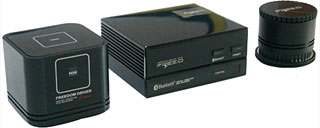 These
compact size devices will virtually turn any flat surface into a High
Quality Sound System. Simply connect your digital music players such as
iPods - MP3 players - PDA's - Portable CD or DVD players - Laptop
Computers and even Mobile Phones, for an incredible music and sound
experience. You won't believe your eyes . . . or your
ears.
These
compact size devices will virtually turn any flat surface into a High
Quality Sound System. Simply connect your digital music players such as
iPods - MP3 players - PDA's - Portable CD or DVD players - Laptop
Computers and even Mobile Phones, for an incredible music and sound
experience. You won't believe your eyes . . . or your
ears.
Freedom Driver's are elegant in design so they can be easily placed
in any room in the home or office. Freedom Driver Colors compliment the
Apple iPod White and Mirror Black.
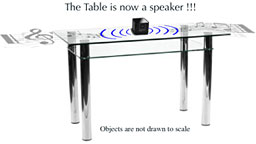 Imagine
turning any table or surface made of Wood, Glass, Marble, Stone, even
Drywall into GIANT speaker systems. Customize your listening pleasure
by changing tabletops and notice the different effects. Perhaps you
feel that Wood is better for Classical music, and Marble or Glass is
better for Rock n Roll. And unlike conventional speakers, no matter
where you stand the music is clear from all directions.
Imagine
turning any table or surface made of Wood, Glass, Marble, Stone, even
Drywall into GIANT speaker systems. Customize your listening pleasure
by changing tabletops and notice the different effects. Perhaps you
feel that Wood is better for Classical music, and Marble or Glass is
better for Rock n Roll. And unlike conventional speakers, no matter
where you stand the music is clear from all directions.
Link: Freedom Driver
Software
Ettore Software Announces TypeIt4Me 3.2
PR: Apart from fixing a number of bugs and sporting a
redesigned Settings tab, this release adds a number of new features
Ettore Software announces the release of version 3.2 of TypeIt4Me,
the original text expander software for Mac OS since 1989.
Apart from fixing a number of bugs and sporting a redesigned
Settings tab, this release adds a number of new features,
including:
- sorting by date created, modified and last used;
- sorting by number of times an abbreviation has been expanded;
- automatic replacement of " (double quotes) with "smart"
quotes;
- prevention of unwanted DOuble CAps;
- easier creation of AppleScript clippings;
- usage statistics showing you the number of keystrokes saved and
your personal average WPM (Words Per Minute) typing speed.
Meanwhile, Ettore Software's founder & CTO/CEO, Riccardo Ettore
- a veteran Mac developer since 1984 - is already working on a new
release with a major new feature to be revealed at next January's
Macworld show in San Francisco.
Link: TypeIt4Me
Desktop Mac
Deals
Low End Mac updates the following price trackers monthly:
For deals on current and discontinued 'Books, see our 13" MacBook and MacBook Pro,
MacBook Air, 13" MacBook Pro, 15" MacBook Pro, 17" MacBook Pro, 12" PowerBook G4, 15" PowerBook G4, 17" PowerBook G4, titanium PowerBook G4,
iBook G4, PowerBook G3, and iBook G3 deals.
We also track iPad,
iPhone, iPod touch, iPod classic, iPod nano, and iPod shuffle deals.



