
The 15″ and 17″ Mid 2010 MacBook Pro models have lower clock speeds than the models they replace. However, because they use mobile Intel i5 and i7 CPUs instead of the older, less efficient Core 2 Duo chips, they are more powerful despite lower clock speeds. These CPUs brings something new to Apple’s portable line, hyperthreading, which lets the dual-core CPU appear to the operating system as four cores.
 A further advantage of Intel’s “i” family of CPUs is that they can overclock themselves by 25% or more depending on the number of cores and processes in use. For instance, a 2.4 GHz i5 may outperform a 3.06 GHz Core 2 Duo. You can’t compare the new i5 and i7 models with previous ones by looking at clock speed, as they are not single clock speed chips.
The other big change comes in the graphics department: These are the first Macs to use Intel HD Graphics – and the first to use Nvidia’s automatic switching GeForce GT 330M GPU. The Intel GPU uses 256 MB of system memory, while the Nvidia GPU has 256 MB of dedicated video memory (512 MB in i7 models).
The entry-level 15″ MacBook Pro costs $100 more than the previous entry-level model, which was the only 15″ MacBook Pro with Nvidia 9400M graphics but not with 9600GT graphics. Since all three configurations of the Spring 2010 15-incher have GeForce 330M graphics, the new 2.4 GHz model should be a better overall performer than last year’s 2.53 GHz model – and quite possibly in the same league as the 2.66 GHz one.
For those who need more pixels than the standard 1440 x 900 display provides, Apple has a $100 build-to-order option for a 1680 x 1050 screen. You can get that in an antiglare finish for an additional $50. (Apple does not have an antiglare option for the standard display.)
Apple has also improved overall field time – the 77.5 Watt-hour battery is rated at 8-9 hours of wireless productivity, a big improvement from 8 hours in the 2009 model. Only the new 13″ MacBook Pro beats it.
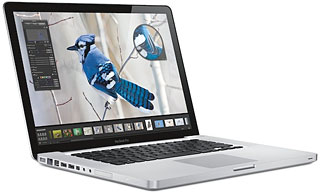
The 15″ MBP design puts all the ports (and a battery indicator) on the left side, leaving the right side for the SATA SuperDrive.
The glass trackpad is the same one found in the previous generation of MacBook Pro models. It supports 1-, 2-, 3-, and 4-finger gestures. The entire trackpad functions as the mouse button.
The new MBP uses the same keyboard as before, complete with backlighting. The black keys look sharp with the aluminum enclosure.
The new model comes in 2.4, 2.53, and 2.6 GHz versions. 320 and 500 GB hard drives are standard, with 128, 256, and 512 GB solid state drive (SSD) options. 4 GB of RAM is standard, and 8 GB is the maximum.
This is the oldest MacBook Pro to officially support macOS Sierra.
Editor’s note: The next two paragraphs are from the profile of the previous version of the MacBook Pro. At this time we do not know if they apply to the new model.
Note that the built-in display is only capable of 18-bit color, not the full 24-bit color you might expect.
Unlike early MacBooks, where every USB port could provide 500 mA of power, only one USB port provides full power – the port closer to the front.
The Apple Remote is a US$20 option.
Closed Lid Mode: All Intel ‘Books support “lid closed” (or clamshell) mode, which leaves the built-in display off and dedicates all video RAM to an external display. To used closed lid mode, your ‘Book must be plugged into the AC adapter and connected to an external display and a USB or Bluetooth mouse and keyboard (you might also want to consider external speakers). Power up your ‘Book until the desktop appears on the external display and then close the lid. Your ‘Book will go to sleep, but you can wake it by moving the mouse or using the keyboard. The built-in display will remain off, and the external monitor will become your only display. Since all video RAM is now dedicated to the external monitor, you may have more colors available at higher resolutions.
To resume use of the internal display, you need to disconnect the external display, put the computer to sleep, and then open the lid. This will wake up your ‘Book and restore use of the built-in display.
Intel-based Macs use a partitioning scheme known as GPT. Only Macintel models can boot from GPT hard drives. Both PowerPC and Intel Macs can boot from APM (Apple’s old partitioning scheme) hard drives, which is the format you must use to create a universal boot drive in Leopard. Power PC Macs running any version of the Mac OS prior to 10.4.2 cannot mount GPT volumes. PowerPC Macs won’t let you install OS X to a USB drive or choose it as your startup volume, although there is a work around for that.
Details
- introduced 2010.04.13 at US$1,799 (2.4 GHz i5, 320 GB hard drive), US$1,999 (2.53 GHz i5, 500 GB hard drive), and US$2,199 (2.66 GHz i7, 500 GB hard drive); add $100 for hi-res 1680 x 1050 display, $150 for antiglare hi-res display; replaced by Thunderbolt model 2011.02.24.
- Part no.: MC371 (2.4 GHz), MC372 (2.53 GHz), MC373 (2.66 GHz)
Mac OS
- requires Mac OS X 10.6.3 Snow Leopard or later. macOS 10.14 Mojave and later are not supported.
- Mac OS X 10.6 Snow Leopard compatibility
- Grand Central Dispatch is supported.
- 64-bit operation is supported.
- OpenCL is supported.
- OS X 10.8 Mountain Lion compatibility
- AirPlay Mirroring is not supported.
- AirDrop is supported.
- Power Nap is not supported.
Core System
- CPU: 2.4/2.53 Intel i5 or 2.66 GHz Intel i7, soldered in place, no upgrade options
- Level 2 cache: 3 MB shared cache on i5, 4 MB on i7
- Bus: 1066 MHz
- RAM: 4 GB, expandable to 8 GB using DDR3 SO-DIMMs
- Performance (2.4/2.53/2.66/2.8 GHz)
- 64-bit Geekbench: 4858/4968/4434/5535/5842
- Speedmark 6.5: 132/ /151/
Video
- Graphics: Intel HD Graphics and Nvidia GeForce GT 330M with automatic graphics switching
- VRAM, Intel HD: uses 256 MB of system memory
- VRAM, i5 models: 256 MB
- VRAM, i7 models: 512 MB
- Video out: Mini DisplayPort (VGA and DVI video supported with optional adapters)
- display: 15.4″ (38 cm) 16-bit 1440 x 900 110 ppi color active matrix; 1680 x 1050 build-to-order option
- supports 1440 x 900, 1280 x 800, 1152 x 720, 1024 x 640, 800 x 600, 720 x 480, and 640 x 480 pixels at 16:10 aspect ratio; 1024 x 768, 800 x 600, and 640 x 480 pixels at 4:3 aspect ratio; 720 x 480 at 3:2 aspect ratio
- allows mirroring to external display or extended desktop mode
Drives
- Hard drive: 320/500 GB 5400 rpm SATA standard, 7200 rpm and solid state drives (SSD) optional (128, 256, or 512 GB) on 3 Gbps SATA bus
- optical drive: 8x dual-layer SuperDrive writes DVD±R and DVD+R at up to 8x, DVD-RW at up to 4x; dual-layer DVD±RW at up to 4x; reads DVDs at 8x (double-layer at 6x), dual-layer and DVD-ROM at 6x; writes CD-R at 24x, writes CD-RW at 16x, reads CDs at 24x on 3 Gbps SATA bus
- expansion bays: none
Expansion
- USB: 2 USB 2.0 ports
- FireWire 400: none
- FireWire 800: 1 port, backward compatible with FireWire 400
- drive bus: SATA 1 (1.5 Mbps)
- IR port: none
- Ethernet: 10/100/gigabit
- Modem: No longer offered by Apple
- WiFi: 802.11n AirPort Extreme built in
- Bluetooth: BT 2.1 built in
- ExpressCard/34: none
- SD Card Slot: 1
Power
- battery: 77.5 Watt-hours, 8-9 hours of wireless productivity
- AC adapter: 85W MagSafe
Physical
- size: 9.82 x 14.35 x 0.95″ (249 x 364 x 24.1 mm)
- Weight: 5.6 pounds (2.54 kg)
Online Resources
- The Spring 2010 MacBook Pro value equation, Dan Knight, Mac Musings, 2010.04.21. Where are the best values among the new MacBook Pro models, and when are last year’s a better buy?
- Mac Notebook Value for the College Student, Charles W Moore, ‘Book Value, 2009.08.20. “…Apple ‘Books represent the best long-term value for money spent, not to mention user experience….”
- Finding the Best Values in Apple’s MacBook Matrix, Charles W Moore, ‘Book Value, 2009.07.21. With prices ranging from $999 to $2,499, speeds from 1.86 to 2.8 GHz, and sized from 13 to 17 inches, what’s right for you?
- 15″ MacBook Pro best laptop of 2009, battery warning for air travelers, paper battery, and more, The ‘Book Review, 2009.12.18. Also replacing a MacBook screen, thinner notebook drives, smallest external hard drive, BambooBook case, Ferrari One between netbook and notebook, and more.
- Protect your notebook against loss, theft, data loss, and security breaches, Charles W Moore, ‘Book Value, 2009.08.25. 10 percent of laptops are lost or stolen every year. Tips on preventing theft, securing your data, and recovering from a lost, stolen, or broken notebook.
- The 64-bitness of Mac OS X 10.6 Snow Leopard, Dan Knight, Mac Musings, 2009.08.19. Although Apple is promoting Snow Leopard as a fully 64-bit operating system, it defaults to running in 32-bit mode.
- OS X 10.6 requirements, why Apple owns the high end, when to upgrade your Mac, and more, Mac News Review, 2009.08.14. Also Microsoft Word patent infringement, BackPack shelf for iMac and Cinema Displays, two updated Bible study programs, and more.
- The perfect Mac: MacBook Pro or iMac?, Dan Knight, Mac Musings, 2009.08.11. The 15″ MacBook Pro with antiglare could be the perfect Mac, but the iMac also has much to commend it.
- Optical drives on way out, MacBooks can’t display millions of colors, MacBook Air doomed, and more, The ‘Book Review, 2009.07.17. Also problems with 7200 rpm drives, more iTablet speculation, the subsidized netbook rip-off, bargain ‘Books from $179 to $2,144, and more.
- New ‘Books have better displays, digital vs. analog audio I/O, Craigslist restrictions, and more, Charles W Moore, Miscellaneous Ramblings, 2009.07.15. Also three browsers – Opera, Stainless, and Cruz – compared, and installing Mac OS X from DVD on a Mac that can’t mount DVDs.
- Optimized Software Builds Bring Out the Best in Your Mac, Dan Knight, Low End Mac’s Online Tech Journal, 2009.06.30. Applications compiled for your Mac’s CPU can load more quickly and run faster than ones compiled for universal use.
- Avoiding dead and stuck pixels on your LCD screen, Charles W Moore, ‘Book Value, 2009.06.22. While CRT monitors would sometimes develop burn-in, LCD monitors may ship with or develop bad pixels.
- ‘Missing’ MacBook Pro ports, FireWire back but ExpressCard gone, say no to glossy displays, and more, The ‘Book Review, 2009.06.19. Also slower SATA in new 13″ and 15″ MacBook Pro, 5 things still missing from MacBook Pro, WD SiliconDrive III SSDs, bargain ‘Books from $170 to $2,199, and more.
- Low-end MacBook Pros: SD Card and FireWire in, ExpressCard out, Charles W Moore, ‘Book Value, 2009.06.16. The new 13″ and 15″ MacBook Pro have FireWire 800 and SD Card slots, but ExpressCard is gone, left for the 17″ MacBook Pro.
- Low End Mac’s Safe Sleep FAQ, Dan Knight, Online Tech Journal, 2009.06.15. What is Safe Sleep mode? Which Macs support it? How can you enable or disable it? And more.
- The Safe Sleep Mailbag, Charles W Moore, Miscellaneous Ramblings, 2009.06.15. Safe Sleep mode is enabled by default on modern MacBooks. How it works, and how to change how it works.
- MacBook White updated, DIY Mac tablet, danger of ‘Safe Sleep’, $350 80 GB SSD kit, and more, The ‘Book Review, 2009.05.29. Also Apple tablet ‘confirmed’, 3G and lower cost MacBook Air models rumored, 500 GB bus powered hard drive, Mini DisplayPort adapters, bargain ‘Books from $179 to $2,299, and more.
- Mac ‘Book Power Management Adventures, Charles W Moore, ‘Book Value, 2009.05.19. If your ‘Book won’t power up, shuts down while your working, or has other power issues, resetting its internal power manager may clear things up.
- 2 compact portable USB 2.0 hubs, Charles W Moore, ‘Book Value, 2009.01.12. Compact hubs from Targus and Proporta make a great complement to your notebook computer. Each accepts a third-party AC adapter to provide bus power.
- MacBook keyboard among best ever, glass trackpad less than intuitive, TiBook desktop mod, and more, The ‘Book Review, 2009.01.09. Also $179 to change battery in 17″ MacBook Pro, argument for an Apple netbook, MacBook Air SuperDrive hacked for any Mac, bargain ‘Books from $170 to $2,299, and more.
- Apple’s half-baked support for DisplayPort, Frank Fox, Stop the Noiz, 2009.01.06. The DisplayPort specification supports audio, so why does Apple use USB to route sound to the LED Cinema Display?
- Ubuntu Linux and Boot camp make it easy to create a triple boot Mac, Alan Zisman, Mac2Windows, 2008.12.24. Boot Camp makes it easy to install Windows on Intel Macs, and Ubuntu now makes it easy to install Linux to a virtual Windows drive.
- Notebooks and blackouts, Charles W Moore, ‘Book Value, 2008.12.23. When the power goes out, a notebook computer with long-lasting batteries lets you keep working for hours and hours.
- Why DisplayPort is the video connector for the future, Frank Fox, Stop the Noiz, 2008.12.23. DisplayPort supports multiple displays, combines audio and video on one cable, and costs nothing to use.
- New MacBook trackpad takes some getting used to, Alan Zisman, Zis Mac, 2008.12.22. The large glass trackpad is a joy to use in many ways, but it can be frustrating for longtime notebook users and has issues with Boot Camp.
- The ‘Better Safe Than Sorry’ Guide to Installing Mac OS X Updates, Charles W Moore, Miscellaneous Ramblings, 2008.12.16. Most users encounter no problems using Software Update, but some preflight work and using the Combo updater means far less chance of trouble.
- Why You Should Partition Your Mac’s Hard Drive, Dan Knight, Mac Musings, 2008.12.11. “At the very least, it makes sense to have a second partition with a bootable version of the Mac OS, so if you have problems with your work partition, you can boot from the ’emergency’ partition to run Disk Utility and other diagnostics.”
- MacBook slowdown without battery, DisplayPort and DRM, 256 GB SSD, MagSafe solutions, and more, The ‘Book Review, 2008.11.26. Also Mac netbook prospects, laptop cooling table with 2 fans, solar notebook bag, hard shell cases for unibody ‘Books, bargain ‘Books from $500 to $2,299, and more.
- Software to keep your MacBook cool, Phil Herlihy, The Usefulness Equation, 2008.11.25. Heat is the enemy of long hardware life. Two programs to keep your MacBook running cooler.
- DisplayPort copy protection, trackpad update, netbooks not to be taken lightly, and more, The ‘Book Review, 2008.11.21. Also Apple set for record sales, 4-finger gestures on original MacBook Air, MacBook Apple’s best consumer notebook to date, Cricket laptop stand, bargain ‘Books from $490 to $2,299, and more.
- Virtualization shootout: VMWare Fusion 2 vs. Parallels Desktop 4, Kev Kitchens, Kitchens Sync, 2008.11.20. Both programs do the same thing, but one runs Windows XP smoothly alongside Mac apps, while the other bogs down everything but Windows.
- Just right: Papa bear, mama bear, and baby bear MacBooks, Charles W Moore, ‘Book Value, 2008.11.20. Some people like small and light notebooks, others prefer huge desktop replacements, but the best value tends to be in the middle.
- Kensington Ci95m Wireless Mouse: Great battery life, smooth performance, Charles W Moore, ‘Book Value, 2008.11.13. Kensington’s slim wireless mouse is well built, works smoothly, has great battery life, and avoids Bluetooth pairing and wake-up issues.
- MacBook Pro could use both GPUs at once, 9600M GT smokes 9400M for 3D gaming, new cases, and more, The ‘Book Review, 2008.10.31. Also MacBook Pro doesn’t support 8 GB of RAM, matte screen petition, spill sensors in new ‘Books, MacBook Pro reviews, hard drive vs. SSD benchmarks, bargain ‘Books from $259 to $2,399, and more.
- Debunking the Apple Tax, Frank Fox, Stop the Noiz, 2008.10.31. “…no one else is offering the quality of computer construction that Apple offers in the same price range.”
- One OS to rule them all, Frank Fox, Stop the Noiz, 2008.10.29. With Fusion or Parallels letting you run Windows at full speed, Mac OS X gives you the best of both worlds.
- Apple more green, new MacBook details, FireWire on MacBook petition, benchmarks, and more, The ‘Book Review, 2008.10.28. Also Nvidia controller inside new ‘Books, death of matte displays, MacBook Pro distorted video service program, bargain ‘Books from $259 to $2,399, and more.
- New Unibody MacBooks provide some reasons to buy an earlier MacBook Pro, Andrew J Fishkin, Best Tools for the Job, 2008.10.27. While the new MacBook line offers some improvements, Rev. A fears and the lack of a matte display can make the previous design a better choice.
- Apple’s new production technology: Is it worth it?, Tim Nash, Taking Back the Market, 2008.10.27. Carving MacBook bodies from a block of aluminum simplifies production, increases assembly automation, and gives Apple a leg up on the competition.
- How to clone Mac OS X to a new hard drive, Simon Royal, Tech Spectrum, 2008.10.07. Whether you want to put a bigger, faster drive in your Mac or clone OS X for use in another Mac, here’s the simple process.
- Apple Trumps Microsoft in Making the 64-bit Transition Transparent to Users, Frank Fox, Stop the Noiz, 2008.09.18. To use more than 4 GB of RAM under Windows, you need a 64-bit PC and the 64-bit version of Windows. On the Mac, OS X 10.4 and later already support it.
- Does running OS X system maintenance routines really do any good?, Charles W Moore, Miscellaneous Ramblings, 2008.08.26. Mac OS X is designed to run certain maintenance routines daily, weekly, and monthly – but can’t if your Mac is off or asleep.
- Tricking out your notebook for superior desktop duty, Charles W Moore, ‘Book Value, 2008.07.29. For desktop use, you don’t need to be limited by the built-in trackpad, keyboard, and display or a notebook’s compromised ergonomics.
- Kensington Portable Power Outlet a great accessory for the road warrior, Charles W Moore, ‘Book Value, 2008.07.22. With three AC outlets and two USB charging ports, this compact device is a great way to have extra power outlets when you’re on the go.
- Free VirtualBox for Mac now a virtual contender, Alan Zisman, Mac2Windows, 2008.07.21. A year ago, the Mac version of VirtualBox lacked some essential features. Over the past year, it’s grown into a very useful tool.
- 4-core Core 2 Extreme mobile CPU in August, 256 MB SSD coming to MacBook Air, and more, The ‘Book Review, 2008.07.18. Also Centrino 2 shipping, OS X running on tiny MSI Wind notebook, fuel cell notebooks one step closer, free laptop tracking service, bargain ‘Books from $150 to $2,649, and more.
- Win the depreciation game by buying on the low end, Charles W Moore, ‘Book Value, 2008.06.24. The worst depreciation afflicts high-end models. By buying a less powerful version, choosing certified refurbished, or picking up a used computer, you’ll come out ahead.
- 16:9 computer displays: Let’s not go there, Dan Knight, Mac Musings, 2008.06.17. “…there’s no reason our computer displays should match the proportions of our television displays.”
- SheepShaver brings Classic Mac OS to Intel Macs and Leopard, Alan Zisman, Mac2Windows, 2008.05.20. Mac OS X 10.5 doesn’t support Classic Mode. Neither does Leopard. But SheepShaver lets you emulate a PowerPC Mac and run the Classic Mac OS.
- Windows on Macs: Three paths for integration, Jason Packer, Macs in the Enterprise, 2008.05.14. Mac users have three routes for running Windows apps: Run Windows using Boot Camp or virtualization, or use a compatibility layer such as WINE.
- Where’s the best MacBook value: Top, bottom, or middle?, Charles W Moore, ‘Book Value, 2008.04.29. When it comes to MacBook and MacBook Pro value, the top-end model is usually the worst value, but which model holds the sweet spot?
- 18 bits can’t display millions of colors, today’s magic is different from yesterday’s, and more, Charles W Moore, Miscellaneous Ramblings, 2008.04.16. Also more feedback on Mac browsers, slow dialup Internet, and a SCSI-to-USB 2.0 solution.
- 18-bit video inadequate, restoring AppleWorks speed, Macintosh display info, and more, Dan Knight, Low End Mac Mailbag, 2008.04.09. Also problems importing AppleWorks drawings and a damaged, unfixable mail database in Outlook Express 5.
- Millions vs. thousands of colors: What’s the difference?, Dan Knight, Mac Musings, 2008.04.07. Once again Apple is being sued over a Mac that can display ‘only’ 262,144 colors per pixel, not the millions it claims. Does it realy matter?
- Restore stability to a troubled Mac with a clean system install, Keith Winston, Linux to Mac, 2008.01.15. If your Mac is misbehaving, the best fix just might be a fresh reinstallation of Mac OS X – don’t forget to backup first.
- We need more than 2 USB ports in MacBooks, Dan Knight, Mac Musings, 2008.01.14. There’s something wrong when you can’t plug a flash drive, mouse, and printer into a notebook computer at the same time.
- Does a college freshman need to run Windows on a MacBook?, Al Poulin, My Turn, 2007.07.24. While you can run Windows on today’s Intel-based Macs, is there any reason most college students would want to or need to?
- Apple sued: Can 262,144 colors be considered ‘millions’?, Dan Knight, Mac Musings, 2007.05.16. A new class action lawsuit claims Apple is deceiving buyers when it claims to display “millions of colors” on its notebook computers. What’s really going on here?
- 1 core, 2 cores, 4 cores, 8: How Much Difference Does It Make?, Dan Knight, Mac Musings, 2007.04.10. Geekbench scores make it possible to compare the newest 3 GHz 8-core Mac Pro with the 1.5 GHz Core Solo Mac mini – and all the models in between.
- Simple ergonomics for the road warrior, Ed Eubanks Jr, The Efficient Mac User, 2007.01.16. The benefits of external keyboards and mice, laptop stands, typing gloves, and anti-RSI software for notebook users.
- To AppleCare or not to AppleCare?, Charles W Moore, Miscellaneous Ramblings, 2006.11.20. Consumer Reports, which generally recommends against extended warranties, says AppleCare makes sense. But does it?
- Pre-2006 Software: The Big Reason You Shouldn’t Buy an Intel Mac in 2006, Ted Hodges, Vintage Mac Living, 2006.11.09. If you work with software that predates the Intel transition, you may be better off sticking with PowerPC Macs. And if you use classic apps, you definitely want to avoid Intel.
- Better laptop performance: What’s the best upgrade?, Andrew J Fishkin, The Mobile Mac, 2006.10.09. Memory, CPU, bus speed, and hard drives all impact performance and battery life. Which upgrades will give you the most up time in the field?
- Drive matters, Dan Knight, Mac Musings, 2006.06.14. There’s more to picking the right hard drive than size, spindle speed, buffer size, and price. But how can a 5400 rpm drive ever outperform a 7200 rpm drive?
- Power strategies for using your ‘Book in the field: Batteries and AC adapters, Andrew J Fishkin, The Mobile Mac, 2006.06.05. One or two extra batteries and at least one spare AC adapter can be essential when you’re traveling and need to get hours and hours of use from your ‘Book.
- Comparing Apples to Apples: When is Macintel faster? When does PowerPC make more sense?, Dan Knight, Mac Musings, 2006.01.29. Benchmarks show the Intel Core Duo flies through native code but plods through PowerPC programs. Will PowerPC or Intel give you the more productive workflow?
- MacBook Pro (15-inch, Mid 2010) – Technical Specifications, Apple
Keywords: #mbp15mid2010 #mid2010mbp15
Short link: http://goo.gl/JQaXyx
searchwords: mbp15mid2010, mid2010mbp15
